Android-Touch-Helper: an Accessibility Service that taps the skip button on splash ads
AdSkip — an Android assistant for automatically skipping app launch ads
At a glance
- What is it?
- zfdang/Android-Touch-Helper, also called AdSkip, is a Java app that uses Android's Accessibility Service to find and click skip targets on app launch ads. It asks for no network or storage permission, and it skips by keyword, by predefined control or by screen position.
- Who is it for?
- Install Android-Touch-Helper if you are annoyed by launch-screen ads and accept that an Accessibility Service can read what is on your screen, since the app's stated safeguards are open source code and no network or storage permission. It is the wrong tool for ads that appear mid-session or for anyone who will not grant Accessibility access.
- Can I use it commercially?
- Yes. MIT is a permissive licence: you can use, modify and sell software built on it, as long as you keep its copyright and licence notices.
- Is it still maintained?
- Yes. The repository last received commits 38 days ago.
- What is it written in?
- Mainly Java, according to GitHub's language statistics.
Answers come from the project's GitHub data, last synced on November 25, 2026, and from our analysis. They are not legal advice.
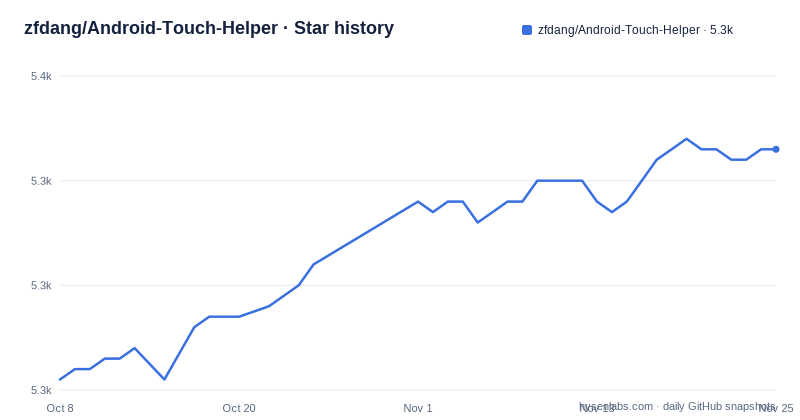
Star history
- zfdang/Android-Touch-Helper5,343 ★ · +22
| Repository | 2026-10-08 | 2026-11-25 |
|---|---|---|
| zfdang/Android-Touch-Helper | 5.3k | 5.3k |
22 Stars in the last 48 days, measured from the daily GitHub snapshot. Compare with other projects
Editorial analysis
Accessibility Service is how the app sees a skip button, and also why privacy is the first concern
Android-Touch-Helper, listed in the repository description as AdSkip, is an Android helper app that automatically skips splash ads. It is implemented with Android Accessibility Service. That is the system mechanism that lets an app inspect what is on screen, which is how it can detect a skip target and click it for you.
The project is direct about the cost. Accessibility-based tools can access sensitive on-screen information, so privacy is the biggest concern for this kind of app. The README answers with three statements in bold: the project is open source, it does not require network permission or storage permission, and it does not collect or upload personal data.
Those claims can be checked in two places. The permission list shown on the install page tells you what the build asks for, and the Java source in the app directory shows what it does with the screen content. An app without network permission cannot send what it reads off the device by itself, which is the practical reason the no-network claim matters.
The license is MIT, the primary language is Java, and the repository is not archived.
Keyword detection clicks any button whose text matches, so the word list decides what gets pressed
The first of three skipping methods is keyword detection. The app looks for buttons containing specific keywords and clicks them automatically. A button labelled with a skip-style word on a splash screen gets pressed with no input from you.
This is the broadest method, and the width cuts both ways. It needs no knowledge of the individual app, so it can cover many apps at once. It also acts on any button whose text matches, wherever that button appears while the service is running. The README does not publish the keyword list, so the exact words are visible only in the source.
Because the match is on text, a skip button drawn as an image with no label would not be found by this method. That gap is what the other two methods address.
The README states nothing about speed or success rate, and gives no list of apps where keyword detection works. Treat it as a best-effort click on obvious buttons.
Predefined controls and screen positions cover apps whose skip button has no usable label
The second method finds and clicks predefined controls for a given app. Instead of matching text, the app is told which UI control in a specific application is the skip target, and it presses that control. The third method clicks a configured screen area for a given app, which works when the skip target cannot be identified as a control at all.
Both of these are per-app. Someone has to define the control or the coordinates for each application, so coverage depends on those definitions existing. A newly installed app with an unusual ad layout has no entry until one is added.
Screen-position clicking is the most fragile of the three. A fixed area depends on the layout of that app's ad, and a redesign of the ad can move the target out from under the click. The README does not say how often definitions are updated, though the release list shows steady activity: Release 276 and Release 277 both on 2026-09-22, and Release 278 on 2026-10-10.
Ideas and pull requests are welcome according to the README, which suggests that per-app rules are something users can contribute.
Install it from F-Droid or Google Play, and match the build to the source you read
The README links two distribution channels. One is F-Droid, with the package com.zfdang.touchhelper. The other is Google Play, under the same package ID in the store URL. The project website is TouchHelper.zfdang.com, set as the homepage on the repository.
The choice matters for the privacy argument. The strongest reason to trust an Accessibility app is that you can read the code, and the strongest evidence that the installed build matches the code is a store that builds from source. The README does not explain how either channel builds its package, so it makes no promise there. If you care about the exact match, check the build information on the F-Droid page.
The repository also holds a Gradle build (build.gradle, settings.gradle, gradlew and gradlew.bat), an app directory, a docs directory and a scripts directory. Building from source is possible with the included wrapper, though the README gives no build instructions, so expect to follow standard Android Gradle practice.
A Chinese README, README.zh-CN.md, is linked at the top.
The maintainer calls the project mature, and the release log backs the claim with dates
The README includes a maintenance note. It calls the project mature and stable, with the core functionality complete and the app widely used. The maintainer says they continue to review and merge pull requests, cut releases and fix bugs, with the most recent commits in September 2026. Large new features, the note adds, may take longer.
The repository data is consistent with that. The last push is dated 2026-10-19, and the three latest releases are tag-278 on 2026-10-10, tag-277 on 2026-09-22 and tag-276 on 2026-09-22. Two releases on one day suggest a quick follow-up fix, though the listing does not say what changed.
For a user, this means bug fixes are available, and a request for a big new capability may wait. Because the core function is described as complete, expect the app to keep doing what it does today and not to grow into something new.
The release names are plain numbers (Release 278), so there is no semantic version to read a change size from. Check the release notes on GitHub before updating.
It does not remove ads inside apps, and it borrowed ideas and code from AccessibilityTool
The scope is narrow by design. The app skips splash ads, the ones shown when an app launches. It does not block ads shown elsewhere, filter network traffic or remove ad content from a page. The three methods all work by pressing something on the screen, so an ad with no skip button and no configured area is left alone.
That also means the ad still loads. The app clicks past it and does not stop it from being displayed or fetched, since it has no network role of its own. What you save is the time spent waiting or tapping.
The acknowledgements section credits LGH1996's AccessibilityTool, and says this project borrowed ideas and code from it. Anyone auditing the licensing or comparing behaviour has a named upstream to read alongside this repository.
Despite the name, this project does not add a floating assistive button or change touch sensitivity, and its Accessibility permission is used to skip ads.
Editorial conclusion
Install Android-Touch-Helper if you are annoyed by launch-screen ads and accept that an Accessibility Service can read what is on your screen, since the app's stated safeguards are open source code and no network or storage permission. It is the wrong tool for ads that appear mid-session or for anyone who will not grant Accessibility access. Before enabling it, read the permission list on the F-Droid or Play Store page and compare the build you install with the open source repository.
Frequently asked questions
What does Android-Touch-Helper do?
It is an Android app, also called AdSkip, that skips splash ads at app launch. It uses Android Accessibility Service to find a skip target and click it.
Does Android-Touch-Helper need network or storage permission?
No. The README says the project is open source, requires neither network nor storage permission, and does not collect or upload personal data.
How does Android-Touch-Helper decide what to click?
It uses three methods: keyword detection on buttons, predefined UI controls for a given app, and a configured screen position for a given app.
Official sources
Add this badge to your README
If you maintain this project, the badge below links readers to this analysis and shows its maintenance status from the daily GitHub snapshot. Paste the markdown into your README; add ?metric=license or ?metric=stars to the image URL for a different field.

[](https://hysenlabs.com/projects/zfdang-android-touch-helper)Star history chart for your README
[](https://hysenlabs.com/projects/zfdang-android-touch-helper)Was this useful?