Attic and the multi-tenant Nix cache it puts in front of S3
Multi-tenant Nix Binary Cache
At a glance
- What is it?
- Attic puts a server in front of S3-compatible storage so several mutually untrusting teams can share one Nix binary cache without seeing each other's paths. The deduplication and server-side signing model holds together, but the project calls itself an early prototype and its README ships no install command of its own.
- Who is it for?
- Adopt Attic when one S3-compatible bucket has to back caches for people who must never see each other's paths, and when you would rather keep the signing key off every build machine. Pass on it if you need a packaged install, a documented retention policy, or a stable command surface, because the README hands you a tutorial link instead of commands and calls the project an early prototype.
- Can I use it commercially?
- Check first. The repository uses a licence we do not classify automatically, so read its LICENSE file before any commercial use.
- Is it still maintained?
- Yes. The repository last received commits 1 day ago.
- What is it written in?
- Mainly Rust, according to GitHub's language statistics.
Answers come from the project's GitHub data, last synced on October 23, 2026, and from our analysis. They are not legal advice.
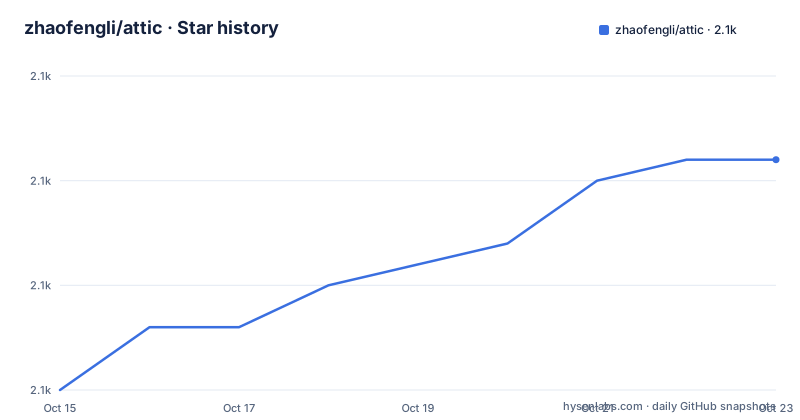
Star history
- zhaofengli/attic2,131 ★ · +11
| Repository | 2026-10-15 | 2026-10-23 |
|---|---|---|
| zhaofengli/attic | 2.1k | 2.1k |
11 Stars in the last 8 days, measured from the daily GitHub snapshot. Compare with other projects
Editorial analysis
Multi-tenancy built from restricted views over one store
Attic is a self-hostable Nix Binary Cache server that keeps its bytes in an S3-compatible storage provider, and the reason it exists is to serve more than one cache out of that single backing store. Its audience is anyone who wants a private cache for themselves and a separate one for friends or co-workers, with tenants treated as mutually untrusting so that none of them can pollute another cache's view. Behind that promise sits deduplication rather than separate storage. Individual caches are restricted views of a content-addressed `NAR Store` and Chunk Store, and uploading a path creates a mapping that grants the local cache access to the global NAR, so identical content lands in the bucket once and gets referenced many times over. Whether that isolation survives a hostile tenant is not something the README addresses, and no threat model or audit is mentioned anywhere in it.
Server-side signing is the difference from client keys
Signing is the part of a binary cache that decides who holds a secret. Attic's stated design performs it on the fly on the server at fetch time, so the user pushing store paths never has access to the signing key. What this design argues against is a cache where each client signs what it uploads, which spreads a long-lived private key across every machine that ever builds a derivation. That is an architectural difference rather than a tuning knob, and it is the reason a running server sits in front of the bucket at all instead of clients reading and writing object storage directly. The operational half is missing. Key storage, key rotation and the minting of client tokens are all undocumented, and the workspace does contain a `token` crate that CI compiles for `wasm32-unknown-unknown`, so token handling code is expected to run somewhere a browser can reach it.
Four workspace crates, two of them aimed at WebAssembly
The root Cargo.toml declares a workspace with `resolver = "2"` and four members: `attic`, `client`, `server` and `token`. That split matters, because the crate called `attic` is not the whole program. The justfile's WebAssembly target descends into `attic` and builds it with the `chunking` feature and the io feature switched on, then descends into `token` and builds that crate plainly, while `client` and `server` stay out of the browser build entirely.
ci-build-wasm:
	#!/usr/bin/env bash
	set -euxo pipefail
	# https://github.com/rust-lang/rust/issues/122357
	export RUST_MIN_STACK=16777216
	pushd attic
	cargo build --target wasm32-unknown-unknown --no-default-features -F chunking -F io
	popd
	pushd token
	cargo build --target wasm32-unknown-unknown
	popd
The export is a workaround rather than a tuning value. A 16 MiB stack is pushed onto the build after an upstream rust-lang bug report, so anyone compiling that target on their own machine should expect to carry the same line until the underlying crash is fixed.
The with-nix recipe reads a version map it never defines
Day to day work runs through a justfile that opens with `set positional-arguments`, which is how recipes such as `list` and `with-nix` receive their inputs. One variable anchors the file: `here` resolves from `JUST_INVOCATION_DIR` with a fallback to the invocation directory, and `base` is the working directory. Worth reading before you type anything is the `with-nix` recipe, which takes a Nix version plus the command you actually want to run:
with-nix version *command:
	set -e; \
	hook="$(jq -e -r '.[$version].shellHook' --arg version "{{ version }}" < "$NIX_VERSIONS" || (>&2 echo "Version {{ version }} doesn't exist"; exit 1))"; \
	eval "$hook"; \
	CARGO_TARGET_DIR="{{ base }}/target/nix-{{ version }}" \
	{{ command }}
The gap is `$NIX_VERSIONS`. It is read as JSON, with a shellHook expected per version tag and a named error thrown when a key is missing, yet the justfile never defines or defaults the variable. An `.envrc` does sit in the repository root, the usual home for such a definition, but nothing in the tree states that it sets this variable or what it contains. Note also that `CARGO_TARGET_DIR` is redirected under `target/`, so each Nix version keeps its own output directory.
Unit tests resolve through a flake attribute left undocumented
Testing never calls cargo test. The CI recipe takes one matrix value, asks Nix which system it is on, builds a named flake attribute, and then executes every binary that lands in the resulting store path:
ci-unit-tests matrix:
	#!/usr/bin/env bash
	set -euxo pipefail
	system=$(nix-instantiate --eval -E 'builtins.currentSystem')
	tests=$(nix build .#internalMatrix."$system".\"{{ matrix }}\".attic-tests --no-link --print-out-paths -L)
	find "$tests/bin" -exec {} \;
Two things hide behind that one attribute path. The `internalMatrix` branch lives in a flake whose contents are not part of the repository listing, so the set of test binaries cannot be read without checking out the tree yourself. Passing `--print-out-paths -L` only hands you a store path to inspect afterwards, while `nix-instantiate` appears solely to evaluate `builtins.currentSystem` before the work moves to `nix build`, which is the legacy half of the Nix command line kept alive for compatibility. Formatting is checked on its own with `cargo fmt --check`, and container images go through a shell script under `.ci/`, so the test recipe tells you nothing about which parts of signing or garbage collection are covered.
Fifteen minutes promised, no install command written down
The shortest route into Attic is a link rather than a command. Its README's 'Try it out (15 minutes)' section points at `docs.attic.rs/tutorial.html` and adds that it works on macOS as well as on Linux. No install command, package name, config file or port appears in it, and nothing in the repository root closes the gap. What is there is a Nix-heavy source tree holding `flake.nix`, a `flake/` directory, `flake-compat.nix` for older tooling, `default.nix`, `crane.nix`, `shell.nix`, `ci-installer.nix` and a `nixos/` module, next to `integration-tests/`, a `book/` for longer documentation and a `renovate.json` for dependency bumps. Five Nix entry points in one root says something about the intended reader: people who already run Nix and know which of those entry points their setup wants. Everyone else needs the tutorial page.
Five paths pushed against 566 already cached
The demo output at the top of the README is the only concrete look at how a push reports itself, and its header line reads:
Pushing 5 paths to "demo" on "local" (566 already cached, 2001 in upstream)...Read that closely and the numbers do not add up on their face. Five paths are being pushed to a cache named demo on a server named local, yet the same line reports 566 already cached and 2001 sitting upstream, both numbers far larger than the push and neither explained anywhere in the file. Something upstream plainly sits behind that local cache, but whether those counts describe the dependency closure of the five paths or the server's inventory is left unsaid. Hashed store paths resolve first in the rest of the block, then named packages such as vscode 1.74.2 and zoom 5.12.9.367 still transfer. The throughput figures in that block come from the maintainer's own machine and tell you nothing about yours.
What the early prototype label leaves unproven
Attic describes itself as an early prototype in the README's opening paragraph, and the rest of the file is written in a confident present tense. Two of the five stated goals have no knobs to turn anywhere: garbage collection is described only as removing unused store paths in an LRU manner, with no threshold, schedule or configuration key given, and replication is presented as a property of the design for deployment to serverless platforms such as `fly.io`, without any documented replication command. The file also contradicts itself on legal terms, stating that Attic is available under the Apache License, Version 2.0 with details in the LICENSE file while GitHub's own licence field for the repository reads Other, a custom licence GitHub cannot classify; open that LICENSE file yourself and settle which text governs before anything depends on it. The repository is not archived and the last push landed on 2026-10-01, so the code moves even though the packaging and policy story has not caught up.
Editorial conclusion
Adopt Attic when one S3-compatible bucket has to back caches for people who must never see each other's paths, and when you would rather keep the signing key off every build machine. Pass on it if you need a packaged install, a documented retention policy, or a stable command surface, because the README hands you a tutorial link instead of commands and calls the project an early prototype. Before committing a team to it, read the four crates in the workspace, note that two of them build for WebAssembly, and confirm that the LRU garbage collection it describes is the policy you actually need.
Frequently asked questions
How do I install and run Attic?
The README hands you a 15 minute tutorial at `docs.attic.rs/tutorial.html` and states that it works on macOS too. It gives no install command of its own, and the repository root offers several Nix entry points, including `flake.nix`, `default.nix` and `crane.nix`.
Does Attic let several teams share one S3 bucket safely?
The stated design treats tenants as mutually untrusting and makes each cache a restricted view of the content-addressed NAR Store and Chunk Store. Content is written once and shared while the views stay separate, though no threat model is published.
Who holds the Nix signing key in Attic?
Signing is done on the fly by the server when store paths are fetched, so a user pushing paths never has access to the signing key. The README does not document where the key is stored or how it is rotated.
How is Attic deployed, and does it need more than one machine?
It is designed to be deployed to serverless platforms like `fly.io` but also works in a single-machine setup. Storage itself is an S3-compatible provider, and replication is described as a property of the design rather than a command.
How do I run Attic's tests?
The CI recipe takes a matrix value, evaluates the current system with `nix-instantiate`, then builds the `attic-tests` attribute under `internalMatrix` with `nix build` and runs every binary in the output. The flake holding that attribute is not documented in the repository listing.
Official sources
Add this badge to your README
If you maintain this project, the badge below links readers to this analysis and shows its maintenance status from the daily GitHub snapshot. Paste the markdown into your README; add ?metric=license or ?metric=stars to the image URL for a different field.

[](https://hysenlabs.com/projects/zhaofengli-attic)Star history chart for your README
[](https://hysenlabs.com/projects/zhaofengli-attic)Was this useful?