MoonlightBox: building a person graph and parallel timelines from chat logs
般若波罗蜜。回到每一个争吵和沉默的节点,看看另一个版本的结局。
At a glance
- What is it?
- MoonlightBox is a local-first system that imports exported WeChat chats, segments them into evidence-backed event nodes, compiles a person world with a seven-section agent, and lets you branch off any historical node to hold a conversation with a persona built from your real messages. It runs as a single Docker container or a split stack, and it calls out to OpenAI compatible endpoints rather than shipping a model.
- Who is it for?
- MoonlightBox suits a single person who wants to explore their own chat history as a structured story graph, and who is willing to sit through a review workflow where every generated claim has to be approved against source messages. It does not suit a team analysing someone else's conversations, a deployment that must avoid sending chat text to a third-party model provider, or anyone who wants a finished product rather than a research tool with an alpha-stage package version.
- Can I use it commercially?
- Not without permission. GitHub finds no licence file in the repository, and without a licence all rights are reserved by default: you may read the code but not reuse it. Check the README, or ask the authors, before using it.
- Is it still maintained?
- Yes. The repository last received commits 52 days ago.
- What is it written in?
- Mainly Python, according to GitHub's language statistics.
Answers come from the project's GitHub data, last synced on November 7, 2026, and from our analysis. They are not legal advice.
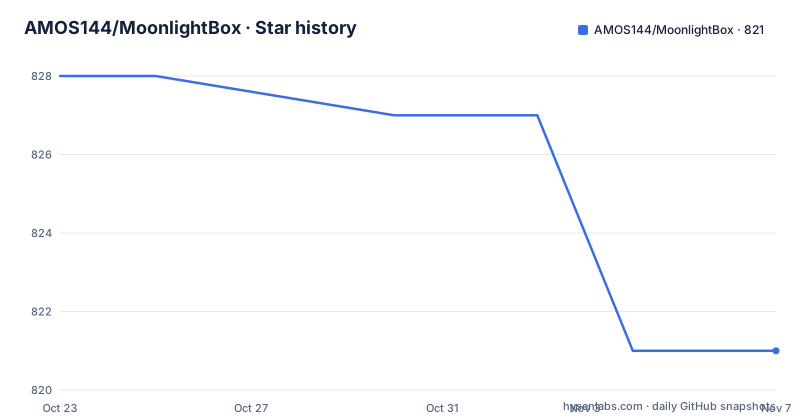
Star history
- AMOS144/MoonlightBox821 ★ · -7
| Repository | 2026-10-23 | 2026-11-07 |
|---|---|---|
| AMOS144/MoonlightBox | 828 | 821 |
-7 Stars in the last 15 days, measured from the daily GitHub snapshot. Compare with other projects
Editorial analysis
A local-first pipeline over your own message archive
MoonlightBox describes itself in Chinese as a single-user, local-first chat memory analysis and digital persona system. Importing WeChat chat records lets it build a traceable world of people, with event nodes, relationship changes and a place graph, and lets you create an independent parallel dialogue branch from any historical node to keep talking to a digital persona shaped by your real conversations.
Three properties define the design.
Local-first means the raw data, the SQLite database, the vector index and the media files all stay on your own machine or your own server. Cloud control means the LLM analysis goes through an OpenAI compatible interface, with MiniMax and DeepSeek given as examples, and the key point is that when no key is configured the task fails safely rather than silently degrading. Media originals are never uploaded.
Traceability is the third. Every event node and every persona statement carries source message evidence, and nothing takes effect until a human has reviewed it.
That review step is not a detail, it is the architecture. The workflow in the documentation runs in five stages: import, where you create a project and upload a wxecho CSV, JSON or TXT export and confirm which participant is you; analysis, where an event analysis task detects relationship turning points and produces event nodes with source evidence; review, where you check relationship changes and shared experiences in the node page and exclude false positives before confirming the timeline; person world compilation, where a PersonWorld agent produces a seven-section profile and graph proposals that you approve item by item; and exploration, where the world page shows a place map and an activity heatmap and you create a parallel branch from any node.
The branch behaviour has one rule worth stating plainly, because it is the sort of thing that could quietly break the illusion: a branch only retrieves history before its starting point, so it does not spoil the future.
One container for the whole stack
The simplest deployment is an all-in-one image with the frontend, backend, the LightRAG graph and all the workers in a single container. It needs no GPU, because the persona replies are generated by the cloud cognition model and this version does not include local LoRA training or inference.
cp docker/runtime.env.example .env   # 填入 MiniMax 与 Embedding 的 API key
docker run -d --name moonlightbox -p 8080:80 \
  -v moonlightbox-data:/app/data \
  --env-file .env \
  ghcr.io/amos144/moonlightbox:latest
Then open http://localhost:8080. All running data, being the SQLite database, the vector store, the LightRAG index and the settings, lives in the moonlightbox-data volume, so deleting the container does not lose data. The image itself contains no API key, and the cognition and node analysis models can also be configured from the Settings page in the web interface.
Building it yourself is a single Dockerfile.allinone build.
docker build -f Dockerfile.allinone -t moonlightbox:allinone .If you want local LoRA training and inference, or want to browse Phoenix traces, you use the root Dockerfile and docker-compose.yml instead, which is the split multi-container deployment described in docs/deployment.md. The presence of both paths is the key architectural decision: the all-in-one image deliberately omits the GPU pieces so that the common case stays simple, and the split deployment adds them back.
That split has a cost worth stating. The split stack is described in the compose file with a LightRAG sidecar at http://lightrag-sidecar:9621, a Phoenix collector at http://phoenix:6006/v1/traces, and a persona inference service reachable at http://persona-runtime:8765, with a required token for that last one. The compose file also carries an unusual and deliberate detail: the runtime data directory must live outside the worktree, defaulting to ../.runtime-data/data, so that the same path applies across every worktree under .worktrees and can be overridden with an absolute path for other deployment layouts.
Three API keys, and the boundary where chat text leaves your machine
The minimum configuration is three values, and the documentation is explicit that the cognitive model key falls back to the node analysis key when left empty.
# 节点分析 / 认知模型(OpenAI 兼容接口,示例为 MiniMax,可换 DeepSeek 等)
MOONLIGHTBOX_NODE_ANALYSIS_API_KEY=<你的 key>
MOONLIGHTBOX_COGNITION_API_KEY=<你的 key>     # 留空则复用节点分析 key

# LightRAG 图谱的 Embedding(示例为阿里云百炼兼容接口)
LIGHTRAG_SIDECAR_EMBEDDING_API_KEY=<你的 key>
The optional settings cover the parts of the system you might not want to switch on. The AMap web service key is used for place POI disambiguation on the backend, while the frontend's VITE_AMAP_JS_KEY and VITE_AMAP_SECURITY_CODE are for the basemap rendering on the world page. Phoenix traces are off by default and enabled by the local development script. The MOONLIGHTBOX_TRAINING_ settings cover the base model, iterations and learning rate for local LoRA training.
The privacy boundary is the part to read twice. With cloud analysis enabled, chat text is sent to the configured provider. Original media files, local model weights and the Phoenix body, which can be disabled, are not uploaded. API keys are injected only through an uncommitted .env or environment variables.
That is a narrower claim than local-first might suggest, and the wording reflects it. The database, the index and the media never leave; the text does, whenever a cloud model is in the loop. The place map has a related detail worth noting, since coordinates are scrubbed on the backend before being sent to the browser.
For the deployment, the compose file also shows a privacy default that is easy to miss: MOONLIGHTBOX_SPATIAL_HEATMAP_DEFAULT_PRIVACY=blurred, and MOONLIGHTBOX_SPATIAL_PROVIDER_PERSISTENCE_ALLOWED=false. The system is designed to default toward not retaining location history.
Agents, a graph store and a full trace of every call
The dependency list shows what this thing is actually built from: FastAPI and uvicorn for the API, SQLAlchemy and Alembic for the database and migrations, chromadb for the vector store, fastembed for local embeddings, langchain and langgraph for the agent orchestration, langgraph-checkpoint-sqlite for persisting agent state, arize-phoenix-otel plus openinference-instrumentation-langchain for tracing, and pydantic-settings for configuration.
The agent roles named in the documentation are specific. Runtime v1 has three components: Director, DayPlan and PersonaActor, and the Director and DayPlan drive the digital person's simulated life and replies. PersonWorld compiles the seven-section person profile. AgentLoopController is the unified component that writes every agent execution into Phoenix, capturing model requests, tool calls, LightRAG retrievals, compression, elapsed time and error codes, searchable by branch or execution id.
That observability is more than a nice-to-have in a system with this many agents, and the compose file carries a revealing comment about it: the business ledger still lives in the MoonlightBox SQLite database, and a Collector failure does not participate in task state decisions. Tracing is diagnostic, not load-bearing.
The persona model is deliberately narrow. The documentation says the optional local QLoRA training plus human blind test acceptance only handles tone expression and does not participate in decision making. The current chat path is by default decided and expressed by the cloud cognition model and does not depend on local LoRA, and the training service is retained without affecting existing training assets.
That separation is the interesting design decision here. Tone is treated as a separate, trainable, locally executable concern, while decisions stay with a cloud model. It keeps the GPU requirement optional while still letting the persona sound like a particular person.
The gates that stop a generated memory becoming fact
The review workflow is the part that makes this different from a summarisation tool, and there are several gates on the path from a generated statement to something the system treats as true.
For event analysis, the documentation describes event segmentation plus multi-signal change detection plus LLM review, producing key nodes that carry source evidence. You then check relationship changes and shared experiences on the node page and exclude false positives before confirming the timeline.
For the person world, the PersonWorld agent generates the seven-section profile and graph proposals, and you approve them item by item.
For media, the semantic labelling tool runs separately and the result is reviewed item by item in the recall and data quality screen. Media that is not approved or that goes out of bounds does not enter the conversation.
For a trained persona, the gates are the strictest. Once the timeline is confirmed, a worker generates the training set from real replies and performs local QLoRA. The new model has to pass structural checks, fact safety checks, future leakage checks, repetition checks and history replay checks, and then a human blind test, before it replaces the currently enabled version.
The future leakage check is the one that protects the branch illusion, and it is checked at two levels: once at training time and once at generation time by the branch only retrieving history before its start point.
Media labelling is a separate command line.
PYTHONPATH=backend uv run python -m moonlightbox.media.cli \
  --project-id <项目 ID> --modality all
After it runs locally you review the annotations in the recall and data quality screen, and only approved media can enter the conversation.
The overall effect is that nothing the model generates about your life becomes part of the system without a human saying so. That is slower than a summariser and it is the point.
Running it on your own machine, and what the checks are
Local development needs Python 3.12 with uv, Node.js 22 or newer, and Linux or WSL2 for the full backend capabilities including import, LightRAG and training.
./scripts/start.sh # 一键:安装依赖、迁移数据库、启动前后端与全部 WorkerOne command installs dependencies, runs the database migrations and starts the frontend, the backend and all the workers, with Ctrl+C shutting everything down together. The default ports are backend 8001, frontend 5175, persona inference 8765 and Phoenix 6006, each overridable through environment variables such as MOONLIGHTBOX_BACKEND_PORT.
The verification commands are four separate tools, which tells you the project is checked in the way a strict Python project is.
uv run pytest backend/tests -q
uv run ruff check backend
uv run mypy backend/moonlightbox
cd frontend && npm test -- --run && npm run lint && npm run build
The pytest configuration sets pythonpath to backend and testpaths to backend/tests, with a custom marker named model for slow tests that need a local Linux model or a CUDA GPU. Ruff targets py312 with a line length of 100 and selects the E, F, I, UP and B rule sets, so the usual pyflakes and pyupgrade rules are enforced.
Mypy is the strictest of the four: the configuration sets strict = true and scopes it to the backend/moonlightbox files, meaning every function in the core package has full type annotations with no escape hatches. That is a deliberate bar for a codebase whose correctness depends on structured evidence passing between agents.
Editorial conclusion
MoonlightBox suits a single person who wants to explore their own chat history as a structured story graph, and who is willing to sit through a review workflow where every generated claim has to be approved against source messages. It does not suit a team analysing someone else's conversations, a deployment that must avoid sending chat text to a third-party model provider, or anyone who wants a finished product rather than a research tool with an alpha-stage package version. Before adopting it, read the privacy boundary section, since enabling cloud analysis sends chat text to the configured provider, and confirm the package version, which the manifest lists as 0.1.0.
Frequently asked questions
What does MoonlightBox do with exported WeChat chats?
It imports a wxecho CSV, JSON or TXT export, segments it into event nodes with source evidence, compiles a seven-section person profile and a place graph that you approve item by item, and lets you create a parallel dialogue branch from any node to talk to a persona built from your real messages.
How do I run MoonlightBox with Docker?
Copy docker/runtime.env.example to .env and fill in the MiniMax and Embedding API keys, then run the docker run command that maps port 8080 to 80 and mounts a moonlightbox-data volume, using the ghcr.io/amos144/moonlightbox:latest image. Open http://localhost:8080 when it starts.
Does MoonlightBox send my chat messages to a server?
With cloud analysis enabled, chat text is sent to the provider you configure through the OpenAI compatible endpoint. Original media files, local model weights and the Phoenix body are not uploaded, and the raw data, SQLite database, vector index and media files all stay on your machine or your own server.
What stops a generated memory from being treated as fact in MoonlightBox?
Every event node and persona statement carries source message evidence and needs human approval. Event nodes are reviewed for false positives, the person world is approved item by item, media labels are reviewed separately, and a newly trained persona model must pass structural, fact safety, future leakage, repetition and history replay checks plus a human blind test before it replaces the enabled version.
Does MoonlightBox need a GPU?
Not for the all-in-one image, since persona replies are generated by the cloud cognition model and that image contains no local LoRA training or inference. The split multi-container deployment described in docs/deployment.md is the one to use for local LoRA training and inference, and full backend capabilities including import, LightRAG and training need Linux or WSL2.
Official sources
Add this badge to your README
If you maintain this project, the badge below links readers to this analysis and shows its maintenance status from the daily GitHub snapshot. Paste the markdown into your README; add ?metric=license or ?metric=stars to the image URL for a different field.

[](https://hysenlabs.com/projects/amos144-moonlightbox)Star history chart for your README
[](https://hysenlabs.com/projects/amos144-moonlightbox)Was this useful?