learn-regex: one README, sixteen translations, linked regex101 examples
Learn regex the easy way
At a glance
- What is it?
- ziishaned/learn-regex is a single-page tutorial that teaches regular expressions through matched examples, each one linked to a saved state on regex101. It covers meta characters, lookarounds, flags and greedy versus lazy matching.
- Who is it for?
- learn-regex suits a beginner who wants one page explaining meta characters, lookarounds and greedy versus lazy matching with a playground link per example, and its MIT licence means you can fork it into a course of your own. It does not suit anyone who needs a specific dialect, because the contents stop at section 6 with no chapter on engine-specific flavours.
- Can I use it commercially?
- Yes. MIT is a permissive licence: you can use, modify and sell software built on it, as long as you keep its copyright and licence notices.
- Is it still maintained?
- Probably not. The repository last received commits 14 months ago, on August 25, 2025.
- What is it written in?
- GitHub does not report a main language for this repository.
Answers come from the project's GitHub data, last synced on November 15, 2026, and from our analysis. They are not legal advice.
Star history
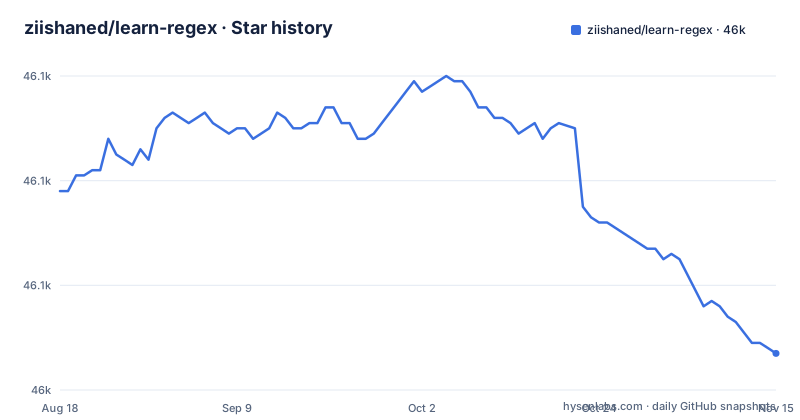
- ziishaned/learn-regex46,047 ★ · -31
| Repository | 2026-08-18 | 2026-11-15 |
|---|---|---|
| ziishaned/learn-regex | 46.1k | 46k |
-31 Stars in the last 89 days, measured from the daily GitHub snapshot. Compare with other projects
Editorial analysis
Every example points at a saved regex101 state, not a local runner
The repository has no code in it. The root holds .github/, .gitignore, LICENSE.md, README.md, an img/ folder and translations/, so there is no package manifest, no test file and no script to run. What the README offers instead is a link per example, and those links go to a third-party playground with the pattern already loaded. The full stop example ends at https://regex101.com/r/xc9GkU/1, the case-sensitivity example at https://regex101.com/r/1paXsy/1, and the character set example at https://regex101.com/r/2ITLQ4/1.
That design is the whole workflow: read a paragraph, click through, change the pattern until it does what the paragraph says. It is fast and it costs you a dependency you do not control. Those saved states live on someone else's service, and a link that stops resolving leaves a paragraph of prose describing a pattern with no way to try it.
The homepage is a third-party one too, gum.co/learn-regex, which is where the project is advertised from. Read the file locally and you have text and images; the practice half of the lesson only exists online.
The username example gives you the accepted strings, not the expression
There is exactly one applied example before the syntax chapters, and it is the one worth reading first. The premise is a username field that should allow letters, numbers, underscores and hyphens while limiting the length, and the text then states which strings the pattern accepts: `john_doe`, `jo-hn_doe` and `john12_as`. It also says why one string fails, since `Jo` contains an uppercase letter and is too short.
That failure explanation is the useful part, because it tells you the pattern enforces both a character rule and a length floor. The expression itself, though, appears as a picture in the README rather than as a line you can copy. The accepted and rejected strings survive in plain text, the pattern does not.
There is nothing to install, so this is the whole first run: open README.md, read the definition, work the username example, and follow section 1 where `the` is shown matching inside a sentence and `The` failing to match `the`, which is how the text establishes that matching is case-sensitive by default.
The meta character table is the lookup, sections 2.1 to 2.8 are the lesson
Two different documents share the word meta characters. The table lists twelve of them with one line each: the period, the character class, the negated class, star, plus, question mark, braces, the group, alternation, the escape, the caret and the dollar sign. Braces are given as {n,m}, matching at least n but not more than m repetitions, and the escape is listed as the way to match the reserved characters [ ] ( ) { } . * + ? ^ $ \ |.
The prose then walks the same ground in order, and the order is the teaching. The full stop, then character sets, then negated character sets, then repetitions split into the star, the plus and the question mark, then braces, then capturing groups with non-capturing groups underneath, then alternation, then escaping, then anchors split into the caret and the dollar sign.
Use the table when you already know what you are looking for and the prose when you do not. A reader who starts at the table will miss the two behaviours that the table cannot hold, including the fact that a period inside a character set means a literal period, which is why `ar[.]` matches `ar.` instead of any character.
The caret does two jobs and the table only shows the first one
In the table, `^` is the beginning of the input and `$` is the end of the input. Both are true, and neither is the whole story. The negated character set section explains that the caret normally marks the start of the string, but when it is typed after the opening square bracket it negates the set instead. So `[^ ]` means any character that is not in the brackets, while a leading `^` means position.
This is the most common way to read the table wrong, and the table cannot fix it because a table cell has one meaning per row. The same shape of problem exists elsewhere in the file. A hyphen inside a character set gives a range, and the text notes that the order of the range inside the brackets does not matter, so `[Tt]he` accepts both cases. A period inside the same brackets is literal, not the wildcard it is everywhere else.
The consequence for a reader is that meta characters are context sensitive, not keywords. The escaped-character row makes the same point from the other side by listing exactly which characters need a backslash, and anything not on that list is a character you can usually type directly.
Sections 3 to 6 assume an engine and never name one
After the meta characters the course jumps to the parts that are dialect-sensitive. Section 3 is shorthand character sets. Section 4 is lookarounds, split into positive lookahead, negative lookahead, positive lookbehind and negative lookbehind. Section 5 is flags, covering case insensitive, global search and multiline. Section 6 is greedy versus lazy matching, and the contents list stops there.
The availability of lookbehind in particular is not uniform across the implementations people reach for, so check which engine you use before relying on section 4. The flags matter in the same way, since case insensitive, global and multiline are exposed differently depending on the API.
If your work lives in one runtime, check that runtime's own documentation for its dialect.
Sixteen translation files, no sync, and a last push on 2025-08-25
The language list is the longest part of the project. Alongside the English README there are sixteen files under translations/: German, Spanish, French, Brazilian Portuguese, Chinese, Japanese, Korean, Turkish, Greek, Hungarian, Polish, Russian, Vietnamese, Indonesian, Persian and Hebrew, each at translations/README-xx.md with its own language code.
Sixteen parallel copies of a teaching document is a maintenance surface, and nothing in the root entries suggests tooling for it. A correction to the English file is a one-line edit there and a hand-translated edit in each of the others, and a reader who arrives through a translation link has no way to tell how current it is. A project with this many languages usually needs a translation script or a per-file review date, and this one has neither in the listing.
The dates explain why. The last push was on 2025-08-25, the repository is not archived, and there are no GitHub releases. The default branch is master rather than main, so tooling that assumes main finds nothing. For a document that is still accurate about meta characters this is survivable. For anything time-sensitive, the fixed content is the problem, not the age of the commits.
What the table of contents stops short of, and what that costs you
The contents run from section 1 Basic Matchers to section 6 Greedy vs Lazy Matching, with the deeper material in between. Look at the list as a boundary rather than a curriculum. There is no entry for backreferences, no entry for Unicode property escapes, no entry for possessive quantifiers or atomic groups, and no entry for the regular expression flavours such as PCRE that differ from the core syntax taught here.
That is a coherent choice for a page aimed at someone meeting the notation for the first time, since each of those topics is a chapter of its own and cramming them in would undo the point. The cost is that a reader who arrives with a real problem, a log line that needs a backreference or a pattern that has to handle non-ASCII text, will finish this page and still be stuck.
The MIT licence in LICENSE.md at least means you can take the text and add the missing chapters yourself.
Editorial conclusion
learn-regex suits a beginner who wants one page explaining meta characters, lookarounds and greedy versus lazy matching with a playground link per example, and its MIT licence means you can fork it into a course of your own. It does not suit anyone who needs a specific dialect, because the contents stop at section 6 with no chapter on engine-specific flavours. Verify first that the regex101 links still resolve, since the last push was on 2025-08-25 and those external states are the only place the patterns become testable.
Frequently asked questions
What the heck is regex?
The README defines a regular expression as a group of characters or symbols used to find a specific pattern in a text, and notes that the term is usually shortened to regex or regexp. It describes matching as running left to right against a subject string, and lists replacing text, validating forms and extracting substrings as the uses.
How do I learn regex?
The file is ordered as six sections: basic matchers, meta characters with subsections down to anchors, shorthand character sets, lookarounds, flags, and greedy versus lazy matching. Each worked example carries a link to a saved regex101 state, so the practice happens in the browser rather than in a local setup.
Where can I practice regex?
On regex101, through the link attached to each example. The full stop example opens https://regex101.com/r/xc9GkU/1 and the character set example opens https://regex101.com/r/2ITLQ4/1, each with the pattern already loaded and editable. The repository itself contains no code, only documentation, an img/ folder and translations/.
what is the best way to learn regex
The structure it offers is a fixed reading order rather than a toolkit: twelve meta characters in a lookup table, then the same material in prose from the full stop through to anchors, then shorthand sets, lookarounds, flags and greedy versus lazy matching. The first applied example is a username validator, which the text says accepts john_doe, jo-hn_doe and john12_as but rejects Jo.
Official sources
Add this badge to your README
If you maintain this project, the badge below links readers to this analysis and shows its maintenance status from the daily GitHub snapshot. Paste the markdown into your README; add ?metric=license or ?metric=stars to the image URL for a different field.

[](https://hysenlabs.com/projects/ziishaned-learn-regex)Star history chart for your README
[](https://hysenlabs.com/projects/ziishaned-learn-regex)Was this useful?