Blizzard/s2client-proto: the protocol definitions behind StarCraft II bot control
StarCraft II Client - protocol definitions used to communicate with StarCraft II.
At a glance
- What is it?
- s2client-proto is not a bot framework. It is the protobuf definition of the StarCraft II client API, plus the Linux headless builds, map packs and replay packs that make the API usable outside Windows. Here is what it gives you, how to install it, and where it stops.
- Who is it for?
- Adopt s2client-proto if you are building a scripted or machine-learning bot, doing replay analysis, or writing tool assisted play, and you accept that the Python package is only generated bindings over the .proto files while the actual game client is a separate download behind the AI and Machine Learning License. Do not adopt it if you want a ready-made environment with observations, actions and reward shaping already defined; PySC2 is the wrapper for that job.
- Can I use it commercially?
- Yes. MIT is a permissive licence: you can use, modify and sell software built on it, as long as you keep its copyright and licence notices.
- Is it still maintained?
- Yes. The repository last received commits 2 days ago.
- What is it written in?
- Mainly Python, according to GitHub's language statistics.
Answers come from the project's GitHub data, last synced on November 22, 2026, and from our analysis. They are not legal advice.
Star history
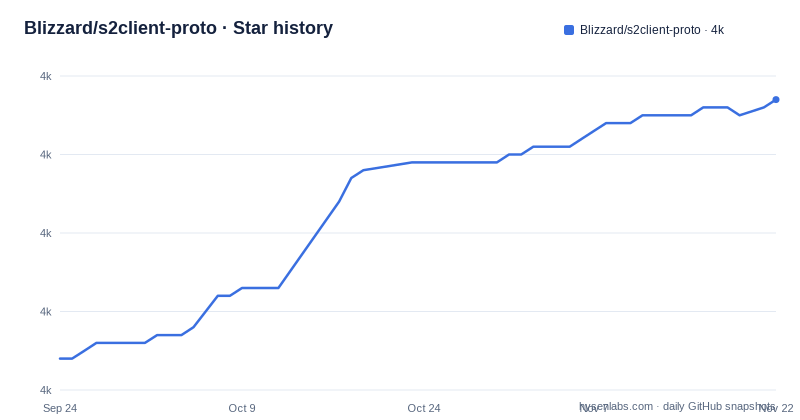
- Blizzard/s2client-proto3,997 ★ · +33
| Repository | 2026-09-24 | 2026-11-22 |
|---|---|---|
| Blizzard/s2client-proto | 4k | 4k |
33 Stars in the last 59 days, measured from the daily GitHub snapshot. Compare with other projects
Editorial analysis
What the protocol definitions actually solve
The StarCraft II API gives full external control of the game from outside the client. s2client-proto is the piece that defines the wire format for that control: the protobuf protocol definition of the API lives at s2clientprotocol/sc2api.proto, with prose documentation in docs/protocol.md. Anyone writing a bot, a machine-learning agent, a replay analyser or a tool assisted play interface talks to the client through these message types, whatever language they write in.
The repository is not a bot framework. It ships the definition, a Python packaging path for that definition, and the game-side assets: self contained headless Linux StarCraft II builds, ladder map packs, and replay packs of 1v1 ladder games. The README lists the audiences plainly: scripted bots, machine-learning based bots, replay analysis, and tool assisted human play.
The practical consequence is that this repository is a dependency, not an application. You do not run it. You generate bindings from it, or install the Python package that has already been generated, and then your own code drives a StarCraft II process. That distinction matters when you are deciding whether to adopt it: the hard engineering work of observations, action spaces and reward shaping belongs to whatever you build on top, or to a wrapper like PySC2.
How the protobuf definitions and the Python package fit together
The data flow is: your code builds request messages, sends them to a running StarCraft II client over the API, and receives response messages defined by the same schema. The schema is the contract. The C++ reference implementation in Blizzard/s2client-api is one consumer of that contract; PySC2 and CommandCenter are community consumers listed in the README.
The Python side is generated, not hand written. setup.py walks the s2clientprotocol directory, finds every file ending in .proto, and calls the protobuf compiler on each one. It looks for protoc in the PROTOC environment variable first, and falls back to find_executable('protoc'). If neither resolves, the build exits with 'protoc not found. Is the protobuf-compiler installed?'. If the compiler itself fails, the script tells you to make sure your protoc version is at least 2.6, and notes that you can point PROTOC at a custom compiler.
The package version is not hard coded. setup.py sets version=s2clientprotocol.build.game_version(), so the Python distribution version tracks the game version the definitions target. That is a sensible choice for a protocol package, and it also means the version string tells you which client build your bindings were cut against.
One more file matters outside the protobuf tree: stableid.json. The README describes it as the mapping from ability ids in the protobuf API to the internals of the game, plus general ids that group abilities with similar semantics, such as the various forms of burrow, cancel, and lift or land. It is updated occasionally with the game, and the README says it can also be updated manually by downloading it and placing it in the root of your StarCraft II directory. If your bot issues an ability id that the local stableid.json does not know, that is a version mismatch, not a bug in your code.
Installing s2clientprotocol and generating your first bindings
The repository is a Python package, so the install path is the usual one, with the protobuf compiler as a prerequisite. The setup script checks for protoc and exits if it cannot find one, so install the compiler first, or export PROTOC to point at a binary you already have.
pip install protobuf
export PROTOC=$(which protoc)
pip install .
Running pip install . from the repository root triggers the custom build step, which compiles every .proto under s2clientprotocol/ into Python modules and appends an empty __init__.py to the package directory before the normal build_py step runs. If protoc is missing you will see the 'protoc not found' message and nothing will be installed.
Once the package is importable, the messages are available as generated Python classes. The README does not give an import example, so the exact module path depends on the generated layout; check what the build produced under s2clientprotocol/ after installation. The samples directory is where to look next: samples/replay-api/ is the worked example the repository ships.
ls s2clientprotocol/
ls samples/replay-api/
Separately, the game side is a manual download. Linux packages, map packs and replay packs are password protected with the password 'iagreetotheeula', and the README states that typing that password means you agree to the AI and Machine Learning License. Extract the Linux package into a folder, and that folder becomes your installation directory. Map packs extract into the Maps folder; replay packs replace the Battle.net and Replays folders. On Linux there is no default path, unlike Windows (C:\Program Files (x86)\StarCraft II\) and Mac (/Applications/StarCraft II/), so you must keep track of where you extracted it yourself.
The licence gate and the version sprawl are the real costs
Two constraints stand out before any technical one. First, the game data is not open. The Linux builds, map packs and replay packs sit behind the AI and Machine Learning License, and the README is explicit that entering the password 'iagreetotheeula' binds you to that licence. The MIT licence on the repository covers the protocol definitions and the packaging code, not the game binaries or the maps. Treat those as two separate legal questions, and read the AI and Machine Learning License yourself rather than assuming the MIT header covers everything in the download list.
Second, version alignment is manual work. The Linux download list runs from 3.17 through 4.10, and the two tagged releases are 1.2.0 for SC2 4.0 and 1.1.0 for SC2 3.17, both from 2017. The repository itself has moved since: the last push was on 2026-07-16, and stableid.json is described as updated occasionally with the game. So the release tags do not tell you which game version the current master targets. You have to pick a Linux package, pick a matching set of definitions, and keep stableid.json in sync with both. Nothing in the README describes a compatibility matrix or a rollback procedure for when a game update shifts ability ids under your bot.
There is also a plain scope limit. This repository defines messages and ships assets. It does not implement a client, a connection helper, or an observation pipeline. If you expected to pip install something and have a running agent, you will be disappointed, and the README points you at PySC2 for that layer.
When PySC2 is the better starting point
PySC2, DeepMind's Python environment wrapper, is the natural alternative and the README lists it under Community. The difference in approach is the level of abstraction. s2client-proto gives you the raw protocol: you construct request messages, manage the client connection, and interpret response messages yourself. PySC2 wraps that protocol into an environment with observations and actions already defined, which is the shape most reinforcement learning code expects.
Choosing between them is mostly about how much of the plumbing you want to own. If you are doing replay analysis, or writing a scripted bot that issues specific ability ids, or building tool assisted play where you need direct control over what is sent, the protocol layer is the right level and a wrapper would only get in the way. If you want to train an agent and compare against published results, the wrapper saves you from reimplementing the observation stack.
The same split applies on the C++ side. The reference implementation in Blizzard/s2client-api is described as a library for building scripted bots using the API, so it sits above the protocol definitions the way PySC2 does on the Python side. CommandCenter is another community option in the same space. None of these replace s2client-proto; they consume it.
Maintenance, upgrades and what the repository does not promise
The repository is not archived, and the last push was on 2026-07-16. That is recent activity, but the tagged releases are old: 1.2.0 dates to 2017-11-14 and 1.1.0 to 2017-09-01. Read those two facts together. The project is being touched, but the release tags do not reflect the current state of the definitions, and the README does not document an upgrade path, a deprecation policy, or a rollback procedure if a definitions update breaks your bot.
Upgrade cost therefore lands on you. When the game moves, stableid.json may need replacing, and the README says it can be updated manually by dropping the file into the root of your StarCraft II directory. That is a one-file operation, which is convenient, but it also means there is no version pinning mechanism described for it. If you deploy bots across several machines, keeping stableid.json consistent across them is your problem.
On licensing, the MIT licence applies to the repository contents. The AI and Machine Learning License applies to the Linux packages, maps and replays, and the README frames acceptance as a deliberate act via the password. That is a distinction worth checking before you ship anything built on the game data.
Editorial conclusion
Adopt s2client-proto if you are building a scripted or machine-learning bot, doing replay analysis, or writing tool assisted play, and you accept that the Python package is only generated bindings over the .proto files while the actual game client is a separate download behind the AI and Machine Learning License. Do not adopt it if you want a ready-made environment with observations, actions and reward shaping already defined; PySC2 is the wrapper for that job. Before you commit, verify that protoc is on PATH or that PROTOC points at a working compiler, and confirm the Linux package version you download is the one you intend to target, since the download list spans 3.17 through 4.10.
Frequently asked questions
Is Blizzard/s2client-proto a bot framework I can run directly?
No. It contains the protobuf protocol definition of the StarCraft II API, a Python packaging path for those definitions, and game assets such as headless Linux builds, map packs and replay packs. Your own code, or a wrapper such as PySC2, drives the game client through the protocol.
What do I need installed before running pip install on s2client-proto?
The protobuf compiler. setup.py looks for protoc in the PROTOC environment variable and then on PATH, and exits with 'protoc not found' if neither resolves. It also states that your protoc version should be at least 2.6.
Where do I get the Linux StarCraft II build and the map packs?
From the download links in the README. The Linux packages, map packs and replay packs are password protected with the password 'iagreetotheeula', and the README states that entering it means you agree to the AI and Machine Learning License. Extract the Linux package into a folder, which then becomes your installation directory.
What is stableid.json used for in s2client-proto?
It maps ability ids used in the protobuf API to the internals of the game, and defines general ids that group abilities with similar meaning, such as burrow, cancel and lift or land. The README says it is updated occasionally with the game and can be replaced manually by placing the file in the root of your StarCraft II directory.
Official sources
Add this badge to your README
If you maintain this project, the badge below links readers to this analysis and shows its maintenance status from the daily GitHub snapshot. Paste the markdown into your README; add ?metric=license or ?metric=stars to the image URL for a different field.

[](https://hysenlabs.com/projects/blizzard-s2client-proto)Star history chart for your README
[](https://hysenlabs.com/projects/blizzard-s2client-proto)Was this useful?