VectorDBBench's default client is its sponsor's, and its CLI help shows six of two dozen backends
Benchmark for vector databases.
At a glance
- What is it?
- This is a benchmark harness rather than a table of numbers: you point it at a database you already run and it inserts, searches, filters, and measures. The design is careful about workloads, covering corpora, dimensions, modalities, metrics, and query distributions across classic retrieval sets and newer multimodal sets. Two things are worth knowing before you read any result. The default install target is the client's own vendor, and the printed command line help on the page lists six commands while the install table advertises around two dozen backends.
- Who is it for?
- Use this if you can run the database yourself, because a harness you drive locally tells you something a hosted leaderboard cannot, and the cost reports are the part most worth generating. Two cautions.
- Can I use it commercially?
- Yes. MIT is a permissive licence: you can use, modify and sell software built on it, as long as you keep its copyright and licence notices.
- Is it still maintained?
- Yes. The repository last received commits 1 day ago.
- What is it written in?
- Mainly Python, according to GitHub's language statistics.
Answers come from the project's GitHub data, last synced on November 13, 2026, and from our analysis. They are not legal advice.
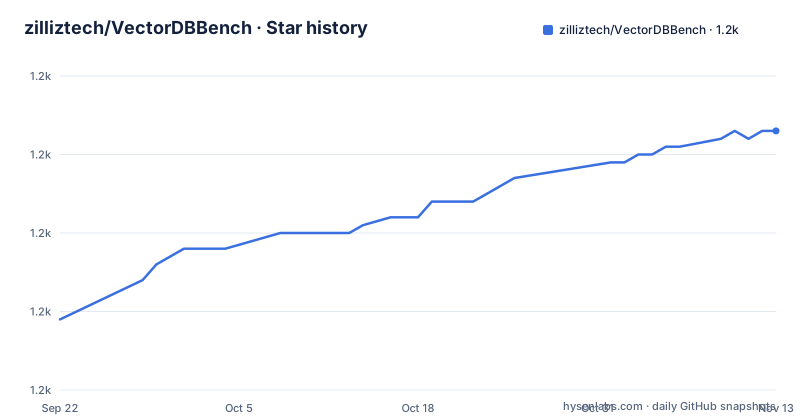
Star history
- zilliztech/VectorDBBench1,203 ★ · +24
| Repository | 2026-09-22 | 2026-11-13 |
|---|---|---|
| zilliztech/VectorDBBench | 1.2k | 1.2k |
24 Stars in the last 52 days, measured from the daily GitHub snapshot. Compare with other projects
Editorial analysis
The default install target is the client's own vendor, and the leaderboard lives there too
The sponsor paragraph is one sentence long and sits directly under the project description. The benchmark is sponsored by the company behind the vector database the harness talks to first, it describes that company as the leading open source vendor in the field, and the next clause invites you to start a trial of that company's cloud service. The install table agrees with the sponsorship rather than hiding it: the first row of optional clients is the client library and the hosted service from that vendor, and it is the only row marked as the default. So a first install, with no bracketed extra, benchmarks the sponsor. The leaderboard link points at the sponsor's site too, and the package metadata lists a team address at the same vendor's domain. None of this makes the results wrong, and running the harness against someone else's server is the recommended use, but it does mean a reader who takes the default path is measuring the default.
Two dozen backends behind about twenty extras, with six products sharing one
The install table is a useful map of the field's fragmentation, and it has two shapes worth noting. First, extras are not one to one with products. One Postgres shaped extra covers a plain extension, a scale-out build, a disk index, two hosted offerings, a chord based extension, and a lake-native vector type, so six different systems install from a single name. Two other extras each cover a pair: one extension covers both the Elastic and the Alibaba hosted variant, and another covers both the Amazon and the Alibaba OpenSearch variants. Second, the prose and the table disagree about shell quoting. The worked example above the table wraps the bracketed form in quotes, which a Zsh user needs, while every row in the table omits them:
pip install 'vectordb-bench[pinecone]'The quote requirement is documented once, in the example, and not in the table where twenty eight rows depend on it.
The help output printed on the page shows six commands for two dozen backends
The page shows what the command line help actually prints, and the listing is short. Six commands appear: two Postgres index variants, a chord based query variant, a MySQL variant, a test command, and one vector database client. That is the entire surface a reader sees if they follow the page's own documentation, against an install table advertising roughly twice that many backends. The reason is not hidden: the harness generates a command per database and index combination, so the count depends on which extras are installed, and the page's transcript was captured from one machine with a small subset present. The consequence is that a newcomer cannot use the page to predict what will appear after installing a Pinecone or a Vespa extra. You can list them yourself, which the page does tell you to do, but the transcript it offers as illustration understates the tool rather than showing it.
Two hosted backends interpret the same index level flag differently
The most consequential detail on the page is a small paragraph about a flag with ten values. Two related commands accept an index level option, and both send it on servers that support it. The difference is what happens when you leave it out. For the open source engine, no level is sent at all, which preserves whatever the server would have done. For the hosted service, the existing default of one is kept and always sent. That means two runs of the same case against those two endpoints are not configured identically even when your command line is identical, and the recorded value is written into the task configuration so you can see it after the fact. For a benchmark tool this is the right kind of disclosure, since it names the asymmetry instead of hiding it, and it is also the reason a published number from one endpoint should not be compared to a number from the other without reading the configuration record.
A command line harness pulls in a web framework and two object storage clients
The dependency list is much heavier than the command line interface suggests. Alongside the obvious click, YAML, a progress bar, and a data validation library, there is a web UI framework pinned to a narrow range with a comment saying it is needed for stateful tabs and stretch widths on a specific page, plus an async web server, a machine learning library, two plotting libraries, a columnar dataframe library, a histogram library for latency reporting, and two object storage clients, one for a major cloud provider and one for a Chinese cloud provider's equivalent. Dataset tooling is present too, including a retrieval dataset library, an HDF5 library, and a hub client. For a package whose job is measuring someone else's database, the baseline install is effectively a data science environment, and only two trove classifiers are declared for it.
The container installs from a university mirror and then runs the working tree
The image build has two stages and three things a reader should know. It starts from a long term Debian release that is past its supported window, which is a choice that trades current security fixes for a stable base. It installs from a second requirements file that lives in an install directory, separate from the project metadata, so there are two dependency lists in the repository. And it points pip at a university mirror of the package index, hardcoded, which is fast inside one network and a latency problem everywhere else. The runtime stage then copies the interpreter and the installed packages out of the builder, copies the source, sets a Python path environment variable pointing at that copy, and runs the package as a module. So the image executes the working tree you shipped in it rather than an installed distribution, which means anything you forgot to install at build time is simply missing at run time.
Datasets cache under a temporary directory and the test target runs one method
The example environment file has four live settings and two commented ones. The one that matters operationally is the dataset directory, which points inside the system temporary area, so a multi gigabyte corpus download does not survive a reboot and is not shared between runs on different machines. The log file and level are the other two, and the timezone and a dataset URL override are present but switched off, which leaves the timezone to the host. The Makefile is smaller still. It has three targets, and the test target does not run the suite: it invokes pytest against one named method of one test class in the dataset module, with verbose output. Formatting and linting both run over the package directory with two tools, one in write mode and one in check mode.
The version comes from tags, and the line jumped from 1.0 to 2.0 in four months
The package does not declare its version; it derives it from the repository tags at build time through the standard versioning plugin, with the version listed as dynamic. That is the right choice for a tool people install from an index, and it means the number you get tells you which commit was tagged rather than what changed. The tag history shows two point releases a few weeks apart in the spring of 2026, then a jump to a two point zero release in September, four months later, which suggests the two point zero line is where the new work landed. The most recent commit on the default branch is dated 2026-09-22. The root inventory adds three things that do not appear in the readme: an ownership file in the Kubernetes style, a Python installer script sitting next to an installer directory, and a dev container configuration for working on the tool itself.
Editorial conclusion
Use this if you can run the database yourself, because a harness you drive locally tells you something a hosted leaderboard cannot, and the cost reports are the part most worth generating. Two cautions. Your first install gets the sponsor's client and cloud by default, so name the extra you actually want rather than accepting the default. And check the configuration differences the page documents before comparing two managed services, because the same flag is treated differently by the two hosted backends, which means two runs of the same case are not automatically configured the same way.
Frequently asked questions
What is VectorDBBench?
It is an open source benchmark tool for vector databases that runs repeatable workloads for insertion, vector search, filtered search, and full text search. It provides a visual interface for launching runs and comparing result reports, plus cost-effectiveness reports aimed at hosted services, and it is sponsored by the vendor of the vector database it defaults to.
How do I install VectorDBBench?
Python 3.11 or newer, then pip install vectordb-bench for the default client pair, or pip install with a bracketed extra for one specific backend. The page quotes that bracketed form in its worked example because some shells need the quotes, which the install table itself omits.
Which vector databases does VectorDBBench support?
Around two dozen optional clients. The default is the client and hosted service of the sponsoring vendor, one extra covers six Postgres shaped products including a hosted offering and two index extensions, and two further extras each cover both a self hosted and a hosted variant of the same search engine.
Does VectorDBBench full text search use BM25?
Yes. The June 2026 announcement says it benchmarks BM25 style retrieval across supported backends, starting with two public question answering datasets, with payload profiles, recall, queries per second, and load metrics ready to compare. A separate release note document holds the rollout details and the caveats.
Which datasets does VectorDBBench use?
Classic local corpora for image descriptors, an embedding set from a hosted model provider, embeddings generated from a public web crawl dataset, and multimodal sets on Hugging Face, including 24 VIBE datasets and Parquet sets at 1M, 10M, and 100M vectors, which the September 2026 announcement added to the existing performance case.
Official sources
Add this badge to your README
If you maintain this project, the badge below links readers to this analysis and shows its maintenance status from the daily GitHub snapshot. Paste the markdown into your README; add ?metric=license or ?metric=stars to the image URL for a different field.

[](https://hysenlabs.com/projects/zilliztech-vectordbbench)Star history chart for your README
[](https://hysenlabs.com/projects/zilliztech-vectordbbench)Was this useful?