vector-db-benchmark puts the server on one machine and the client on another, on purpose
Framework for benchmarking vector search engines
At a glance
- What is it?
- Qdrant's benchmark harness runs every engine under docker compose with the same dataset and the same four configuration files, wildcards over engine and dataset names, and results into ./results/. The client is pinned to the git dev branch of qdrant-client, and the engine roster is whatever has a client library in pyproject.toml.
- Who is it for?
- Adopt vector-db-benchmark if you are choosing a vector database for your own workload and want a comparison under constraints you control rather than a vendor's chart, since the whole design is same-hardware, same-dataset, same-scenario. Do not treat its published numbers as a decision on their own: the client libraries are pinned to particular windows, the qdrant client tracks an unreleased dev branch, and a server-client split means your network is part of the measurement.
- Can I use it commercially?
- Yes. Apache-2.0 is a permissive licence: you can use, modify and sell software built on it, as long as you keep its copyright and licence notices.
- Is it still maintained?
- Yes. The repository last received commits 8 days ago.
- What is it written in?
- Mainly Python, according to GitHub's language statistics.
Answers come from the project's GitHub data, last synced on November 14, 2026, and from our analysis. They are not legal advice.
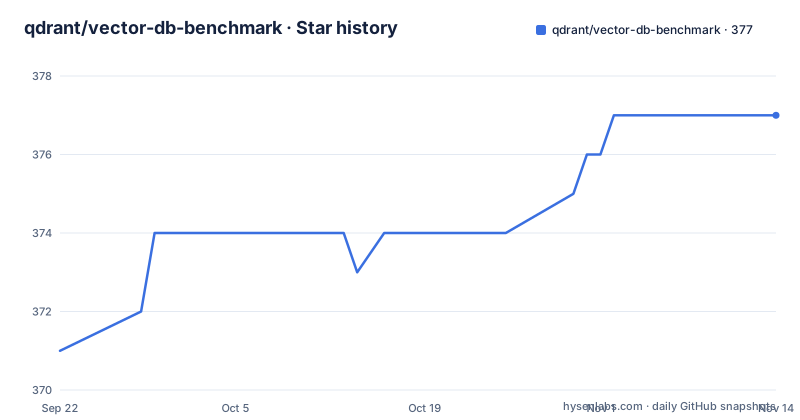
Star history
- qdrant/vector-db-benchmark377 ★ · +6
| Repository | 2026-09-22 | 2026-11-14 |
|---|---|---|
| qdrant/vector-db-benchmark | 371 | 377 |
6 Stars in the last 53 days, measured from the daily GitHub snapshot. Compare with other projects
Editorial analysis
The client is on a different machine, so the network is inside the measurement
Benchmarks here are implemented in server-client mode, and the documentation is explicit about what that means: the server runs on one machine and the client runs on another.
That is a deliberate constraint rather than an inconvenience. Every engine is served with docker compose, using the configuration under engine/servers/.
cd ./engine/servers/<engine-configuration-name>
docker compose up
You pick the engine configuration by directory name, and the containers are expected to expose all the ports the client needs to reach them.
The client side is poetry.
pip install poetry
poetry install
And the run itself is run.py, where engines and datasets both accept wildcards, which is how a matrix is produced rather than a single point.
python3 run.py --engines "qdrant-rps-m-*-ef-*" --datasets "dbpedia-openai-100K-1536-angular"
python3 run.py --engines "*-m-*-ef-*" --datasets "glove-*"
Read those two lines carefully. The first selects one engine mode and sweeps a parameter across its values, on one named dataset. The second selects every engine in that mode across every configuration, on every glove dataset. The other options are --host, defaulting to localhost, and --skip-upload, defaulting to no-skip-upload, which is what lets you reuse data already loaded on a server instead of paying the upload cost on every run.
Results land in the ./results/ directory. The same-hardware claim in the project description rests on the compose setup: every engine gets the same machine and the same container budget, so a difference in the numbers is a difference in the engine rather than in the host.
Four configuration files per experiment, and search_params is allowed to repeat
Each engine has a configuration file defining its benchmark parameters, and the files live in the configuration directory under experiments/. The interesting part is the split, because each stage of the run reads a different file.
connection_params is passed to the client during the connection phase. collection_params is used to create the collection, and indexing parameters are usually defined there. upload_params is used to upload the data to the server. search_params is passed to the client during the search phase.
The detail that makes the harness useful is that the framework allows multiple search configurations for the same experiment run. That is what turns one run into a curve: the same engine, the same collection, the same uploaded data, searched with several parameter sets, so you can see the shape of the quality and latency trade-off instead of a single number.
The first example run uses exactly that, sweeping a parameter across its values with a wildcard in the engine name.
The second half of the design is a warning in the documentation: exact values of the parameters are individual for each engine. So collection_params for one engine is not comparable to collection_params for another unless you know both are configured the way each engine would be configured in production. A framework that lets you choose the per-engine values is only fair if you choose them honestly, and nothing in the framework checks that for you.
That is the thing to keep in mind when reading any published comparison built on this harness, including the one this project publishes.
The engine roster is whatever has a client library in pyproject.toml
There is no separate engine registry file in the repository listing. The set of engines you can compare is defined by the dependency list, which is worth reading as a roster.
Qdrant is there as qdrant-client, and it is not a release pin: it is a git dependency tracking the dev branch of the client repository. Everything else is versioned. Weaviate is held in a narrow window at above 4.22.0 and below 4.23. Elasticsearch sits at ^9.5.0, PyMilvus at ^2.5.0, redis at ^5.0.1, opensearch-py at ^3.2.0, and pgvector at ^0.5.0 with psycopg 3 pulling the binary extra for the Postgres path.
Two consequences follow, and they cut in opposite directions.
The upside is that the roster matches real client libraries rather than hand-written adapters, so you are measuring what you would actually call.
The downside is that a benchmark harness pinned to library windows measures those windows. The Weaviate constraint in particular means a Weaviate result describes 4.22, not Weaviate in general, and the Qdrant client tracking an unreleased branch means a Qdrant result describes code that no pip release contains. Reproducing a published number requires the same pins.
The Python constraint is also narrower than usual: above 3.10 and below 3.13. The project is package-mode false, version 0.1.0, authored by the Qdrant team, which confirms it is a tool to run rather than a library to depend on.
A new engine is three base classes and one factory registration
Adding an engine to the harness is documented as a small, well-bounded job, which is what makes the comparison extensible rather than fixed.
There are a few base classes to implement.
BaseConfigurator defines the methods to create collections and set up indexing parameters. BaseUploader defines the methods to upload the data to the server. BaseSearcher defines the methods to search the data.
The split mirrors the three configuration files from earlier, which is not a coincidence. Connection, collection creation, upload and search are separate concerns, and separating them here means an engine that cannot do a distributed upload can still be benchmarked on search, and an engine with a different collection model does not have to fake the uploader.
The examples live in the clients directory under engine/clients. Once the classes are implemented, the engine is registered in the ClientFactory, at engine/clients/client_factory.py.
That last file is the only mandatory wiring step, which means the cost of adding an engine is one registration plus the class implementations. It also means the factory is the single place where the engine list lives in code, so a new engine that is never registered there simply will not appear in a wildcard run, however complete its implementation looks.
Dataset names pack the embedding model, dimensions and metric into one matchable string
Datasets are declared in one JSON file, datasets/datasets.json, and the framework downloads them automatically into the datasets/ directory. There is no manual download step and no separate loader per dataset, which removes a whole class of setup error from a comparison.
The two example runs show what the naming convention carries. The first names a dataset as dbpedia-openai-100K-1536-angular: a corpus, an embedding provider, a row count, a dimension count and a distance metric, in one string. The second uses a wildcard over glove datasets.
That convention is the reason the wildcard syntax is worth learning. Because the parameters are in the name, a wildcard can select a whole sweep without consulting a config file: engines matching one mode across their ef values, or every glove dataset. Nothing has to be enumerated.
It also means the dataset name is a claim you have to check rather than a label. If your production vectors are a different dimension from the one in the name, or a different metric, you are not comparing engines on the work you will actually do. The dimension in particular changes the size of every vector and therefore the work each engine has to do.
The repository carries a dataset_reader/ directory next to the datasets directory, which is where the parsing lives, and h5py is a dependency, which tells you at least one of these corpus files is not a flat list of floats. benchmark_cascade/ at the root is a second benchmark path alongside the main benchmark/ directory, for running a load pattern the single-request client does not express.
sync_results.sh and monitoring/ are how a number reaches the public leaderboard
The published results page is at qdrant.tech/benchmarks/, and the machinery behind it is visible in the repository.
sync_results.sh is the step that moves results out of ./results/ and into whatever the website consumes. run_all_engines.sh is the sweep counterpart to the single python3 run.py invocation, for running the matrix across every engine in a batch rather than one selection. monitoring/ holds the monitoring side, ansible/ holds the deployment automation for the server side, and tools/ plus scripts/ hold the rest of the plumbing.
The Dockerfile is where the harness runs, and one detail in it is worth naming because it is the reason a poetry project still builds quickly. It copies only poetry.lock and pyproject.toml first, installs with dev groups excluded, and copies the source afterwards. Change a line of Python and the dependency layer is reused; change a version and it is not. PYTHONHASHSEED is set to random, which matters for a harness whose job is to make runs comparable.
The development setup is modest: pre-commit in a pre-commit config file at the root, pytest in the dev dependency group, and a tests/ directory.
Licensing is Apache 2.0. There are no GitHub releases, so there is no version to pin for the harness itself, and the last push was on 2026-09-25. Read the pinned client versions in pyproject.toml before you try to reproduce a published figure, because that file, not the commit date, is what determines the numbers.
Editorial conclusion
Adopt vector-db-benchmark if you are choosing a vector database for your own workload and want a comparison under constraints you control rather than a vendor's chart, since the whole design is same-hardware, same-dataset, same-scenario. Do not treat its published numbers as a decision on their own: the client libraries are pinned to particular windows, the qdrant client tracks an unreleased dev branch, and a server-client split means your network is part of the measurement. Verify three things first: that the dataset name you pick encodes the embedding model and dimensions you actually use, because comparing a 1536-dimension dataset against your 768-dimension production data compares the wrong thing, that search_params for your engine is configured the way you would configure it in production rather than at a default, and that a rerun on your own hardware is what you will quote, since the published page measures someone else's machine. The licence is Apache 2.0 and the last push was on 2026-09-25.
Frequently asked questions
How do I run a vector database benchmark with vector-db-benchmark?
Start the server for your engine with docker compose from its configuration directory under engine/servers/, then install the client with pip install poetry and poetry install, and run python3 run.py with --engines and --datasets. Results are written to the ./results/ directory.
Which vector databases can vector-db-benchmark compare?
Whichever engines have a client library in the project dependencies: Qdrant, Weaviate, Elasticsearch, Milvus through PyMilvus, Redis, OpenSearch and pgvector on Postgres. Adding another means implementing the BaseConfigurator, BaseUploader and BaseSearcher classes and registering it in engine/clients/client_factory.py.
How are benchmark parameters configured?
Each engine has a configuration file under experiments/configurations/ split into four parts: connection_params for the connection phase, collection_params for creating the collection and indexing, upload_params for loading data, and search_params for the search phase. The framework allows multiple search configurations in the same run.
Where do datasets come from?
They are declared in datasets/datasets.json and downloaded automatically into the datasets/ directory. The names encode the corpus, the embedding model, the row count, the dimensions and the distance metric, which is what makes wildcards such as glove-* usable for a sweep.
Official sources
Add this badge to your README
If you maintain this project, the badge below links readers to this analysis and shows its maintenance status from the daily GitHub snapshot. Paste the markdown into your README; add ?metric=license or ?metric=stars to the image URL for a different field.

[](https://hysenlabs.com/projects/qdrant-vector-db-benchmark)Star history chart for your README
[](https://hysenlabs.com/projects/qdrant-vector-db-benchmark)Was this useful?