zivshek/rag-mcp: a one-file MCP server whose domain lives in its tool description
rag-mcp
At a glance
- What is it?
- A Model Context Protocol server that answers questions about the Godot game engine from a ChromaDB vector store on your own disk, with no embedding service in the loop. The whole server is a single script, the vector store is produced by a separate tool, and the subject matter is defined by the text of the tool description rather than by configuration.
- Who is it for?
- Use this server if you already have a ChromaDB vector store of documentation and want an editor to query it over MCP, since it does exactly one job and the ingestion side is deliberately somebody else's problem. The porting story is better than the name suggests, because the domain is chosen by editing the tool description rather than by configuration, so any collection built the same way can be served the same way.
- Can I use it commercially?
- Yes. MIT is a permissive licence: you can use, modify and sell software built on it, as long as you keep its copyright and licence notices.
- Is it still maintained?
- Probably not. The repository last received commits 18 months ago, on April 4, 2025.
- What is it written in?
- Mainly Python, according to GitHub's language statistics.
Answers come from the project's GitHub data, last synced on October 22, 2026, and from our analysis. They are not legal advice.
Star history
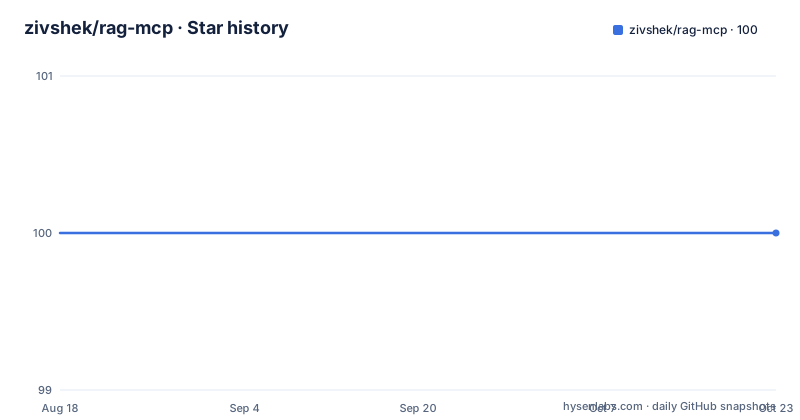
- zivshek/rag-mcp100 ★ · +0
| Repository | 2026-08-18 | 2026-10-22 |
|---|---|---|
| zivshek/rag-mcp | 100 | 100 |
0 Stars in the last 65 days, measured from the daily GitHub snapshot. Compare with other projects
Editorial analysis
The whole server is one script at the root
There is no package structure here. The repository holds a single `server.py` beside `pyproject.toml`, a `uv.lock`, a `.python-version` file, the README and the license, with no source directory and no test directory. That is the whole surface area, and it shapes how you run it: the MCP configuration refers to a path to the server script rather than to a console entry point, so the script is executed directly. The presence of a lock file and of a pinned Python version file says the intended toolchain is uv rather than pip, which matches the run command in the editor configuration, where the script is launched through `uv run`.
The subject matter is chosen by editing prose
The README is blunt about what this tool is and what it is not. It retrieves relevant information about the Godot game engine from a local ChromaDB database, and it says that although the tool is for Godot in particular, with small changes to the tool description it can be used for any Chroma database. That single sentence describes the whole extension mechanism. There is no domain setting, no collection-of-topics mapping and no index of terms, so retargeting the server means editing a piece of text that a model reads. That is a real advantage when you already have a vector store, and it is also why nothing about the tool constrains what may be asked about it.
Ingestion belongs to a different repository
The usage list has three steps, and the first one is not about this project. You get the ChromaDB vector store ready using the web2embeddings tool, a separate repository under the same account, then download or clone this repository to your local disk, and only then configure the MCP server in the editor. The configuration makes the division concrete: the path passed for the database argument is illustrated as a `vector_stores\chroma_db` directory inside that other tool's artifacts. So this repository never creates or updates embeddings. It reads a store that already exists, and if you change the source material you have to go back to the tool that built it, rebuild the store, and only then will this server see different answers.
The documented configuration is written for Windows
The settings block is given as a fragment to paste into the editor's settings.json, under an `mcp` key with an empty `inputs` array and a `servers` object. The server entry is named `godot_rag`, with a comment saying you can use whatever name you want, and the arguments carry their own inline instructions.
"mcp": {
    "inputs": [],
    "servers": {
        "godot_rag": { // or whatever name you want
            "command": "cmd", // replace this with "uv" on Mac or Linux
            "args": [
                "/c", // remove this on Mac or Linux
                "uv", // remove this on Mac or Linux
                "run",
                "path to the server script 'server.py'", // C:\\dev\\rag-mcp\\server.py
                "-d",
                "path to the chroma_db on your computer", // C:\\dev\\web2embeddings\\artifacts\\vector_stores\\chroma_db
                "-c",
                "na
Read the comments rather than the values. The command is `cmd`, which exists only on Windows, and the first two arguments exist only to chain through it. On Mac or Linux you replace the command with `uv` and delete both, which leaves `uv run` followed by the script path. The visible configuration also cuts off after a `-c` argument, so the collection or query naming it takes is not shown in what is published here.
Python 3.13 is the floor, and embeddings are local
The project metadata is short and states the real requirements. Python 3.13 or newer is required, which is a high floor to inherit this early. Three dependencies carry the work: `chromadb` at 0.6.3 or newer for the vector store, `mcp` with its command line extra at 1.6.0 or newer for the protocol server itself, and `sentence-transformers` at 4.0.1 or newer. That last one is the reason the tool needs no service credentials, since it does its embedding work locally rather than calling out to a hosted model. The package is version 0.1.0, and the description field still holds the scaffolding placeholder rather than the sentence the README opens with.
VS Code Insiders is called out as a requirement
One prerequisite is stated as a note rather than a dependency: you may need to download Visual Studio Code Insiders to use MCP or Agent mode. That makes sense given where the configuration lives, since the settings block described above is an editor setting rather than a standalone file, and the Insiders channel is named as the one where this works. The shape of the configuration is worth noting on its own. Servers are declared in a map, so more than one can be registered alongside each other under the same key, the empty `inputs` array suggests shared inputs are optional, and the server name is arbitrary, so a second store could be added as a second entry without touching the first.
No releases, and a project description that was never written
The state of the repository is worth recording before you build on it. The last push to main is dated 2025-04-04 and there are no GitHub releases, so the version you get is whatever the main branch holds. The package version in the metadata is 0.1.0, and the same metadata carries the placeholder description text that scaffolding tools generate, which is a small sign of how little time went into packaging compared with the server itself. The repository is licensed under MIT and has a description field of its own left empty. Nothing in the README describes testing, error handling or how the retrieved context is assembled into an answer, so those questions are answered by reading the one file that does the work.
Editorial conclusion
Use this server if you already have a ChromaDB vector store of documentation and want an editor to query it over MCP, since it does exactly one job and the ingestion side is deliberately somebody else's problem. The porting story is better than the name suggests, because the domain is chosen by editing the tool description rather than by configuration, so any collection built the same way can be served the same way. Two limits before you start. The documented settings block is written for Windows and needs edits on Mac or Linux, and the vector store has to be built first with the separate web2embeddings tool. The last push to main is dated 2025-04-04 and no releases are published.
Frequently asked questions
what is rag mcp server
In this repository it is a single server.py exposed over the Model Context Protocol that answers questions about the Godot game engine from a ChromaDB vector store held on your own disk. It reads a store built elsewhere rather than creating embeddings itself.
what is rag mcp
A Model Context Protocol tool that retrieves relevant information from a local ChromaDB database. The README says it is written for Godot in particular but can serve any Chroma database with small changes to the tool description, and it is named rag-mcp at version 0.1.0.
What does rag-mcp need before it will answer anything?
A ChromaDB vector store built with the separate web2embeddings tool, the repository on local disk, and an MCP server entry in the editor settings. The store path is passed as an argument to the script when the server is launched.
How do I point rag-mcp at a different subject?
By editing the tool description. The README states that although the tool is for Godot in particular, small changes to the tool description let it be used for any Chroma database, so there is no domain setting to configure.
Does rag-mcp need an embedding API key?
Nothing in the project suggests it does. The dependencies are chromadb, mcp with its cli extra, and sentence-transformers, and Python 3.13 or newer is required. The store itself has to be produced beforehand with the web2embeddings tool.
Official sources
Add this badge to your README
If you maintain this project, the badge below links readers to this analysis and shows its maintenance status from the daily GitHub snapshot. Paste the markdown into your README; add ?metric=license or ?metric=stars to the image URL for a different field.

[](https://hysenlabs.com/projects/zivshek-rag-mcp)Star history chart for your README
[](https://hysenlabs.com/projects/zivshek-rag-mcp)