Street Gaussians: Training and Rendering Dynamic Urban Scenes
[ECCV 2024] Street Gaussians: Modeling Dynamic Urban Scenes with Gaussian Splatting
At a glance
- What is it?
- Street Gaussians is a Python research codebase for reconstructing dynamic urban scenes from Waymo monocular video and rendering them with Gaussian Splatting. Its main appeal is a documented training and rendering pipeline for ECCV 2024 research, while its dependency stack, custom-license terms, and incomplete custom-data guidance narrow adoption.
- Who is it for?
- Street Gaussians fits research teams already working with Waymo Open Dataset scenes, monocular video reconstruction, and Gaussian Splatting. It is a poor fit for custom datasets or users who need a fully documented deployment path, because the custom dataset guide is marked TODO and the repository has no release history.
- Can I use it commercially?
- Check first. The repository uses a licence we do not classify automatically, so read its LICENSE file before any commercial use.
- Is it still maintained?
- Yes. The repository last received commits 54 days ago.
- What is it written in?
- Mainly Python, according to GitHub's language statistics.
Answers come from the project's GitHub data, last synced on November 7, 2026, and from our analysis. They are not legal advice.
Star history
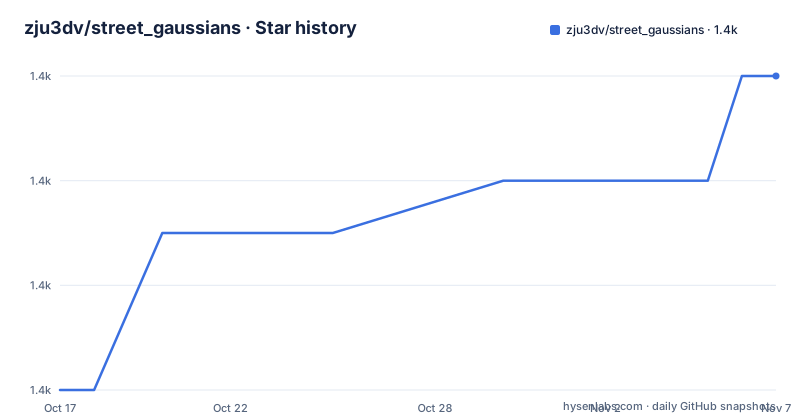
- zju3dv/street_gaussians1,412 ★ · +6
| Repository | 2026-10-17 | 2026-11-07 |
|---|---|---|
| zju3dv/street_gaussians | 1.4k | 1.4k |
6 Stars in the last 21 days, measured from the daily GitHub snapshot. Compare with other projects
Editorial analysis
Street Gaussians and the Waymo Reconstruction Problem
Street Gaussians targets dynamic urban scenes recorded from moving vehicles. The repository is associated with the ECCV 2024 paper "Street Gaussians: Modeling Dynamic Urban Scenes with Gaussian Splatting" and is primarily written in Python. Its documented workflow is aimed at researchers who want to train a scene representation from prepared Waymo Open Dataset material and then produce rendered outputs or a frame export for SIBR_viewers.
The choice of Waymo data is significant. A self-driving dataset contains camera imagery, calibration, motion information, and other records needed to study scenes that change as the vehicle moves. The repository further refers to tracking predictions and LiDAR depth generation, showing that its pipeline depends on more than a directory of extracted video frames. It also links a split file associated with EmerNeRF and distinguishes example scenes from validation or experiment scenes.
The intended users are therefore narrower than users seeking a general-purpose neural rendering application. The repository offers research code for reproducing a paper and experimenting with configurations, not a documented service, command-line product for arbitrary street footage, or turnkey reconstruction application. The README says custom dataset preparation is still TODO, which makes that boundary explicit.
Repository Structure and Processing Boundary
Based on the repository layout, the main entry points are `train.py`, `render.py`, `make_ply.py`, and `metrics.py`. Supporting code is divided among `lib/`, `configs/`, and `script/`, while three local submodules provide rasterization, nearest-neighbor functionality, and a Waymo Open Dataset reader. This arrangement makes the project look like a research implementation with separate stages for preprocessing, optimization, rendering, and evaluation.
The README does not provide a written account of every tensor, model parameter, or scene representation inside `lib/`. It does, however, identify Gaussian Splatting as the rendering approach and links a pipeline diagram. Configuration is said to follow 3D Gaussian Splatting, with documented parameters in `lib/config/config.py`. This is useful for orientation, but it means an adopter must inspect that configuration and the training code to understand exact inputs, defaults, losses, and output layouts.
The Waymo scripts define another important processing boundary. The repository includes conversion, LiDAR depth, and sky mask generation scripts. The sky mask procedure additionally depends on GroundingDINO and a Segment Anything checkpoint. The repository therefore does not perform every required data transformation through its own Python modules alone.
Python, CUDA, and Submodule Installation
The documented installation starts by cloning the repository and creating a Python 3.8 Conda environment. The following commands reproduce the README sequence. The pinned PyTorch build targets CUDA 11.6, so the local CUDA environment must be compatible with that build. The last command invokes the repository's rasterization test, but the README does not document its expected output.
git clone https://github.com/zju3dv/street_gaussians.git
cd street_gaussians
conda create -n street-gaussian python=3.8
conda activate street-gaussian
pip install torch==1.13.1+cu116 torchvision==0.14.1+cu116 torchaudio==0.13.1 --extra-index-url https://download.pytorch.org/whl/cu116
pip install -r requirements.txt
pip install ./submodules/diff-gaussian-rasterization
pip install ./submodules/simple-knn
pip install ./submodules/simple-waymo-open-dataset-reader
python script/test_gaussian_rasterization.py
`requirements.txt` pins `numpy==1.23.5` and `protobuf==3.19`, while also installing packages including `open3d`, `kornia`, `lpips`, `torchmetrics`, and `segment_anything`. It installs `nvdiffrast` from a Git repository. This is a broad native and GPU-oriented dependency set rather than a lightweight Python package. The README does not specify supported operating systems, minimum GPU memory, alternate CUDA versions, or an installation procedure for an already created environment.
Preparing Example and Validation Waymo Scenes
The quickest documented path uses the example scenes linked from the project page or README. That avoids the fuller conversion sequence, although the README does not describe the example layout in this page. Researchers using their own Waymo download must supply the training or validation set directory and choose a split and segment list.
Convert an example-style training set with the following command. Replace the two all-uppercase placeholders with local paths as intended by the command's arguments; the README itself does not define them elsewhere on this page.
python script/waymo/waymo_converter.py --root_dir TRAINING_SET_DIR --save_dir SAVE_DIR --split_file script/waymo/waymo_splits/demo.txt --segment_file script/waymo/waymo_splits/segment_list_train.txtThe validation or experiment workflow adds a tracker prediction file:
python script/waymo/waymo_converter.py --root_dir VALIDATION_SET_DIR --save_dir SAVE_DIR --split_file script/waymo/waymo_splits/val_dynamic.txt --segment_file script/waymo/waymo_splits/segment_list_val.txt --track_file TRACKER_PATHThe repository separately documents LiDAR depth generation:
python script/waymo/generate_lidar_depth.py --datadir DATA_DIRThese steps make data preparation a substantial part of using the project. The validation split may also require changing the validation data source according to an `EmerNeRF` note in the README. This is not an automatic download-and-train workflow.
Generating Sky Masks with External Models
Sky masks are generated by a script that depends on models and checkpoints outside the repository. The README directs users to install GroundingDINO from its own repository and download the `sam_vit_h_4b8939.pth` Segment Anything checkpoint. After those dependencies and the checkpoint path are available, the documented command is:
python script/waymo/generate_sky_mask.py --datadir DATA_DIR --sam_checkpoint SAM_CKPTThis extra stage complicates reproducibility because there are two external installations plus a model checkpoint to coordinate with the Street Gaussians environment. The README does not state whether the generated masks are required for every configuration, whether GroundingDINO must share the same Python environment, or what to do when a mask is incomplete. It also does not provide evaluation criteria for this preprocessing output.
That silence matters when comparing this project with a dataset loader that accepts already prepared masks. Street Gaussians exposes preprocessing as scripts, which is useful for research changes, but the operator remains responsible for environment compatibility, checkpoint placement, input formatting, and inspection of the generated masks. Custom datasets have a larger problem because the README marks their preparation guide as `TODO`.
Training and Rendering with Street Gaussians Configurations
The general training command accepts one YAML configuration. For monocular video reconstruction matching the paper demonstration, the README recommends a configuration from `configs/experiments_waymo`. For general sequences, it recommends `configs/default.yaml`, while warning that some parameters may need adjustment for a particular sequence.
python train.py --config configs/xxxx.yamlTwo shell scripts wrap training for the supplied example and experiment scenes:
bash script/waymo/train_waymo_expample.sh
bash script/waymo/train_waymo_exp.sh
Rendering is driven by `render.py`, with the README listing `evaluate` and `trajectory` as the two modes:
python render.py --config configs/xxxx.yaml mode {evaluate, trajectory}The same distinction appears in the rendering scripts for example and experiment scenes. The documentation does not explain whether the braces are literal shell syntax, whether a chosen mode must be substituted, what output paths are created, how long training takes, or what hardware is sufficient. A single frame can be converted for SIBR_viewers:
python make_ply.py --config configs/xxxx.yaml viewer.frame_id {frame_idx} mode evaluateThe configuration file is thus the central adoption point. Before starting an expensive training run, inspect the selected YAML and `lib/config/config.py`, then confirm how the data paths, frame identifiers, iteration count, and output behavior are defined.
Maintenance, Release History, and License Constraints
The repository is not archived, and its last push was on 2026-09-15. That date records repository activity, but the repository has no GitHub releases. The README provides paper and project links but no versioned installation matrix, migration notes, or release procedure. A recent push does not by itself document compatibility with new CUDA, PyTorch, Python, Waymo, GroundingDINO, or Segment Anything releases.
The license is listed as a custom license that GitHub cannot classify. The repository includes a `LICENSE` file, but its terms are not reproduced in the README. No conclusion about redistribution, commercial use, derivative works, or obligations imposed on trained outputs can be made from the short classification alone. Users must read the actual `LICENSE` file and determine how it applies to their intended use. This is a file review, not legal advice.
Upgrade cost also comes from the environment. Python 3.8, PyTorch 1.13.1, a CUDA 11.6 wheel, pinned NumPy and Protobuf versions, local submodules, `nvdiffrast`, an external detector, and a model checkpoint create several points of version coupling. The repository's latest push date does not remove that operational work.
Street Gaussians Compared with a Static Gaussian Splatting Baseline
Street Gaussians is designed around dynamic street scenes and a Waymo-oriented preparation path. A static 3D Gaussian Splatting workflow for images of one fixed scene is a different approach: it does not require this project's tracking predictions, validation split handling, LiDAR depth generation, or sky mask procedure merely to represent a stationary capture. That makes it a more direct choice when all cameras observe a fixed subject and scene motion is outside the task.
Street Gaussians adds project-specific machinery for moving-camera urban footage, including Waymo conversion, train and validation split files, dynamic validation scenes, trajectory rendering, and experiment scripts. The trade-off is a larger setup surface. The repository does not document a lightweight inference workflow, minimum hardware, resource consumption, or a simple way to process a custom monocular sequence. Its custom dataset section remains `TODO`.
The adoption decision therefore rests on data and research alignment. A team already standardized on Waymo Open Dataset can use the supplied scripts more directly. A team bringing its own capture format must first inspect the converter and training interfaces, and it may have to implement missing dataset preparation. A team looking for a packaged release with documented compatibility guarantees will find no GitHub releases to select from.
Editorial conclusion
Street Gaussians fits research teams already working with Waymo Open Dataset scenes, monocular video reconstruction, and Gaussian Splatting. It is a poor fit for custom datasets or users who need a fully documented deployment path, because the custom dataset guide is marked TODO and the repository has no release history. Evaluate the custom LICENSE file first, then confirm CUDA and PyTorch compatibility, inspect the selected YAML configuration, and account for the full rasterization and tracking preprocessing pipeline before adoption.
Frequently asked questions
How do I install Street Gaussians?
The README documents cloning the repository, creating a Python 3.8 Conda environment, installing the pinned CUDA 11.6 PyTorch packages, installing `requirements.txt`, and installing three local submodules. It does not document alternative CUDA versions or operating systems.
What data does Street Gaussians require?
The documented path uses the Waymo Open Dataset and includes scripts for conversion, LiDAR depth, and sky masks. The README also links downloadable example scenes and processed validation tracking results.
Can Street Gaussians process a custom dataset?
Custom dataset preparation is listed as `TODO` in the README. The repository therefore does not provide a complete documented custom-data workflow.
Official sources
Add this badge to your README
If you maintain this project, the badge below links readers to this analysis and shows its maintenance status from the daily GitHub snapshot. Paste the markdown into your README; add ?metric=license or ?metric=stars to the image URL for a different field.

[](https://hysenlabs.com/projects/zju3dv-street-gaussians)Star history chart for your README
[](https://hysenlabs.com/projects/zju3dv-street-gaussians)Was this useful?