zlib-ng drops old compiler workarounds and adds CPU dispatch
zlib replacement with optimizations for "next generation" systems.
At a glance
- What is it?
- zlib-ng is a C fork of zlib that rebuilds the hot paths with CPU intrinsics and dispatches them at runtime. Its default build, though, leaves the zlib compatible API switched off while still exporting zlib shaped CMake target names.
- Who is it for?
- zlib-ng earns a place when you control the build system and can switch ZLIB_COMPAT on deliberately, and earns none when a prebuilt library gets dropped in expecting stock zlib behaviour. Intrinsics coverage is broad but uneven, so confirm that the routine your workload leans on has a path for your own architecture before committing to it.
- Can I use it commercially?
- Yes. Zlib is a permissive licence: you can use, modify and sell software built on it, as long as you keep its copyright and licence notices.
- Is it still maintained?
- Yes. The repository last received commits 1 day ago.
- What is it written in?
- Mainly C, according to GitHub's language statistics.
Answers come from the project's GitHub data, last synced on November 7, 2026, and from our analysis. They are not legal advice.
Star history
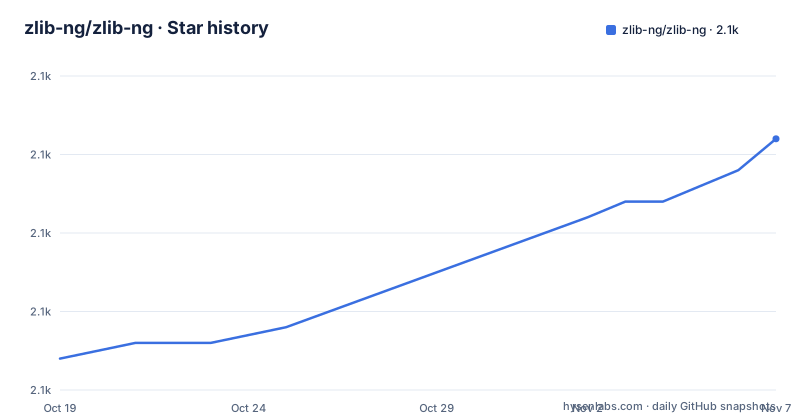
- zlib-ng/zlib-ng2,126 ★ · +14
| Repository | 2026-10-19 | 2026-11-07 |
|---|---|---|
| zlib-ng/zlib-ng | 2.1k | 2.1k |
14 Stars in the last 19 days, measured from the daily GitHub snapshot. Compare with other projects
Editorial analysis
Optimizations that never landed in upstream zlib
The fork exists because optimization patches kept arriving at the wrong place. The stated account is that it saw several third-party contributions with new optimizations not getting implemented into the official zlib repository, so Hans Kristian Rosbach merged the Intel optimizations, some of the Cloudflare optimizations, plus a couple of smaller patches into a tree of his own. What came next was subtraction: workarounds for really old compilers, code for 16-bit environments, dead code, and all contrib and example code. Upstream zlib keeps that compatibility surface on purpose, and the stated goal here is not to replace it but to co-exist as a drop-in replacement with a lower threshold for code change. Plain zlib remains the real alternative, and the difference in approach is exactly this trade, broad reach across old compilers and small systems against a codebase that is harder to change. One number in the feature list needs a caveat, since x86-64 can be about 4x faster than stock zlib appears there with no dataset, no version pair and no measurement procedure attached to it.
Per-architecture code expanded from tpl headers
Dispatch is split across a small group of files at the top level: cpu_features.c, cpu_features.h, functable.c and functable.h, sitting beside arch/, arch_functions.h and arch_natives.h. The template headers inffast_tpl.h, deflate_medium_tpl.h and chunkset_tpl.h sit beside adler32.c, crc32.c, deflate.c, inflate.c, compress.c and insert_string.c. Adler32 is listed with SSSE3, SSE4.2, AVX2, AVX512, AVX512-VNNI, Neon, Neon(DotProd), MSA, VMX & VSX, LSX, LASX and RVV. CRC32-B gets SSE2, SSE4.1, (V)PCLMULQDQ, ARMv8, ARMv8.2 PMULL+EOR3, Power8, IBM Z, LoongArch and ZBC, and inflate copies chunks with SSE2 through AVX512 plus Neon, Power8, VSX, LSX, LASX and RVV. Coverage is uneven, which is the detail worth checking: slide hashing lists SSE2, AVX2, ARMv6, Neon, MSA, Power8, VMX & VSX, LSX and LASX with no AVX512 or RVV, and compare256 covers SSE2, AVX2, AVX512, Neon, Power9, LSX, LASX and RVV. On s390x deflate itself can be handed to DFLTCC hardware instead of a vector loop.
Default build ships zlib targets without the zlib API
Two neighbouring rows of the build options table pull in opposite directions, and a skim reads straight past them. `ZLIB_COMPAT` defaults to OFF while `ZLIB_ALIASES` defaults to ON. The first row compiles with the zlib compatible API, the second provides zlib compatible CMake targets. So an unmodified `cmake .` gives you a library advertising zlib shaped target names while the entry points it actually compiled are the native API. The history section calls the project a drop-in replacement, and dual-linking, listed as a feature, exists only in the mode that is off by default. Set `ZLIB_COMPAT` to ON, or pass `--zlib-compat` to the configure script, before any build of yours expects zlib signatures. This is the first flag to check when a link fails against a fresh checkout.
Building in place with cmake, configure, or ccmake
Both documented build paths configure inside the source tree, which is worth knowing before running them in a checkout you care about.
cmake .
cmake --build . --config Release
ctest --verbose -C Release
The first line configures in the current directory, the second builds what you just configured, the third runs the CMake unit tests verbosely so individual test names appear. The configure script is the other documented route, and it produces makefiles from Makefile.in:
./configure
make
make test
Here configure generates the makefiles, make builds them, and make test runs the suite. If you would rather click through options than type them, the configuration GUI opens on the same directory:
ccmake .The top level carries CMakeLists.txt, a cmake/ directory, configure, Makefile.in and a .shellcheckrc, so both build systems work from one tree. Tests are compiled through the `WITH_GTEST` switch.
Build switches that change what gets compressed
One default matters more than the rest. `WITH_REDUCED_MEM` is OFF, and its own description warns that reducing memory usage affects performance and compression ratio, which makes it a decision about your workload rather than a free saving. Optimisations can be removed with `--without-optimizations`, new strategies with `--without-new-strategies`, and gzFile functions with `--without-gzfileops`, while `WITH_OPTIM`, `WITH_NEW_STRATEGIES` and `WITH_CRC32_CHORBA` are all ON from the start. Note the naming slip in that row: the CMake key is `WITH_GZFILEOP` and the configure flag is `--without-gzfileops`, singular on one side and plural on the other, so search for both when a build script goes looking.
Medium, quick and RLE deflate beside the classics
The deflate side carries more than the classic pair. Alongside deflate.c, deflate_fast.c and deflate_slow.c sit deflate_medium.c, deflate_quick.c, deflate_rle.c, deflate_huff.c and deflate_stored.c, with deflate_medium_tpl.h and compare256_rle.h providing the template and run-length compare paths those files use. The medium and quick algorithms are taken from Intel's zlib fork, and `WITH_NEW_STRATEGIES` is ON by default, so they ship in an ordinary build unless you pass `--without-new-strategies`. Tuning still means measuring your own payloads.
Four native CI targets, seven emulated under qemu
Continuous integration covers four targets natively, Aarch64, S390x, x86 and x86-64, and seven more under qemu, ARM, LoongArch, PPC, PPC64, RISCV, SPARC64 and S390x, on Windows, macOS and Linux. Fuzzing runs under OSS-Fuzz, and coverage lands in Coveralls alongside CodeFactor checks. Two details are easy to miss in the badge table at the top. Its columns are Stable and Develop, and every cell points at a workflow query pinned to the branch of the same name. The three most recent releases are 2.3.1, 2.3.2 (named Hotfix) and 2.3.3, published 2026-02-03. The last push was on 2026-10-06.
Four gaps the build documentation leaves open
The speed figure in the feature list comes with no stated corpus, version pair or compiler flags, so measure on your own data. The build section points at LICENSE.md and calls the terms very simple and very liberal, and the licence field reads Zlib. PORTING.md and FAQ.zlib sit at the top level too.
Editorial conclusion
zlib-ng earns a place when you control the build system and can switch ZLIB_COMPAT on deliberately, and earns none when a prebuilt library gets dropped in expecting stock zlib behaviour. Intrinsics coverage is broad but uneven, so confirm that the routine your workload leans on has a path for your own architecture before committing to it. Start with a configure run using --zlib-compat and make test, then work from the build options table rather than the feature list, since the documented 4x figure comes with no method attached to it.
Frequently asked questions
How do I build zlib-ng so it can be linked in place of stock zlib?
Set ZLIB_COMPAT when using CMake, or pass --zlib-compat to the configure script, because that mode is OFF by default. ZLIB_ALIASES is ON by default and only supplies zlib compatible CMake targets, which is not the same thing.
Does zlib-ng replace zlib or run alongside it?
The stated intent is co-existence rather than replacement. zlib-ng is described as a drop-in replacement with a lower threshold for code change, while upstream zlib keeps its wider reach across old compilers and small systems.
How much faster is zlib-ng than zlib?
The feature list states that x86-64 can be about 4x faster than stock zlib. The feature list gives no dataset, version pair or measurement procedure behind that figure, so it may not transfer to a specific workload.
Which CPU instruction sets does zlib-ng use?
Adler32 is covered by SSSE3, SSE4.2, AVX2, AVX512, AVX512-VNNI, Neon, Neon(DotProd), MSA, VMX & VSX, LSX, LASX and RVV, while CRC32-B uses SSE2, SSE4.1, (V)PCLMULQDQ, ARMv8, ARMv8.2 PMULL+EOR3, Power8, IBM Z, LoongArch and ZBC. Coverage is not uniform, so slide hashing and compare256 have shorter instruction lists.
Can I reduce the memory zlib-ng uses?
WITH_REDUCED_MEM is OFF by default and the option description says it affects performance and compression ratio. The configure equivalent is --with-reduced-mem, so turning it on is a workload decision rather than a free saving.
Official sources
Add this badge to your README
If you maintain this project, the badge below links readers to this analysis and shows its maintenance status from the daily GitHub snapshot. Paste the markdown into your README; add ?metric=license or ?metric=stars to the image URL for a different field.

[](https://hysenlabs.com/projects/zlib-ng-zlib-ng)Star history chart for your README
[](https://hysenlabs.com/projects/zlib-ng-zlib-ng)Was this useful?