Google-Maps-Scrapper for Python Business Data Extraction
This code is used to perform web scraping and data extraction from Google Maps. It is particularly designed for obtaining information about businesses, including their name, address, website, phone number, reviews, and more.
At a glance
- What is it?
- Google-Maps-Scrapper is a Python script that uses Playwright to extract business listings from Google Maps into CSV files. It fits small, targeted searches, but its visible browser, XPath selectors, and Python dependency constraints require operational checks before adoption.
- Who is it for?
- Adopt this project for a controlled, small-volume business search that can tolerate a visible Chromium session and CSV output. Do not choose it as an unattended platform or a high-volume source without first checking Google Maps DOM stability, blocking behavior, branch selection, and the fixed dependency versions.
- Can I use it commercially?
- Yes. MIT is a permissive licence: you can use, modify and sell software built on it, as long as you keep its copyright and licence notices.
- Is it still maintained?
- Yes. The repository last received commits 173 days ago.
- What is it written in?
- Mainly Python, according to GitHub's language statistics.
Answers come from the project's GitHub data, last synced on November 7, 2026, and from our analysis. They are not legal advice.
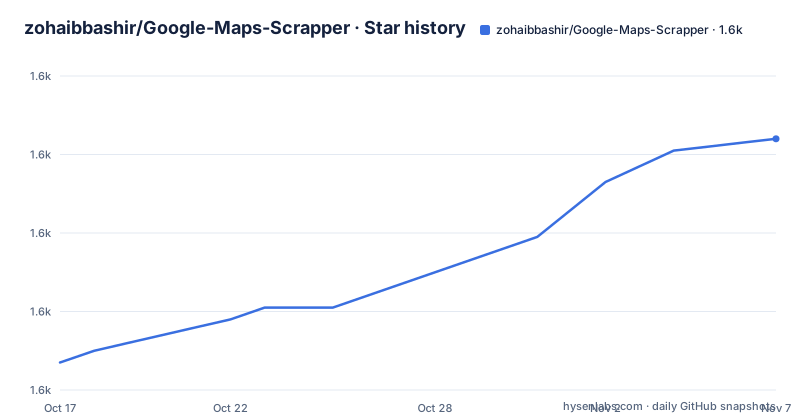
Star history
- zohaibbashir/Google-Maps-Scrapper1,624 ★ · +57
| Repository | 2026-10-17 | 2026-11-07 |
|---|---|---|
| zohaibbashir/Google-Maps-Scrapper | 1.6k | 1.6k |
57 Stars in the last 21 days, measured from the daily GitHub snapshot. Compare with other projects
Editorial analysis
What Google-Maps-Scrapper Extracts
Google-Maps-Scrapper targets the practical problem of turning a Google Maps search into a business-oriented dataset. The README says the script is designed to obtain business names, addresses, websites, phone numbers, reviews, and related information. It is aimed at people who need a focused list of businesses for a particular query, such as restaurants in one city, rather than users who want a general-purpose browser automation framework.
The available fields are broader than a simple place name. According to the README, the scraper can collect review counts and average ratings, detect services such as in-store shopping, in-store pickup, and delivery, retrieve operating hours, and extract introductory information when present. It also applies data cleansing before export, removing redundant or unnecessary columns. The final artifact is a CSV file that can be opened in a spreadsheet or passed to another analysis tool.
The search query is supplied by the operator. This makes the project suitable for a defined research task, such as building a list from a location and business category. It does not provide a documented database, a REST API, a scheduler, or a distributed worker model. The repository layout is small, with `main.py`, `requirements.txt`, a sample `result.csv`, and the README as the primary application files. That simplicity is useful for a one-off collection job, but it also means deployment and operational features are outside the documented scope.
Playwright Browser Flow and Data Export
The documented mechanism is a Python script driven by Playwright. The script launches a visible browser rather than a headless browser, performs the Google Maps search, and then extracts listing information. The README does not expose the full internal architecture or the complete set of selectors, so the exact navigation sequence cannot be confirmed beyond these stages. It does, however, identify `main.py` as the file containing the XPaths that may need editing.
The command-line interface controls the search and output. The `-s` or `--search` option supplies the Google Maps query, while `-t` or `--total` controls the requested number of results. Output goes to `result.csv` by default, or to the path supplied with `-o` or `--output`. The `--append` option adds new results to an existing file instead of replacing it. This gives the script a basic collection-to-export workflow without requiring a separate application layer.
The README says progress appears in the terminal. That feedback is particularly relevant because the browser is visible and the scraper must locate changing page elements. It also reports that scraped data is cleansed and organized before CSV export. The documentation does not state whether failed listings are retried, whether partial results are written after an interruption, or whether duplicate detection is performed across searches. Those behaviors should be checked against `main.py` before relying on a long collection run.
Installation on Python 3.8 or 3.9
The README gives a direct installation path. It specifically recommends Python 3.8 or Python 3.9 and warns that Python 3.10 or later may not be compatible with some dependencies. The dependency file pins versions including Playwright 1.44.0, pandas 2.2.2, numpy 1.26.4, and openpyxl 3.1.2. This version pinning is useful for reproducing the documented environment, although it also means that dependency upgrades will require explicit compatibility work.
Clone the repository, install the requirements, and install the Playwright browser binaries with these commands:
git clone https://github.com/zohaibbashir/Google-Maps-Scrapper.git
cd google-maps-scraper
The clone command creates the local directory named `google-maps-scraper`, then the second command changes into it. The README separately requires a Chrome or Chromium browser for Playwright. Install the Python dependencies next:
pip install -r requirements.txtAfter that, install the browsers required by Playwright:
playwright installThe installation instructions do not specify a virtual environment command, so one is not added here. The README also documents three branches: `Main`, `Latest Libraries`, and `Linux`. It says `Main` is preferred because the latest-libraries branch can cause issues, while `Linux` is intended for Linux support if `main` does not work correctly. This branch choice matters before troubleshooting the scraper itself.
First Search and CSV Collection
A first use should be a small query with a modest result count. The README's primary example searches for Turkish restaurants in Toronto and requests 20 results. Run it from the repository directory after completing installation:
python main.py -s "Turkish Restaurants in Toronto Canada" -t 20The browser window should become visible, the terminal should display progress, and the results should be written to `result.csv` unless another output path is specified. The README does not provide a sample terminal transcript or a documented schema for every exported column, so the exact console text and CSV field order should be taken from the current run and checked against the sample `result.csv`.
To choose a clearer output file and append to it, the README gives this command:
python main.py -s "Turkish Restaurants in Toronto Canada" -t 20 -o toronto_turkish_restaurants.csv --appendThe `-o` option sets the destination path. With `--append`, new rows are added without removing earlier data. Without that flag, the documented behavior is to overwrite the selected output file. The README does not state whether repeated runs deduplicate rows, so append mode should be used only after the existing file format and business identity rules are understood.
Visible Browser, DOM Changes, and Blocking
The scraper has a clear operational constraint: it opens a visible browser window instead of running headless. That choice makes the process inspectable and can help when a listing does not load as expected, but it also requires a graphical environment or an appropriate browser display. The documentation does not describe a server deployment configuration, so a headless Linux host is not covered by the README.
Google Maps presents another direct limitation. The README warns that changes to the Google Maps DOM may break the script and instructs users to update XPaths in `main.py` when that happens. This makes maintenance dependent on the repository's selectors and on an external website. The script is not insulated from Google Maps layout changes, and the presence of a recent repository push does not remove that risk.
The README also advises avoiding too many scrapes in a short period because Google may block the activity. It does not document a rate limit, retry schedule, proxy configuration, cookie handling, or CAPTCHA workflow. Consequently, a blocked run should be treated as a possible failure mode, not as a condition the project promises to handle automatically. The visible browser and DOM selector coupling are the two limitations most likely to affect adoption.
Branches, License, and Maintenance Surface
The repository is not archived, and the last push was on 2026-05-18. That is the maintenance fact supported by the repository data. No GitHub releases are listed, so there is no release history to use as an upgrade contract. The README's branch guidance is consequently more important than a release-based upgrade path. `Main` is the documented preference, `Latest Libraries` is described as potentially problematic, and `Linux` exists as a fallback for Linux support when `main` does not work correctly.
The project is licensed under MIT. That permits use and modification under the terms of the license, but this review does not provide legal advice. Users still need to read `LICENSE` and account for the terms of Google Maps, applicable privacy and data-protection rules, and any restrictions that apply to their intended collection.
Dependency maintenance is also visible in `requirements.txt`. The pins include `playwright==1.44.0` and `pandas==2.2.2`, among others. The README does not provide an upgrade procedure or compatibility matrix. An operator considering a dependency change should inspect `main.py`, preserve the known Python 3.8 or 3.9 constraint until compatibility is established, and validate a small search before changing the pinned environment.
Why a Smaller Collection Approach May Be Better
A real alternative is to use a purpose-built maps data provider or an official business-data API, rather than scraping the Google Maps interface with browser automation. The difference is architectural. This repository controls a browser session, searches Google Maps, reads page elements through XPaths, cleans the extracted values, and writes CSV. An API-based alternative would receive structured business records through a documented interface and would avoid coupling the collector to the visible Google Maps DOM.
That alternative does not remove every collection problem. Access, coverage, pricing, and licensing would depend on the particular provider, none of which is described here. It does, however, move the fragile part away from a changing webpage and into an API contract. For a small local research task, the repository can be more direct because it needs only Python, Playwright, and a browser. For repeated unattended collection, the API approach is conceptually cleaner because it avoids browser-window management and XPaths.
The practical distinction is not that one method always produces better data. It is control. Google-Maps-Scrapper gives the operator direct control over the search command and CSV output, but accepts responsibility for browser behavior, page changes, blocking, and the quality of scraped fields. A provider-based workflow changes that responsibility to an external service contract.
Editorial conclusion
Adopt this project for a controlled, small-volume business search that can tolerate a visible Chromium session and CSV output. Do not choose it as an unattended platform or a high-volume source without first checking Google Maps DOM stability, blocking behavior, branch selection, and the fixed dependency versions. Verify one representative search, inspect the CSV schema, and confirm that the MIT license and included `main.py` selectors match your operating environment before scheduling repeated jobs.
Frequently asked questions
How do I install Google-Maps-Scrapper for Python?
The README recommends Python 3.8 or 3.9, installing `requirements.txt`, and then running `playwright install`. Google Chrome or Chromium must also be installed.
How do I run Google-Maps-Scrapper with a custom search and CSV output?
Use `python main.py -s "YOUR SEARCH" -t YOUR_NUMBER -o output.csv`. The `-s` and `--search` options set the query, `-t` and `--total` set the requested result count, and `-o` and `--output` set the CSV path.
Does Google-Maps-Scrapper run headless or support appending results?
The README states that the script opens a visible browser window rather than a headless one. It also documents the `--append` option for adding new results to an existing output file instead of overwriting it.
Official sources
Add this badge to your README
If you maintain this project, the badge below links readers to this analysis and shows its maintenance status from the daily GitHub snapshot. Paste the markdown into your README; add ?metric=license or ?metric=stars to the image URL for a different field.

[](https://hysenlabs.com/projects/zohaibbashir-google-maps-scrapper)Star history chart for your README
[](https://hysenlabs.com/projects/zohaibbashir-google-maps-scrapper)Was this useful?