AI Engineering Lab runs one freight company through all 24 weeks
A free, self-paced 24-week AI engineering course: Python, machine learning, LLMs, RAG, fine-tuning, agents and MCP, Azure and Vertex and Bedrock, and Databricks. 43 runnable notebooks, one continuous case study. MIT licensed, no signup. By Zorost Intelligence AI Lab.
At a glance
- What is it?
- AI Engineering Lab is a free, self-paced 24-week AI engineering curriculum built as a single continuous case study at a fictional freight operator, so week 1's seeded dataset reappears as week 10's fine-tuning set and week 23's feature tables. It ships 43 runnable notebooks, an Excel tracker, and a rule that nothing is finished until it carries a metric.
- Who is it for?
- AI Engineering Lab suits a developer or analyst who can commit about ten hours a week and wants a sequenced path with runnable artifacts rather than a survey of topics, since each week ends in something that executes and the same dataset carries the whole program. It does not suit someone looking for model architecture research or a weekend workshop, which the project rules out by name.
- Can I use it commercially?
- Yes. MIT is a permissive licence: you can use, modify and sell software built on it, as long as you keep its copyright and licence notices.
- Is it still maintained?
- Yes. The repository last received commits 90 days ago.
- What is it written in?
- Mainly Jupyter Notebook, according to GitHub's language statistics.
Answers come from the project's GitHub data, last synced on November 15, 2026, and from our analysis. They are not legal advice.
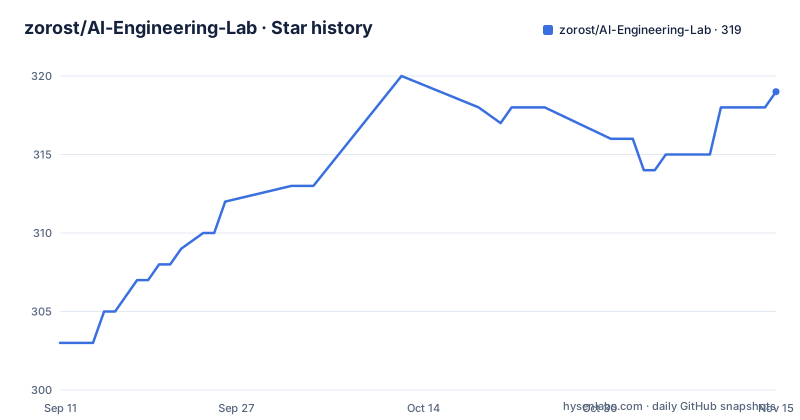
Star history
- zorost/AI-Engineering-Lab319 ★ · +16
| Repository | 2026-09-11 | 2026-11-15 |
|---|---|---|
| zorost/AI-Engineering-Lab | 303 | 319 |
16 Stars in the last 65 days, measured from the daily GitHub snapshot. Compare with other projects
Editorial analysis
Week 1's seeded dataset becomes week 23's feature tables
The organizing decision is one fictional company. You are the AI engineering team at ZoroLogistics, a freight operator, and the same dataset moves through the entire program. Week 1 seeds it. Week 2 turns it into SQL practice. Week 3 makes it training data. Week 7 uses it as a retrieval corpus. Week 10 becomes a fine-tuning set. Week 16 supplies agent tools. Week 23 produces feature tables.
That chain is what distinguishes the program from a folder of unrelated notebooks. The stated outcome is a portfolio of interconnected artifacts rather than 24 disconnected demos, and the reuse is deliberate enough that the curriculum README and the week folders can be read in any order without breaking.
The choice of freight is also argued rather than decorative. It is described as a good classroom domain because it is regulated, traceable, and full of messy operational text, and the claim is that the skills transfer to aviation, manufacturing, pharma, government, and finance, which are the industries the lab already serves. The program runs on a weekly cadence with one concept paired to one artifact, so the domain has to supply both.
Week 1 sets up the machine and generates that shared dataset, and the documentation notes that no GPU is needed for the first eight weeks.
A week is not finished until the artifact carries a number
Each week runs on a four-beat schedule. Study occupies Monday to Tuesday: the week README and the one knowledge base file it points to. Build is Wednesday to Thursday: run the notebooks, then change them and break one thing on purpose. Ship is Friday: the use case exercise, described as one artifact, one number, one honest note. Reflect runs Friday to Sunday: a ten question quiz you pass at eight, and only then tick the tracker row.
The breaking step is the unusual one. Breaking a notebook on purpose is part of the build phase, which means failure is scheduled rather than avoided, and the reflection gate is a fixed difficulty rather than self-assessment. The tracker itself is an Excel file under `curriculum/tracking`, which is why `openpyxl` sits in the requirements.
From week 3 onward the rule tightens into a habit the documentation calls the point of the program: nothing is finished until it carries a metric and a short error-analysis note. Two weeks in, every artifact you produce is expected to answer what it scored and where it went wrong, which is a different deliverable than a notebook that runs.
The audience boundary is stated in the same section. The program is for software developers adding AI, analysts moving toward engineering, students and career changers, and technical founders.
The core requirements file covers weeks one to eight only
The dependency file is explicitly scoped, and its header says so: core Python dependencies for weeks 1 to 8, with later weeks adding extras in the first cell of each notebook. Installation is a single command.
git clone https://github.com/zorost/AI-Engineering-Lab.git
cd AI-Engineering-Lab
python -m pip install -r requirements.txt
What is inside that file is data tooling rather than model tooling: numpy at 1.26 or newer, pandas 2.1, matplotlib 3.8, scikit-learn 1.4, Jupyter and its kernel, pyarrow 15, duckdb 1.0, and openpyxl 3.1. There is no machine learning framework, no transformer library, and no LLM client in the base set, which matches the claim that the first eight weeks need no GPU.
The consequence is worth understanding before week 9. Everything from language model work onward arrives through notebook cells that install what they need at the point of use, so the environment changes shape as you progress, and a week that fails to import is usually a dependency question rather than a broken notebook. The starter file `START-HERE.md` exists for exactly this, since it names the tools, the order, and what to do when something breaks.
Four credential styles share one environment template
The environment template opens with an instruction that shapes how the course runs: copy it to `.env` and fill in only what the current week needs, and never commit the file. Keys are introduced in the week that needs them rather than all at once.
Three blocks are labelled by phase. Language model keys start at week 5 and cover `OPENAI_API_KEY`, `ANTHROPIC_API_KEY`, and `OPENROUTER_API_KEY`, with OpenRouter described as one key for many models. The local option is `OLLAMA_BASE_URL`, defaulted to `http://localhost:11434` and annotated as needing no key at all. Cloud platforms arrive at week 18: an Azure AI project connection string, a Google API key paired with a Google Cloud project, and an AWS region defaulting to `us-east-1` that relies on whatever standard AWS credentials you already configured. Databricks appears at week 21 with host, client id, client secret, and a token, which covers two different authentication modes in one block.
Four styles in one file is the practical hazard: a bearer key, a project connection string, ambient cloud credentials, and a two-part Databricks login. A partially filled `.env` fails at a different point for each, which is why the template ships the values empty and commented rather than with placeholder keys that look configured.
The stack heading has no body and the cost section answers in one line
Two structural gaps are visible in the documentation. The section headed as the stack you will master has no content under it, followed immediately by the cost section. Nothing in the repository fills that gap, so the stack has to be inferred from the seven phase descriptions rather than read off a list.
The cost section is the opposite: the stated price is nothing, the program is MIT licensed, and there is no signup. The follow-on sentence about what weeks 1 to 13 need is cut off in the text available here, so the boundary between the free early weeks and the later cloud phases has to be established from the phase table instead, where weeks 18 to 20 are the Azure, Vertex, and Bedrock block.
Release signalling is thin in the same way. The repository has no GitHub releases at all, yet it carries a `CHANGELOG.md` and a `ROADMAP.md` beside a `.env.example`, a `.vscode/` directory, and a `zoro/` folder. With the last recorded push on 2026-08-17, there is no tag to pin and no release cadence to read, so the curriculum state has to be judged from the repository contents themselves.
The Skills Map implementation is independent and says so up front
The curriculum is organised around a published external framework, and the documentation is careful about the relationship. It states that the program implements Andrew Ng's AI Engineering Skills Map and his three loops for building software in the AI era, and that the Skills Map is Ng's synthesis published in The Batch in 2026.
The disclaimer follows immediately: AI Engineering Lab is an independent implementation and is not affiliated with or endorsed by Andrew Ng or DeepLearning.AI. A link to the lab's own reading of the map sits below the quote.
The claimed contribution is a single sentence, and it is a disagreement rather than an addition: Zorost adds the part the map leaves out, on the grounds that skills do not ship, systems do. That claim is what the 24-week structure is arguing for, since a skills map lists capabilities while a week in this program has to end in an artifact with a metric, an error note, and a tracker tick.
Anyone comparing this against the original framework should read both, and should note that the whole curriculum is also published as a browsable page before anything is cloned, with all 24 weeks filterable by phase and each linking back to its folder.
The reference tree is what the weeks link to, and the audience is narrow
Everything outside the week folders is reached through a reference directory, and its four visible branches explain how the material is meant to be used. A knowledge-base branch holds 14 concept files, the reading behind each week, and the weekly schedule requires reading exactly one of them per week. A skills branch holds tool guides for Claude Code, Cursor, OpenCode, and Ollama. An agents branch holds patterns for OpenClaw, Hermes, and MCP. A platforms branch covers Azure, Vertex, Bedrock, and Databricks. A resources branch collects free outside courses mapped to the weeks.
The audience is defined as precisely as the stack. You need a machine you can install software on, about ten hours a week, and basic computer literacy. You do not need prior Python, a GPU, or a paid API key. The project also names what it is not for: a research career in model architecture, or a weekend prompt workshop.
Those two exclusions are the useful filter. The phase table runs from foundations through Python, data, machine learning, and deep learning in weeks 1 to 4, then tokens, transformers, prompt and context engineering, retrieval, graphs, and local models in weeks 5 to 8, before quantization, LoRA and DPO fine-tuning, serving, and error analysis in weeks 9 to 11.
Editorial conclusion
AI Engineering Lab suits a developer or analyst who can commit about ten hours a week and wants a sequenced path with runnable artifacts rather than a survey of topics, since each week ends in something that executes and the same dataset carries the whole program. It does not suit someone looking for model architecture research or a weekend workshop, which the project rules out by name. Before you start, read START-HERE.md for the order and the troubleshooting path, and plan for the fact that the core requirements file only covers weeks one to eight, with everything after that installed from notebook cells as you go.
Frequently asked questions
What does AI Engineering Lab need before week one?
A clone of the repository, a change into it, and `python -m pip install -r requirements.txt`. The project points newcomers at START-HERE.md first, which names the tools, the order, and what to do when something breaks. Opening `curriculum/week-01` sets up the machine and generates the dataset every later week reuses.
How long is the AI Engineering Lab program and how is it split?
Twenty-four weeks in seven phases: foundations in weeks 1 to 4, LLM core in 5 to 8, model engineering in 9 to 11, harnesses and loops in 12 to 13, agents in 14 to 17, cloud AI platforms in 18 to 20, and Databricks in 21 to 24.
Do I need a GPU or a paid API key for AI Engineering Lab?
No. You need a computer you can install software on, about ten hours a week, and basic computer literacy, but not prior Python, a GPU, or a paid API key. No GPU is needed for the first eight weeks, and the local provider is configured through `OLLAMA_BASE_URL` with no key required.
What counts as finished work in AI Engineering Lab?
From week 3 on, nothing is finished until it carries a metric and a short error-analysis note. The weekly ship beat is one artifact, one number, and one honest note, and the reflection beat is a ten question quiz you pass at eight before ticking the tracker row.
How much does the AI Engineering Lab course cost?
Nothing. The program is MIT licensed and there is no signup. The base requirements file installs only data tooling for weeks one to eight, and later weeks install their own extras in the first cell of each notebook.
Official sources
Add this badge to your README
If you maintain this project, the badge below links readers to this analysis and shows its maintenance status from the daily GitHub snapshot. Paste the markdown into your README; add ?metric=license or ?metric=stars to the image URL for a different field.

[](https://hysenlabs.com/projects/zorost-ai-engineering-lab)Star history chart for your README
[](https://hysenlabs.com/projects/zorost-ai-engineering-lab)Was this useful?