TweetFeed: A Community IOC Feed With Formats for Every Tool
TweetFeed collects Indicators of Compromise (IOCs) shared by the infosec community at Twitter. Here you will find malicious URLs, domains, IPs, and SHA256/MD5 hashes.
At a glance
- What is it?
- TweetFeed turns malware and phishing indicators posted on Twitter/X into CSV, MISP, STIX, TAXII, and blocklist feeds. The project is useful for blue teams that want fresh IOCs without building their own collection pipeline.
- Who is it for?
- Adopt TweetFeed if you need a free, low-maintenance source of community-reported IOCs for enrichment, blocklists, or MISP correlation, and you can tolerate the noise that comes with unvetted social media data. Do not use it as your only threat feed for high-security environments where false positives are costly.
- Can I use it commercially?
- Yes. CC0-1.0 is a permissive licence: you can use, modify and sell software built on it, as long as you keep its copyright and licence notices.
- Is it still maintained?
- Yes. The repository received new commits within the last day.
- What is it written in?
- GitHub does not report a main language for this repository.
Answers come from the project's GitHub data, last synced on October 21, 2026, and from our analysis. They are not legal advice.
Star history
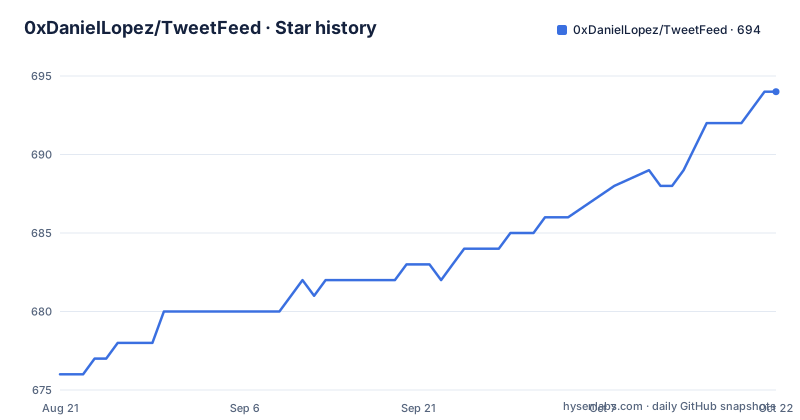
- 0xDanielLopez/TweetFeed694 ★ · +18
| Repository | 2026-08-21 | 2026-10-21 |
|---|---|---|
| 0xDanielLopez/TweetFeed | 676 | 694 |
18 Stars in the last 61 days, measured from the daily GitHub snapshot. Compare with other projects
Editorial analysis
What TweetFeed Actually Collects
The feed is not a curated threat intelligence product. There is no mention of a vetting process, no scoring of IOC confidence, and no deduplication beyond what the pipeline does. The README states the counters and feeds are regenerated every 15 minutes, so freshness is decent. But you are trusting the crowd. For a blue team that wants to enrich alerts or block known-bad domains, that trade-off is often acceptable. For a SOC that needs high-fidelity indicators, you would want to combine this with other sources.
The Data Flow: From Tweet to Feed
The incremental sync endpoint, /v1/since/<ISO8601>, is the recommended way to stay current without downloading the full year.csv. It returns a 410 error past the 365-day horizon, so you cannot go further back. The REST API supports chaining filters in any order, so /v1/today/url/phishing and /v1/today/phishing/url return the same result. That is a nice touch for scripting. The data flow is straightforward: tweets in, structured feeds out, with a 15-minute refresh cycle.
Getting It Running: What You Actually Do
For DNS blocking, the blocklist endpoints return plain text files ready for different resolvers: domains.txt, hosts.txt, adguard.txt, rpz.txt, dnsmasq.txt, ips.txt, urls.txt. You can drop these into your resolver or firewall. For MISP integration, you add the feed via Sync Actions > Feeds > Add, using the directory https://tweetfeed.live/misp, and MISP appends /manifest.json itself. There is also a hash cache file for MISP's feed correlation. The TAXII 2.1 server is read-only, no auth, with a single collection ID. Point any TAXII client at the discovery URL and you are done. The setup cost is near zero because you are consuming, not deploying.
The Format Trap: No Header Row in CSV
One detail that will trip you up is the CSV format. The README explicitly states there is no header row. The first line is already data. If you set ignoreFirstRecord in Splunk or skip_header in Python's csv module, you will drop a legitimate IOC. This is a real failure mode that the documentation warns about, so it is not a hidden bug. But it means every integration must account for it. The schema is date, user, type, value, tags, tweet_url. Tags are space-separated, which can be a problem if a tag itself contains a space, though the README does not mention such cases. The lack of a header is a deliberate design choice to keep the files lean, but it is a sharp edge for newcomers. When you build a parser, test it against a known entry from today.csv to confirm you are reading the first row correctly.
What the Feed Does Not Give You
The 365-day horizon for the year.csv and the 31-day rolling window for TAXII and blocklists are hard limits. If you need historical data beyond a year, this feed will not help. The STIX year bundle is intentionally omitted to avoid GitHub's push limit, so you cannot get a full year of STIX in one file. The incremental sync endpoint is the workaround, but it only goes back 365 days. For long-term threat hunting, you would need to archive the data yourself.
Alternatives: How TweetFeed Compares
The obvious alternative is URLhaus by abuse.ch, which also provides IOCs for malicious URLs and has a similar API. The difference is that URLhaus is a curated database with a submission and review process, whereas TweetFeed pulls directly from social media with no vetting. URLhaus offers a higher signal-to-noise ratio but covers only URLs, not domains, IPs, or hashes. TweetFeed covers all five IOC types, so it is broader but noisier. Another alternative is AlienVault OTX, which has a larger community and more context, but it is heavier to integrate and requires an API key. TweetFeed's advantage is its simplicity and zero-auth access. For a quick blocklist or a MISP feed, TweetFeed is easier to set up. For a production threat intel platform, you would likely prefer URLhaus or OTX for their curation and enrichment.
Maintenance and License: What You Inherit
The project is licensed under CC0-1.0, which means you can use the data without attribution or restrictions. That is a permissive license, but it also means the project provides no warranty. The README includes a disclaimer section, though its text is not in the provided material. The repository is not archived and had a push on 2026-08-29, so it appears actively maintained. However, there are no recent releases listed, so you cannot rely on release notes for changes. The maintenance cost for you as a consumer is low: you just poll the API or download the CSVs. But you must handle the format changes yourself, since there is no versioned API. The API endpoint structure is stable in the README, but the project could change it without notice. The 15-minute regeneration is a maintenance commitment from the author, and it seems to be holding. For a free feed, that is good, but you should monitor the endpoints for failures, especially if you depend on it for blocking.
Editorial conclusion
Adopt TweetFeed if you need a free, low-maintenance source of community-reported IOCs for enrichment, blocklists, or MISP correlation, and you can tolerate the noise that comes with unvetted social media data. Do not use it as your only threat feed for high-security environments where false positives are costly. Before integrating, verify the feed's freshness against your own polling interval, check that the CSV headerless format matches your parser, and confirm that the 31-day rolling window for TAXII and blocklists fits your retention needs.
Frequently asked questions
What is TweetFeed?
A feed of indicators of compromise shared by the infosec community on Twitter/X, covering malicious URLs, domains, IPs and SHA256 and MD5 hashes. It republishes them every 15 minutes as CSV, RSS, MISP, STIX 2.1, TAXII 2.1 and blocklists.
How often does TweetFeed publish new data?
Every 15 minutes, which is also the recommended polling ceiling. Consumers are told to send If-None-Match or If-Modified-Since, since an unchanged file answers 304 with an empty body.
Can I clone the TweetFeed repository to get the data?
Not if you want it fresh. The history is rewritten once a day as a single-commit snapshot, so a plain git pull breaks daily. Use a shallow clone with blobs filtered out and refresh with git fetch --depth 1 origin master followed by a hard reset to origin/master.
Which formats does TweetFeed publish?
CSV windows for today, week, month and year, RSS 2.0 plus scoped RSS per tag, type or user, a MISP manifest with one event per day and 365 days of history, STIX 2.1 bundles for today, week and month, a read-only TAXII 2.1 server, and 16 blocklist formats over a rolling 30 days.
Official sources
Add this badge to your README
If you maintain this project, the badge below links readers to this analysis and shows its maintenance status from the daily GitHub snapshot. Paste the markdown into your README; add ?metric=license or ?metric=stars to the image URL for a different field.

[](https://hysenlabs.com/projects/0xdaniellopez-tweetfeed)Star history chart for your README
[](https://hysenlabs.com/projects/0xdaniellopez-tweetfeed)