NucleiFuzzer: Automated URL Discovery and Nuclei Fuzzing in One Command
NucleiFuzzer is a robust automation tool that efficiently detects web application vulnerabilities, including XSS, SQLi, SSRF, and Open Redirects, leveraging advanced scanning and URL enumeration techniques
At a glance
- What is it?
- NucleiFuzzer wraps five URL discovery tools, deduplication, live-host filtering and Nuclei fuzzing templates into a single nf command. It suits bug bounty hunters who want one pipeline from domain to report, but it brings eight external dependencies and an undocumented output schema.
- Who is it for?
- Adopt NucleiFuzzer if you are a bug bounty hunter or security engineer who wants one command to turn a domain into a fuzzed endpoint list and a Nuclei report, and who is willing to install and keep eight external tools healthy. Do not adopt it if you need a single supported scanner, a documented output schema, or a license you can redistribute under without checking.
- Can I use it commercially?
- Not without permission. GitHub finds no licence file in the repository, and without a licence all rights are reserved by default: you may read the code but not reuse it. Check the README, or ask the authors, before using it.
- Is it still maintained?
- Activity is slowing. The repository last received commits 6 months ago.
- What is it written in?
- Mainly Python, according to GitHub's language statistics.
Answers come from the project's GitHub data, last synced on November 7, 2026, and from our analysis. They are not legal advice.
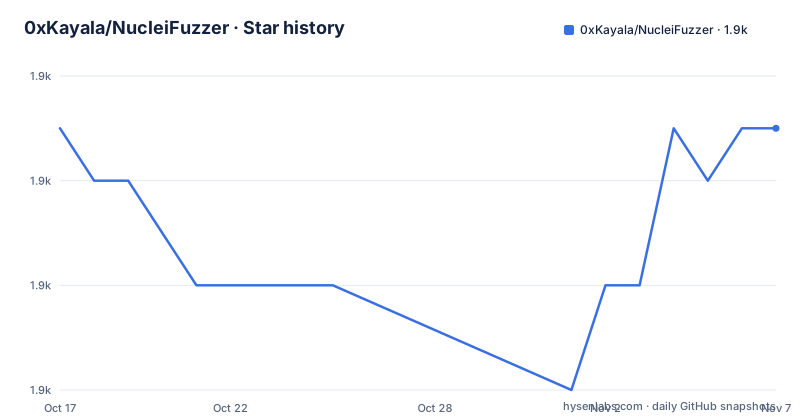
Star history
- 0xKayala/NucleiFuzzer1,867 ★ · +0
| Repository | 2026-10-17 | 2026-11-07 |
|---|---|---|
| 0xKayala/NucleiFuzzer | 1.9k | 1.9k |
0 Stars in the last 21 days, measured from the daily GitHub snapshot. Compare with other projects
Editorial analysis
What NucleiFuzzer automates and who it serves
NucleiFuzzer is a Python command-line tool that exposes a single entry point named nf. It targets security professionals, bug bounty hunters and web developers who need to move from a domain name to a vulnerability report without manually stitching tools together. The README describes the project as an automation layer over ParamSpider, Waybackurls, Katana, Gauplus and Hakrawler for URL discovery, with Nuclei and fuzzing templates performing the actual checks. The stated detection scope covers cross-site scripting, SQL injection, server-side request forgery and open redirects. The value proposition is orchestration rather than a new detection engine: each underlying tool keeps its own behaviour, and NucleiFuzzer coordinates them and filters their output.
How the discovery-to-scan pipeline works
The pipeline has four stages that are visible in the README. First, five discovery tools gather candidate URLs from different sources: ParamSpider mines parameters, Waybackurls pulls historical URLs, Katana and Hakrawler crawl the live site, and Gauplus expands the set. Second, uro removes duplicate URLs so the same endpoint is not scanned twice. Third, httpx filters the list to live hosts and relevant responses. Fourth, Nuclei runs fuzzing templates from the projectdiscovery nuclei-templates repository against the surviving endpoints. The README also mentions JSON and HTML reporting with severity grouping, plus an AI vulnerability analysis feature marked as new, but it does not explain how that analysis runs, which model it uses, or what its output looks like. Output lands in a folder that defaults to ./output, and the -o flag overrides it.
Installing NucleiFuzzer and running a first scan
The README provides a one-line installer that clones the repository, enters it, makes install.sh executable and runs it, then checks that the nf command exists.
git clone https://github.com/0xKayala/NucleiFuzzer.git && cd NucleiFuzzer && sudo chmod +x install.sh && ./install.sh && (command -v nf &> /dev/null && nf -h || echo "Installation failed: Command 'nf' not found. Please check for errors during installation.") && cd .. || echo "Failed to clone or navigate to NucleiFuzzer repository. Please check your setup."After installation, nf -h prints the available options.
nf -hA single-domain scan uses the -d flag.
nf -d example.comMultiple domains or URLs come from a file with -f.
nf -f file.txtTo override the default output folder, pass -o.
nf -d example.com -o ./outputThe help output lists four options: -h/--help, -d/--domain, -f/--file and -o/--output, with ./output as the default output folder. The README mentions rate limiting for efficiency but the help text shown does not expose a rate flag, so that behaviour is not documented in the README help output.
The prerequisite chain that can break installation
The tool is only as reliable as its dependency chain. The README lists eight external tools that must be installed and executing correctly before NucleiFuzzer can run: Nuclei, ParamSpider, waybackurls, gauplus, hakrawler, katana, httpx and uro. It also expects the fuzzing templates from the nuclei-templates repository. The README provides git clone URLs for each dependency but does not document installation or version requirements for them, and it does not state whether install.sh installs anything beyond NucleiFuzzer itself. A failure in any one of these tools, or a version mismatch between them, breaks the whole run because the wrapper has no documented fallback. Operators should verify each binary responds on PATH before the first scan.
Output formats and what the README does not explain
The README advertises clean output and severity grouping, and shows screenshots of the console and a results view, but it does not document output file names, directory layout beyond the default folder, or the JSON schema. It also does not describe how to re-run only part of the pipeline or resume an interrupted scan. Without those details, integrating NucleiFuzzer into a continuous integration job requires trial and error. The practical demonstration is a YouTube video, which is not a substitute for written reference documentation.
When NucleiFuzzer is the wrong tool
NucleiFuzzer is the wrong choice when the target list is small or already known. In that case running Nuclei directly against a curated URL file avoids the overhead and failure modes of eight helper tools. It is also a poor fit for teams that need a supported product with a documented API or service level agreement, because the repository carries no stated license and no maintenance commitment beyond the code. The default branch is main and the project is not archived, but the last push was on 2026-04-17, so anyone adopting it should plan to maintain their own fork of the orchestration scripts.
NucleiFuzzer versus running Nuclei directly
The honest alternative is Nuclei by itself. NucleiFuzzer automates discovery, deduplication and live-host filtering before handing URLs to Nuclei with fuzzing templates. Nuclei alone assumes you already have a URL list and runs templates against it. The trade-off is coverage versus moving parts: NucleiFuzzer can find parameters and historical endpoints a manual list misses, but it adds eight dependencies and several failure points. If your workflow already produces a clean URL list through other means, the wrapper adds little.
Maintenance status and licensing
Recent releases are v2.4.0 on 2025-01-07, v2.0.1 on 2025-01-02 and v1.0.3 on 2024-07-08. The last push to the default branch was on 2026-04-17. That date is more than six months before 2026-10-19, so the repository should not be described as actively maintained; the code may still work, but there is no evidence of ongoing updates. The license field is empty in the repository metadata and the README does not name one, so redistribution or commercial use needs a license check first. Installation also requires sudo for install.sh, which matters in locked-down environments.
Editorial conclusion
Adopt NucleiFuzzer if you are a bug bounty hunter or security engineer who wants one command to turn a domain into a fuzzed endpoint list and a Nuclei report, and who is willing to install and keep eight external tools healthy. Do not adopt it if you need a single supported scanner, a documented output schema, or a license you can redistribute under without checking. Verify first that Nuclei, ParamSpider, waybackurls, gauplus, hakrawler, katana, httpx and uro all run on your machine, that the fuzzing templates are present, and that the repository license permits your intended use.
Frequently asked questions
What is NucleiFuzzer?
NucleiFuzzer is a Python automation tool that combines ParamSpider, Waybackurls, Katana, Gauplus and Hakrawler for URL discovery with Nuclei fuzzing templates for scanning. It targets security professionals, bug bounty hunters and web developers.
How do I install NucleiFuzzer?
Clone the repository, enter it, make install.sh executable and run it, then check that the nf command exists. The README's one-line installer performs all of these steps in sequence.
How do I scan a single domain with NucleiFuzzer?
Run nf -d example.com. Output goes to ./output by default, or use -o to set a different folder.
Official sources
Add this badge to your README
If you maintain this project, the badge below links readers to this analysis and shows its maintenance status from the daily GitHub snapshot. Paste the markdown into your README; add ?metric=license or ?metric=stars to the image URL for a different field.

[](https://hysenlabs.com/projects/0xkayala-nucleifuzzer)Star history chart for your README
[](https://hysenlabs.com/projects/0xkayala-nucleifuzzer)Was this useful?