Jaaz: a local-first canvas agent positioned as a Canva and Manus substitute
The world's first open-source multimodal creative assistant This is a substitute for Canva and Manus that prioritizes privacy and is usable locally.
At a glance
- What is it?
- Jaaz is an Electron desktop app from 11cafe that puts an image and video generation agent on an infinite canvas. The README claims local-first privacy; the repository shows a React front end, a Python server and a ComfyUI path.
- Who is it for?
- Adopt Jaaz if you want a desktop canvas where an agent places generated images and video and you are willing to run ComfyUI or pay for API access, because the README describes both paths. Do not adopt it if you need a documented Linux build or a clear licence: the manual install is labelled for Linux and local builds, and LICENSE is present in the repository root but GitHub reports the licence as NOASSERTION, so read that file before shipping anything commercial.
- Can I use it commercially?
- Check first. The repository uses a licence we do not classify automatically, so read its LICENSE file before any commercial use.
- Is it still maintained?
- Activity is slowing. The repository last received commits 8 months ago.
- What is it written in?
- Mainly TypeScript, according to GitHub's language statistics.
Answers come from the project's GitHub data, last synced on November 15, 2026, and from our analysis. They are not legal advice.
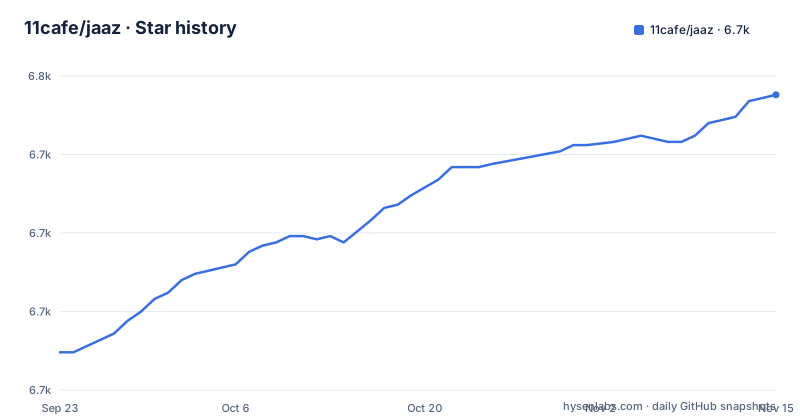
Star history
- 11cafe/jaaz6,744 ★ · +82
| Repository | 2026-09-23 | 2026-11-15 |
|---|---|---|
| 11cafe/jaaz | 6.7k | 6.7k |
82 Stars in the last 53 days, measured from the daily GitHub snapshot. Compare with other projects
Editorial analysis
What Jaaz solves, and for whom
Most image and video generation tools assume you will write prompts and then leave the browser tab open. Jaaz takes the opposite position. The README describes it as an open source Canva AI alternative and a substitute for Canva and Manus that prioritizes privacy and is usable locally. The intended user is someone producing visual material, storyboards, short vertical videos, character shots across several scenes, who would rather work on a canvas than in a chat box. The README's own example is a prompt asking the agent to place one character in six scenes in front of landmark buildings at a 9:16 ratio. That is a layout task as much as a generation task, which explains why the canvas is the product rather than a sidebar. There is also an enterprise angle: the README advertises an Enterprise Cloud Full Edition with private or on-prem deployment and commercial licensing, delivered as a Docker image or full source, and a separate contact address for team deployment. So the repository serves two audiences at once, individual users running the desktop app and companies that want the same features behind their own firewall.
Canvas, agent and the Python server behind the Electron shell
The repository layout tells you more than the feature list. The top level holds electron/, react/, server/, scripts/ and assets/, plus package.json, pyproject.toml and entitlements.mac.plist. package.json names the entry point as electron/main.js and describes the package as an AI design agent local desktop app. The Electron build config ships electron/**/*, package.json and assets/icons/* as application files, and copies server/dist/ and react/dist/ into extraResources. In other words, the shipped app is a shell around a compiled React front end and a compiled Python server that run on the user's machine. That is the mechanism behind the local-first claim: there is no remote backend in the packaging step. The agent layer is described in the README as a chat-driven system that inserts objects, transfers styles and controls logic, and it says the agent works with local ComfyUI and cloud models. The canvas is described as infinite and supporting real-time collaboration, and the README lists a built-in library for media and prompts. The Python side's pyproject.toml lists FastAPI, uvicorn and pydantic as known third-party packages for isort, which suggests a FastAPI server. What the README does not explain is how the agent decides between a local ComfyUI instance and a cloud model at request time. That routing logic is the part a prospective adopter most needs to read in the source.
Installing Jaaz from source and generating a first image
The README says to download the desktop build from the releases page or from jaaz.app, and that clicking Log In at the top right of the homepage gives access to API models under a paid plan. For Linux or local builds it gives a manual path instead. Note that the clone command in the README points at 11cafe/localart, not at the jaaz repository, and that the directory it changes into is react, which matches the react/ directory in this repository.
git clone https://github.com/11cafe/localart
cd react
npm install --force
npx vite build
cd ../server
pip install -r requirements.txt
python main.py
The README states that Python 3.12 or newer is required, in bold, above both the manual install and the development instructions. The npm install uses --force, which the README does not justify; expect peer dependency conflicts to be resolved silently rather than reported.
For development the README gives a slightly different loop, running npm run dev in react and the server separately, and it recommends the Black Formatter extension for VS Code or Cursor.
cd react
npm install --force && npm run dev
cd server
pip install -r requirements.txt
python main.py
Once the app is up, the README's instruction is to start chatting with the agent to generate stories or storyboards. There is no documented command that produces an image without the UI, so the first real use is a canvas interaction: describe the scene in the chat panel, let the agent place the result, then refine by pointing or sketching. The README calls this prompt-free creation and compares it to building with LEGO. Whether that holds up for your material is something only a trial on your own assets will settle.
Where Jaaz is the wrong tool
The README's manual install section is labelled for Linux or local builds, yet the feature list says cross-platform support means Windows and macOS, and the Electron config defines build targets for mac, win and linux. The documentation does not describe a supported Linux desktop workflow beyond that manual path, so a Linux user is on the source route with no stated package. That is a real gap, not a cosmetic one. Second, the privacy claim needs qualification. The README says local-first, no data leaves your device, and fully offline or hybrid setup with Ollama plus APIs. Those two statements describe different configurations. If you connect cloud models such as GPT-4o, Midjourney, VEO3 or Kling, prompts and media necessarily go to those providers. The offline guarantee applies to the ComfyUI and Ollama path, and the README does not spell out which features degrade when you take it. Third, the licence. The repository has a LICENSE file at the top level, but the project metadata reports the licence as NOASSERTION, meaning GitHub could not classify it automatically. The README asserts the app is open source and safe for commercial use and that you own your data. Those are the project's words, and they are not a substitute for reading LICENSE yourself. If you are evaluating Jaaz for a regulated environment, the licence file and the enterprise contact address are the two things to resolve before anything else.
How Jaaz differs from ComfyUI and from Canva
The obvious alternative is ComfyUI itself, which Jaaz lists as a supported local backend. The difference in approach is where the graph lives. ComfyUI exposes the node graph as the interface: you wire samplers, loaders and conditioning nodes and you see the pipeline. Jaaz hides that graph behind a canvas and a chat agent, and treats ComfyUI as one of several interchangeable model sources alongside cloud APIs. If you need to understand or tune the sampling pipeline, ComfyUI is the more direct tool and Jaaz adds a layer you would have to look through. If you want to place six generated images on a board and adjust them visually, the graph is the wrong abstraction and Jaaz is aimed at you. Against Canva, the difference is deployment and data path rather than features: Canva is a hosted service with a browser editor, while Jaaz ships as an Electron desktop application whose server runs locally. The README also positions it against Manus, which it describes as something Jaaz substitutes for, but it does not detail that comparison beyond the privacy framing. Treat the Canva and Manus claims as positioning rather than as a feature-by-feature comparison, because the README does not provide one.
Maintenance, releases and upgrade cost
The last push to the default branch was on 2026-03-02, and the repository is not archived. The most recent release listed is v1.0.30 on 2025-08-09, preceded by v1.0.29 on 2025-07-26 and v1.0.28 on 2025-07-23. Those three releases landed within about two and a half weeks of each other, which suggests a period of frequent patch releases in mid-2025, followed by a quieter stretch: no release appears between August 2025 and the March 2026 push. package.json still declares version 1.0.30, consistent with the latest release tag. The practical upgrade cost depends on which install you chose. A desktop build is replaced by downloading a newer release. A source install means pulling the repository, rebuilding the React front end with npx vite build, reinstalling Python requirements and restarting python main.py, and the README does not document a migration step for the built-in media and prompt library or for anything the agent has stored locally. That missing migration note is worth testing on a copy of your data before you upgrade in place.
Editorial conclusion
Adopt Jaaz if you want a desktop canvas where an agent places generated images and video and you are willing to run ComfyUI or pay for API access, because the README describes both paths. Do not adopt it if you need a documented Linux build or a clear licence: the manual install is labelled for Linux and local builds, and LICENSE is present in the repository root but GitHub reports the licence as NOASSERTION, so read that file before shipping anything commercial. Verify first that your Python is 3.12 or newer and that the server starts, since the README states that requirement and gives no fallback.
Frequently asked questions
What is Jaaz AI?
Jaaz is described in its README as an open source Canva AI alternative: a desktop application with an infinite canvas where an agent generates and arranges images and video. The repository is written mainly in TypeScript, with a Python server and an Electron shell.
Is Jaaz usable fully offline?
The README states that Jaaz supports a fully offline or hybrid setup using Ollama plus APIs, and that it works with local ComfyUI and cloud models. The offline guarantee therefore applies to the local model path; connecting cloud providers such as GPT-4o, Midjourney, VEO3 or Kling sends work to those services.
Which Python version does Jaaz require for a source install?
The README states Python version 3.12 or newer, in bold, above both the manual install steps and the development instructions. The manual path then runs pip install -r requirements.txt inside the server directory and starts the app with python main.py.
What licence does Jaaz use?
The repository root contains a LICENSE file, but the project metadata reports the licence as NOASSERTION, so GitHub could not classify it automatically. The README claims the app is open source and safe for commercial use, and separately advertises commercial licensing for an enterprise edition, so read LICENSE directly rather than relying on the README.
How do you install Jaaz on Linux?
The README's manual install section is labelled for Linux or local builds and gives a source route: clone the repository, build the React front end with npx vite build, install the Python requirements and run python main.py. The feature list names Windows and macOS under cross-platform support, and the README does not describe a packaged Linux build.
Official sources
Add this badge to your README
If you maintain this project, the badge below links readers to this analysis and shows its maintenance status from the daily GitHub snapshot. Paste the markdown into your README; add ?metric=license or ?metric=stars to the image URL for a different field.

[](https://hysenlabs.com/projects/11cafe-jaaz)Star history chart for your README
[](https://hysenlabs.com/projects/11cafe-jaaz)Was this useful?