AcePanel 3.x: A Go-Based Server Panel That Stays Out of the Way
Project brief: AcePanel - Enterprise server operation and maintenance management panel.
At a glance
- What is it?
- AcePanel is a BSD-licensed, single-binary server management panel written in Go. Its core pitch is low system footprint and offline operation, but the documentation leaves several operational details unstated.
- Who is it for?
- Adopt AcePanel if you run clean amd64 or arm64 systems, want a single-binary panel you can stop after deployment, and prefer BSD-3-Clause licensing for unrestricted modification. Skip it if you need a panel with an active English community, extensive plugin ecosystem, or if you cannot tolerate the risk of a project whose release cadence (three versions in two weeks) suggests rapid change.
- Can I use it commercially?
- Yes. BSD-3-Clause is a permissive licence: you can use, modify and sell software built on it, as long as you keep its copyright and licence notices.
- Is it still maintained?
- Yes. The repository received new commits within the last day.
- What is it written in?
- Mainly Go, according to GitHub's language statistics.
Answers come from the project's GitHub data, last synced on November 14, 2026, and from our analysis. They are not legal advice.
Star history
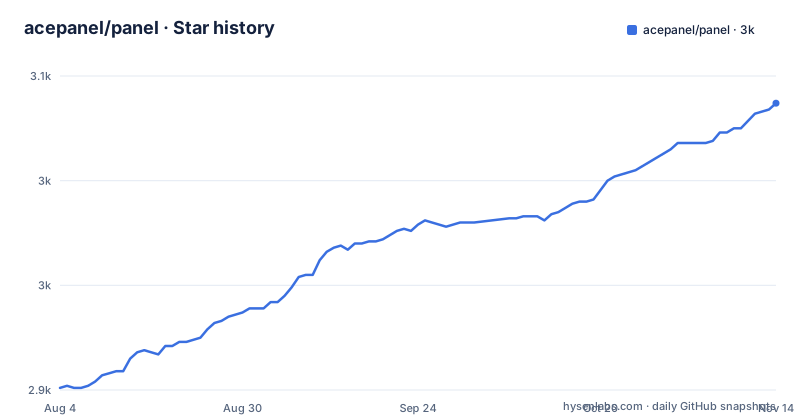
- acepanel/panel3,037 ★ · +136
| Repository | 2026-08-04 | 2026-11-14 |
|---|---|---|
| acepanel/panel | 2.9k | 3k |
136 Stars in the last 102 days, measured from the daily GitHub snapshot. Compare with other projects
Editorial analysis
What AcePanel Sits On and What It Promises
AcePanel describes itself as a next-generation, all-purpose server operations and maintenance panel. The README positions it for small website deployments and complex custom applications alike. The project is written in Go, ships as a single file, and is released under the BSD-3-Clause license. The homepage is acepanel.net, and the default branch is main. The most recent release at the time of writing is v3.3.4, dated 2026-08-28. The project is not archived, and the last push matches that release date. The README claims eight advantages: low resource usage, minimal system modification, modern system compatibility, efficient operations, offline operation, security and stability, full open source, and permanent free use. The last point is a promise that no paid or licensed features will be added to the panel core. That promise is notable because many panels in this space have moved to freemium models. However, the README does not specify which systems are supported beyond amd64 and arm64 architectures under 'clean mainstream systems.' The README links to install documentation for the exact OS list.
The Single-Binary Design and Its Operational Consequence
The most concrete architectural claim in the README is that AcePanel runs as a single file. That design choice has direct operational consequences. A single binary is easier to deploy, update, and remove than a multi-service stack. The README states that the panel can be stopped after deployment without affecting existing services. That means the panel does not need to run continuously to keep your sites alive. This is a deliberate contrast with panels that embed a web server or a process supervisor as a persistent dependency. In practice, you would use AcePanel to configure services, then stop the panel process, leaving only the services it configured running. The README does not explain how the panel manages services when it is not running, nor does it clarify whether scheduled tasks or monitoring features work in that stopped state. That gap matters. If you rely on the panel for cron jobs or health checks, stopping it might disable those features. The README does not answer that question.
Installation: One Curl Pipe, but Read the Script First
The README provides a single install command: bash <(curl -sSLm 10 https://dl.acepanel.net/helper.sh). This is a standard curl-pipe-to-bash pattern. The -m 10 flag sets a maximum transfer time of 10 seconds for the curl request, which is a small safeguard against a stalled download. The command assumes you are running a clean, mainstream system on amd64 or arm64. The README points to an install document for the full list of supported systems. Because the install is a remote script, you should inspect the script's contents before executing it. The README emphasizes low system modification, but it does not list what the script changes. A cautious operator will download the script and read it first. The command is short, but the trust boundary is the script's origin, dl.acepanel.net, and the script's content is not shown.
Offline Mode and the Stop-the-Panel Workflow
One of AcePanel's distinguishing features is offline mode. The README says the panel supports offline operation, and it goes further: you can stop the panel process after deployment and it will not affect existing services. This is a strong claim. In many panels, the agent or daemon must run to enforce firewall rules, renew certificates, or collect metrics. AcePanel's design appears to decouple the panel from the runtime state of the services it manages. That is a genuine advantage for users who want a configuration tool, not a resident watchdog. The README does not specify how updates are handled in offline mode, nor whether the panel can reapply configuration changes without being restarted. If you need to change a site's settings after stopping the panel, you would presumably restart it, make the change, and stop it again. That workflow is not documented in the README. The offline mode is a selling point, but its boundaries are fuzzy.
Migration Path from 耗子面板 2.x: A Real Bridge
The README includes a note about migrating from 耗子面板 2.x to AcePanel 3.0, with a link to a forum thread at tom.moe. This is a concrete sign that AcePanel is a successor to an earlier project, and the migration path is explicitly addressed. The note is short, but it names the source project and the target version. For existing 耗子面板 users, this migration guide is the first thing to read. The README does not describe what the migration covers, such as site configs, databases, or SSL certificates. The existence of a migration guide suggests that AcePanel is not a ground-up rewrite with incompatible data formats, but the README does not confirm that. If you are not a 耗子面板 user, this note is irrelevant. If you are, the migration path is a reason to consider AcePanel over a different panel that would require manual reconfiguration.
What the README Does Not Tell You: Support and Community
The README lists a QQ group and a WeChat group as community channels. There is no mention of a forum, a Discord server, or an English-language support channel. The README is primarily in Chinese, with a link to an English version. This is a limitation for non-Chinese-speaking users. If you hit a problem, your support options are a QQ group or a WeChat group, both of which are China-centric platforms. The project has a homepage and a GitHub repository, but the README does not mention issue response times or any formal support process. The project is fully open source, so you can read the code and file issues on GitHub, but the community is likely to be small and Chinese-speaking. This is not a judgment on quality, but a practical consideration for adoption.
Licensing and the 'Permanent Free' Promise
AcePanel is licensed under BSD-3-Clause. That is a permissive license that allows modification, redistribution, and commercial use, provided the copyright notice is preserved. The README adds a separate promise: the panel core will never introduce paid or licensed features. This is a product commitment, not a legal one. The license does not prevent the authors from changing their minds, but the promise is explicit in the README. For an enterprise, BSD-3-Clause means you can fork the project and embed it in a proprietary product without releasing your changes. That is a meaningful difference from GPL-licensed panels, which would require you to open-source modifications. The README also states that the panel is fully open source, which is true in the sense that the code is public. There is no mention of a CLA, so contributions may carry their own copyright. The 'permanent free' promise is a strong signal for budget-conscious teams, but it is not enforceable.
Alternatives and the Core Trade-Off
The most direct alternative to AcePanel is 宝塔面板 (BT Panel), which is widely used in the same market. BT Panel offers a richer feature set, including a plugin store, a web-based file manager, and a larger community. The key difference is architectural: BT Panel typically runs a persistent daemon and a web interface, and its free tier has pushed some features into paid add-ons. AcePanel's single-binary, stop-after-deploy model is the opposite approach. Another alternative is an infrastructure-as-code tool like Ansible, which is not a panel at all. Ansible does not provide a web UI or a point-and-click interface, but it gives you declarative configuration and no resident daemon. AcePanel sits between these two: it offers a panel's convenience without the always-on footprint. The trade-off is that AcePanel's feature set is likely smaller than BT Panel's, and its community is less established. The README does not list specific features beyond general claims of completeness, so you would need to inspect the UI screenshots or the documentation to see what is actually included.
Editorial conclusion
Adopt AcePanel if you run clean amd64 or arm64 systems, want a single-binary panel you can stop after deployment, and prefer BSD-3-Clause licensing for unrestricted modification. Skip it if you need a panel with an active English community, extensive plugin ecosystem, or if you cannot tolerate the risk of a project whose release cadence (three versions in two weeks) suggests rapid change. Before adopting, verify that the supported OS list matches your environment, test the migration path from 耗子面板 2.x if you are an existing user, and confirm that the offline mode covers all features you plan to use, since the README does not enumerate what breaks without network access. The panel's low-modification promise is its main differentiator, but that claim is not backed by a published list of what it changes, so audit the install script before running it on a production host.
Frequently asked questions
What is AcePanel?
A server operation and maintenance management panel written in Go, distributed as a single file binary for amd64 and arm64 on mainstream systems. Its dependency set covers container management, DNS across ten providers, certificate issuance, systemd services, scheduled jobs and a browser terminal, and it claims an offline mode in which the panel process can be stopped without affecting running services.
How do I install AcePanel?
The documented method is one shell line that downloads a helper script from a download host and executes it, with a ten second timeout on the download. The project also publishes binaries on its releases page, and an installation document on a pages domain under the account covers which systems are supported.
Which database engines does AcePanel support?
Three, from the drivers in its module manifest: MySQL, PostgreSQL and SQLite. The manifest also includes a migration library for the schema layer, and the panel keeps its own state separately from whatever it manages.
What licence is AcePanel released under?
A three clause BSD licence, which the repository carries as a file and which the badge row links to. The project also states that it is fully open source and commits that the panel itself will never introduce paid or licensed functionality.
Official sources
Add this badge to your README
If you maintain this project, the badge below links readers to this analysis and shows its maintenance status from the daily GitHub snapshot. Paste the markdown into your README; add ?metric=license or ?metric=stars to the image URL for a different field.

[](https://hysenlabs.com/projects/acepanel-panel)Star history chart for your README
[](https://hysenlabs.com/projects/acepanel-panel)Was this useful?