Dependency review on pull requests: what dependency-review-action actually diffs
A GitHub Action for detecting vulnerable dependencies and invalid licenses in your PRs
At a glance
- What is it?
- dependency-review-action is a TypeScript GitHub Action that fails a pull request when it introduces a vulnerable dependency or a dependency with a licence outside your allow list. It works from a dependency diff between two revisions on the default branch, and it is available to public repositories and to private repositories covered by GitHub Advanced Security.
- Who is it for?
- dependency-review-action fits teams already on GitHub Advanced Security that want a licence and severity gate on every pull request, and it is the wrong tool for repositories without that licence, for audits of pre-existing dependencies, or for detecting a vulnerable package that was already present before the branch was cut.
- Can I use it commercially?
- Yes. MIT is a permissive licence: you can use, modify and sell software built on it, as long as you keep its copyright and licence notices.
- Is it still maintained?
- Yes. The repository last received commits 7 days ago.
- What is it written in?
- Mainly TypeScript, according to GitHub's language statistics.
Answers come from the project's GitHub data, last synced on November 7, 2026, and from our analysis. They are not legal advice.
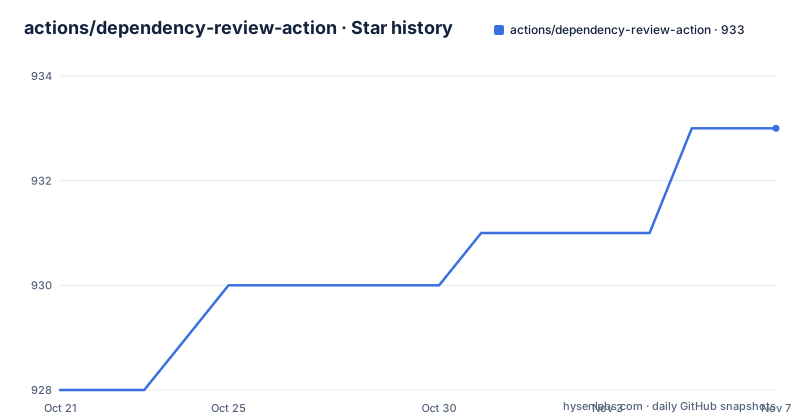
Star history
- actions/dependency-review-action933 ★ · +5
| Repository | 2026-10-21 | 2026-11-07 |
|---|---|---|
| actions/dependency-review-action | 928 | 933 |
5 Stars in the last 17 days, measured from the daily GitHub snapshot. Compare with other projects
Editorial analysis
The unit of analysis is the diff, not the whole dependency tree
The action is a GitHub Action written in TypeScript, and the README gives it one job: it scans pull requests for dependency changes and raises an error if vulnerabilities or invalid licences are being introduced. What makes it cheap to run is the comparison it uses. The README states that the action is supported by an API endpoint that diffs the dependencies between any two revisions on the default branch. In other words, the action judges the delta, the packages a branch adds or moves, not every package the repository already carries.
That choice has two consequences. A repository with a large existing dependency set does not get flooded with findings on every pull request, because unchanged packages are outside the diff. And the judgement is relative to the default branch, so a pull request opened against a branch that has fallen behind gets compared with a base that no longer represents what will actually merge. The base branch choice is therefore an input to correctness, not just to the review UI.
The dependency list in package.json shows the shape of the implementation. There are GitHub API packages such as @actions/core and @actions/github, an octokit stack with @octokit/plugin-retry for retrying failed requests, and a group of licence handling libraries: @onebeyond/spdx-license-satisfies, spdx-expression-parse and spdx-satisfies. Licence comparison is treated as a first class part of the product rather than a string match on package metadata.
Adding the workflow file under .github/workflows
Installation is a single YAML file in the workflow folder. The README gives this as the standard installation for any public repository, or any organisation owned private repository whose organisation has a GitHub Advanced Security licence. The workflow triggers on pull requests, asks for read only contents permission, checks out the repository, and then runs the action itself:
name: 'Dependency Review'
on: [pull_request]

permissions:
  contents: read

jobs:
  dependency-review:
    runs-on: ubuntu-latest
    steps:
      - name: 'Checkout Repository'
        uses: actions/checkout@v6
      - name: 'Dependency Review'
        uses: actions/dependency-review-action@v5
The checkout step is not decorative. The action diffs dependency changes between revisions, and the repository state has to be present for that comparison to mean anything. Pinning the action to the major version tag is what the README shows, and there is a `dist/` directory and an `action.yml` at the root of the repository, which is the layout a JavaScript action uses when it ships a bundled entry point rather than a Docker image.
One upgrade cost is called out plainly in the README. Version 5.0.0 updates the runtime to node24, and that requires a minimum Actions Runner version of v2.327.1. On a managed runner this is invisible, but on an enterprise installation with your own runner images it becomes the thing to check first, because the job fails at startup rather than at the review step.
The GitHub Enterprise Server path replaces the runner label
Installation on GitHub Enterprise Server takes a different workflow file, and the difference is a single value. The README lists three prerequisites for this path: GitHub Advanced Security enabled for the enterprise, GitHub Connect enabled so the enterprise can reach actions hosted on github.com, and the dependency-review-action installed on the server itself. The workflow then runs on a self hosted runner rather than a GitHub provided one:
name: 'Dependency Review'
on: [pull_request]

permissions:
  contents: read

jobs:
  dependency-review:
    runs-on: self-hosted
    steps:
      - name: 'Checkout Repository'
        uses: actions/checkout@v6
      - name: 'Dependency Review'
        uses: actions/dependency-review-action@v5
The `self-hosted` value is a placeholder rather than a fixed label. The README instructs you to replace the `runs-on` value with the label of any of your runners, so a fleet with several runner classes needs a matching label or the job will sit queued. Note also that the GitHub Connect requirement means this installation still depends on GitHub hosted infrastructure being reachable from the enterprise, which matters for organisations that restrict outbound network access.
The Advanced Security requirement is worth stating separately because it is the most common reason installation fails outright. Public repositories can use the action without a paid licence. Private repositories on GitHub cloud need an organisation with a GitHub Advanced Security licence, and the README says the action is available for private repositories with that licence.
Severity thresholds and SPDX allow lists decide what counts as a failure
Every configuration option is optional, so a minimal installation already works, but two options carry most of the behaviour. The `fail-on-severity` option sets the severity threshold. Its accepted values are `low`, `moderate`, `high` and `critical`, and the default is `low`, which means an unconfigured action fails the job on any vulnerability the diff introduces. Raising the threshold is how a team trades noise for strictness without editing code.
The `allow-licenses` option takes a list of allowed licences, and the action fails pull requests that introduce dependencies whose licences do not match the list. The possible values are SPDX compliant identifiers, which is consistent with the licence libraries in the dependency list, including the expression parser, since a dependency's licence field can hold an expression rather than a single identifier. The README has a dedicated subsection on `OTHER` in licence strings, which is the marker that appears when a package's declared licence cannot be resolved to a known SPDX identifier. Treating that marker explicitly matters, because an unresolved licence is exactly the case a licence policy exists to catch, and a default allow list that excludes it will fail every pull request that adds such a package.
The README describes two configuration methods: inline configuration in the workflow, and an external configuration file kept outside the workflow. The external file is the one worth reaching for in a larger organisation, since inline options in many workflow files drift apart over time.
Results land in two places, and only in those two places
The README documents exactly two places to look after a run. The first is the job logs page: open the Actions tab, select the workflow run, then under Jobs click dependency review. The second is the job summary page: open the Actions tab, select the workflow run, click Summary and scroll to the dependency-review summary.
This is a narrow surface, and it is worth planning around. There is no separate dashboard and no separate report artifact to archive, so a compliance process that needs a durable record has to capture the workflow run itself. The job summary view is the more readable of the two for a reviewer, since it groups the findings, while the logs view is where you go when you need to understand why one specific package was flagged.
The results are also the only channel for the outcome. A pull request that fails here fails on the workflow, and the README documents the option of using the action to block a pull request from being merged as a separate topic. Combined with the trigger in the standard workflow file, which is `pull_request`, the practical scope is the pull request path. A direct push to the default branch does not pass through this workflow, so the gate covers proposed changes and not the branch itself.
What the action will not tell you about
Several gaps follow from the diff model and from the licensing of the underlying platform. Because the comparison is between two revisions on the default branch, a vulnerability that was already present in the base branch is not introduced by the pull request and therefore not reported. The action answers the question of what a change brings in, not what is already there. If you want the state of the existing tree, that is a different tool and a different job.
Second, the results live only in the run, and the run lives on GitHub. There is no documented export or report format for piping findings into a scanner or a dashboard, so if you need findings in another system you would have to parse the run yourself, and the README does not document such a workflow.
Third, the licensing gate applies to dependencies being introduced, and the SPDX identifiers must be known to the comparison libraries. A package whose licence metadata is absent or malformed falls back to the `OTHER` case, which is a real edge in real repositories.
Finally, the entry point in the repository metadata is inconsistent with the project location. The package.json repository field points at git+https://github.com/github/dependency-review-action.git while the project lives under the actions organisation. Minor, but it means a dependency on the published bundle is being pulled from a path whose naming history predates the current location.
A TypeScript codebase with its own build, lint and packaging steps
The repository is a normal TypeScript project with the scripts a maintainer would expect. The build step runs tsc against tsconfig.build.json, format and format-check run prettier over TypeScript files, lint runs eslint across src, package runs ncc build with a source map and a licenses file, and test runs jest. The `all` script chains build, format, lint, package and test in that order, which is the sequence to run before opening a pull request. The repository also carries a .devcontainer folder, a .eslintrc.json, a .prettierrc.json, a CODEOWNERS file, a SECURITY.md and a jest.config.js, plus src, types, __tests__ and docs directories.
The `package` script using ncc is the tell that this action ships bundled JavaScript. The dist folder at the repository root holds that bundle, which is what a JavaScript based action executes on the runner. The licence field on the repository says MIT, and the package.json agrees with an MIT licence entry, which matters for teams that vendor the action or read its source into their own supply chain review.
On maintenance, the last push was on 2026-10-16, and the recent release history shows v5.0.0 on 2026-05-08, v4.9.0 on 2026-03-03 and v4.8.3 on 2026-02-20. The step from 4.x to 5.0.0 is the visible upgrade, and it carries the node24 runtime and the runner version floor described earlier. The project is maintained by GitHub, so the action tracks platform changes to the dependency graph API and the Actions runtime rather than a separate release philosophy.
Editorial conclusion
dependency-review-action fits teams already on GitHub Advanced Security that want a licence and severity gate on every pull request, and it is the wrong tool for repositories without that licence, for audits of pre-existing dependencies, or for detecting a vulnerable package that was already present before the branch was cut. Before switching it on, verify three things: that your organisation holds GitHub Advanced Security if the repository is private, that your self-hosted runners on GitHub Enterprise Server are at v2.327.1 or later because v5.0.0 moved the runtime to node24, and that the pull request base branch is current, since the comparison runs against the default branch and a stale base produces a misleading diff.
Frequently asked questions
Can I use dependency-review-action on a private repository?
Yes, provided the owning organisation has a GitHub Advanced Security licence. The README lists public repositories and private repositories with that licence as the supported cases, and on GitHub Enterprise Server it also requires GitHub Connect and the action installed on the server.
How do I choose which vulnerability severity fails the pull request?
The `fail-on-severity` option sets the threshold and accepts `low`, `moderate`, `high` or `critical`. The default is `low`, and the action fails on pull requests that introduce vulnerabilities at the chosen level or above.
Where do I read the dependency review results after the action runs?
They appear on the job logs page under the dependency review job, and on the job summary page under the dependency-review summary. Both are reached from the Actions tab by selecting the workflow run.
Do I need my own runner to install dependency-review-action?
Only for a GitHub Enterprise Server installation, where the workflow uses `runs-on: self-hosted` and the README tells you to replace that value with the label of your own runner. Standard installations on GitHub use `runs-on: ubuntu-latest`.
Does dependency-review-action report vulnerabilities that are already in my codebase?
No. The API endpoint it uses diffs the dependencies between two revisions on the default branch, so it reports what a pull request introduces. Vulnerabilities present in the base branch are outside that diff.
Official sources
Add this badge to your README
If you maintain this project, the badge below links readers to this analysis and shows its maintenance status from the daily GitHub snapshot. Paste the markdown into your README; add ?metric=license or ?metric=stars to the image URL for a different field.

[](https://hysenlabs.com/projects/actions-dependency-review-action)Star history chart for your README
[](https://hysenlabs.com/projects/actions-dependency-review-action)Was this useful?