Claude Video: A /watch Command That Gives Claude Eyes and Ears for Any Video
Give Claude the ability to watch any video. /watch downloads, extracts frames, transcribes, hands it all to Claude.
At a glance
- What is it?
- This Python plugin for Claude Code and other agent hosts turns any video URL or local file into frames and a timestamped transcript, so Claude can answer questions about what it actually saw and heard. The trade-off is a frame budget that you must manage, and a transcription fallback, optional local WhisperX or Groq/OpenAI, for videos without captions.
- Who is it for?
- Adopt claude-video if you already work inside Claude Code or another Agent Skills host and regularly need to analyze videos that have captions, such as YouTube talks, screen recordings with audio, or competitor content. Skip it if your videos are long, captionless, and token-sensitive, because they then depend on local WhisperX or Groq/OpenAI transcription and the default 100-frame cap may miss the moment you care about.
- Can I use it commercially?
- Yes. MIT is a permissive licence: you can use, modify and sell software built on it, as long as you keep its copyright and licence notices.
- Is it still maintained?
- Yes. The repository last received commits 50 days ago.
- What is it written in?
- Mainly Python, according to GitHub's language statistics.
Answers come from the project's GitHub data, last synced on November 13, 2026, and from our analysis. They are not legal advice.
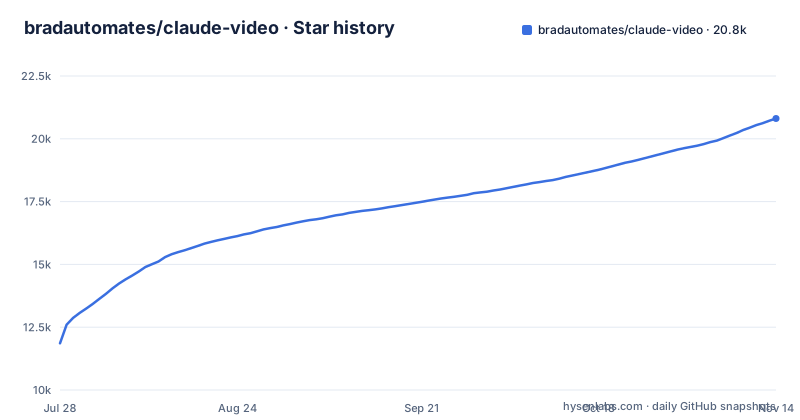
Star history
- bradautomates/claude-video20,719 ★ · +8,860
| Repository | 2026-07-28 | 2026-11-13 |
|---|---|---|
| bradautomates/claude-video | 11.9k | 20.7k |
8,860 Stars in the last 108 days, measured from the daily GitHub snapshot. Compare with other projects
Editorial analysis
The gap this plugin fills
Claude can read webpages, run scripts, and browse repositories, but it cannot watch a video. Paste a YouTube link and it guesses from the title or pulls a transcript that misses most of what is on screen. This plugin, claude-video, gives Claude both visual and auditory access. It downloads a video, extracts frames, pulls a timestamped transcript, and hands both to Claude as readable context. The intended users are people who already work with Claude Code, Codex, Cursor, Copilot, or another Agent Skills host. The use cases in the README are concrete: analyzing a competitor's ad hook, diagnosing a bug from a screen recording, summarizing a long talk, and converting a playlist into searchable notes. The plugin does not replace a video player. It replaces the guesswork that happens when you ask an AI about a video it cannot see.
How /watch actually works
The README's fastest path hands the whole video, picture and sound, to Google's agentic video model with a free Google AI Studio key and relays its timestamped answer; without a key, or for a private video, the local engine (forced with --engine local) works on your machine as follows. You paste a URL or a local path and ask a question. The plugin uses yt-dlp to check for captions first. At transcript detail, if captions exist, it returns without downloading the video. If not, it downloads only what the run needs. ffmpeg then extracts frames at a chosen detail level. The efficient mode decodes keyframes only, which is near-instant. The balanced and token-burner modes prefer scene-change frames and fall back to a uniform sampler when scene detection under-produces. JPEGs are 512 pixels wide by default and clamped to 1998 pixels tall for Claude Read compatibility. The transcript comes from native captions when available, or from optional local WhisperX or Groq/OpenAI transcription. The script extracts a mono 16 kHz 64 kbps mp3 audio clip, roughly 480 kB per minute, and sends it to Groq's whisper-large-v3 or OpenAI's whisper-1. Finally, it prints frame paths with time markers and the transcript with timestamps, and Claude reads each frame in parallel. The working directory is printed at the end, and Claude removes it if no follow-ups are pending.
Installation and first run
The README gives a separate install path for each host. For Claude Code, the recommended route is a marketplace command: /plugin marketplace add bradautomates/claude-video, then /plugin install watch@claude-video. This auto-updates via the marketplace. Codex users paste a $skill-installer request into Codex's message box, and for Cursor, Copilot, or another Agent Skills host you run npx skills add bradautomates/claude-video -g --skill watch. Watch does not work in Claude Chat or Cowork, and browser apps have limits. Zero configuration is claimed for starting: yt-dlp and ffmpeg install on first run via brew on macOS, and Linux or Windows print the exact commands. Captions cover most public videos for free. Transcription through local WhisperX or Groq/OpenAI is only needed when a video has no captions. A typical invocation looks like /watch https://youtu.be/dQw4w9WgXcQ what happens at the 30 second mark? The plugin also accepts local paths for files like .mp4, .mov, .mkv, and .webm.
The frame budget is the real constraint
Token cost is dominated by frames, and the README is explicit about it. The script's auto-fps logic exists to prevent blowing your context budget on a sparse scan of a 30-minute video. The table shows a default frame budget that scales with duration: 30 frames for videos under 30 seconds, 40 frames up to one minute, 60 frames up to three minutes, 80 frames up to ten minutes, and 100 frames for anything longer, with a sparse scan warning. For longer videos, the README advises re-running focused or using --detail token-burner for full uncapped coverage. When a user names a moment, such as around 2:30 or the last 30 seconds, you pass --start and --end. Focused mode gets denser per-second budgets, capped at 2 fps. This is a genuine trade-off. A 100-frame cap on a two-hour lecture will miss most of the content, and the plugin's answer will be only as good as the frames it kept. The budget is a guardrail, not a feature, and you must actively manage it for long videos.
Deduplication keeps the budget honest
Frame selection can still surface near-identical frames. A screen recording that holds one slide for 90 seconds produces a dozen frames, each billed as a separate image. The plugin runs a dedup pass by default on every frame mode, and --no-dedup turns it off. The mechanism is clever and dependency-light. One ffmpeg call scales each extracted JPEG to a 16x16 grayscale thumbnail. Everything after that is pure-stdlib Python, no image libraries. For each frame, it computes the mean absolute difference against the last frame that was kept, on a 0 to 255 scale. If the difference is at or below 2.0, the frame is dropped. Otherwise it is kept and becomes the new reference. Comparing against the last kept frame, not the previous frame, catches slow fades that never trip a frame-to-frame threshold. The threshold is deliberately low and measures absolute brightness rather than structure, so a one-line code diff or a scrolling terminal survives. The Frames line reports what was collapsed, for example 6 selected from 14 candidates with 8 near-duplicates dropped. On always-moving footage, nothing is dropped and you pay what you would have anyway.
Limitations and failure modes
The most obvious limitation is the dependency on captions. The README says captions cover most public videos for free, but that is not universal. Many YouTube videos have no captions, and auto-generated captions can be inaccurate for heavy accents or technical jargon. When captions are missing, the plugin falls back to optional local WhisperX or Groq/OpenAI transcription. Another failure mode is the frame budget itself. For videos longer than ten minutes, the default 100-frame cap is a sparse scan. If you ask a question about a specific detail in the middle of a 45-minute video, the plugin may not have captured that frame, and the answer will be incomplete. The README acknowledges this by suggesting focused --start and --end ranges. A third limitation is that the plugin is only as good as the tooling it wraps. yt-dlp does not cover every video platform, and some sites may block downloads. Finally, the plugin prints a working directory at the end, and cleanup relies on Claude deciding to remove it. If you do not ask follow-ups, it removes it, but if the process is interrupted, you may be left with temporary files.
Alternatives and the difference in approach
The obvious alternative is to do the work manually: download a video with yt-dlp, extract frames with ffmpeg, transcribe with a local Whisper model, and paste the results into Claude yourself. That approach gives you full control over frame rates, resolution, and transcription quality, but it is a multi-step process that requires scripting or repeated manual steps. This plugin automates that pipeline inside a single slash command. The difference is in the integration. Instead of running three separate tools and assembling the output, you get one command that handles caption detection, download, frame extraction, deduplication, and transcription, and then hands the result to Claude in a format it can read directly. Another alternative is to rely on Claude's built-in ability to read a transcript if you paste one manually, but that loses the visual information entirely. The plugin's scene-aware frame extraction is a differentiator, because it tries to capture what changes on screen rather than a uniform sample.
Maintenance and license considerations
The repository is under the MIT license, which allows free use, modification, and redistribution with attribution. There is no homepage and no indication of a large maintenance team, but the release history shows active development: v0.3.0, v0.3.1 and v0.3.2, all in September 2026. The README mentions that the Claude Code marketplace install auto-updates, which reduces the maintenance burden for users on that path. The plugin depends on yt-dlp and ffmpeg, both of which are actively maintained upstream, but their behavior can change. If yt-dlp breaks for a particular site, the plugin will inherit that break. The Groq and OpenAI transcription options depend on external APIs whose pricing and models can change. The deduplication logic is pure-stdlib Python, which is stable, but the frame extraction relies on ffmpeg's scene detection, which is not perfect and may under-produce on certain content, triggering the uniform sampler fallback. Before adopting it, check whether the plugin's version is compatible with your Claude Code version, and test it on a short video with known captions to confirm the output format works in your environment.
Editorial conclusion
Adopt claude-video if you already work inside Claude Code or another Agent Skills host and regularly need to analyze videos that have captions, such as YouTube talks, screen recordings with audio, or competitor content. Skip it if your videos are long, captionless, and token-sensitive, because they then depend on local WhisperX or Groq/OpenAI transcription and the default 100-frame cap may miss the moment you care about. Before relying on it, verify that your target videos actually have captions, test the frame budget on a short clip, and confirm that your Claude subscription or API plan can handle the image token load for the detail mode you choose.
Frequently asked questions
Can Claude view a video?
Not by itself, and the route depends on the engine. With the local engine, /watch extracts timestamped frames and a transcript with ffmpeg and yt-dlp and hands those to the agent. With the Gemini engine, the whole video is handed to Google's agentic video model and the timestamped answer is relayed back.
how to use claude video
Install the skill for the host you use, then start a Code session and type /watch, selecting /watch:watch from autocomplete. The skill needs a Code session: it does not work in Claude Chat or Cowork, and browser apps have limits.
Is the Claude video free?
The project is MIT licensed and the fastest path uses a free Google AI Studio key. The optional transcription paths can use WhisperX locally, or Groq and OpenAI, which are paid services, and the local engine needs ffmpeg and yt-dlp on your machine.
Can Claude generate video?
Not through this project. The work goes the other direction, giving an agent video evidence by turning a URL or a local file into timestamped frames and a transcript. Nothing in the described workflow writes, edits or renders video.
Official sources
Add this badge to your README
If you maintain this project, the badge below links readers to this analysis and shows its maintenance status from the daily GitHub snapshot. Paste the markdown into your README; add ?metric=license or ?metric=stars to the image URL for a different field.

[](https://hysenlabs.com/projects/bradautomates-claude-video)Star history chart for your README
[](https://hysenlabs.com/projects/bradautomates-claude-video)Was this useful?