ComfyUI VNCCS Utils: 3D Factory, UniCanvas and Pose Studio as ComfyUI Nodes
A collection of utility nodes from the VNCCS project that are useful not only for the project's primary goals but also for everyday ComfyUI workflows.
At a glance
- What is it?
- AHEKOT/ComfyUI_VNCCS_Utils collects the utility nodes of the VNCCS project into one ComfyUI package: a Gaussian 3D scene workspace, an infinite canvas editor, pose and prompt tooling. It is aimed at ComfyUI users who want these workspaces as installable nodes rather than a separate tool.
- Who is it for?
- This package is a reasonable choice for ComfyUI users who want an infinite canvas, pose-driven generation and a persistent Gaussian 3D scene inside the same graph, and a poor choice for a minimal install, since the dependency list pulls in torch, torchvision, transformers, pytorch-lightning and an extra color-matcher package, or for a release-driven upgrade policy, because the repository publishes no GitHub releases and tracks version 0.7.0 in pyproject.toml alone.
- Can I use it commercially?
- Yes. MIT is a permissive licence: you can use, modify and sell software built on it, as long as you keep its copyright and licence notices.
- Is it still maintained?
- Yes. The repository last received commits 1 day ago.
- What is it written in?
- Mainly JavaScript, according to GitHub's language statistics.
Answers come from the project's GitHub data, last synced on November 7, 2026, and from our analysis. They are not legal advice.
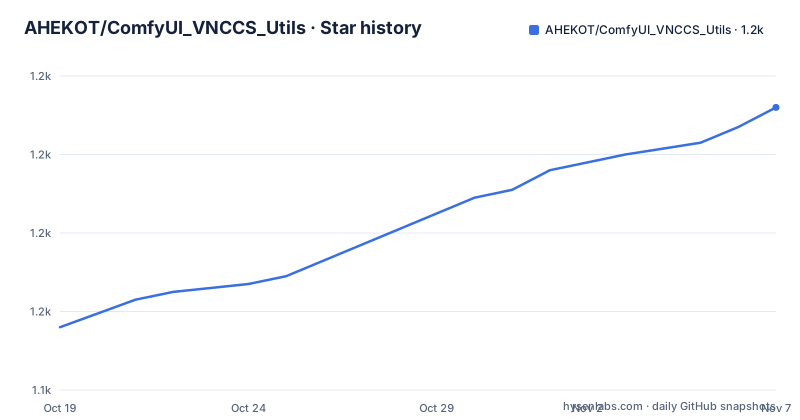
Star history
- AHEKOT/ComfyUI_VNCCS_Utils1,212 ★ · +56
| Repository | 2026-10-19 | 2026-11-07 |
|---|---|---|
| AHEKOT/ComfyUI_VNCCS_Utils | 1.2k | 1.2k |
56 Stars in the last 19 days, measured from the daily GitHub snapshot. Compare with other projects
Editorial analysis
One Package for Three Very Different Creative Workspaces
ComfyUI_VNCCS_Utils is described as a collection of utility nodes from the VNCCS project that are useful for everyday ComfyUI workflows. The collection is not one tool with one job. It packages VNCCS 3D Factory, a scene-oriented image-to-3D Gaussian workspace; VNCCS UniCanvas, an infinite-canvas image generation and editing surface; VNCCS Pose Studio; VNCCS Prompt Designer; and supporting generation utilities.
The audience is a ComfyUI user who already thinks in graphs. Every piece here is exposed as a node with a stable identifier, so these workspaces can be dropped into a workflow rather than run as a separate application with its own interface. The project also carries a Comfy Registry publisher identity, which means the collection is meant to be found and installed through the node registry rather than by copying files.
The 3D Factory is the most unusual of the three. It runs the open-source VAST-AI-Research/TripoSplat pipeline locally, turns reference images into editable 3D Gaussian models, keeps every generated object in a persistent scene, and renders the actual Gaussian assets through a bundled SparkJS viewport. That is a scene graph with a live preview, not a one-shot image-to-3D button.
The Package Layout Separates Nodes, API, Web and Tests
The repository tree shows how the work is separated. At the top level sit __init__.py, pyproject.toml and requirements.txt, alongside directories for nodes/, api/, web/, config/, data/, workflows/, docs/, scripts/, tests/, PromptLibrary/ and a vnccs_sam3d/ package. The web/ directory is where the browser-side interface for the canvas and viewport lives, and the primary language listed for the repository is JavaScript, which fits a node set that ships its own editing surface.
The docs/ directory carries the per-feature guides that the README points to, including docs/VNCCS_3D_FACTORY.md, docs/UNICANVAS_KREA2_EDIT.md, docs/UNICANVAS_POSE_LAYERS.md and docs/UNICANVAS_PANORAMA.md. A workflows/ directory and a PromptLibrary/ directory suggest that ready-made graphs and prompt collections are part of the deliverable rather than something you assemble from nothing.
The vnccs_sam3d/ package name and the tests/ directory indicate that object selection, which the README calls SAM-powered, is implemented in project code and covered by tests. A CHANGELOG.md, AGENTS.md and CLAUDE.md sit in the root, and there is a .comfyignore alongside .zcodeignore, which are packaging controls for the Comfy Registry build.
3D Factory Keeps a Scene, Not a Pile of Standalone Models
The design decision that separates 3D Factory from a typical image-to-3D node is persistence. A Scene Manager creates and reopens scenes, and generated objects, names, transforms, generation settings and exports persist on the ComfyUI host. Objects can be imported as existing validated Gaussian PLY files, and they appear immediately in the object list and the live viewport.
The viewport is described as a True Gaussian Viewport, meaning multiple Gaussian PLY objects render together with orbit, pan, detail zoom, adaptive camera clipping and selection, and the README is explicit that there is no synthetic floor mesh. Interactive transforms let you click an object in the viewport and move, rotate or uniformly scale it with visible gizmos, with exact numeric fields kept in a collapsed precision panel for when the gizmo is not precise enough.
Export is where the Gaussian representation is respected rather than approximated. The documentation states that export bakes transforms into the actual Gaussian centers and covariance, preserves opacity and spherical-harmonic color data, and embeds the current camera plus every saved scene camera. Individual objects can be exported separately, or the visible scene can be combined into one editable Gaussian PLY. Saved Scene Cameras are limited to 32 named cameras, and clicking one inspects its exact view, with the current view followed by each saved camera delivered as an ordered ComfyUI IMAGE LIST at the shared Scene Export resolution.
Observable Jobs and a Library Format That Keeps Only Canonical Assets
Background removal, image encoding, diffusion steps, Gaussian decoding, serialization and scene insertion all expose real progress, printed to the ComfyUI console and retained in a downloadable per-job log. For a workflow that can sit in a queue for a long time, having progress that is observable rather than a silent spinner is a real difference in how the tool feels to use.
The Gaussian Library stores individual objects or complete scenes with automatic 3D previews. The packaging format is a .vnccs3d package that keeps only canonical PLY assets, and it can be saved and loaded locally. Public repository assets can be downloaded, but publishing repositories is currently disabled, which means the sharing path is one directional for now: you can pull assets in, but you cannot push your own scene to a hosted library through the interface.
Widget state is saved with the workflow, covering scene selection, generation controls, source reference, object transforms and selection, current and saved cameras, the grid, and the transform mode. Reference images are persisted on the ComfyUI host rather than kept as temporary browser file URLs, which is the difference between a workflow that reopens with its inputs intact and one that opens with broken images.
UniCanvas Works on Layers Without a Fixed Image Boundary
UniCanvas is an integrated infinite-canvas generation and editing workspace. The premise is that a composition is not limited to a single image frame, so generations can be placed wherever the layout needs them. Editing happens on layers: separate raster and mask layers with visibility, opacity, selection, movement and compositing controls.
Generation is region scoped. A selected region becomes the target for new images, image edits, inpaint, outpaint and full-area transformations, which is what lets the canvas be both a sketchpad and an edit surface. The Crop-and-Stitch Inpaint feature generates the selected masked area at full resolution and pastes it back only inside the mask, which avoids the usual loss of detail when a masked region is regenerated inside a downscaled whole-image pass.
Canvas tools are split by what they act on. The Brush paints color on the active raster layer, or white mask pixels on the active mask layer, and the cursor previews the layer being painted. The Shape tool offers Square, Circle and Triangle, chosen in Shape Settings, then dragged on the active raster or mask layer. Beyond that there is Free Transform for resize, rotate, skew, distort, perspective, warp, tilt in 3D and flip, all without rasterizing the workflow first, plus move, resize, rotate, snap and undo/redo.
Two features extend well past flat 2D. Panorama Editing imports an equirectangular panorama, lets you look around from its center, and paints, masks, transforms or generates within a square perspective view, with edits kept on the sphere and exports using the complete panorama. Pose Studio Layers insert an editable mannequin from the vertical toolbar, pose it in a dedicated edit session, and then generate characters that follow the pose, using the pose and the background composite as references.
Registering the Nodes and Preparing the Local Pipeline
There is no command line install documented for this project, so the route is the Comfy Registry listing, where the publisher id is vnccs and the display name is VNCCS - Collection of utility nodes. The node identifiers you will look for are declared in pyproject.toml under the [tool.comfy] table:
[tool.comfy]
PublisherId = "vnccs"
DisplayName = "VNCCS - Collection of utility nodes"
NodeIds = [
    "VNCCS_PositionControl",
    "VNCCS_VisualPositionControl",
    "VNCCS_BBox_Extractor",
    "VNCCS_PoseStudio",
    "VNCCS_UniCanvas",
    "VNCCS_3DFactory",
    "VNCCS_Config",
    "VNCCS_PromptDesigner"
]
The first real use depends on which workspace you want. For the 3D Factory, the documentation points at docs/VNCCS_3D_FACTORY.md for setup and workflow, and the pipeline itself is local: the official TripoSplat pipeline runs in process with the ComfyUI PyTorch device, and model setup and weight download are graphical steps rather than command line ones. The weights come through huggingface_hub, which is in the dependency list.
For UniCanvas, the starting point is adding the VNCCS_UniCanvas node, placing a generation, and then using the region tools on the result. The README names specific model paths: preset, custom checkpoint and GGUF file switching for supported generation backends, a Qwen Edit 2.1 path that calls ComfyUI nodes directly for generation and masked edits including the native LoRA loader, a Krea2 Identity Edit that uses grounded Qwen3-VL with a Likeness control in the upper right, and Turbo LoRA cards with a general LoRA Stack in the generation panel.
A Heavy Dependency List for a Utility Package
The dependency set is where the operational cost of this package shows up. Both pyproject.toml and requirements.txt list opencv-python, huggingface_hub, aiohttp, av, kornia, torch, torchvision, numpy, Pillow, transformers, safetensors, pytorch-lightning, omegaconf, pyyaml, yacs, timm, einops, roma and tqdm. requirements.txt adds color-matcher, and both files pin dynamicprompts at 0.31 or newer but below 1.
For a package whose selling point is convenience, that is a heavy install. torch and torchvision are unavoidable in a ComfyUI environment, but transformers, pytorch-lightning, timm, av and kornia are pulled in by the generation utilities rather than by a specific stated feature, and the dynamicprompts pin means a version conflict elsewhere in your ComfyUI environment is a real possibility.
The licensing is straightforward. The project is MIT licensed, and the pyproject classifiers record MIT alongside OS Independent and Python 3. The repository also carries a licenses/ directory, which typically collects third-party license texts for redistributed components.
Version handling is the other soft spot. The repository publishes no GitHub releases, and pyproject.toml records version 0.7.0. Git tags and releases are separate; record a specific commit for a reproducible source snapshot and track separately resolved dependencies. The repository is not archived and the last recorded push was on 2026-10-18.
Editorial conclusion
This package is a reasonable choice for ComfyUI users who want an infinite canvas, pose-driven generation and a persistent Gaussian 3D scene inside the same graph, and a poor choice for a minimal install, since the dependency list pulls in torch, torchvision, transformers, pytorch-lightning and an extra color-matcher package, or for a release-driven upgrade policy, because the repository publishes no GitHub releases and tracks version 0.7.0 in pyproject.toml alone. Before installing, check that your ComfyUI environment can satisfy the pinned dynamicprompts range, read docs/VNCCS_3D_FACTORY.md for the pipeline setup, and confirm that the local TripoSplat pipeline fits your GPU, because the last push was on 2026-10-18 and the project can change under you without a tagged release.
Frequently asked questions
What is ComfyUI VNCCS Utils used for?
It collects the utility nodes of the VNCCS project into a single ComfyUI package, covering a 3D Gaussian scene workspace called VNCCS 3D Factory, an infinite-canvas generation and editing workspace called VNCCS UniCanvas, plus VNCCS Pose Studio, VNCCS Prompt Designer and supporting generation utilities.
How do I install ComfyUI VNCCS Utils?
The project does not document a command line install; it is published to the Comfy Registry under the publisher id vnccs with the display name VNCCS - Collection of utility nodes. The repository also provides a requirements.txt and a pyproject.toml you can inspect before pulling dependencies into your ComfyUI environment.
Does VNCCS 3D Factory need a hosted API?
The documentation states the local TripoSplat pipeline runs in process with the ComfyUI PyTorch device, with model setup and weight download handled graphically. Weights are fetched through huggingface_hub, which is a listed dependency.
Can I share a Gaussian scene I built in 3D Factory with other people?
You can download public repository assets, but the documentation says publishing repositories is currently disabled. Scenes can be saved and loaded locally as .vnccs3d packages that keep only canonical PLY assets.
What can the UniCanvas brush and shape tools do?
The Brush paints color on the active raster layer, or white mask pixels on the active mask layer, with a cursor preview of the layer being painted. The Shape tool offers Square, Circle and Triangle selected in Shape Settings, then dragged on the active raster or mask layer.
Official sources
Add this badge to your README
If you maintain this project, the badge below links readers to this analysis and shows its maintenance status from the daily GitHub snapshot. Paste the markdown into your README; add ?metric=license or ?metric=stars to the image URL for a different field.

[](https://hysenlabs.com/projects/ahekot-comfyui-vnccs-utils)Star history chart for your README
[](https://hysenlabs.com/projects/ahekot-comfyui-vnccs-utils)Was this useful?