SpamBlocker screens calls and SMS without taking over either app
Android Call/SMS blocker.
At a glance
- What is it?
- SpamBlocker is an Android 10+ call and SMS blocker written in Kotlin that works as a caller ID app and, for text, as a notification taker rather than a replacement messaging client. The filter list is unusually wide, but the SMS screening path is effectively unused and the project distributes only as a prebuilt app.
- Who is it for?
- SpamBlocker fits an Android 10 or newer phone owner who is tired of unknown callers and one-time-passcode floods and who is willing to grant notification access and keep an APK up to date. It does not fit anyone who needs sent-message logging, an SMS app, iOS, or a build-from-source workflow: the repository ships no documented Gradle invocation for consumers, and the SMS screening service mode is supported by no SMS app the project knows of.
- Can I use it commercially?
- Yes. MIT is a permissive licence: you can use, modify and sell software built on it, as long as you keep its copyright and licence notices.
- Is it still maintained?
- Yes. The repository last received commits 3 days ago.
- What is it written in?
- Mainly Kotlin, according to GitHub's language statistics.
Answers come from the project's GitHub data, last synced on November 7, 2026, and from our analysis. They are not legal advice.
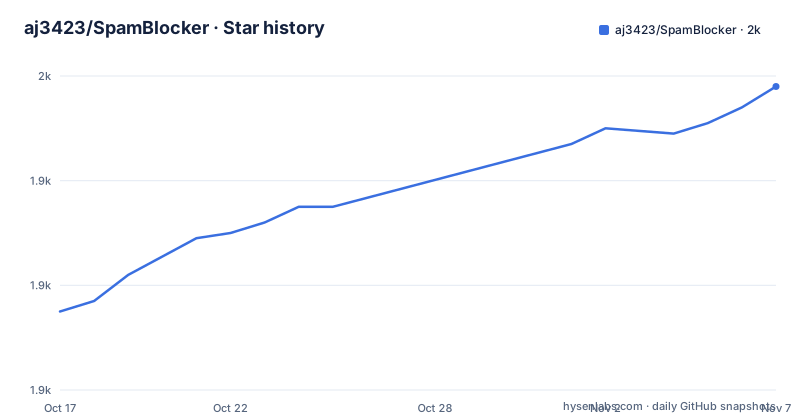
Star history
- aj3423/SpamBlocker1,958 ★ · +43
| Repository | 2026-10-17 | 2026-11-07 |
|---|---|---|
| aj3423/SpamBlocker | 1.9k | 2k |
43 Stars in the last 21 days, measured from the daily GitHub snapshot. Compare with other projects
Editorial analysis
The design choice that defines it: not being the dialer or the messaging app
Most call and SMS blockers on Android ask to become your default phone app, which means they take over the in-call UI, the contact list and the message thread view. SpamBlocker refuses that trade. The project states it works without replacing your call or SMS app, and that you can kill the app after setup because it does not need to stay running in the background. For calls it registers as a caller ID app. For text it takes over SMS notifications instead, which means you have to disable notifications in your real SMS app yourself or every message shows twice.
That division has a cost the project is upfront about. In the comparison table, SpamBlocker cannot send or receive SMS, it shows notifications, and its message log holds received messages only with no sent messages. The SMS app you keep does the actual sending and receiving, and its logs keep everything, including undeleted spam texts, which the project links to issue 647. So the value proposition is narrow on purpose: avoid interruptions, not become the messaging client. If you were already unhappy with your SMS app, this is not the fix.
Fifteen filters, and the ones that need setup work
The filter list is where this project spends its effort, and a few entries are unusual enough to be worth reading closely.
Contact Prefix does not match a contact, it matches the prefix of an existing one, so a clinic number saved as xxxx22 also admits xxxx11 through xxxx99. Emergency allows calls for a while after you dial an emergency number such as 911. Push Alert admits a call after another app posts a notification, on the theory that a driver announcing a pickup will phone seconds later. SMS Alert does the same for a message reading something like a notification that someone is calling you back. Recent Apps lets a call through when certain apps were used in the last stretch, which covers the refund call that follows online pizza ordering. Meeting Mode declines calls while you are in an online video meeting.
The rest are conventional but complete: Contacts, Contact Group, Repeated Calls for the same number in a short window, Dialed Number, Answered Number, Off Time as a window that always allows calls, SMS Bomb to stop continuous OTP floods, Schedule and Calendar to adjust rules around your own commitments, STIR/SHAKEN for callers that fail attestation, Spam Database for imported blocklists, and Local AI Training for your own spam SMS filter.
Against the Spam Database entry the project points at the FTC Do Not Call registry as an example of a downloadable dataset. Nothing in the README states where the import file goes or what format it takes.
Getting it: three download badges, no build instructions
There is no install command to copy. The README carries three download badges and no Gradle invocation for consumers, and the repository top level does include a standard Android layout: app/, build.gradle.kts, settings.gradle.kts, gradle.properties, local.properties and the gradlew and gradlew.bat wrappers. That is a working source tree for someone who already has an Android toolchain, but the project does not document how to configure local.properties, which SDK path to point at, or how to produce a signed release APK, so it would be guesswork to write out those steps here.
The documented path is a prebuilt package. The README links a F-Droid listing at the package identifier spam.blocker, a badge pointing at the Obtainium app for tracking releases from GitHub, and a badge pointing at the repository's own latest release page. The README also links to the Obtainium repository, but does not explain how that integration works.
One distribution note belongs in the README's own words: the project is asking for help with a 14-day closed testing track for its Google Play Store release, tracked in issue 664. That tells you the Play Store version is still in progress, so the badges above are the real distribution channels right now.
The SMS screening service mode has no client
Beyond notification takeover there is a second SMS design in the README, described as an SMS screening provider mode and compared to call screening. In it the SMS app asks SpamBlocker to check a message in real time and the app replies with block or allow. The README is blunt about the status: it only works with SMS apps that support this SMS screening protocol, and as of writing, this is not supported by any SMS app.
That is a real dead end worth naming before anyone builds a plan around it. The protocol wiki link is the only reference to the interface, and the feature cannot be exercised in the field today. Treat the notification takeover path as the only functioning SMS mechanism, and the trade-off that comes with it, silencing the stock SMS app's notifications by hand, as a permanent cost rather than a setup step.
Where it is the wrong tool
Three concrete boundaries stand out.
Platform scope is one: the project describes itself as an Android 10+ app. There is no iOS build and no desktop component, so a cross-platform household cannot standardize on it.
Function scope is another: the filter rows are almost all about incoming calls and incoming notifications. A business that needs call recording, caller identification for unknown numbers that are not spam, or a searchable full message history will find that this app stores received messages only and provides no send path.
Governance scope is the third. Every filter except Spam Database and Local AI Training lives on the device, with no account, no shared policy and no remote administration. That is a virtue for privacy and a limitation for a family or a small office that wants one rule set enforced everywhere. A team evaluating this should also weigh the manual work: disabling SMS app notifications is not automatic, and the project does not document a rollback path for a bad filter configuration beyond clearing the app's data.
What an alternative actually changes
The difference from a carrier-level or network-level blocking service is architectural, not a matter of feature count. SpamBlocker runs on the handset and can use signals a network cannot see: STIR/SHAKEN attestation carried by the call itself, whether a notification from a delivery app just arrived, whether you used the ordering app a minute ago, whether you are in a meeting, and a locally trained model of your own spam SMS. A database-only blocklist, by construction, can only match numbers someone else reported.
The difference from replacing the dialer is equally concrete. Because it stays a caller ID app, the stock phone app keeps the in-call screen, the keypad, and the contact integration, and the app needs no persistent background process after setup. A full replacement dialer can do richer call handling and add an ongoing foreground service, but takes over the thing you use most often on the phone.
Against a general spam filter app for SMS, the deciding factor is the STIR/SHAKEN row and the Local AI Training row. Neither is something a notification-scanning filter can offer, because neither signal reaches a filter that only reads message content.
Licence, releases and upgrade cost
The repository is MIT licensed, so the source can be read, modified and redistributed under that licence's notice requirements. No legal reading of that is offered here beyond noting the identifier.
On maintenance, the repository is not archived and the last push was on 2026-10-14, the same day as release v5.19. v5.18 followed on 2026-10-01 and v5.16 on 2026-09-12, so the cadence in that window is roughly one or two releases a month. That cadence is the upgrade cost to plan for: The README links distribution through Obtainium and F-Droid, but does not document how either service handles upgrades. The project is Kotlin on Gradle with a standard app module and a metadata/ directory for store listings, and the top level also carries an AGENTS.md that the README does not describe.
Editorial conclusion
SpamBlocker fits an Android 10 or newer phone owner who is tired of unknown callers and one-time-passcode floods and who is willing to grant notification access and keep an APK up to date. It does not fit anyone who needs sent-message logging, an SMS app, iOS, or a build-from-source workflow: the repository ships no documented Gradle invocation for consumers, and the SMS screening service mode is supported by no SMS app the project knows of. Before adopting, verify that your own SMS app can have its notifications silenced without losing the messages themselves, and check the release page for the current version, since v5.19 landed on 2026-10-14.
Frequently asked questions
Does SpamBlocker replace my default phone and SMS apps?
No. The project states it works without replacing your call or SMS app and does not need to stay running in the background after setup. It registers as a caller ID app for calls, and for SMS it takes over notifications, which means you must disable notifications in your SMS app to avoid duplicates.
What Android version does SpamBlocker need?
The project describes itself as an Android 10+ call and SMS blocker, written in Kotlin. No minimum build beyond that is stated, and no other platform build is offered.
How do I get SpamBlocker, and can I build it from source?
The README carries download badges for F-Droid at the package identifier spam.blocker, for the Obtainium app against GitHub releases, and for the latest GitHub release page. The repository contains a Gradle source tree with app/, build.gradle.kts, settings.gradle.kts and gradlew, but the README documents no build command, SDK configuration or signing steps.
Can SpamBlocker stop one-time-passcode SMS floods?
The SMS Bomb filter is listed as blocking continuous OTP message floods. The README does not say how the threshold is tuned or whether it can be set to pass single codes through.
Does the SMS screening service mode work with any SMS app yet?
The project says this mode only works with SMS apps that support its SMS screening protocol, and that as of writing no SMS app supports it. The working SMS path is notification takeover instead.
Can SpamBlocker import an external spam number database?
The Spam Database filter is documented as blocking numbers from a spam database, and the README says any downloadable database can be integrated, giving the FTC Do Not Call registry as an example. The import location and file format are not documented.
Official sources
Add this badge to your README
If you maintain this project, the badge below links readers to this analysis and shows its maintenance status from the daily GitHub snapshot. Paste the markdown into your README; add ?metric=license or ?metric=stars to the image URL for a different field.

[](https://hysenlabs.com/projects/aj3423-spamblocker)Star history chart for your README
[](https://hysenlabs.com/projects/aj3423-spamblocker)Was this useful?