Agent Skills Ninja: A VS Code Extension for Managing SKILL.md Files Across AI Coding Assistants
VS Code Extension for searching, installing and managing Agent Skills (SKILL.md) for GitHub Copilot, Claude Code and AI coding assistants
At a glance
- What is it?
- Agent Skills Ninja is a VS Code extension that searches, installs, and manages SKILL.md files for GitHub Copilot, Claude Code, Cursor, Windsurf, and Cline. It centralizes skill management and writes instruction files automatically, but its license is unstated and its maintenance cadence is fast.
- Who is it for?
- Adopt Agent Skills Ninja if you work with multiple AI coding assistants in VS Code and need a single place to manage SKILL.md files across workspace and user scopes. Do not adopt it if you require a clear open source license, because the repository declares NOASSERTION, which means you cannot assume redistribution rights.
- Can I use it commercially?
- Check first. The repository uses a licence we do not classify automatically, so read its LICENSE file before any commercial use.
- Is it still maintained?
- Yes. The repository last received commits 2 days ago.
- What is it written in?
- Mainly TypeScript, according to GitHub's language statistics.
Answers come from the project's GitHub data, last synced on October 22, 2026, and from our analysis. They are not legal advice.
Star history
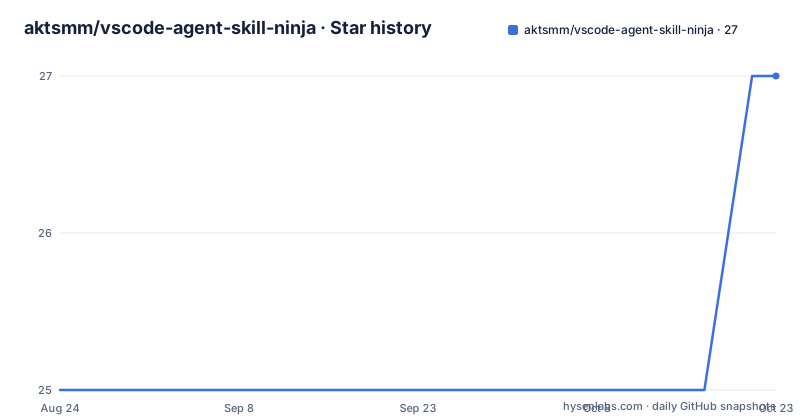
- aktsmm/vscode-agent-skill-ninja27 ★ · +2
| Repository | 2026-08-24 | 2026-10-22 |
|---|---|---|
| aktsmm/vscode-agent-skill-ninja | 25 | 27 |
2 Stars in the last 59 days, measured from the daily GitHub snapshot. Compare with other projects
Editorial analysis
What Problem It Solves and Who It Is For
AI coding assistants like GitHub Copilot and Claude Code can read SKILL.md files to guide their behavior. Managing those files across multiple projects and tools quickly becomes a chore. Agent Skills Ninja is a VS Code extension that centralizes search, installation, and management of SKILL.md files. It targets developers who use more than one AI assistant and want a consistent workflow. The README lists GitHub Copilot, Claude Code, Cursor, Windsurf, and Cline as supported tools. The extension also handles four scopes: workspace, user/global, read-only installed extensions, and optional built-in skills. That breadth is useful for teams that standardize on a set of skills and need to propagate them across repositories. The core problem is not skill creation, but skill discovery and maintenance.
How It Works: Instruction Files and Output Formats
The extension writes a managed block into instruction files like AGENTS.md, copilot-instructions.md, or CLAUDE.md. The block is delimited by HTML comments: <!-- agent-ninja-START --> and <!-- agent-ninja-END -->. Inside that block, the extension inserts an IMPORTANT prompt that tells agents to prefer skill-led reasoning over pre-training-led reasoning. The README quotes the prompt: "Prefer skill-led reasoning over pre-training-led reasoning. Read the relevant SKILL.md before working on tasks covered by these skills." The extension offers five output formats: ref, full, compact, legacy, and none. The default is ref, which keeps the instruction file light by writing only a link to a separate catalog file. The catalog path defaults to .github/skills/README.md, but you can change it with skillNinja.refCatalogPath. For workspace skills, relative paths resolve from the workspace root. For user/global skills, they resolve from the instruction file directory, which keeps personal files portable. The full format writes a detailed table directly into the instruction file, while compact writes a compressed index. The legacy format is a simple table without the IMPORTANT prompt. The none format removes the managed block and any generated catalog, but preserves text you wrote outside the block. That design gives you control over how much context agents load.
Getting It Running: Installation and Configuration
The README does not give a direct install command, but the extension is published on the VS Code Marketplace under the ID yamapan.agent-skill-ninja. You can install it from the Extensions view in VS Code by searching for that ID. After installation, you configure the primary managed workspace root with skillNinja.skillsDirectory, which defaults to .github/skills. You can add repo-local roots with skillNinja.additionalSkillRoots. The extension auto-detects AI tools in your workspace and selects the appropriate instruction file format. You can override that manually in settings. To change the output format, go to Settings, find Output Format, and select ref, full, compact, or legacy. For search, the extension supports multi-keyword queries scored by name, path, and description relevance. It uses parallel fetch with 50 concurrent requests and has a fallback search that retries with fewer keywords if the initial query returns nothing. You can install a skill by double-clicking a remote row, or enable single-click install with skillNinja.singleClickInstall. The extension also auto-updates the instruction file after installation. These settings are specific enough that you can start using the extension within minutes.
Limitations and Failure Modes
The most obvious limitation is the license. The repository declares NOASSERTION, which means there is no clear open source license. That is a legal red flag for any organization that wants to redistribute or modify the extension. The README does not clarify the licensing terms. Another limitation is the dependency on the managed block markers. If you edit files outside the block, the extension preserves your text, but if you accidentally delete a marker, the extension may not recognize the block on the next run. The README mentions "Index Integrity Check" that auto-detects missing skills and prompts for an index update, but it does not describe what happens if the instruction file is corrupted. The extension also relies on auto-detection of AI tools. If a new tool appears that is not in the list, you must rely on manual override. The batch reinstall feature can fail partially, and the release notes mention "Partial Failure Warnings" that show succeeded and failed counts. That is honest, but it means you cannot assume a batch operation is atomic. Finally, the extension writes files into your workspace, which could conflict with version control if you do not review the changes before committing.
Maintenance and Upgrade Cost
The release history shows rapid iteration: v0.9.49, v0.9.48, and v0.9.47 were pushed within days of each other in late August 2026. That cadence suggests active development, but it also means updates arrive frequently. Each release may change behavior, as seen in v0.9.49 which added unreadable-file protection and batch prompt fixes. The repository is not archived, and the last push matches the latest release, so the project is alive. The upgrade cost is low for a VS Code extension because the marketplace handles updates automatically. However, the README warns about re-indexing the catalog, which implies that after major updates you may need to regenerate the skill output. The extension provides a root-level inline action called "Regenerate Skill Output" that regenerates AGENTS.md, copilot-instructions.md, CLAUDE.md, or the linked ref catalog. That action reduces the manual work after an upgrade. Still, you should read the changelog before updating, because a format change could rewrite your instruction files in unexpected ways.
A Real Alternative and the Difference in Approach
A direct alternative is to manage SKILL.md files manually with a simple directory structure and a handwritten AGENTS.md file. That approach gives you full control and no dependency on a third-party extension. The difference is that manual management requires you to update the instruction file every time you add or remove a skill. Agent Skills Ninja automates that update and adds search and installation from GitHub. Another alternative is to use the built-in skill support in each assistant. For example, Claude Code has its own skills directory, and GitHub Copilot has its own instructions file. The difference is that those native mechanisms are tool-specific. Agent Skills Ninja unifies them into one interface and one instruction file per root. The trade-off is that the extension introduces a new abstraction layer, and you must trust it to write correct files. Manual management is transparent but tedious. The extension's value is highest when you have many skills and multiple assistants to keep in sync.
Who Should Adopt It and What to Verify First
Adopt Agent Skills Ninja if you are a developer who uses two or more AI coding assistants in VS Code and you want to manage skills in one place. It is also useful for teams that share a standard skill set across repositories. Do not adopt it if you need a clear open source license, because the NOASSERTION status is a blocker for many organizations. Before adopting, verify the license on the VS Code Marketplace page, because the repository does not state it. Also check the latest release notes for any breaking changes, given the rapid release cadence. Test the extension in a throwaway repository first to see how it writes instruction files and whether the output format suits your agents. The extension's ability to auto-update instruction files is a real time-saver, but only if you trust the generated content. The unreadable-file protection in v0.9.49 suggests the maintainers are addressing edge cases, which is a positive sign. The core judgement is that this extension is practical for multi-tool skill management, but the missing license is a concrete boundary you must resolve before relying on it.
Editorial conclusion
Adopt Agent Skills Ninja if you work with multiple AI coding assistants in VS Code and need a single place to manage SKILL.md files across workspace and user scopes. Do not adopt it if you require a clear open source license, because the repository declares NOASSERTION, which means you cannot assume redistribution rights. Before installing, verify the license status on the marketplace page and check the latest release notes for breaking changes, given the rapid release cadence. The extension is practical for teams that want automatic instruction file updates, but you must confirm the legal terms first.
Frequently asked questions
What is a VS Code agent, and what does Agent Skills Ninja register?
The extension registers a chat participant with the id and name skill, full name Agent Skills Ninja, carrying four commands: search, install, list and recommend. It also registers a language model tool named skillNinja_search with the reference name searchSkills and the display name Search Agent Skills.
How do you use agent skills with Agent Skills Ninja?
Skills are SKILL.md files, and the extension searches them locally and on GitHub, installs them into skillNinja.skillsDirectory, which defaults to .github/skills, and lists them in a managed block inside AGENTS.md, copilot-instructions.md or CLAUDE.md. You pick the block shape under Settings, Output Format: ref, full, compact, legacy or none.
Which agents can Agent Skills Ninja serve, and how do I pick one?
It is built for GitHub Copilot, Claude Code, Cursor, Windsurf and Cline, and it keeps the instruction file in sync for AGENTS.md, copilot-instructions.md and CLAUDE.md alike. Skills are managed across four scopes: workspace, user/global, read-only installed extensions and an optional built-in set.
What are the differences between Copilot agents and Agent Skills Ninja skills?
The README does not compare them. What it defines is a skill as a SKILL.md file managed across four scopes, listed in a managed block whose format you choose, with a When to Use column extracted from the ## When to Use section of each SKILL.md and an IMPORTANT prompt that tells the agent to prefer skill-led reasoning.
Official sources
Add this badge to your README
If you maintain this project, the badge below links readers to this analysis and shows its maintenance status from the daily GitHub snapshot. Paste the markdown into your README; add ?metric=license or ?metric=stars to the image URL for a different field.

[](https://hysenlabs.com/projects/aktsmm-vscode-agent-skill-ninja)Star history chart for your README
[](https://hysenlabs.com/projects/aktsmm-vscode-agent-skill-ninja)