SnapOtter: 200+ file tools in one stack, with admin/admin and the limits turned off
Project brief: Open-source, self-hosted file-processing tool. Convert, compress, OCR, transcribe & run local AI across image, video, audio, PDF & documents, via UI, REST API & pipelines. Your files never leave your network.
At a glance
- What is it?
- SnapOtter is a self-hosted file-processing stack covering image, video, audio, PDF and document work through a UI, a REST API and pipelines. The quick start is a single docker run that logs you in as admin, and the environment file it ships with leaves rate limiting, user counts and upload caps disabled.
- Who is it for?
- SnapOtter suits someone who wants file conversion, OCR and local model work on hardware they control, and the pitch against hosted services is coherent: one stack instead of five subscriptions, no external SaaS dependency, and a multi-arch image that runs on Intel, Apple Silicon and Raspberry Pi. The deployment decisions are what need attention before this faces anything but a home network.
- Can I use it commercially?
- Yes, with strict conditions. AGPL-3.0 is a network copyleft licence: if people use a modified version over a network, for example as a hosted service, you must offer them its source code under the same licence.
- Is it still maintained?
- Yes. The repository received new commits within the last day.
- What is it written in?
- Mainly TypeScript, according to GitHub's language statistics.
Answers come from the project's GitHub data, last synced on November 13, 2026, and from our analysis. They are not legal advice.
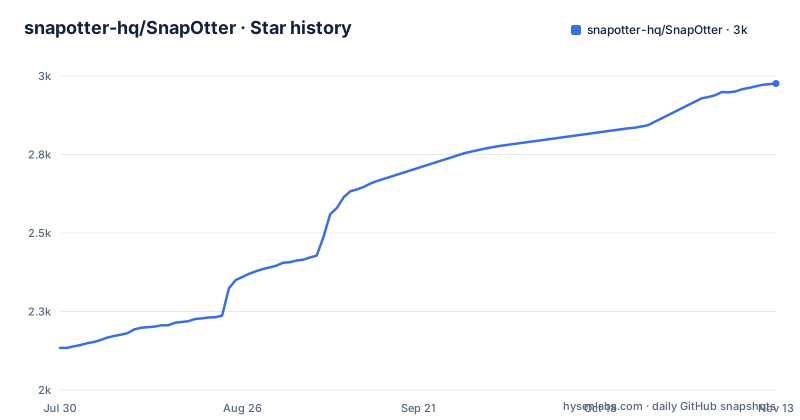
Star history
- snapotter-hq/SnapOtter2,976 ★ · +842
| Repository | 2026-07-30 | 2026-11-13 |
|---|---|---|
| snapotter-hq/SnapOtter | 2.1k | 3k |
842 Stars in the last 106 days, measured from the daily GitHub snapshot. Compare with other projects
Editorial analysis
The whole quick start is one command and the first login is admin over admin
Installation is a single line, and the page is explicit about how little it does:
docker run -d --name SnapOtter -p 1349:1349 -v SnapOtter-data:/data snapotter/snapotter:latestOne container, port 1349 published to the host, one named volume for data, and then a browser pointed at localhost. The credentials are given twice on the same page, once in the quick start sentence and once in a table under the heading for default credentials: username `admin`, password `admin`. The only mitigation offered is a sentence saying you will be asked to change your password on first login. That is a sensible default for a tool that binds to a local port, and a poor one for anything else, because the quick start publishes 1349 on all interfaces by default rather than on the loopback address alone. The production path repeats the pattern at the database layer, where the compose example sets the Postgres user, password and database all to `snapotter` and carries an inline comment reading Change this for any non-local deployment. Two shared credentials, both documented, both needing a manual change before the stack leaves a home network.
The compose file on the page depends on a Redis service it never defines
The deployment section describes a three-container stack made of the app, Postgres 17 and Redis 8, then pastes the file it wants you to save as `compose.yaml`:
services:
  snapotter:
    image: snapotter/snapotter:latest
    ports: ["1349:1349"]
    environment:
      DATABASE_URL: postgres://snapotter:snapotter@postgres:5432/snapotter
      REDIS_URL: redis://redis:6379
    volumes:
      - SnapOtter-data:/data
    depends_on: [postgres, redis]
    restart: unless-stopped
  postgres:
    image: postgres:17-alpine
    environment:
      POSTGRES_USER: snapotter
      # Change this for any non-local deployment.
      POSTGRES_PASSWORD: snapotter
      POSTGRES_DB: snapotter
    volumes: ["SnapOtter-pgdata:/var/lib/postgresql/data"]
    restart
Three things do not line up. The app declares `depends_on: [postgres, redis]` and a `REDIS_URL` pointing at a host named `redis`, but the file defines no `redis` service, so it describes two containers while claiming three. Both named volumes are used without a top-level `volumes` declaration. And the postgres service ends with a bare `restart` key where the app service spells out `restart: unless-stopped`, which is not a value the Compose file format accepts. As printed, the file is a sketch rather than something that starts. The single-container quick start avoids all of it by embedding Postgres 17 and Redis 8 inside the image.
The shipped environment file leaves almost every limit disabled
The example environment file is the most revealing document in the repository, because it is what a new deployment copies. Its convention is that zero means unlimited or off, and most of the file is zeros: `MAX_UPLOAD_SIZE_MB=0`, `MAX_BATCH_SIZE=0`, `CONCURRENT_JOBS=0`, `MAX_MEGAPIXELS=0`, `RATE_LIMIT_PER_MIN=0`, `MAX_USERS=0`, `MAX_WORKER_THREADS=0`, `PROCESSING_TIMEOUT_S=0`, `MAX_PIPELINE_STEPS=0`, `MAX_CANVAS_PIXELS=0`, `MAX_PDF_PAGES=0`, `MAX_VIDEO_DURATION_S=0`, `MAX_AUDIO_DURATION_S=0` and `MAX_VIDEO_BITRATE_KBPS=0`. So out of the box there is no upload size cap, no batch cap, no rate limiting, no user limit, no processing timeout and no cap on page count or media duration. A handful of values are real: files expire after `FILE_MAX_AGE_HOURS=72` with a cleanup pass every 60 minutes, one user may have `MAX_AI_JOBS_PER_USER=5` in flight (the comment notes the AI pool is concurrency 1), animated background removal stops at `GIF_BG_MAX_FRAMES=150`, SVG input is capped at `MAX_SVG_SIZE_MB=50` with a comment explaining that the file ships that default on purpose so copying it does not remove the guard, logos cap at 2048 KB, split grids at 100, LibreOffice gets 120 seconds and preview encodes 300. Authentication itself is on, with `AUTH_ENABLED=true` and the admin credentials in the same block.
The page says pipelines stop at twenty steps and the environment file sets that to zero
One knob is documented twice with different numbers. The pipelines feature is described as chaining tools into reusable workflows with twenty steps by default, naming the variable `MAX_PIPELINE_STEPS`. The example environment file sets `MAX_PIPELINE_STEPS=0`, under a heading whose comment reads Processing with zero meaning auto or unlimited, so the file as copied removes the step cap the page advertises. Batch size is documented more carefully: the page says the limit is unlimited in the published image and one hundred when you build from source, both governed by `MAX_BATCH_SIZE`. Two builds of the same code, two different batch ceilings, stated in one sentence. The per-user AI cap is the only limit where the file and the feature description are obviously in step, since the comment next to the value explains that the AI pool runs at concurrency 1 and that zero would mean unlimited, which on a pool of one is not a number anyone wants.
The acceleration variable cannot be honoured by the image that ships it
There is a variable for choosing a hardware encoder family, `SNAPOTTER_HW_ACCEL`, accepting `nvenc` or `vaapi` with software as the default, and the comment beside it explains the catch in plain words: it needs an ffmpeg built with that family, the image ships a static ffmpeg that has neither, so the setting falls back to software and says so at startup. The deployment section draws the same line from the other direction. GPU acceleration exists through a separate Compose file for NVIDIA CUDA, covering background removal, upscaling and transcription, while OCR deliberately uses the same portable CPU runtime whether the host has a GPU or not, so results do not change between machines. Intel and AMD integrated graphics through VA-API, Quick Sync or OpenCL are not supported for AI inference at all, and those machines run the AI tools on the processor. The engine paths are overridable, with commented-out entries for the ffmpeg, ffprobe, qpdf, soffice and pdfcpu binaries, so a host with better builds can substitute them. Without those, the official image is a CPU product.
Analytics are on by default and the file documents the two ways out
The privacy claim and the telemetry claim sit in the same bullet, and the page is unusually direct about the second. Files never leave your network, and there are no external SaaS dependencies, which is the load-bearing part of the promise for a document tool. Then it says basic analytics help the project catch bugs and improve tools, and gives two switches: disable them at build time with `SNAPOTTER_ANALYTICS=off`, or turn them off at runtime through the in-app admin opt-out, with a link to the deployment documentation section on analytics. The repository backs this with files of its own, since a telemetry document sits in the root next to a security policy, a support policy, a migration guide and a licensing note. The build-time switch is the one to notice, because an image built without it ships analytics on.
Eight Playwright configurations, mutation testing, and a Trivy allow-list
The toolchain tells you how this is built and tested. It is a pnpm workspace pinned to `[email protected]` and requiring Node `>=22.22.0`, orchestrated with turbo, linted with biome through a root script that enumerates directories by hand, and typechecked per package. The end-to-end surface is unusually wide: eight separate Playwright configurations cover the main run, analytics, local analytics, the public demo instance, the documentation site, the image editor, the landing page and a no-auth path, which reads like a deliberate matrix rather than one suite with flags. Mutation testing runs through Stryker with its own two Vitest configurations. Container scanning has both a `.trivyignore` and a `.trivy-unfixed-allow` file, the second being an explicit allowance for advisories with no fix available. Releases go through `.releaserc.json` with a release-notes directory, and git hooks are installed through husky. The three newest tags are v2.0.0, v2.1.0 and v2.2.0, all published within July 2026, with nothing tagged since 2026-07-29 while the default branch kept moving through 2026-11-02.
Editorial conclusion
SnapOtter suits someone who wants file conversion, OCR and local model work on hardware they control, and the pitch against hosted services is coherent: one stack instead of five subscriptions, no external SaaS dependency, and a multi-arch image that runs on Intel, Apple Silicon and Raspberry Pi. The deployment decisions are what need attention before this faces anything but a home network. Change the admin password and the database password, because the quick start hands you admin over admin and the compose example ships the Postgres account as snapotter over snapotter with a comment asking you to change it for anything non-local. Then read the environment file line by line, since rate limiting, user limits, upload size and processing timeouts all ship disabled or unlimited and the defaults are not conservative. Check whether you need a GPU build, because the ordinary image cannot use one. The newest tag is v2.2.0 from 2026-07-29 while the default branch was last pushed on 2026-11-02.
Frequently asked questions
what is snap otter
SnapOtter is an open-source, self-hosted file-processing tool that converts, compresses, OCRs, transcribes, strips metadata and runs local AI across image, video, audio, PDF and document files. It exposes the same tools through a web UI, a REST API and JSON pipelines, and runs on AMD64 and ARM64, including Apple Silicon and Raspberry Pi.
What are the default SnapOtter login credentials?
Username admin and password admin, given in the quick start and repeated in a default credentials table. The page states you will be asked to change the password on first login. The production compose example separately ships the Postgres user, password and database all set to snapotter, with a comment asking you to change it for any non-local deployment.
Do my files get uploaded anywhere when I use SnapOtter?
The page states files never leave your network and that there are no external SaaS dependencies, with local AI running on your own hardware. It also says basic analytics are enabled to help catch bugs, switchable off at build time with SNAPOTTER_ANALYTICS=off or at runtime through the in-app admin opt-out.
Does SnapOtter need a graphics card?
No, and the ordinary image cannot use one. NVIDIA CUDA acceleration is available through a separate GPU Compose file for background removal, upscaling and transcription, OCR deliberately runs the same portable CPU runtime on both CPU-only and NVIDIA hosts, and Intel or AMD integrated acceleration is not supported for AI inference. The shipped static ffmpeg has neither nvenc nor vaapi, so the SNAPOTTER_HW_ACCEL setting falls back to software.
Can I call SnapOtter tools from my own application?
Yes. Every tool is available over a REST API with API key authentication, and interactive documentation is served at /api/docs. Multi-step workflows are defined as pipelines that can be chained, imported and exported as JSON.
Official sources
Add this badge to your README
If you maintain this project, the badge below links readers to this analysis and shows its maintenance status from the daily GitHub snapshot. Paste the markdown into your README; add ?metric=license or ?metric=stars to the image URL for a different field.

[](https://hysenlabs.com/projects/snapotter-hq-snapotter)Star history chart for your README
[](https://hysenlabs.com/projects/snapotter-hq-snapotter)Was this useful?