TinyVue picks your Vue version with the dependency's major number, its script list is annotated in Chinese, and its lint config is the format that predates flat config
Project brief: TinyVue is an enterprise-class UI component library of OpenTiny community, support both Vue.js 2 and Vue.js 3, as well as PC and mobile.
At a glance
- What is it?
- opentiny/tiny-vue is a component library that publishes one package name for both Vue 2 and Vue 3 with 104 components, where the version choice lives entirely in the install command and never in the import, the agent skills live in a different repository, the root manifest refuses to be installed by anything but one package manager, and the release line has shipped two minor versions in five months.
- Who is it for?
- TinyVue is worth a look if you have to serve both Vue 2 and Vue 3 from one component set, because the dual-major packaging is genuinely elegant and the component count is large enough to matter for an enterprise interface. Two things to check before committing.
- Can I use it commercially?
- Yes. MIT is a permissive licence: you can use, modify and sell software built on it, as long as you keep its copyright and licence notices.
- Is it still maintained?
- Yes. The repository last received commits 16 days ago.
- What is it written in?
- Mainly Less, according to GitHub's language statistics.
Answers come from the project's GitHub data, last synced on November 14, 2026, and from our analysis. They are not legal advice.
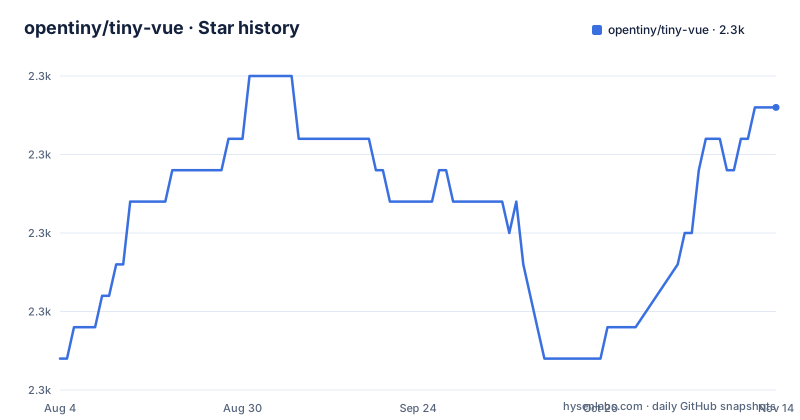
Star history
- opentiny/tiny-vue2,274 ★ · +8
| Repository | 2026-08-04 | 2026-11-14 |
|---|---|---|
| opentiny/tiny-vue | 2.3k | 2.3k |
8 Stars in the last 102 days, measured from the daily GitHub snapshot. Compare with other projects
Editorial analysis
The Vue major version is chosen at install time and never appears in the code
The library publishes one package name and picks the framework major with the dependency's own major number. The two documented install commands are:
npm i @opentiny/vue@3npm i @opentiny/vue@2After either one, the import is identical and carries no version at all:
<script lang="ts" setup>
  import { Button as TinyButton } from '@opentiny/vue'
</script>

<template>
  <tiny-button>Tiny Vue</tiny-button>
</template>
So a Vue 3 project and a Vue 2 project have byte-identical component imports, and the difference lives entirely in one character of a dependency specifier. For an organisation maintaining two application generations that is a real saving, and it is a cleaner mechanism than conditional exports or peer dependency ranges.
The cost is equally real and equally quiet. Because nothing in the source says which major is installed, a project that ends up with both majors in one dependency tree has no way to express the distinction in code, and a developer reading an import has no way to tell which variant they are looking at. The only place the choice exists is the install command, which means it lives in a lockfile.
The snippet also shows that the library expects TypeScript in the single file component block, so the dual-major story is a TypeScript story as much as a packaging one.
The agent skills come from a different repository and cover sixteen tools
The page's build-with section installs a skill for coding assistants from a repository that is not this one.
npx skills add opentiny/agent-skills -g --skill tiny-vue-skill --agent cursorTwo things to notice in one line. The source is the organisation's agent-skills repository rather than the component library's own tree, and the tool is selected with a flag rather than being inferred.
The table under it maps sixteen assistants to their flag values. The naming is not uniform: four of them are the full hyphenated product name, so a Claude Code value reads differently from a Kilo Code value which is a bare word, and the same goes for the two tools whose names carry a product suffix. Nothing documents a rule, so the value has to be read off the table.
That table is worth more attention than it looks. A component library that ships a skill teaching an assistant its component APIs is making a claim that the components are learnable by a model reading documentation, and the coverage is wide enough that the same skill is expected to work across sixteen different hosts with different plugin formats.
The repository itself also carries agent instructions in its own tree, so the same project teaches both the assistants that use the library and the assistants that contribute to it, from two different places.
The script list is annotated with Chinese comment keys
The root manifest is a workspace root rather than a publishable package: it is marked private, and its entry point points into a directory of per-package manifests. That is the normal shape for a monorepo, and it means the interesting content here is the script table.
It is organised with separators written as script names. Some entries are Chinese sentences with an empty string value, used as headings:
    "// ---------- 启动官网文档 ----------": "",
    "dev": "pnpm -C examples/vue3 dev",
    "dev2": "pnpm -C examples/vue2 dev",
The package manager tolerates it, so the file reads as a table of contents rather than a flat list, and a maintainer editing the scripts knows which group they are in. It is a small piece of craft and it is also invisible to anyone reading rendered documentation about the project.
The scripts themselves show the monorepo's shape more clearly than any prose would. Development runs inside a per-major example application rather than at the root, one script for each Vue major. The documentation site is a separate example that has to build a theme package first before starting. And there is an internal command-line tool with its own directory and its own build step, whose jobs include scaffolding a component and generating the mapping that decides which components get bundled into which entry.
That last one is the mechanism behind the claim that the library supports configuration-driven development for low-code platforms: something in the repository decides how the components are packaged for consumption.
The install script fetches a package from the registry to refuse the install
Two lifecycle scripts do work at install time, and both are worth reading before you clone the repository.
    "preinstall": "npx only-allow pnpm",
    "postinstall": "pnpm build:internals",
The first is the standard trick for enforcing a package manager: the pre-install hook invokes a package from the registry that exits with an error unless it is being run by the expected one. It works, and it also means every install of this repository makes a network fetch of an unpinned package before it can refuse to proceed.
The second is more consequential. A plain install of the dependencies triggers a build of the internal tooling, so installing is not a pure dependency resolution step. If the build fails, the install fails, and a first-time contributor without the right environment gets a compiler error rather than a message about tooling.
The engines field reinforces the constraint, requiring a Node floor and a package-manager floor, and the manifest separately pins the exact package-manager patch version it was developed against. So the project states both a minimum and an exact version of its package manager, which is a reasonable thing to do for a monorepo with a patched dependency tree.
There is also a bootstrap script with a filter that explicitly excludes the distribution output directory from installation, which is the sort of detail that exists because someone hit the problem and wrote it down.
The lint configuration is the format that came before flat config
The toolchain at the root of this repository is current in almost every part and legacy in exactly one, and the odd one out is the linter.
There is a husky directory for commit hooks, a staged-files lint configuration, a prettier configuration with its own ignore file, an editor configuration, an attributes file, a commit message lint configuration, and a dependency-unused check configuration. All of those are current patterns. The lint configuration is a JavaScript file using the older key-based format rather than the flat configuration the current linter prefers.
So the one file a contributor is most likely to have to translate when upgrading anything else is the one still written the old way. It is the kind of drift that survives for years because nothing breaks.
Two other root entries point at the same kind of accumulation. There is a JavaScript language configuration alongside four TypeScript configurations, which is the editor-configuration counterpart of a project that started as JavaScript and became typed. And there is a patches directory, which under this package manager means the repository modifies one of its own dependencies in place rather than waiting for an upstream fix.
That last one is a maintenance commitment rather than a smell. It is also the kind of thing that has to be re-applied on every dependency bump, and the repository does not say which packages it patches.
Three TypeScript configurations for three Vue targets, and one of them is 2.7
The dual-major claim has a concrete cost in the repository's configuration, and it shows up in the file names.
There are four TypeScript configuration files at the root: a base one, and one each for Vue 2, Vue 2.7, and Vue 3. So the one-code-two-frameworks line is really three build targets, because Vue 2.7 is treated as separate from Vue 2.
That is the right call on the merits, since 2.7 is where the older framework gained composition API support and behaves differently from the last 2.6 release, and typing it as a third target is more honest than pretending 2.7 is 2.6. It also means anyone touching types has three configurations to keep aligned rather than two.
The Vue language server has its own configuration file as well, which is the editor-side counterpart and the reason single file component types resolve correctly in an editor rather than only at build time.
The development instructions confirm the split is exercised rather than theoretical. There is a script for each framework version, and the two point at two different example applications. The examples directory holds five in total, the other three being the documentation site, its hosted variant and the public assets. One local port serves whichever application you started.
The clone step also uses an SSH remote rather than an HTTPS one, which means the documented development path assumes you have a key configured, while the consumer install path above it uses the package manager and needs none.
Two minor versions in five months on a line that is two years old
The release history is small and irregular.
The three most recent tags are 3.30.0 in April 2026, 3.31.0 at the end of July, and 3.32.0 in mid-September. So the gap between the first two is about four months and between the second and third about seven weeks.
The default branch is named dev rather than main or master, and its most recent push is dated 2026-09-17, two days after the newest tag. The version in the root manifest matches the newest tag exactly, which is worth noting because it is the opposite of what a workspace root with a private flag usually does.
Two documentation languages ship: the page and a Simplified Chinese version, with a separate Chinese contributing guide alongside the English one. That is a smaller localisation surface than most of the multi-language projects around, and it matches the community description in the repository description, which names an enterprise component library for the OpenTiny community.
The contributor list on the page is generated: the file names the convention it follows, which is members with at least one merged pull request, and the table is laid out eight to a row with a link per contributor to their commit history for this repository. The visible portion of that table ends partway through a row, which is where the page stops.
Editorial conclusion
TinyVue is worth a look if you have to serve both Vue 2 and Vue 3 from one component set, because the dual-major packaging is genuinely elegant and the component count is large enough to matter for an enterprise interface. Two things to check before committing. The version selection is invisible once installed, so a project that ends up with both majors in one dependency tree has no way to express that in its source. And the repository builds two separate example applications with different scripts and one shared dev port, which tells you the dual support is verified by running both rather than by a shared abstraction.
Frequently asked questions
How do I install TinyVue for Vue 2 versus Vue 3?
By the major version of the dependency. The page gives one install command for major 3 and another for major 2, both for the same package name. The import specifier afterwards carries no version, so the choice exists only in the install command.
How many components does TinyVue provide?
The page claims 104. The root manifest's keyword list also includes terms for renderless and headless components, which frames the library differently from a count of ready-made components.
What is tiny-vue-skill and where does it come from?
A set of skill tools for AI coding assistants covering the library's usage, APIs and practices. It installs with a single command from the organisation's separate agent-skills repository, and the tool is chosen with an agent flag; the page maps sixteen assistants to their flag values.
What does TinyVue require to build from source?
Node 18 or newer and a package manager at 9.5 or newer, with the manifest pinning an exact patch version of it. The documented clone uses an SSH remote, and there are separate development scripts for the Vue 2 and Vue 3 example applications.
How does TinyVue support low-code platforms?
By supporting configuration-driven component development, and by shipping an internal command-line tool whose jobs include scaffolding a component and generating the mapping that decides which components are bundled into which entry point.
Official sources
Add this badge to your README
If you maintain this project, the badge below links readers to this analysis and shows its maintenance status from the daily GitHub snapshot. Paste the markdown into your README; add ?metric=license or ?metric=stars to the image URL for a different field.

[](https://hysenlabs.com/projects/opentiny-tiny-vue)Star history chart for your README
[](https://hysenlabs.com/projects/opentiny-tiny-vue)Was this useful?