AYAB Desktop: Controlling a Knitting Machine from Python and Qt
The AYAB Software
At a glance
- What is it?
- AYAB Desktop is a GPL-3.0 Python GUI that turns a standard Brother or Silver Reed knitting machine into a computer-controlled colorwork device. This review covers its architecture, setup path, and the practical limits of relying on a volunteer-maintained toolchain.
- Who is it for?
- Hobbyist knitters who already own a compatible Brother or Silver Reed machine and are comfortable with Python virtual environments, git, and command-line tools will find AYAB Desktop a viable way to automate colorwork. Those who expect a polished commercial product, or who want to avoid compiling firmware or managing OS-level USB permissions, should wait for a packaged release.
- Can I use it commercially?
- Yes, with conditions. GPL-3.0 is a copyleft licence: if you distribute software that includes it, you must release that software's source code under the same licence. Running it internally without distributing it does not trigger that obligation.
- Is it still maintained?
- Yes. The repository last received commits 3 days ago.
- What is it written in?
- Mainly Python, according to GitHub's language statistics.
Answers come from the project's GitHub data, last synced on October 21, 2026, and from our analysis. They are not legal advice.
Star history
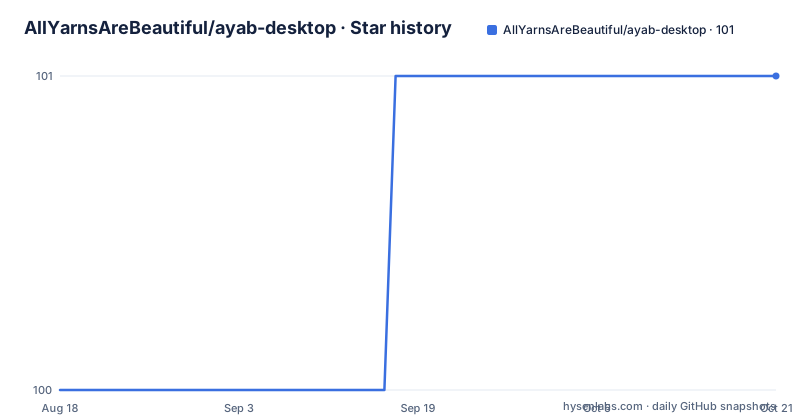
- AllYarnsAreBeautiful/ayab-desktop101 ★ · +1
| Repository | 2026-08-18 | 2026-10-21 |
|---|---|---|
| AllYarnsAreBeautiful/ayab-desktop | 100 | 101 |
1 Stars in the last 64 days, measured from the daily GitHub snapshot. Compare with other projects
Editorial analysis
What AYAB Desktop Actually Does
The README does not list supported machine models explicitly, but the project's homepage and manual are referenced for that information. The core problem it solves is narrow but real: computer-controlled knitting for hobbyists who otherwise would have no way to create custom colorwork without buying expensive commercial equipment.
Architecture: Python GUI, Firmware, and a Manifest File
The repository is structured as a Python application using PySide6 for the Qt 6 interface. The README mentions converting PySide6 .ui files and generating translation files, which indicates a standard Qt Designer workflow. The application does not contain the knitting machine firmware itself. Instead, it bundles a precompiled hex file that is downloaded from a separate repository, ayab-firmware, during the CI build. The name of the firmware release to bundle is stored in a manifest file at src/main/resources/base/ayab/firmware/manifest.txt. When building from source, you must supply your own firmware.hex at main/resources/base/ayab/firmware/firmware.hex, either by compiling it yourself (the README suggests using VSCode with PlatformIO) or by copying a compiled binary into that path. This separation is a deliberate design choice: the desktop app and the firmware evolve independently, and the manifest pins a known-good firmware version for each desktop release. It also means that a source checkout is not runnable out of the box; you need to fetch or build the firmware first.
Getting It Running: Python 3.11, Qt 6, and a Script Called setup-environment.ps1
The README gives a step-by-step setup that is specific to Python 3.11. On Debian or Ubuntu, you must add the deadsnakes PPA to install python3.11, then install system libraries including libasound2-dev, avrdude, and qt6-tools-dev-tools. On openSUSE, the equivalent packages are python311 and libasound2. After cloning the repository, you create a virtual environment with python3.11 -m venv .venv, activate it, and install dependencies from requirements.txt. The README also mentions a file called requirements.build.txt for runtime dependencies, though the setup instructions only show installing from requirements.txt, which is the development dependency set. Then you run bash ./setup-environment.ps1 to convert the .ui files and generate translations. Finally, you launch the application with fbs run. The fbs command refers to the FBS (fman build system) packaging tool, which is used for building and running PySide6 applications. On Windows, the instructions require Anaconda Powershell, a conda environment, and a separate Perl installation. On macOS, you need the universal2 Python installer and possibly a manual pip bootstrap if you hit an SSL error.
Flashing the Firmware: avrdude and USB Permissions
A key part of the setup is flashing the firmware to the Arduino. The README says that avrdude must be available on your system, and it lists avrdude as a package to install on both Debian and openSUSE. The flashing process is triggered from within the AYAB Desktop GUI, which uses the bundled firmware.hex file. On Linux, you may need to add your user to the tty and dialout groups to get USB communication rights. The README shows the commands: sudo usermod -aG tty [userName] and sudo usermod -aG dialout [userName]. This is a common source of failure for new users, because the application will not see the Arduino until the permissions are correct. The README does not provide a command to flash the firmware manually; it assumes you will use the GUI's built-in flash feature. If you are building from source, you must ensure the firmware.hex file is in place before attempting to flash, otherwise the GUI will have nothing to send.
CI/CD and Release Process: Tags Trigger Builds
The project uses GitHub Actions for continuous integration. According to the README, a new build is triggered when a tag is pushed that starts with v (for regular releases) or test (for test builds). Test tags follow a convention: the current date in YYMMdd format, with a letter suffix if multiple test builds are created on the same day. The CI pipeline automatically downloads the firmware release specified in the manifest.txt file and packs it into the desktop release. This means that the release process is tightly coupled to the firmware version, and a mismatch between the desktop app and the firmware could cause issues. The README also states that test tags and releases are manually removed from time to time, which suggests that the maintainers treat test builds as disposable. For a user who wants to install a stable version, the release page is the safest source, not the main branch, because main is where ongoing development happens.
Maintenance and Upgrade Cost: A Volunteer Project with a Clear Branching Model
The repository is not archived, and the latest release is 1.0.0, dated 2025-03-10. The README describes a branching model: development happens on main, and for each major release a maintenance branch is created with the naming convention <version>-maint (for example, 0.95-maint). This is a sensible approach for backporting bug fixes and security patches. However, the project is clearly volunteer-driven, and the setup complexity reflects that. The requirement to use Python 3.11 specifically, the need to install Qt 6 development tools, and the manual firmware handling all contribute to a high barrier to entry. The license is GPL-3.0, which means you can modify and redistribute the software, but any derivative work must also be GPL-3.0. This is a real consideration for anyone who wants to embed AYAB into a proprietary product. The maintenance cost for a user is also non-trivial: every time you update the desktop app, you need to check whether the firmware version in the manifest has changed, and you may need to reflash the Arduino. The README does not provide an automated upgrade path; you are expected to rebuild from source or download a new release binary.
Limitations and Failure Modes
The most obvious limitation is that AYAB Desktop is not a standalone knitting solution. It requires a compatible knitting machine, an Arduino, and the firmware to be flashed. The README does not list which machines are supported, so you must consult the manual or the firmware repository. Another failure mode is the USB permission issue on Linux; if you forget to add your user to the tty and dialout groups, the application will not detect the Arduino. The README also warns about the pip SSL:TLSV1_ALERT_PROTOCOL_VERSION problem on macOS, which suggests that the setup can break depending on your Python installation. The dependency on fbs run for launching the app from source is another point of fragility: fbs is a third-party tool, and if it is not maintained, the startup command could break. Finally, the CI process requires a specific tag format, and if you push a tag that does not match the pattern, no build will be triggered. This is not a problem for end users, but it is a constraint for contributors.
Alternatives: Manual Knitting and Commercial Pattern Systems
The most direct alternative is to use the knitting machine manually, which is the baseline that AYAB aims to replace. That approach requires no software, no Arduino, and no firmware, but it limits you to the patterns that the machine's built-in electronics can produce, often from punch cards or proprietary cartridges. Another alternative is to use a commercial pattern design and control software that works with specific knitting machine brands. These products often provide a more polished user interface and pre-tested firmware, but they are proprietary and may not support older machines. The key difference in approach is that AYAB is open source and hardware-agnostic within the Brother and Silver Reed ecosystem, while commercial options are closed and tied to a single vendor. For a user who wants to avoid the setup complexity, a commercial product might be worth the cost. For a user who values openness and has the technical skills, AYAB offers a level of control that commercial software cannot match.
Editorial conclusion
Hobbyist knitters who already own a compatible Brother or Silver Reed machine and are comfortable with Python virtual environments, git, and command-line tools will find AYAB Desktop a viable way to automate colorwork. Those who expect a polished commercial product, or who want to avoid compiling firmware or managing OS-level USB permissions, should wait for a packaged release. Before committing, verify that your machine model is supported by the firmware bundled in the manifest.txt, confirm that avrdude is available on your system for flashing, and check the manual at manual.ayab-knitting.com for the current list of compatible machines.
Frequently asked questions
What is AYAB?
This repository is the desktop GUI for it. The code is a Qt 6 and PySide6 application on Python 3.11, it talks to an Arduino over USB, it flashes firmware to the board, and it converts interface definition files and generates translation files as part of its build. The project's name and homepage point at knitting.
Which requirements file do I install to run ayab-desktop?
The one named requirements.build.txt. The README states that runtime dependencies live in that file and development dependencies live in requirements.txt, which is the reverse of the usual convention, so installing the plain requirements file gives you a test runner and a type checker instead of the runtime stack.
What does a new ayab-desktop build get triggered by?
A new tag, and the tag must start either with v for a version such as v1.0.0 or with test for a test build such as test230517. Test tags carry the current date in a year-month-day format, with a letter appended if a build already exists for that day, and the tags are removed manually over time.
Why does my ayab-desktop build have no firmware to flash?
Because the firmware is a separate artefact and a source build does not fetch it. Continuous integration downloads a named firmware release into the desktop release, but when you build locally you have to make sure a compiled hex file is present at the firmware path in the desktop tree, compiling it yourself with a toolchain such as PlatformIO and dropping it there yourself.
Official sources
Add this badge to your README
If you maintain this project, the badge below links readers to this analysis and shows its maintenance status from the daily GitHub snapshot. Paste the markdown into your README; add ?metric=license or ?metric=stars to the image URL for a different field.

[](https://hysenlabs.com/projects/allyarnsarebeautiful-ayab-desktop)Star history chart for your README
[](https://hysenlabs.com/projects/allyarnsarebeautiful-ayab-desktop)