Labelme v7 is an application with three stable interfaces and no Python API
Project brief: Image annotation with Python. Supports polygon, rectangle, circle, line, point, and AI-assisted annotation.
At a glance
- What is it?
- Labelme annotates images, video and flags in a Python and Qt GUI under GPL-3.0. Version 7 raised the platform floor, removed the Python import surface, and left only the command line, the JSON file and the config file as contract.
- Who is it for?
- Labelme suits a team that annotates images or video and can live with a desktop GUI and a file format as its integration point. It does not suit pipelines that import labelme as a library, and it does not suit anyone still on Qt5, Python 3.10 or 3.11 who needs new features.
- Can I use it commercially?
- Yes, with conditions. GPL-3.0 is a copyleft licence: if you distribute software that includes it, you must release that software's source code under the same licence. Running it internally without distributing it does not trigger that obligation.
- Is it still maintained?
- Yes. The repository last received commits 1 day ago.
- What is it written in?
- Mainly Python, according to GitHub's language statistics.
Answers come from the project's GitHub data, last synced on November 13, 2026, and from our analysis. They are not legal advice.
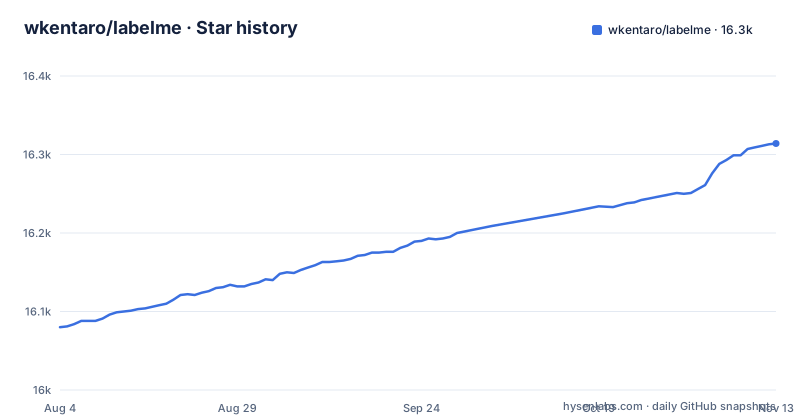
Star history
- wkentaro/labelme16,314 ★ · +234
| Repository | 2026-08-04 | 2026-11-13 |
|---|---|---|
| wkentaro/labelme | 16.1k | 16.3k |
234 Stars in the last 101 days, measured from the daily GitHub snapshot. Compare with other projects
Editorial analysis
v7 privatised the Python modules, so import labelme.app stops working
Labelme describes itself as an application, not a library, and says so directly: it exposes no stable Python API. In v7 the internal modules were renamed to underscore-prefixed names, which means `import labelme.app`, `labelme.utils`, `labelme.widgets` and similar imports no longer resolve. This is the sharpest break in the 6 to 7 upgrade, and it is silent. Code that reached into labelme for a helper will fail on the import rather than on behaviour, but only after you have already moved to PySide6 and Python 3.12. The stated remedy is to pin `labelme<7` and vendor the pieces you need. The project points at examples/utils.py as copy-and-adapt reference code that reads the on-disk JSON annotation format without depending on labelme at all. Three stable interfaces remain: the command line, the JSON annotation format, and the `~/.labelmerc` config format. Everything else, import surface included, may be renamed without notice.
Boolean options in ~/.labelmerc changed type under YAML 1.2
v7.0.0 also changed how the config file is parsed. `~/.labelmerc` is now read with ruamel.yaml under YAML 1.2 rules, and the practical effect is that the spellings `yes`, `no`, `on` and `off`, in any capitalisation, are read as strings rather than as booleans. A config written years ago with auto_save set that way will therefore load, and will not do what you think. The fix is dull and worth doing immediately: switch every boolean option to `true` or `false`. The same reasoning applies to anything else you feed that file, since the config is one of the three formats the project commits to keeping stable, and its parsing rules are what changed underneath it.
The Qt binding moved from PyQt5 to PySide6, and the floor moved with it
Three platform floors moved at once in v7.0.0. The GUI binding changed from PyQt5 on Qt5 to PySide6 on Qt6, so a plain install now pulls PySide6 where it used to pull PyQt5. The minimum Python rose to 3.12, dropping 3.10 and 3.11. And Qt6 requires a 64-bit macOS, Windows or Linux, so older operating systems that Qt5 alone supported are no longer covered. The support table splits cleanly: v7.x takes Python 3.12 to 3.14 with Qt6 on 64-bit systems, while v6.3.x keeps Python 3.10 to 3.11, Qt5 and older operating systems. The escape hatch is one command.
pip install 'labelme<7'All previous releases stay installable from PyPI, so existing pins keep resolving. Labelme follows SPEC 0, the successor to NEP 29, for dropping Python versions, in step with numpy, scipy and scikit-image, so this floor is a dependency decision rather than a preference.
v6.3.x takes critical fixes only, on a best-effort basis with no SLA
The maintenance line has an explicit scope, which is rare and useful to know before you commit to it. v6.3.x receives critical fixes only, best-effort, with no release cadence and no service level agreement. Critical is defined narrowly: security vulnerabilities, data-loss or annotation-corruption bugs, and install or launch breakage caused by upstream dependency drift. Feature backports and non-critical bugs are out of scope, and all new development happens on v7.x. So a team parked on Qt5 or Python 3.10 gets its security holes closed and its corrupted files addressed, and should not expect a missing GUI option or a new export format to appear. Read that as a reason to move rather than as comfort. Note also that drift from upstream dependencies counts as launch breakage, which is an admission that an old line can stop starting at all when its dependencies move.
Three install paths with three different terms, one of them paid
Installation is offered three ways and they are not equivalent. The pip path is one command.
pip install labelmeThe same block also carries the GitHub variant, `pip install git+https://github.com/wkentaro/labelme.git`, for tracking the tip of the main branch rather than the last release. The second option is a standalone executable with no Python and no Qt at all, downloaded from labelme.io, and that one is a one-time payment for lifetime access which the project says helps it stay maintained. The third is the system package manager on Linux distributions that package labelme, with a repology badge tracking which distributions ship it and at which version. Consequence for anyone budgeting an install: the no-dependency route is the paid one, while pip and the distro packages are the free routes that carry the Python requirement.
A plain install pulls osam and a capped onnxruntime for the AI annotation paths
The runtime dependencies in pyproject.toml are what the AI-assisted features sit on. Point-to-polygon and point-to-mask annotation runs through SAM and EfficientSAM models, and text-to-annotation runs through YOLO-world and SAM3. The libraries behind them are declared as osam>=0.10.1,<0.11 and onnxruntime>=1.23.2,<1.29, alongside pyside6>=6.8 for the GUI, plus numpy, scipy, scikit-image, matplotlib, pillow, tifffile, imgviz, loguru, natsort and ruamel-yaml. Two of those have an upper bound: onnxruntime is capped below 1.29 and osam below 0.11, while everything else has a floor only. Those caps are the lines to watch when other packages in the same environment need newer versions of either library.
The command line writes JSON, and the JSON is the only contract
Once you stop importing labelme, the tool is driven from the command line and the output is a JSON file.
labelme  # just open gui

# tutorial (single image example)
cd examples/tutorial
labelme apc2016_obj3.jpg  # specify image file
labelme apc2016_obj3.jpg --output annotations/  # read and save annotation files in an annotation folder
labelme apc2016_obj3.jpg --with-image-data  # include image data in JSON file
Each flag maps to a file on disk: --output chooses the directory for the annotation JSON files, and --with-image-data embeds the image data inside the JSON instead of referring to it. Run labelme with --help for the full set. The consequence for automation is clean and worth taking seriously: read the JSON yourself, as examples/utils.py does, and you are insulated from every future rename inside the package. The other documented consumers are video annotation, image flag annotation for classification and cleaning, and export to VOC for semantic and instance segmentation or COCO for instance segmentation.
Versions come from git tags, and releases are assembled from changelog.d fragments
The build backend is hatchling with hatch-vcs, and the version is dynamic, taken from source control rather than written down. Releases are prepared by a just recipe that runs as a shell script and collects fragments from the changelog.d directory, matching files named for added, changed, deprecated, removed, fixed and security changes. So a contributor's change reaches a release through a small markdown file in a directory, not through a version bump. Two other recipes show where the invariants live: check_translate fails if the translation catalogs are stale or incomplete, and check_config_migrations replays released configs, which the recipe notes requires full release tags. That last one has a practical consequence: a shallow clone without tags cannot run the config migration check, so contributors working from a truncated checkout lose that safety net without being told why.
Editorial conclusion
Labelme suits a team that annotates images or video and can live with a desktop GUI and a file format as its integration point. It does not suit pipelines that import labelme as a library, and it does not suit anyone still on Qt5, Python 3.10 or 3.11 who needs new features. Before upgrading, read the v6 to v7 notes and check whether your config sets booleans as yes, no, on or off. If you have code importing labelme internals, pin labelme<7 and adapt examples/utils.py. If you are installing without Python or Qt, know that the standalone build is a paid one-time download while the pip path is not.
Frequently asked questions
Is LabelMe free to use?
The pip and Linux distribution package routes are free and GPL-3.0. The standalone executable with no Python and no Qt dependency is a one-time payment for lifetime access, which the project says helps fund its maintenance.
how to install labelme
Use pip install labelme, or pip install git+https://github.com/wkentaro/labelme.git for the latest version from GitHub. Version 7 needs Python 3.12 to 3.14 and PySide6 on 64-bit macOS, Windows or Linux.
how to use labelme in python
Labelme is an application, not a library, and exposes no stable Python API. In v7 the internal modules were renamed to underscore-prefixed names, so imports such as labelme.app, labelme.utils and labelme.widgets no longer work. Read the JSON annotation format directly instead, following examples/utils.py.
how to use labelme for yolo
The export formats documented in the README are VOC for semantic segmentation and instance segmentation, and COCO for instance segmentation. A YOLO-specific export is not documented there, so check the current README before planning a conversion around it.
Official sources
Add this badge to your README
If you maintain this project, the badge below links readers to this analysis and shows its maintenance status from the daily GitHub snapshot. Paste the markdown into your README; add ?metric=license or ?metric=stars to the image URL for a different field.

[](https://hysenlabs.com/projects/wkentaro-labelme)Star history chart for your README
[](https://hysenlabs.com/projects/wkentaro-labelme)Was this useful?