AMScrollingNavbar: A Scroll-Following Navigation Bar for UIKit
GitHub describes it as Scrollable UINavigationBar that follows the scrolling of a UIScrollView. The repository metadata lists Swift as its primary language. The metadata lists the MIT license. This article stays within the project description and details documented in the GitHub repository README.
At a glance
- What is it?
- AMScrollingNavbar is a Swift subclass of UINavigationController that collapses and expands the navigation bar in sync with a UIScrollView. This review covers its mechanism, setup, limitations, and whether it still fits modern iOS development.
- Who is it for?
- Adopt AMScrollingNavbar if you maintain a UIKit app targeting iOS 11 or earlier and need a simple, battle-tested way to collapse the navigation bar on scroll. Skip it if you are building with SwiftUI or targeting iOS 13+, where UINavigationBar's built-in large title collapse and scroll edge appearance cover most cases.
- Can I use it commercially?
- Yes. MIT is a permissive licence: you can use, modify and sell software built on it, as long as you keep its copyright and licence notices.
- Is it still maintained?
- Probably not. The repository last received commits 42 months ago, on April 13, 2023.
- What is it written in?
- Mainly Swift, according to GitHub's language statistics.
Answers come from the project's GitHub data, last synced on October 23, 2026, and from our analysis. They are not legal advice.
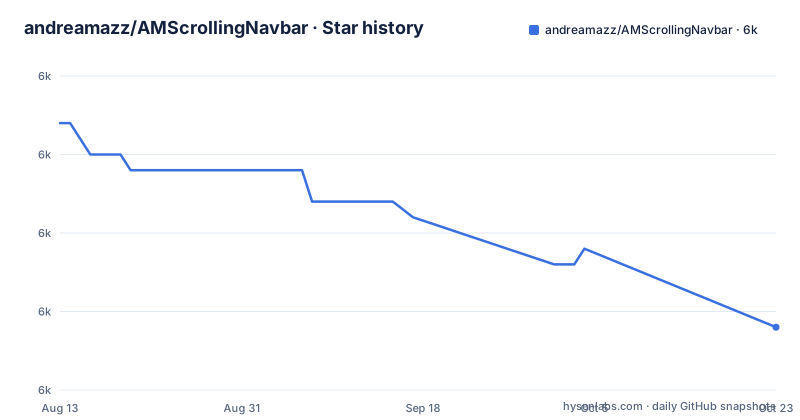
Star history
- andreamazz/AMScrollingNavbar5,984 ★ · -13
| Repository | 2026-08-13 | 2026-10-23 |
|---|---|---|
| andreamazz/AMScrollingNavbar | 6k | 6k |
-13 Stars in the last 71 days, measured from the daily GitHub snapshot. Compare with other projects
Editorial analysis
What AMScrollingNavbar Solves and Who It Is For
UIKit's UINavigationBar stays fixed at the top of the screen. Apps that want to reclaim vertical space often hide or shrink the bar while the user scrolls down, then bring it back when scrolling up. AMScrollingNavbar automates that behavior by subclassing UINavigationController and observing a scroll view. The intended audience is iOS developers using storyboards or programmatic UIKit, not SwiftUI. The README positions it as a drop-in replacement: you swap the navigation controller class and call one method. It is useful for list-heavy screens like feeds, tables, or collections where every pixel of content matters. The library has been around since the early Swift days, with version 1.x written in Objective-C, so it carries history that newer projects may not need.
The Mechanism: A Custom Navigation Controller That Observes Scroll Offset
The core is ScrollingNavigationController, a UINavigationController subclass. When you call followScrollView(_:delay:), the controller attaches itself to the scroll view's content offset changes. The README does not detail the internal implementation, but the public API reveals the data flow: the controller reads the scroll view's offset, compares it with the previous offset, and translates the navigation bar's frame accordingly. A delay parameter (in points) prevents the bar from collapsing immediately on a small scroll. The scrollSpeedFactor parameter multiplies the scroll velocity, letting the bar move faster or slower than the content. The controller also tracks a state machine with three states: collapsed, expanded, and scrolling. A delegate method, scrollingNavigationController(_:didChangeState:), reports these transitions so you can adjust other UI, like hiding a toolbar.
Getting It Running: CocoaPods, Carthage, and the Minimal API
Installation is straightforward. With CocoaPods, add pod 'AMScrollingNavbar' and use_frameworks! to your Podfile. With Carthage, add github "andreamazz/AMScrollingNavbar" to your Cartfile. After installation, set the class of your UINavigationController in the storyboard to ScrollingNavigationController, or instantiate it programmatically. In your view controller's viewWillAppear, cast the navigation controller and call followScrollView(tableView, delay: 50.0). You must call stopFollowingScrollView() in viewDidDisappear to avoid retaining the scroll view. The README gives a Swift example and an Objective-C variant that includes extra parameters like scrollSpeedFactor and collapseDirection. For a tab bar or a custom footer, pass them as followers in the followers array. If you want to avoid repeating the setup, subclass ScrollingNavigationViewController, which provides the base implementation.
Followers, Additional Offset, and the Tint Color Quirk
The followers parameter is a distinctive feature: it lets you move other views alongside the navigation bar. Each follower must specify a direction, either .scrollDown or .scrollUp, so the library knows whether the view should follow the bar when it collapses or expands. You can pass a UITabBar directly, which is useful for hiding the tab bar on scroll. The additionalOffset parameter lets you scroll the bar further out of the way, beyond its default height. A notable quirk: the library keeps its own copy of UINavigationBar.tintColor. If you change the tint color at runtime, you must call navBarTintUpdated() to sync it. This is an extra step that standard navigation bars do not require, and forgetting it leads to a stale color.
Handling Navigation and Scroll-to-Top: Two Failure Modes
The README warns about navigation. If a controller with an active scroll view pushes another controller, the collapsed bar may remain hidden on the next screen. The recommended fix is to call showNavbar(animated:) in viewWillDisappear. Similarly, when the user taps the status bar to scroll to the top, the navigation bar stays collapsed by default. You must override scrollViewShouldScrollToTop and call showNavbar(animated:true, scrollToTop:true) to expand it. These are not edge cases; they are common user interactions. The library handles them, but only if you remember the extra calls. The followers also risk keeping their scroll offset when navigating away, as the README notes. This makes the library less 'drop-in' than its initial promise suggests.
Maintenance, License, and the 2019 Halt
The last release, 5.3.0, was pushed on July 16, 2019. The repository is not archived, but no commits have appeared since. The README lists version history: 2.x for Swift 2, 3.0 for Swift 3, 4.0 for Swift 4, and 5.1.0 for Swift 4.2. There is no mention of Swift 5.1 or later, nor of iOS 13's UIScene lifecycle. This is a real maintenance cost. If you adopt it today, you may need to patch compilation issues with newer Swift compilers. The license is MIT, which permits commercial use and modification without copyleft restrictions. The README does not document a formal maintenance policy, so you should treat the project as stable but dormant.
Alternatives and the Trade-off with Native Behavior
The obvious alternative is to use UIKit's built-in large title navigation bar, introduced in iOS 11. It collapses the large title into a standard title when you scroll, with no extra code. That approach differs fundamentally: it shrinks the title, not the entire bar, and it does not hide the bar completely. For hiding the bar entirely, you could implement your own UIScrollViewDelegate method and animate the navigation bar's frame, but that requires handling the same edge cases AMScrollingNavbar already solves. Another alternative is UINavigationBar's scrollEdgeAppearance, which lets you customize the bar's appearance when the scroll view reaches the edge, but it does not move the bar. AMScrollingNavbar offers more aggressive space saving, but at the cost of manual state management and the risk of breaking with new iOS versions.
Editorial conclusion
Adopt AMScrollingNavbar if you maintain a UIKit app targeting iOS 11 or earlier and need a simple, battle-tested way to collapse the navigation bar on scroll. Skip it if you are building with SwiftUI or targeting iOS 13+, where UINavigationBar's built-in large title collapse and scroll edge appearance cover most cases. Before adopting, verify that the last push from 2019 still compiles with your Swift version, and test the followers behavior with your navigation stack, since the README warns that followers may keep scroll offset when navigating away.
Frequently asked questions
In AMScrollingNavbar, what does hiding the bottom navigation on scroll actually do?
The bar collapses upward as the scroll view you handed to followScrollView moves, and it expands again as the content comes back. A UITabBar can sit in the followers array and travel with it, and the delegate reports collapsed, expanded or scrolling through didChangeState.
How do I fix a navbar that does not move while scrolling in AMScrollingNavbar?
Check the navigation controller class first, since the calls exist only on ScrollingNavigationController and a storyboard still set to UINavigationController gives you nothing to call. Then call followScrollView(tableView, delay: 50.0) in viewWillAppear and stopFollowingScrollView() in viewDidDisappear.
Where does AMScrollingNavbar keep the navigation bar in the view hierarchy?
There is no separate bar view to position. You replace your UINavigationController with a ScrollingNavigationController, set that class in the storyboard or create it in code, and the bar it already owns moves with the scroll view you hand it.
How is AMScrollingNavbar different from a sticky navigation bar?
A sticky bar stays in place while content moves under it, and this library does the reverse. The bar collapses as the observed scroll view scrolls, and showNavbar(animated: true) brings it back, including from scrollViewShouldScrollToTop when the status bar is tapped.
Official sources
Add this badge to your README
If you maintain this project, the badge below links readers to this analysis and shows its maintenance status from the daily GitHub snapshot. Paste the markdown into your README; add ?metric=license or ?metric=stars to the image URL for a different field.

[](https://hysenlabs.com/projects/andreamazz-amscrollingnavbar)Star history chart for your README
[](https://hysenlabs.com/projects/andreamazz-amscrollingnavbar)Was this useful?