wayvnc serves VNC into a wlroots session, and the security choices are yours
A VNC server for wlroots based Wayland compositors
At a glance
- What is it?
- A C implementation of a VNC server for wlroots-based Wayland compositors, with three authentication paths of very different quality and a unix control socket for runtime control. GNOME, KDE and Weston are explicitly out of scope.
- Who is it for?
- Adopt wayvnc if you run Sway or another wlroots compositor and need remote framebuffer access, including into a headless session with no physical display attached. Do not adopt it on GNOME, KDE or Weston, which the README rules out, and do not enable DES authentication on a network you do not fully trust, since that path sends the session unencrypted and truncates the password to eight characters.
- Can I use it commercially?
- Yes. ISC is a permissive licence: you can use, modify and sell software built on it, as long as you keep its copyright and licence notices.
- Is it still maintained?
- Yes. The repository last received commits 5 days ago.
- What is it written in?
- Mainly C, according to GitHub's language statistics.
Answers come from the project's GitHub data, last synced on October 23, 2026, and from our analysis. They are not legal advice.
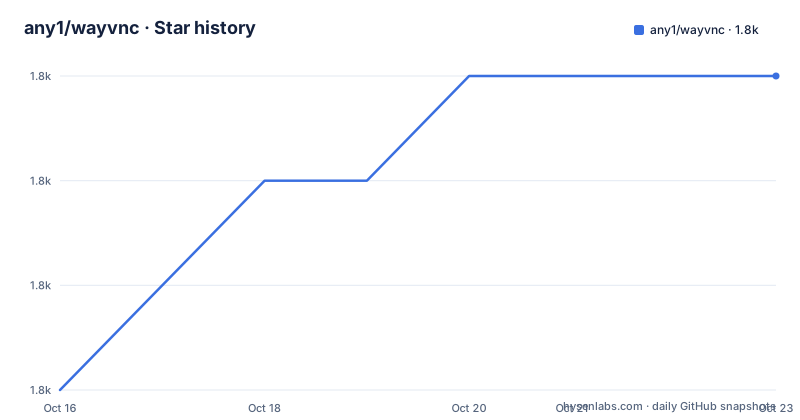
Star history
- any1/wayvnc1,848 ★ · +3
| Repository | 2026-10-16 | 2026-10-23 |
|---|---|---|
| any1/wayvnc | 1.8k | 1.8k |
3 Stars in the last 7 days, measured from the daily GitHub snapshot. Compare with other projects
Editorial analysis
It attaches to a running compositor rather than replacing one
wayvnc does not run a display server. It attaches to a Wayland session that is already up, creates virtual input devices, and exposes a single display over the RFB protocol that VNC clients speak. The virtual input part is what makes it useful rather than merely a screen mirror: a remote client can type and move a pointer, not just look.
The dependency on wlroots is hard. The README states plainly that GNOME, KDE and Weston are not supported. This narrows the audience considerably: this is for Sway and other wlroots-based compositors, not for a general workstation.
One capability is worth calling out on its own. The Wayland session may be headless, so wayvnc can run with no physical display attached at all. That turns a VNC server into a way to reach a machine that has no monitor cable plugged in, which is the situation on a rack-mounted or embedded box.
Building from source with meson and two subprojects
The build is meson and ninja. The runtime dependency list names aml, drm, libxkbcommon, neatvnc, pixman and jansson, with gbm and pam marked optional. The build needs GCC, meson, ninja and pkg-config.
Packaged installs are the easy path, and each distribution has a one-liner in the README. On Arch the set is base-devel, libglvnd, libxkbcommon, pixman, gnutls and jansson.
pacman -S base-devel libglvnd libxkbcommon pixman gnutls janssonDebian unstable and testing use the distribution's own packaging metadata, which is the shortest option available.
apt build-dep wayvncUbuntu installs the dependency set directly, including libwlroots-dev and libjansson-dev. Building then reduces to two commands.
meson build
ninja -C build
The unit tests run through meson test, and the integration tests live in a separate script under test/integration.
neatvnc and aml usually mean linking two subprojects by hand
The dependency story has a wrinkle. neatvnc and aml are both by the same author, and the README says the easiest way to satisfy them is to link them into the subprojects directory rather than install them system-wide. The procedure is a short shell sequence: clone wayvnc, neatvnc and aml side by side, then create wayvnc/subprojects and symlink the other two checkouts into it.
mkdir wayvnc/subprojects
cd wayvnc/subprojects
ln -s ../../neatvnc .
ln -s ../../aml .
cd -
The same pattern repeats for neatvnc itself, which also needs aml in its own subprojects directory. A relative symlink rather than a copy is deliberate, so an edit in one checkout is visible from the other. If your distribution already ships neatvnc and aml, this whole step is unnecessary, which is why the packaged routes come first in the README.
Localhost by default, and what changes when you override it
The default listening address is localhost. Passing an address as the first argument changes it, and 0.0.0.0 is the example the README gives for accepting connections on any interface.
./build/wayvnc
./build/wayvnc 0.0.0.0
The README is unusually direct about the consequence: do not do this on a public network or the internet without user authentication enabled. It names two protective measures. SSH tunnelling while listening on localhost is called the best option. Alternatively, wayvnc's own authentication can be enabled.
That default is the single most important operational fact here. A VNC server with no encryption and no password, reachable from the network, hands over an interactive session, so the address binding and the config file have to be treated as one decision rather than two.
Three authentication schemes with very different properties
VeNCrypt over TLS needs a private X509 key and a certificate. The README gives a self-signed generation command using an EC key on the secp384r1 curve with SHA-384, valid for 3650 days, written into the wayvnc config directory as tls_key.pem and tls_cert.pem. The subject and subjectAltName are set to localhost and 127.0.0.1, and the README says to replace those with your own host name and IP or keep them for local testing.
RSA-AES is the middle option. It combines RSA with AES in EAX mode and resists eavesdropping and man-in-the-middle attacks, but it is Trust on First Use in the same sense as SSH: the user verifies the server's credentials on first connection, and later credential changes are expected to raise a warning in the client. Enabling it requires an RSA key generated with ssh-keygen in PEM format.
ssh-keygen -m pem -f ~/.config/wayvnc/rsa_key.pem -t rsa -N ""DES is the third and the one to avoid. The README marks it as providing no encryption at all, using an outdated challenge-response scheme in which only the first eight characters of the password are used. It exists for compatibility with clients that speak DES but cannot handle no authentication, and macOS Screen Sharing is named as such a client. It also does not work when enable_pam is set, since PAM overrides password-based authentication.
The config file keys that decide what the client sees
Configuration lives at $HOME/.config/wayvnc/config by default, or wherever the --config option points. The key names are short and each one changes a specific behaviour. use_relative_paths makes the key and certificate filenames resolve against the config directory, which is why the examples can say tls_key.pem rather than a full path. address sets the listening interface. enable_auth and password turn on credential checking, username names the account. private_key_file and certificate_file point at the TLS material, while rsa_private_key_file points at the RSA key. relax_encryption and allow_broken_crypto are the two keys that unlock the DES path for legacy clients.
One consequence of use_relative_paths=true is worth planning for: the key files have to sit next to the config, so a systemd unit that runs as a different user needs those files readable by that user.
TLS and RSA credentials can be present at the same time, in which case the client chooses.
A unix socket and a wayvncctl binary for runtime control
wayvnc exposes a unix domain socket at $XDG_RUNTIME_DIR/wayvncctl, with a fallback to /tmp/wayvncctl-$UID when the runtime directory is not set. Clients connect to it and exchange JSON-formatted IPC messages to query and control the running instance, and the wayvncctl utility is the command line front end to that socket.
The detailed protocol lives in the wayvnc(1) manpage, with the client side in wayvncctl(1); the scdoc sources for both, wayvnc.scd and wayvncctl.scd, are in the repository root.
The example directory shows what people build on top. examples/auto-attach.py is a Python script, examples/single-output-sway is a configuration for a single-output Sway setup, and examples/event-watcher is an event-loop mode that runs commands when particular events occur inside wayvnc. That last one is the interesting hook: it is how a script reacts to a client connecting or a mode changing, without polling the socket from the outside.
The PAM path is implemented in a wayvnc.pam file at the repository root, which is what enable_pam engages.
Releases are frequent, the licence is permissive, and support is IRC
The repository is not archived and the last push was on 2026-09-28, with v0.10.2 released three days earlier on 2026-09-25. Before that, v0.10.1 dates from 2026-07-09 and v0.10.0 from 2026-04-28. That is a release every few months across a 0.x line, so expect API churn if you script against internals.
The licence is ISC, which is short and permissive. There is no copyleft obligation reaching code that links against it, which matters if wayvnc ends up inside a commercial image.
The top-level files give the shape of the project: COPYING for the licence, FAQ.md which the README points to for common questions, CONTRIBUTING.md, FUNDING.yml, a protocols/ directory for the RFB implementation, src/ and include/ for the server itself, and util/ for the helper binaries. Builds run on builds.sr.ht rather than GitHub Actions, with packaging status tracked through repology.
Support is the #wayvnc channel on libera.chat and the GitHub discussion forum, both named in the README.
Editorial conclusion
Adopt wayvnc if you run Sway or another wlroots compositor and need remote framebuffer access, including into a headless session with no physical display attached. Do not adopt it on GNOME, KDE or Weston, which the README rules out, and do not enable DES authentication on a network you do not fully trust, since that path sends the session unencrypted and truncates the password to eight characters. Before exposing anything beyond localhost, put a password in $HOME/.config/wayvnc/config with enable_auth=true and either generate tls_key.pem and tls_cert.pem or an rsa_key.pem, because binding to 0.0.0.0 without authentication is exactly what the README warns against.
Frequently asked questions
Does wayvnc work on GNOME or KDE?
No. The README states that wayvnc is for wlroots-based Wayland compositors and that Gnome, KDE and Weston are not supported. It is aimed at compositors such as Sway.
How do I protect a wayvnc server listening on 0.0.0.0?
The README says not to expose it on a public network or the internet without user authentication. It points to SSH tunnelling while listening on localhost as the best protection, or to enabling authentication with enable_auth=true, password and either TLS credentials or rsa_private_key_file in the config.
What is the wayvnc control socket and where is it?
wayvnc opens a unix domain socket at $XDG_RUNTIME_DIR/wayvncctl, falling back to /tmp/wayvncctl-$UID. The wayvncctl utility talks to it, exchanging JSON-formatted IPC messages to query and control the running instance.
Why does wayvnc need the neatvnc and aml subprojects?
Both are by the same author and are not always available from your distribution. The README says the easiest fix is to clone wayvnc, neatvnc and aml side by side and symlink neatvnc and aml into wayvnc/subprojects, and aml into neatvnc/subprojects.
Official sources
Add this badge to your README
If you maintain this project, the badge below links readers to this analysis and shows its maintenance status from the daily GitHub snapshot. Paste the markdown into your README; add ?metric=license or ?metric=stars to the image URL for a different field.

[](https://hysenlabs.com/projects/any1-wayvnc)Star history chart for your README
[](https://hysenlabs.com/projects/any1-wayvnc)Was this useful?