ZMap sends one packet per host and leaves every conversation to ZGrab2
ZMap is a fast single packet network scanner designed for Internet-wide network surveys.
At a glance
- What is it?
- A stateless single packet network scanner in C under the Apache-2.0, built for Internet-wide surveys rather than targeted probing. Its two headline speed figures need very different hardware and capture paths, and its statelessness is both the reason it is fast and the reason it cannot read a single banner.
- Who is it for?
- ZMap fits a researcher measuring how much of a port is reachable across the whole public IPv4 space, who can run raw packets and accept a stateless result that only says an address answered. It does not fit anyone who needs service banners, a TLS handshake, or a verdict on why a host stayed silent.
- Can I use it commercially?
- Yes. Apache-2.0 is a permissive licence: you can use, modify and sell software built on it, as long as you keep its copyright and licence notices.
- Is it still maintained?
- Yes. The repository last received commits 7 days ago.
- What is it written in?
- Mainly C, according to GitHub's language statistics.
Answers come from the project's GitHub data, last synced on November 14, 2026, and from our analysis. They are not legal advice.
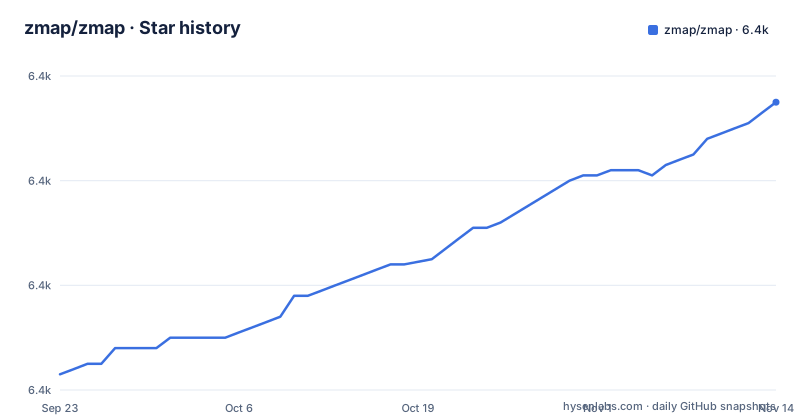
Star history
- zmap/zmap6,435 ★ · +52
| Repository | 2026-09-23 | 2026-11-14 |
|---|---|---|
| zmap/zmap | 6.4k | 6.4k |
52 Stars in the last 52 days, measured from the daily GitHub snapshot. Compare with other projects
Editorial analysis
One packet per host is the design, and ZGrab2 exists because of it
ZMap is stateless and sends a single packet per target address. There is no connection table, no handshake to complete, and no second packet to confirm anything. That constraint is what produces the throughput figures in the project description: on a typical desktop computer with a gigabit Ethernet connection, ZMap can scan the entire public IPv4 address space on a single port in under 45 minutes, and the worked example it gives is a TCP SYN packet to every IPv4 address on port 25 to find potential SMTP servers.
The cost of statelessness is concrete. Because nothing is tracked, ZMap cannot tell you what a service says, only whether it answered. The project says as much by pointing you at ZGrab2, described there as its sister project, when what you need is an involved scan such as a banner grab or a TLS handshake. Those are stateful application-layer operations, so they live in a different binary.
Nothing in the option surface changes this. There is no flag that turns a single packet into a conversation.
45 minutes on gigabit only becomes 5 minutes with netmap or PF_RING
The two speed figures come with different hardware and different capture layers. The under 45 minute number is for a typical desktop computer with a gigabit Ethernet connection. The under 5 minute number needs a 10gigE connection and either netmap or PF_RING.
That is a jump of nearly an order of magnitude resting on a packet capture path the stock libpcap stack does not provide, and the repository keeps `README.netmap.md` and `10gigE.md` as separate top level documents. The builder stage of the container image installs plain `libpcap-dev` and nothing else, so the default path through that image is the slower one.
The project frames the under 45 minute figure as the baseline for a typical desktop computer with a gigabit Ethernet connection.
Neither figure is a benchmark you can reproduce from the README alone. It gives no packet loss rate, no CPU model, and no measurement window, so treat both numbers as orientation rather than as a promise about your own uplink.
Root is not optional, and the container relocates the privilege instead of removing it
The one command given for a first scan carries a privilege requirement in front of it, and the project says it requires root privileges:
sudo zmap -p 80Raw packet sending is the reason. No unprivileged mode and no alternative path that avoids elevated capabilities are described anywhere in the README.
The container image is the project's own answer to that problem, and it relocates the privilege rather than removing it. The image builds from ubuntu:24.04. The builder stage installs build-essential, cmake, libgmp3-dev, gengetopt, libpcap-dev, flex, byacc, libjson-c-dev, libjudy-dev, pkg-config, and libunistring-dev, then configures with CMake and installs into /opt/zmap. The run stage installs only shared libraries plus dumb-init, and the entry point is dumb-init in front of the zmap binary so a ctrl-c stops a running container cleanly.
docker build -t zmap .
docker run -it --rm --net=host ghcr.io/zmap/zmap <zmap args>
That `--net=host` is the part to notice. Host networking puts the scan on your own interface, so the filesystem isolation you gained from the container is not isolation from the network.
Probe modules cover one packet protocols, which is why banners sit out of scope
The probe set is where the scope becomes concrete. Fully implemented modules cover TCP SYN scans, ICMP, DNS queries, UPnP, and BACNET, and the project points at an examples directory for UDP probes as well. Upnp is worth pausing on, because the protocol is designed to let a device be controlled by a short request from a local network, so the same single packet that discovers a host is also a request a poorly configured device may answer.
The example tree is three directories: `examples/forge-socket/`, `examples/probe-modules/`, and `examples/udp-probes/`. That tells you where to look when you add a protocol.
What a probe module cannot do is carry a dialog. Because the tool is stateless, a module has exactly one chance to elicit a response, so anything needing a request, an answer, and a follow-up request belongs to ZGrab2. ZMap will tell you that something is there. It will not tell you what it says.
The scan rate is framed as an ethical decision rather than a performance setting
A caution block sits directly under the project description, and its content is about behavior rather than syntax. Performing Internet-wide scans can have serious ethical and operational implications. While ZMap defaults to usually safe settings, the responsibility for being a good internet citizen sits with whoever runs it. The rules of thumb given are to scan at the slowest speed necessary, to scan slower if you are scanning a smaller target space, and to provide a way for network operators to opt out.
That last one is unusual in a tool of this kind. Opt out is an obligation placed on the operator running the scan, not on the owner of the network being scanned.
The tension between the two framings is worth naming. The same program is presented as something that can sweep a port across all of IPv4 in under an hour and as something that should be slowed down and made to accept exclusion requests. The project resolves this by pointing at a getting started section and a scanning best practices page in the wiki rather than encoding the policy in the tool. No option in the documented surface is described as an opt-out mechanism, so providing one falls to you.
Usage questions are pushed out of the issue tracker on purpose
Support has a routing rule and it is stated explicitly. Check the FAQ in the project wiki first, then ask the community in the Discussions category, and do not create an issue for usage or support questions.
For a tool with this many command line options and packet capture dependencies, that rule matters. The README points usage questions to the FAQ and the Scanning Best Practices page rather than to the tracker.
The repository is not archived, and the last recorded push to main came on 25 October 2026. The most recent release is v4.4.0 from 29 May 2026, with v4.3.4 in May 2025 and v4.3.3 in April 2025 before it, so the gap between a tagged release and work on main is a few months rather than a sign of abandonment.
The tree also carries SECURITY.md, CONTRIBUTING.md, a CHANGELOG.md, and a CITATION.cff, which is where to look for what actually changed instead of asking in Discussions.
Everything the release publishes is staged and formatted by scripts in the tree
The build and release machinery sits at the top level rather than inside a hidden pipeline. There is a `release-build.sh` at the root, plus `scripts/`, `containers/`, `conf/`, `lib/`, `src/`, and `test/`.
Style is enforced by two checked in entry points, `format.sh` and `checkFormat.sh`, alongside a `.clang-format` and an `.editorconfig`. A C project carrying that combination is telling you formatting is a gate rather than a suggestion.
The Docker file is documented as a build path in its own comments, not just a convenience wrapper. It warns about layer caching and explains that building a specific commit means checking that commit out first. The image carries a label pointing at its source repository, which is the convention for something published to a registry.
What none of these files pin for you is a dependency version beyond the base image. The Docker file names its apt packages without versions, so a rebuild later resolves to whatever that suite offers then. Installation itself is delegated: the README points at INSTALL.md for package manager and from source instructions, and names 4.4.0 as the latest stable release for Linux, macOS, and BSD.
A stateless single packet design leaves several answers it cannot give
It is worth being explicit about the gaps, because the speed claims invite assumptions the design does not support.
ZMap cannot report a service banner, a certificate, or a protocol version, since collecting any of those needs a handshake and the tool holds no handshake state. It cannot distinguish a host that filtered the packet from a host that was switched off, because both look the same on a single unanswered packet. It cannot tell you whether a port is open to a particular client after the scan finishes, since the address you scanned from is one machine on a network with its own rules.
It also does not cover Windows. The stated operating systems are GNU/Linux, Mac OS, and BSD, and the release supports Linux, macOS, and BSD. The container is Linux only, built from ubuntu:24.04, so there is no documented path on Windows in this repository.
And there is no reporting layer here. The output is a progress line, an address, and a hitrate, and the README does not document a way to turn a finished sweep into structured records beyond what the tool prints.
Editorial conclusion
ZMap fits a researcher measuring how much of a port is reachable across the whole public IPv4 space, who can run raw packets and accept a stateless result that only says an address answered. It does not fit anyone who needs service banners, a TLS handshake, or a verdict on why a host stayed silent. Before running it, decide who asked for the scan, whether the network operators have a way to opt out, and what capture path you actually have, because the sub five minute figure needs netmap or PF_RING on 10gigE and nothing else reaches it.
Frequently asked questions
What is ZGrab, and how does it relate to ZMap?
ZGrab2 is described as ZMap's sister project, built for more involved scans such as a banner grab or a TLS handshake. It performs stateful application-layer handshakes, which is the work ZMap's stateless single packet design cannot do.
What are the key differences between ZMap and Nmap?
The README makes no comparison with Nmap. It says architecture details and a comparison with other tools are in three research papers, and it separates ZMap as stateless and single packet from ZGrab2, which is stateful.
How long does a ZMap scan of a whole port actually take?
Under 45 minutes on a typical desktop with a gigabit Ethernet connection, and under 5 minutes on a 10gigE connection with either netmap or PF_RING. No CPU model, packet loss rate, or measurement window is given for either figure.
Why does ZMap need root privileges?
It sends raw packets, and the documented command carries sudo in front of it. The container image handles this by running with host networking rather than by dropping the requirement.
Which operating systems can ZMap run on?
GNU/Linux, Mac OS, and BSD. The latest stable release, 4.4.0, is stated to support Linux, macOS, and BSD, and the container image is built from ubuntu:24.04.
What protocols can a ZMap probe module send?
Fully implemented probe modules cover TCP SYN scans, ICMP, DNS queries, UPnP, and BACNET, with a large number of UDP probes kept in the examples directory. Anything needing a handshake belongs to ZGrab2.
Official sources
Add this badge to your README
If you maintain this project, the badge below links readers to this analysis and shows its maintenance status from the daily GitHub snapshot. Paste the markdown into your README; add ?metric=license or ?metric=stars to the image URL for a different field.

[](https://hysenlabs.com/projects/zmap-zmap)Star history chart for your README
[](https://hysenlabs.com/projects/zmap-zmap)Was this useful?