ravynOS: a pre-alpha Darwin and FreeBSD system chasing macOS source compatibility on x86-64
An open-source OS project that aims to provide source and binary compatibility with macOS® and a similar user experience.
At a glance
- What is it?
- ravynOS stitches Darwin, FreeBSD and new code into an OS meant to look and build like macOS. At version 0.7.1 it labels itself Pre Alpha, targets x86-64 only, and promises binary compatibility only eventually.
- Who is it for?
- ravynOS is for systems programmers and Mac platform enthusiasts who want to help build a Darwin and FreeBSD based OS, or who want to boot the demo VM and see where it stands. It is not for anyone who needs to run existing Mac binaries or wants a daily desktop, since the build declares itself Pre Alpha and binary compatibility is a later goal.
- Can I use it commercially?
- Not without permission. GitHub finds no licence file in the repository, and without a licence all rights are reserved by default: you may read the code but not reuse it. Check the README, or ask the authors, before using it.
- Is it still maintained?
- Yes. The repository last received commits 70 days ago.
- What is it written in?
- Mainly C, according to GitHub's language statistics.
Answers come from the project's GitHub data, last synced on November 15, 2026, and from our analysis. They are not legal advice.
Star history
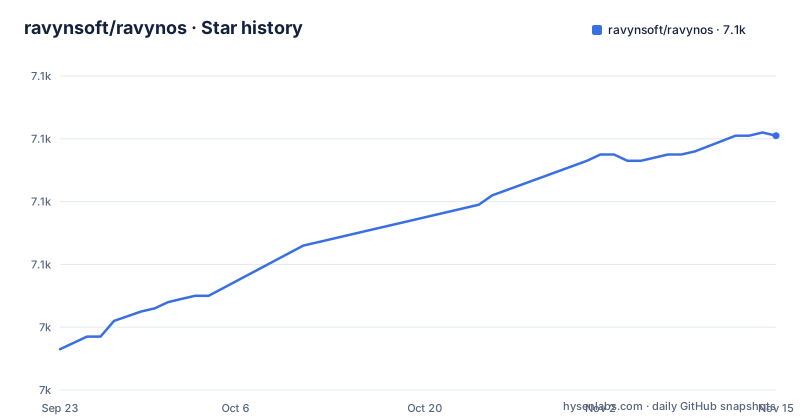
- ravynsoft/ravynos7,101 ★ · +68
| Repository | 2026-09-23 | 2026-11-15 |
|---|---|---|
| ravynsoft/ravynos | 7k | 7.1k |
68 Stars in the last 53 days, measured from the daily GitHub snapshot. Compare with other projects
Editorial analysis
Darwin and FreeBSD underneath, new code for the gaps
ravynOS sets out to give users a macOS-like experience and some compatibility with macOS on x86-64 machines. It does not start from scratch. It builds on Darwin and FreeBSD, pulls in existing open source packages that already work in the same space, and writes new code where nothing suitable exists. The repository tree reflects that mix: Kernel/ and BSD/ sit beside GNU/, then a set of Apple-shaped directories, Frameworks/, PrivateFrameworks/, CoreServices/, SystemLibrary/, Libraries/ and SysApps/, plus Developer/, tools/, ISO/ and installravynos/. The default branch is named darwin rather than main. The primary language is C. The last push to the repository was on 2026-09-06, and the project points newcomers to CONTRIBUTING.md for current needs, a Discord server, and the #ravynOS-general:matrix.org room. The README exists in ten translations, but the English text is authoritative where they differ, because volunteers maintain the others and they are not always current.
The build itself says Pre Alpha at version 0.7.1
The top-level Makefile carries two lines that set expectations better than any feature list: PROD_VERSION = 0.7.1 and PROD_FAMILY = Pre Alpha. The README's last design goal reads pleasant to use, secure, stable, and performant, and it is a goal, not a status report. Readers who arrive from searches such as ravynos review or ravynos download expecting a usable Mac replacement should read that label first.
The practical consequence is that ravynOS is something to experiment with, contribute to, or follow, not something to install on a machine you depend on. Nothing in the README states which of the design goals are complete today. If you want to judge progress, the published demo VM image is the direct route, and anything you plan around should be confirmed there rather than inferred from the list of goals.
Source compatibility comes first, Mac binaries come eventually
The first design goal is source compatibility with macOS applications: you could take the source of a Mac application, compile it on ravynOS, and run it. Binary compatibility, meaning running an app already compiled for macOS, is explicitly marked as eventual. The OS also aims to provide the Apple APIs that applications expect, along with the GUI metaphors that go with them: a file manager, an application launcher, and a top menu bar that reflects the open application.
This split has a direct cost for users. Any Mac program you only have as a compiled binary, which covers most commercial software, is outside what the project currently promises. The source route only helps when you have the code and the Apple APIs it calls are covered. Developers porting their own apps are the audience this goal serves today. Applications are meant to ship as self-contained App Bundles, with support for DMG files and other archive formats, matching how Mac software is packaged.
x86-64 is the only configured architecture
The README names x86-64 as the platform and arm64/arm64e as an eventual one. The Makefile matches: ARCH_CONFIGS = X86_64 and KERNEL_CONFIGS = RELEASE, under a comment that reads Set ONE arch and ONE config. A conditional maps a MACHINE value of x86_64 or amd64 to BuildArch = X86 and CpuArch = x86_64, and anything else falls through to BuildArch = AArch64 and CpuArch = aarch64. That branch shows arm64 has a place in the build logic, but the configured architecture is X86_64 and the SDK release is labelled x86_64.
For readers the consequence is plain. Apple Silicon Macs and other arm64 hardware are not a supported target yet, so anyone hoping to run ravynOS natively on recent Mac hardware is waiting on a goal the project has not reached. Plan to use an x86-64 machine or a VM on one.
A BSD make build that writes outside the checkout
The top-level Makefile is written in BSD make syntax, with .if blocks, .include lines and ${.CURDIR}, and it pulls its rules from ./BSD/share/mk, including sys.mk, src.tools.mk, bsd.linker.mk and bsd.compiler.mk. The build output does not go inside the source tree. _ROOT_BINARY_DIR is set to ${ROOT_SOURCE_DIR}/../build, and OBJTOP, OBJROOT and MAKEOBJDIRPREFIX all point there, so a checkout at ~/src/ravynos writes into ~/src/build. Make sure that sibling directory has room and is not something else you care about.
The world target builds, in order, version, Developer, Kernel, Libraries/libfirehose_kernel, Libraries and BSD. When the host OS reports as Darwin, the build uses the host's CC, CXX and AR to build its toolchain; on any other host it falls back to /usr/bin/cc, /usr/bin/c++ and /usr/bin/ar unless you override HOST_CC, HOST_CXX and HOST_AR. CFLAGS adds -Wno-incompatible-sysroot to silence warnings about the ravynOS.sdk versus MacOSX.sdk naming. If a toolchain bundle is already present, the build defaults to not rebuilding it.
No install steps in the README, only release artifacts
The README contains no installation commands, which matters for anyone searching how to install ravynos. What the project does publish is a set of release artifacts, each aimed at a different reader:
- demo-vm, the ravynOS Demo VM Image, published 2026-07-25 - SDK_0.7.0.1, the ravynOS SDK and KDK v0.7.0.1 for x86_64, published 2026-02-07 - linux_tc_0.2, a ravynOS Xcode Toolchain for Linux x86-64, published 2025-12-24
The demo VM is the route for someone who wants to see the system running. The SDK and KDK are for building software and kernel components against ravynOS. The Linux toolchain lets developers on Linux x86-64 hosts build for ravynOS without a Mac, which lines up with the Makefile's non-Darwin host branch. Note that the SDK is versioned 0.7.0.1 while the Makefile is already at 0.7.1, so the SDK can trail the source tree. The repository also has ISO/ and installravynos/ directories, but no install procedure is written in the README itself.
Mac folder layout and filesystems are goals you should verify
Two design goals describe the system a user would see. The first is a macOS-compatible folder layout, with /Library, /System, /Users and /Volumes. The second is filesystem support: HFS+ and APFS to match Macs, plus FAT, NTFS and ZFS. A further goal promises an updated Unix environment with current tools, shells and power user tools, a direct contrast to the older userland Mac users are used to.
These are listed as goals, and the README does not mark any of them as finished. Someone hoping to mount an APFS disk from a Mac, or to rely on NTFS write support, should test that in the demo VM before planning around it. The folder layout goal is easier to reason about, because the source tree already mirrors Apple's naming with SystemLibrary/, CoreServices/ and the Frameworks directories, but a directory name in the tree is not proof that the installed system behaves the same way.
Editorial conclusion
ravynOS is for systems programmers and Mac platform enthusiasts who want to help build a Darwin and FreeBSD based OS, or who want to boot the demo VM and see where it stands. It is not for anyone who needs to run existing Mac binaries or wants a daily desktop, since the build declares itself Pre Alpha and binary compatibility is a later goal. Before investing time, check which of the listed design goals actually work in the demo VM image and confirm your hardware is x86-64.
Frequently asked questions
How do you install ravynOS?
The README gives no install commands. The project publishes a ravynOS Demo VM Image release dated 2026-07-25, which is the route to try it, and the repository has ISO/ and installravynos/ directories.
Is ravynOS just FreeBSD with a Mac look?
No. ravynOS builds on both Darwin and FreeBSD, adds existing open source packages, and writes new code to fill the gaps, aiming at macOS source compatibility and a Mac-like UX.
Does ravynOS use Darwin?
Yes. ravynOS builds on Darwin together with FreeBSD, and its default branch is named darwin.
Is ravynOS a Linux distribution?
No. ravynOS is built on Darwin and FreeBSD. Its Linux connection is a separate release, an Xcode toolchain for Linux x86-64 hosts used to build for ravynOS.
Official sources
Add this badge to your README
If you maintain this project, the badge below links readers to this analysis and shows its maintenance status from the daily GitHub snapshot. Paste the markdown into your README; add ?metric=license or ?metric=stars to the image URL for a different field.

[](https://hysenlabs.com/projects/ravynsoft-ravynos)Star history chart for your README
[](https://hysenlabs.com/projects/ravynsoft-ravynos)Was this useful?