Keka: a macOS and iOS file archiver where the GitHub repo is not the app
The macOS & iOS file archiver
At a glance
- What is it?
- Keka is a macOS and iOS archiver distributed from keka.io. Its GitHub repository is a support surface for issues, a wiki and translations, so anyone expecting source code or a build script will be disappointed.
- Who is it for?
- Keka suits macOS and iOS users who want a graphical archiver that compresses files in a bunch of formats and can encrypt them without touching a terminal, and who accept that the app source is not in this repository and the repository is a support surface. It is not for people who need to audit or build the archiver themselves, because the repository README points to keka.io for downloads and states the repo is used mainly for issues and the collaborative wiki.
- Can I use it commercially?
- Not without permission. GitHub finds no licence file in the repository, and without a licence all rights are reserved by default: you may read the code but not reuse it. Check the README, or ask the authors, before using it.
- Is it still maintained?
- Yes. The repository last received commits 5 days ago.
- What is it written in?
- Mainly PHP, according to GitHub's language statistics.
Answers come from the project's GitHub data, last synced on November 14, 2026, and from our analysis. They are not legal advice.
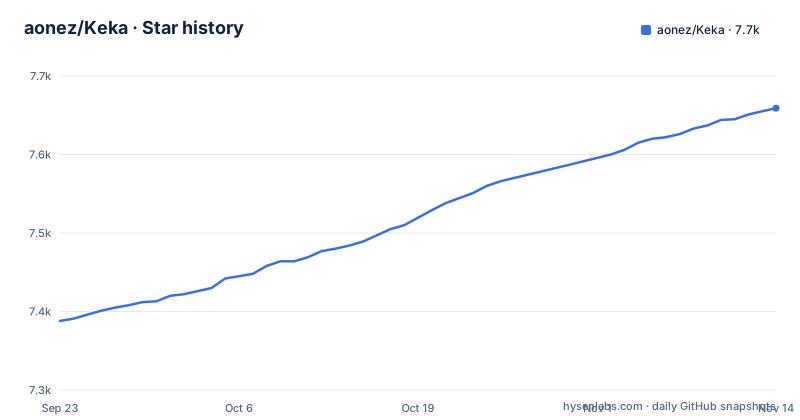
Star history
- aonez/Keka7,659 ★ · +271
| Repository | 2026-09-23 | 2026-11-14 |
|---|---|---|
| aonez/Keka | 7.4k | 7.7k |
271 Stars in the last 52 days, measured from the daily GitHub snapshot. Compare with other projects
Editorial analysis
What Keka solves, and who it is actually for
macOS ships with Archive Utility, which handles zip and little else. Engineers who receive .7z, .rar or .zst files from colleagues, CI artifacts or download mirrors usually end up installing something extra. Keka positions itself at that gap: the README says you can "compress as many files as you want in a bunch of formats" and encrypt them for storage and sharing.
The intended audience is not the command-line crowd. Someone who already lives in 7z, unrar and zstd on the terminal gains little from Keka. The people who benefit are Mac and iOS users who want drag-and-drop compression, password-protected archives and extraction of formats the system does not handle, without learning flags. The repository description ("The macOS & iOS file archiver"), plus the separate Translations-iOS and Translations-macOS directories at the top level, show that mobile is a first-class target rather than an afterthought.
Why the GitHub repository is not the application
This is the part that trips people up. The primary language is listed as PHP, and the top-level entries are .gitattributes, .gitconfig, .github/, .gitignore, Bin/, FUNDING.yml, Img/, README.md, Translations-Web/, Translations-iOS/, Translations-macOS/ and Wiki/. There is no Xcode project, no Swift or Objective-C package manifest, and no build instructions. The README is explicit: "This repository is used mainly to take care of Issues and have a collaborative Wiki." The PHP is consistent with a translation or web-facing helper rather than the shipped archiver.
So the data flow is: the application is built and distributed elsewhere, and the repository collects the community layer around it. Bin/ presumably holds helper binaries, though the README does not describe their contents. If you clone this repo expecting to compile Keka, you will not get there. Treat it as a bug tracker, a documentation wiki and a translation workspace.
Installing Keka on Mac and getting a first archive out
The README does not give a package-manager command. It says plainly: "Go to the Keka website at https://www.keka.io to get the latest version." That is the install path. There is no Homebrew formula, no Mac App Store link and no curl script documented in the repository.
If you need a specific build rather than the current one, the Releases section is the documented fallback. The README states that you can "download a specific version" there, and points to https://www.keka.io/#legacy for the updated list of legacy versions. Recent releases include v1.6.6 and v1.6.7, both published on 2026-06-30, and v1.6.8, published on 2026-09-24.
The README does not document usage steps, so the reliable reference for step-by-step usage is the project Wiki, which the README describes as the place to "learn and share Keka knowledge."
To inspect what the repository actually ships, clone it and list the top level:
git clone https://github.com/aonez/Keka.git
cd Keka
ls
That clone gives you translation folders, image assets and configuration files, not a runnable archiver. The `ls` output is the quickest way to confirm the repository's real scope.
The limitations that matter before you commit
The biggest one is that the application source is not in this repository. The repository carries no licence file in the top-level listing, and the README never states licence terms. Anyone who needs to audit the compression code, patch a format handler or redistribute a modified build cannot do it from this repository. For a security-sensitive tool that handles untrusted archives, that is a real constraint, not a footnote.
Second, the repository is not the release channel. Version history lives on keka.io and in the Releases section, and the README directs you there rather than describing an update mechanism. Whether Keka self-updates, prompts, or requires a manual re-download is not documented in the README, so do not assume.
Third, the README does not document rollback. If a new release breaks your workflow, the only stated route back is the legacy versions list on the website. There is no documented downgrade command, no version pinning file, and no changelog in the repository root. Plan for that if you deploy Keka across a team.
Finally, this is a GUI tool for macOS and iOS. On Linux servers, in CI containers, or anywhere without a desktop session, it is simply the wrong tool, and the project makes no claim otherwise.
How Keka compares with the command-line archivers
The honest alternative is not another Mac app. It is p7zip, unrar and zstd invoked from the terminal, or a wrapper like tar for the formats it covers. The difference in approach is fundamental. Command-line tools expose every switch, script cleanly, and run headless on any Unix; Keka puts a graphical app in front of compression and encryption, which is exactly why people choose it.
That trade-off cuts both ways. If your job is to extract a hundred archives in a loop, or to decompress a stream inside a Docker build, a shell one-liner beats a GUI every time, and Keka offers nothing there. If your job is to send a password-protected .7z to a colleague from a Mac laptop, the terminal route means remembering the right flags and getting the encryption mode correct, which is where GUI tools earn their place.
A second comparison is with the built-in Archive Utility. Keka's advantage is format coverage: the README says it compresses files "in a bunch of formats". The cost is an extra third-party application in your stack, with the licensing and update questions described above.
Maintenance, releases and what the repository tells you
The repository is not archived, and its last push was on 2026-10-19. That is recent enough that the issue tracker and wiki are live surfaces rather than a graveyard. The release cadence visible in the release list is steady: v1.6.6 and v1.6.7 on 2026-06-30, then v1.6.8 on 2026-09-24, with the two June releases landing hours apart, which suggests a quick follow-up fix rather than a planned pair.
Upgrade cost is where the repository is thin. Nothing in the README describes an update channel, a changelog format, or how a user on v1.6.7 learns that v1.6.8 exists. The Releases page is the record; watching it is the only documented way to track versions. For a single Mac that is fine. For a fleet, you are building your own process around a page you have to check.
On licensing, the README does not state a licence identifier anywhere, and the repository has no top-level LICENSE entry. That means the terms governing use, redistribution and modification come from keka.io, not from the repository, and anyone embedding Keka in a commercial image or a managed deployment should read those terms directly. This is a factual gap in the repository, not a legal opinion.
Editorial conclusion
Keka suits macOS and iOS users who want a graphical archiver that compresses files in a bunch of formats and can encrypt them without touching a terminal, and who accept that the app source is not in this repository and the repository is a support surface. It is not for people who need to audit or build the archiver themselves, because the repository README points to keka.io for downloads and states the repo is used mainly for issues and the collaborative wiki. Before adopting it, check the release list at github.com/aonez/Keka/releases for the version you need, confirm the licence terms shown on keka.io, and read the open issues for your format of interest.
Frequently asked questions
What is Keka?
Keka is described in its README as the macOS file archiver: you can compress files in a bunch of formats and encrypt them for storage and sharing. The repository description also names iOS, and the README calls the repository mainly a place for Issues and the collaborative Wiki.
How do you use Keka?
The README does not document the menu labels, but the project keeps usage guidance in its Wiki, which the repository links as the place to "learn and share Keka knowledge."
Is Keka safe?
The README contains no security audit and no licence statement, and the repository has no top-level licence file, so safety cannot be confirmed from what is published there. The README does say Keka can encrypt archives "to store and share securely and with privacy," which describes a feature rather than an audit.
Is Keka a name?
The README treats Keka as the product name of the macOS and iOS file archiver, and the repository is aonez/Keka on GitHub. The README does not explain the origin or meaning of the word itself.
Official sources
Add this badge to your README
If you maintain this project, the badge below links readers to this analysis and shows its maintenance status from the daily GitHub snapshot. Paste the markdown into your README; add ?metric=license or ?metric=stars to the image URL for a different field.

[](https://hysenlabs.com/projects/aonez-keka)Star history chart for your README
[](https://hysenlabs.com/projects/aonez-keka)Was this useful?