Metis: Arm's agentic code review tool, built around local evidence
Metis is an open-source, AI-driven tool for deep security code review
At a glance
- What is it?
- Metis is an open-source, AI-driven security code review framework from Arm's Product Security Team that reviews and triages code with LLMs, validates its own findings and those of third-party SAST tools, and supports about twenty languages through a plugin system, with ChromaDB by default and PostgreSQL with pgvector or Qdrant as alternatives. It is a research-grade tool with a real pipeline, not a prompt wrapper.
- Who is it for?
- Adopt Metis if you are reviewing large or legacy codebases where conventional linters and static analysis produce more noise than signal, and if you can accept that findings need a human in the loop. Do not adopt it as a replacement for a SAST tool or a policy gate, because it is a reviewer rather than a gate, and its own output is validated rather than final.
- Can I use it commercially?
- Yes. Apache-2.0 is a permissive licence: you can use, modify and sell software built on it, as long as you keep its copyright and licence notices.
- Is it still maintained?
- Yes. The repository last received commits 2 days ago.
- What is it written in?
- Mainly Python, according to GitHub's language statistics.
Answers come from the project's GitHub data, last synced on November 7, 2026, and from our analysis. They are not legal advice.
Star history
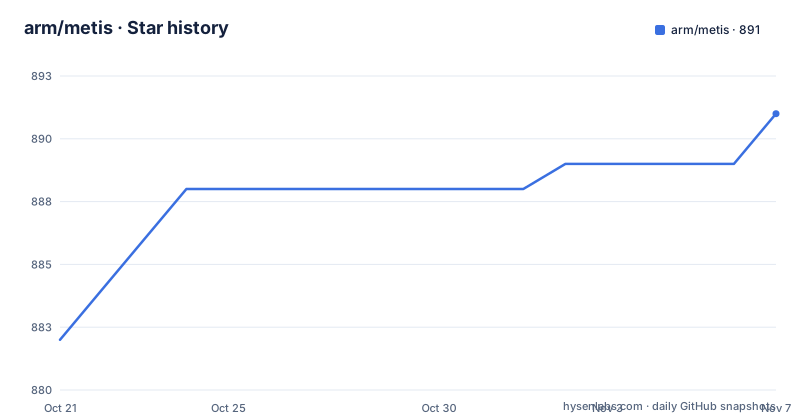
- arm/metis891 ★ · +9
| Repository | 2026-10-21 | 2026-11-07 |
|---|---|---|
| arm/metis | 882 | 891 |
9 Stars in the last 17 days, measured from the daily GitHub snapshot. Compare with other projects
Editorial analysis
The problem: review fatigue in large and legacy codebases
The audience for Metis is stated with unusual precision: it helps engineers detect subtle vulnerabilities, improve secure coding practices, and reduce review fatigue, and this is especially valuable in large, complex or legacy codebases where traditional tooling often falls short.
That last clause is the design brief. A linter and a static analyser find the mistakes that have patterns. The bugs that survive in a mature codebase are the ones where a value is checked in one place, trusted in another, and used in a third, and no rule set describes that. It is also the class of bug a human reviewer, tired at the end of a long review session, is most likely to miss.
Metis is an open-source, agentic AI security framework for deep security code review, created by Arm's Product Security Team, and the project describes itself as an open-source, AI-driven tool for deep security code review. The name is after the Greek goddess of wisdom, deep thought and counsel.
Two features frame the design. The first is deep reasoning: unlike linters or traditional static analysis tools, Metis does not rely on hardcoded rules, and uses LLMs capable of semantic understanding and reasoning. The second is deterministic local evidence: reviews and triage emphasise source-local analysis, language plugins and deterministic evidence collection over broad retrieval.
The language is Python, the licence is Apache-2.0, the project requires Python 3.12 or newer, and the last push was on 2026-10-19. The published releases are metis-v1.5.5 from 2026-10-13, metis-v1.5.2 from 2026-09-04 and metis-v1.5.0 from 2026-07-02.
The core choice: source-local evidence instead of broad retrieval
The second feature is the one that distinguishes Metis from the many tools that paste a repository into a context window and hope.
Deterministic local evidence means that when Metis looks at a function, the evidence it gathers is the code around that function, gathered in a way that can be checked, and the language plugins and the code graph give it the structure it needs to do that. Broad retrieval, in contrast, means fetching whatever seems relevant from a large store, which is convenient and noisy.
The distinction is not academic for a security tool. A finding that cites a specific line in a specific file, reachable through a specific call path, can be verified by a human in a minute. A finding that cites a retrieved fragment cannot. The tooling in the repository reflects this: there is a document for the current review graph and the SARIF triage flow, and a separate document for optional compilation database filtering for C and C++ review, which is a mechanism for narrowing the code the tool considers.
The vector store backends, ChromaDB, PostgreSQL with pgvector and Qdrant, exist to support the same idea. A code graph is a local, structural index, and the vector store sits beside it for the parts of the work that are genuinely about similarity.
The framing of issue validation completes the picture, and it is the part that makes the tool credible in a review process: it validates findings from its own analysis and from third-party SAST tools, gathering evidence to reduce false positives. A tool that can also argue with another tool's output is far more useful in a pipeline than one that just adds more findings to the queue.
The language matrix: CodeGraph for C and C++, plugins for everything else
The supported languages table is the clearest description of how the tool works, because it separates two tiers of analysis.
C and C++ get the deeper treatment: Simple LLM and CodeGraph Reachability for review, and Navigation-assisted LLM with CodeGraph context for triage, backed by a tree-sitter CodeGraph. Reachability matters here, because in C and C++ the question is rarely whether the code is wrong in isolation but whether an untrusted value can reach a dangerous operation, and a code graph is what lets the model reason about that path rather than about the file it happens to be reading.
Every other language gets a language-plugin simple LLM review and a navigation-assisted LLM for triage, with tree-sitter code splitting as the mechanism. The list is long: Java, C#, Python, Ruby, Rust, Solidity, TypeScript, Terraform, Go, TableGen, Verilog, SystemVerilog, JavaScript, Kotlin, Perl, PHP, AArch64 Assembly and Jupyter Notebook.
The practical reading is that a language plugin gives the model a way to split a file into the units that matter, and navigation gives it a way to move between them. That is a lighter treatment than the code graph in C and C++, and the difference is one of engineering effort: building a call graph for a language with a stable compilation model is a different job from splitting a file with tree-sitter.
The plugin system is described as making it easy to extend support to additional languages, and extensibility is listed as a feature in its own right, alongside support for additional languages, models and new prompts.
Providers and vector stores, and the local default
The model layer is where a tool like this has to be flexible, because the interesting question for a security team is usually where the model runs and what leaves the network.
Metis supports the major LLM services and local models: OpenAI, Azure OpenAI, Anthropic, Gemini, AWS Bedrock, Bedrock Mantle, vLLM, Ollama, llama.cpp and LiteLLM, with OpenAI as the default. The provider is selected by setting llm_provider.name in a trusted configuration file and selecting it with a --config PATH argument, and the matching extra has to be installed.
The storage layer has the same shape. By default Metis uses ChromaDB for local, no-setup usage, and PostgreSQL with pgvector and Qdrant are available as optional backends. The distinction that matters is operational: the default needs nothing running, while the Postgres path wants a database with the pgvector extension, and the compose file for it runs pgvector/pgvector:pg17 on port 5432 with a data volume and a database initialisation directory mounted in.
The dependency list shows the shape of the implementation: chromadb, langchain, langchain-core, langchain-openai, langgraph, langsmith, llama-index with the Chroma vector store, pathspec, prompt-toolkit for the interactive prompt, pydantic, pyyaml, rich for the terminal output, tree-sitter with tree-sitter-language-pack, and unidiff for handling unified diffs. The optional extras add bandit, mypy, pre-commit and ruff for linting, boto3 and the AWS LangChain integrations for Bedrock, the Anthropic integration, and the Google GenAI integration for Gemini.
Installing: uv, the extras and the container image
The installation path is short, and it is built around uv rather than pip and a virtualenv of your own making.
After cloning, you can either create a virtual environment or install the dependencies system wide. The recommended route is:
uv venv
uv pip install .
and the system wide variant adds a flag:
uv pip install . --systemThe backends and providers are extras rather than separate installs, so you pay for what you use:
uv pip install '.[postgres]'uv pip install '.[qdrant]'The container route is a build rather than a compose file for the application itself, and the Dockerfile is a careful piece of work. It builds on a pinned uv image with a digest, creates a dedicated unprivileged user, syncs the dependencies, and produces a runtime stage on a pinned Python 3.13 slim image. It also downloads the tiktoken encoding file into a cache directory at build time and points TIKTOKEN_CACHE_DIR at it, so the tokeniser does not need the network at run time. The entrypoint is the metis command itself.
After the install you need a model provider. OpenAI is the default, and the key is exported before use:
export OPENAI_API_KEY="your-key-here"For any other provider, set llm_provider.name in a trusted configuration file, select it with --config PATH, and install the matching extra. The repository carries an examples/ directory with one directory per provider, including anthropic, azure_openai, bedrock, bedrock_mantle, gemini, llamacpp, ollama and vllm, plus a focused_review_code example.
Maintenance, licence and where Metis is the wrong tool
The licence is Apache-2.0, recorded in the project metadata with the licence text in the LICENSE file, and the repository also carries a SECURITY.md for reporting issues and a CONTRIBUTION.md alongside an AGENTS.md.
The maintenance signals are the ones a security tool needs. The repository is not archived, the last push was on 2026-10-19, and the release history shows a steady line of 1.5.x tags through 2026. The badge set is also telling: pre-commit enabled, Ruff for linting and format, Python 3.12 or newer, an OpenSSF Scorecard badge, and an OpenSSF Best Practices badge. For a tool whose output people act on, having the dependency hygiene visible is part of the product.
Where Metis is the wrong tool is a matter of expectation. It is a reviewer, not a gate. The issue validation stage is there to reduce false positives, not to certify a finding, and the documentation does not claim otherwise. If you need a check that blocks a merge on a specific pattern, a linter or a SAST rule is the right instrument and Metis is a second opinion on top of it.
It is also the wrong tool where the code cannot be shared with a model provider. The local options in the list, vLLM, Ollama and llama.cpp, exist for that case, and the ChromaDB default keeps the storage local too, but a team with a strict rule about code leaving the network has to configure the local path deliberately rather than install and run.
And for a small codebase, a human reading the diff is probably better value than an agentic review pipeline with a graph, a store and a model in the loop. Metis earns its cost in the large and legacy case, which is exactly where the project says it is aimed.
Editorial conclusion
Adopt Metis if you are reviewing large or legacy codebases where conventional linters and static analysis produce more noise than signal, and if you can accept that findings need a human in the loop. Do not adopt it as a replacement for a SAST tool or a policy gate, because it is a reviewer rather than a gate, and its own output is validated rather than final. Before you run it, decide which model provider and which vector store you will use, since the default ChromaDB setup is local but the Postgres and Qdrant paths change the deployment, and read the execution graph and triage flow documents to understand what the tool does before it reviews anything.
Frequently asked questions
What is Metis and who builds it?
Metis is an open-source, agentic AI security framework for deep security code review, created by Arm's Product Security Team. It is designed to help engineers detect subtle vulnerabilities, improve secure coding practices and reduce review fatigue, especially in large, complex or legacy codebases.
How is Metis different from a linter or a static analyser?
Unlike linters or traditional static analysis tools, Metis does not rely on hardcoded rules, and uses LLMs capable of semantic understanding and reasoning. Reviews and triage emphasise source-local analysis, language plugins and deterministic evidence collection over broad retrieval, and findings from its own analysis and from third-party SAST tools are validated to reduce false positives.
Which languages does Metis support?
C and C++ get a CodeGraph reachability review and a navigation-assisted triage with a tree-sitter backed code graph. Java, C#, Python, Ruby, Rust, Solidity, TypeScript, Terraform, Go, TableGen, Verilog, SystemVerilog, JavaScript, Kotlin, Perl, PHP, AArch64 Assembly and Jupyter Notebook get a language-plugin simple LLM review and a navigation-assisted LLM for triage, with tree-sitter code splitting.
How do I install Metis and point it at a model?
After cloning, run uv venv and then uv pip install ., or uv pip install . --system, and add extras such as '.[postgres]', '.[qdrant]' or a provider extra. The default provider is OpenAI, which needs export OPENAI_API_KEY="your-key-here"; any other provider is selected by setting llm_provider.name in a trusted configuration file and passing --config PATH.
Does Metis need a database, and what licence is it under?
By default Metis uses ChromaDB for local, no-setup usage, and PostgreSQL with pgvector and Qdrant are available as optional backends, with a compose file for the Postgres one. The licence is Apache-2.0, the package requires Python 3.12 or newer, and the last push was on 2026-10-19 with release metis-v1.5.5 dated 2026-10-13.
Official sources
Add this badge to your README
If you maintain this project, the badge below links readers to this analysis and shows its maintenance status from the daily GitHub snapshot. Paste the markdown into your README; add ?metric=license or ?metric=stars to the image URL for a different field.

[](https://hysenlabs.com/projects/arm-metis)Star history chart for your README
[](https://hysenlabs.com/projects/arm-metis)Was this useful?