OpenReel Video: a browser-based, client-side video editor built on WebCodecs and WebGPU
OpenReel Video - Professional browser-based video editor. Open source CapCut alternative. 100% browser-based, no installation, no cloud uploads, no watermarks.
At a glance
- What is it?
- OpenReel Video is an MIT-licensed React and TypeScript editor that runs in the browser, with alpha desktop builds and a pnpm monorepo you can self-host. This review covers what it does, how to run it locally, and where the client-side design breaks down.
- Who is it for?
- Adopt OpenReel Video if you edit short-form footage on a recent Chrome or Edge machine and want the timeline to stay on your own disk. Skip it if you need a headless render farm, a stable 1.0, or a browser without WebCodecs.
- Can I use it commercially?
- Yes. MIT is a permissive licence: you can use, modify and sell software built on it, as long as you keep its copyright and licence notices.
- Is it still maintained?
- Yes. The repository last received commits 29 days ago.
- What is it written in?
- Mainly TypeScript, according to GitHub's language statistics.
Answers come from the project's GitHub data, last synced on November 15, 2026, and from our analysis. They are not legal advice.
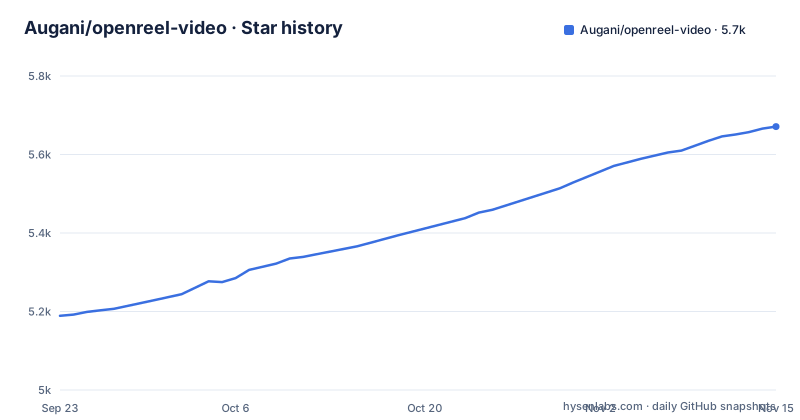
Star history
- Augani/openreel-video5,671 ★ · +482
| Repository | 2026-09-23 | 2026-11-15 |
|---|---|---|
| Augani/openreel-video | 5.2k | 5.7k |
482 Stars in the last 53 days, measured from the daily GitHub snapshot. Compare with other projects
Editorial analysis
The problem OpenReel Video targets: editing without an upload or an installer
Most browser video tools are thin front ends. You drag a clip in, it goes to a server, and the render comes back as a download link. OpenReel Video takes the opposite position. The README states that core editing and rendering happen on your device, and that you can import, cut, preview and export local media without uploading it to a server; optional AI and connected services use network requests.
That constraint defines the audience. It suits someone cutting a short video on a laptop who does not want a 4 GB install, a subscription, or a watermark on the output. It also suits privacy-sensitive work where the footage cannot leave the machine at all. The repository description frames the project as an "Open source CapCut alternative," and the licence is MIT, so there is no per-seat cost and no export watermark.
The trade-off is that the browser becomes the runtime. Anything the browser cannot decode, the editor cannot edit. Anything the machine cannot hold in memory, the editor cannot comfortably scrub.
How the client-side engine is put together
The repository is a pnpm monorepo. The README describes apps/web as the browser editor and shared desktop interface, apps/desktop as the desktop app, native integrations and packaging, and packages/core as the timeline, media, audio, rendering and export engines, with shared interface components in packages/ui and AI editing tools in packages/agent.
The README lists the stack as React, TypeScript, Zustand, MediaBunny, WebCodecs, WebGPU, Web Audio and Three.js, and mentions local autosave and undo/redo.
The dependency list is short and telling: @ffmpeg/core and @ffmpeg/core-mt at 0.12.6, plus mediabunny for media processing. The build script runs build:wasm in @openreel/core before the web build.
The README notes that browser codec support, available memory and hardware affect which export settings you can use and how fast exports finish.
Running OpenReel Video locally with pnpm
The README gives a Quick Start for running the editor on your own machine. It requires Node.js 18 or newer, and package.json declares pnpm 11.7.0 as the package manager with a minimum of pnpm 8. The clone, install and dev commands are:
git clone https://github.com/Augani/openreel-video.git
cd openreel-video
pnpm install
pnpm dev
After pnpm dev, the README says to open the local URL printed by Vite, usually http://localhost:5173.
For a production bundle, the README gives a two-step build. The root build script compiles the WebAssembly core first, then builds the web app, so the first run is slower than a plain frontend build:
pnpm build
pnpm preview
If you would rather not install anything, the README points to https://openreel.video as a hosted instance you can open directly. The README recommends an up-to-date browser, with Chrome or Edge as a good starting point, and says larger projects and 4K footage benefit from more memory and a capable GPU. The repository also ships a start.sh at the top level.
Where the browser-only design becomes the wrong tool
The README says desktop builds are currently in alpha, and the most recent release is OpenReel Desktop v1.0.0-alpha.17 from 2026-08-29. The last push to the default branch was on 2026-10-17. An alpha release number is a fair signal about API and project-format stability.
Memory is the harder limit. In the browser editor, decoding, compositing and encoding happen in the tab, and the README says available memory and hardware affect which settings you can use and how fast exports finish. A long timeline with 4K source material will hit the tab's memory ceiling before a native editor does.
Codec support is inherited from the browser. The README says codec and GPU support vary across browsers and operating systems, and that browser codec support affects which export settings you can use. A format your browser cannot open is a format OpenReel cannot edit, regardless of what the feature list says.
Finally, the README describes core editing and rendering as happening on your device. If your workflow needs unattended batch rendering, a shared project library across a team, or a render farm, this architecture is the wrong shape.
How OpenReel Video differs from Shotcut and Kdenlive
The obvious alternative for an editor who wants no subscription and no watermark is a native open source NLE such as Shotcut or Kdenlive. Both are desktop applications built on MLT and FFmpeg, and both run the decode, composite and encode pipeline as native processes with direct file system access.
The difference in approach is where the work happens. Shotcut and Kdenlive spawn native threads and can address far more memory than a browser tab, and they read and write files directly. They also install locally, which the OpenReel browser editor avoids, though OpenReel also offers alpha desktop builds for macOS, Windows and Linux.
OpenReel's counter-argument is deployment and reach. Because it is a React app served over HTTP, a self-hosted instance is reachable from any supported browser without installing anything, and the README says core editing and rendering happen on your device, while optional AI and connected services use network requests. The root package.json depends on @ffmpeg/core and @ffmpeg/core-mt, and the desktop build offers native FFmpeg export.
Pick the native editor when you need long timelines, exotic codecs, or scripted batch exports. Pick OpenReel when the constraint is that the footage must not leave the machine and the install must not exist.
Maintenance, packaging and the MIT licence
The repository is not archived, and the last push was on 2026-10-17. The release history shows a steady cadence through 2026: v0.4.0 on 2026-05-14, v0.5.0 on 2026-05-30, and v1.0.0-alpha.17 on 2026-08-29. The version field in the root package.json is 0.1.2, which does not match the release tags, so treat the tags as the real version signal.
The licence is MIT, declared in package.json and in the LICENSE file at the repository root. For most adopters that means you can use, modify and redistribute the code, including in commercial settings, provided the copyright notice and permission notice travel with it. This is a general description of the licence text, not legal advice; if you plan to redistribute a modified build, read LICENSE yourself.
The README warns that browser storage can be cleared by your browser and recommends keeping backups of your project files and original media; it supports exporting project files for backups and moving between sessions. Before you rely on it, test that export and import round-trip on a throwaway project.
Editorial conclusion
Adopt OpenReel Video if you edit short-form footage on a recent Chrome or Edge machine and want the timeline to stay on your own disk. Skip it if you need a headless render farm, a stable 1.0, or a browser without WebCodecs. Before committing, open a real project, verify that local autosave survives a tab close, and confirm your target export preset finishes at the resolution you need.
Frequently asked questions
What does OpenReel Video do?
It is an open source video editor for the browser and desktop, with a multi-track timeline, effects, color grading and export to MP4 and WebM, plus ProRes from the desktop build. The README states that core editing and rendering happen on your device, so local media can be edited and exported without uploading it to a server.
Is OpenReel Video a good open source alternative to CapCut?
The repository description positions it as an "Open source CapCut alternative" and it is MIT licensed with no watermarks and no subscription. Desktop builds are still labelled alpha, with the latest release being v1.0.0-alpha.17, so expect alpha-level stability.
Is OpenReel Video one of the best online open source video editors?
That depends on your constraints. Core editing and rendering happen on your device and it is self-hostable under MIT, but the browser editor runs in a browser tab, so it is bounded by browser codec support and tab memory in a way native editors are not.
What is the best app for making video reels?
The README covers everything from a quick social clip to a longer edit, with captions, animated titles, SRT subtitle import, landscape, portrait and square presets, and resolution presets up to 4K. Whether it is the best for you depends on whether your browser can decode your footage and your machine has the memory for it.
Official sources
Add this badge to your README
If you maintain this project, the badge below links readers to this analysis and shows its maintenance status from the daily GitHub snapshot. Paste the markdown into your README; add ?metric=license or ?metric=stars to the image URL for a different field.

[](https://hysenlabs.com/projects/augani-openreel-video)Star history chart for your README
[](https://hysenlabs.com/projects/augani-openreel-video)Was this useful?