AutoMuteUs: the Discord bot that needs a second program on your game PC
Discord Bot to automute Among Us players at round transitions, in conjunction with https://github.com/automuteus/amonguscapture
At a glance
- What is it?
- AutoMuteUs mutes and unmutes Among Us players in Discord when a round transitions, but the bot cannot read the game by itself. It needs a separate capture application running on a Windows PC, and that split shapes every decision about deploying it.
- Who is it for?
- AutoMuteUs suits Discord servers that run scheduled Among Us sessions with players willing to install and keep the capture application running on a Windows machine, and teams that already keep Redis, Postgres and a Discord token. It does not suit players on unsupported storefronts, beta or cracked builds, or anyone who wants a Discord bot to work without local software.
- Can I use it commercially?
- Yes. MIT is a permissive licence: you can use, modify and sell software built on it, as long as you keep its copyright and licence notices.
- Is it still maintained?
- Yes. The repository last received commits 1 day ago.
- What is it written in?
- Mainly Go, according to GitHub's language statistics.
Answers come from the project's GitHub data, last synced on November 7, 2026, and from our analysis. They are not legal advice.
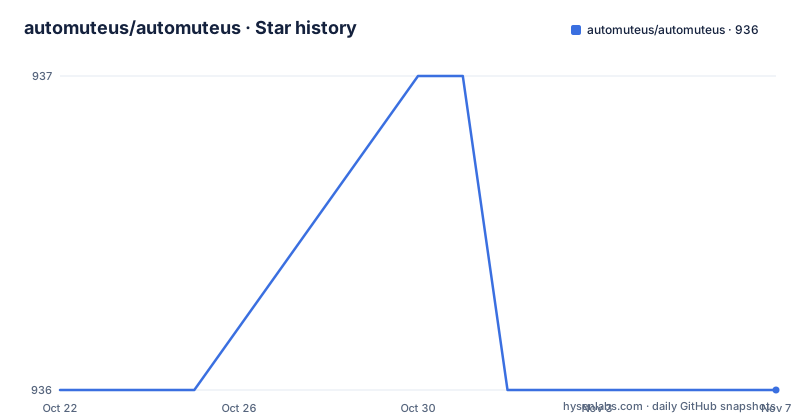
Star history
- automuteus/automuteus936 ★ · +0
| Repository | 2026-10-22 | 2026-11-07 |
|---|---|---|
| automuteus/automuteus | 936 | 936 |
0 Stars in the last 16 days, measured from the daily GitHub snapshot. Compare with other projects
Editorial analysis
A Discord bot that cannot see the game on its own
AutoMuteUs is a Discord bot that reads Among Us game data and mutes or unmutes players automatically during a match. The README describes the aim plainly: a Discord bot "to harness Among Us game data, and automatically mute/unmute players during games!". The audience is Discord server owners and moderators who host Among Us sessions and want the voice channels to line up with the round structure instead of relying on a human watching the screen.
The important part of that pitch is the second half of it. The bot does not connect to Among Us. It depends on a separate program, the capture application in the automuteus/amonguscapture repository, which runs on a Windows PC, reads the game, and relays data to the bot. The requirements section is blunt about the consequence: any Among Us game that does not have a user running the capture software will not have automuting capabilities.
So the product is two pieces of software with a network link between them. One piece senses the game, the other acts on Discord. Every limitation that follows, from storefront support to server sizing, comes from that architecture rather than from the bot code itself.
The capture application is the sensor, the bot is the actuator
The repository layout shows a Go service rather than a single script. Top level entries include bot/, cmd/, common/, internal/, pkg/, storage/, main.go, locales/, grafana/, docs/, and several Dockerfiles for different variants: Dockerfile, Dockerfile.api, Dockerfile.galactus, Dockerfile.ipn. The module path in go.mod is github.com/automuteus/automuteus/v8, and the file declares go 1.27.
The dependency list points at the shape of the running system. Discord traffic goes through github.com/bwmarrin/discordgo, while github.com/googollee/go-socket.io and github.com/hesh915/go-socket.io-client provide the socket.io channel that the capture application talks over. github.com/jackc/pgx/v5 pulls in Postgres, github.com/go-redis/redis/v8 and github.com/bsm/redislock pull in Redis, and github.com/prometheus/client_golang with a grafana/ directory suggest metrics collection. The charm.land libraries for bubbletea, bubbles, huh and lipgloss point at a terminal interface, and swaggo/gin-swagger alongside gin-gonic/gin suggest an HTTP API with generated documentation.
The capture application has its own boundary: it currently only supports the Steam, Epic Games, itch.io and Microsoft Store releases of the game, and explicitly does not support beta or cracked versions.
Slash commands link Discord accounts to in-game colours
Everything happens through Discord slash commands. Starting a session is a single command:
/new
# Starts a game, and allows users to react to emojis to link to their in-game players
The bot answers with a private reply containing a link used to sync the capture software to the game, and the same reply carries a download link for the latest capture build if one is not already installed. Players then react to emojis to bind their Discord account to an in-game player.
The command list covers the whole session lifecycle. `/help` prints usage. `/pause` stops the bot from muting anyone until it is unpaused, and `/end` ends the game, unmutes everyone and resets state. `/refresh` rebuilds the status message when it has drifted too far up the channel. Linking can also be done by hand, for example `/link @Soup cyan`, with `/unlink @Soup` to undo it. `/settings` and `/stats` both return links to a web dashboard where server settings and statistics are managed, `/map skeld true` posts a map image with the detailed version, and `/privacy`, `/info` and `/premium` expose bot information, the data collection notice and the premium status of the server.
Self-hosting means a two stage image with two exposed ports
There is no single command install in the documentation. The README points self-hosters at Docker and Docker-compose, unRAID and Heroku, and states that self-hosting requires solid knowledge and troubleshooting capability across those platforms. The images are published on Docker Hub at the automuteus/automuteus repository, and the hosted bot is added to a server from the invite link at add.automute.us.
The Dockerfile in the repository shows what a build looks like. It compiles a static binary in a builder stage, stamps the version and commit into it, and copies the result into an Alpine runtime as an unprivileged user:
FROM --platform=${BUILDPLATFORM} golang:1.27-alpine AS builder
ARG TARGETOS
ARG TARGETARCH
RUN apk add --no-cache git
WORKDIR /src
COPY ./go.mod ./go.sum ./
RUN go mod download
COPY ./ ./
RUN export TAG=$(git describe --tags "$(git rev-list --tags --max-count=1)") && \
    export COMMIT=$(git rev-parse --short HEAD) && \
    CGO_ENABLED=0 \
    GOOS=${TARGETOS} \
    GOARCH=${TARGETARCH} \
    go build -installsuffix 'static' -tags timetzdata \
    -ldflags="-X main.version=${TAG} -X main.commit=${COMMIT}" \
    -o /app .
The runtime stage then runs as user bot, exposes port 8080 for health and liveliness checks and port 2112 for Prometheus metrics, and writes logs to /app/logs through the LOG_PATH environment variable. Expect to wire both ports if you monitor the deployment.
Translations are extracted with goi18n, not edited by hand
Localization runs through CrowdIn, and the workflow for adding strings is documented. Contributors first install the extraction tool at a pinned version:
go install -v github.com/nicksnyder/go-i18n/v2/[email protected]Then, any time strings or translations change, they regenerate the message catalogue:
goi18n extract -outdir localesThe locales/ directory in the repository is where that output lands, and the Dockerfile comment on the copy step notes that translations are embedded in the compiled binary. That is worth knowing before changing languages: a new string is not live until it has been extracted, translated through the CrowdIn project at automuteus.crowdin.com/automuteus, and rebuilt into the executable.
For an operator this means language support is a build artefact rather than a runtime setting. The README does not document a way to swap the locale at startup, and the go.mod file pins github.com/nicksnyder/go-i18n/v2 at v2.6.1 while the extraction tool is pinned separately at v2.1.1.
Where automuting silently stops working
The failure modes are structural. If the player who normally runs the capture application leaves the lobby, the game continues and the bot keeps its state but receives no game data, so no muting happens for that session. The README treats this as expected behaviour rather than an error condition.
Storefront coverage is the second wall. A session running a beta build or a cracked copy of the game produces no usable capture data, so the bot is reduced to manual control. Any community whose players drift toward those builds gets a bot that looks installed and does nothing.
The third limitation is operational. Self-hosting means Redis, Postgres, socket.io connectivity and a Discord token in front of a Go binary, with the README explicitly asking for troubleshooting skill. There is also a tier split to keep in mind, since `/premium` reports the premium status of a server and some features sit behind that status. The README does not document a rollback procedure, so an upgrade on a self-hosted instance has to be planned around a fresh image rather than a downgrade path.
Release cadence and the state of the code
The repository is not archived, and the last push was on 2026-10-19. Three tagged releases sit close together in that window: 10.4.1 on 2026-10-19, 10.4.0 on 2026-10-15 and 10.3.0 on 2026-10-04. That pattern suggests work is still landing on the tree, though the dates alone cannot tell you whether any particular release fixes a problem you have.
The licence field on the repository says MIT, and the LICENSE file sits at the top level next to the PRIVACY.md notice that the `/privacy` command points at. A privacy document kept beside the code is a reasonable signal for a bot that sits in a server and mediates voice channels, though it is worth reading before inviting the hosted bot to a server that also hosts other communities. The MIT terms are permissive for self-hosting and modification; redistributing a modified build carries the usual requirement to keep the licence text intact. None of this is legal advice, and the project itself does not spell out how it expects hosters to handle the data it processes.
Editorial conclusion
AutoMuteUs suits Discord servers that run scheduled Among Us sessions with players willing to install and keep the capture application running on a Windows machine, and teams that already keep Redis, Postgres and a Discord token. It does not suit players on unsupported storefronts, beta or cracked builds, or anyone who wants a Discord bot to work without local software. Before adopting, verify the capture application supports the exact storefront your players use, confirm every session includes at least one PC with the capture tool running, and read the self-hosting requirements, since the README asks for Docker and Docker-compose troubleshooting experience rather than a one command install.
Frequently asked questions
Does AutoMuteUs need another program running on my PC?
Yes. The README states you must run the capture application on your Windows PC for the bot to work, and that any Among Us game without a user running the capture software will not have automuting capabilities.
Which Among Us versions does the AutoMuteUs capture application support?
The capture application supports the Steam, Epic Games, itch.io and Microsoft Store releases of the game. It does not support beta or cracked versions.
How do I link my Discord account to my in-game player in AutoMuteUs?
After running /new, players can react to emojis to link to their in-game players, and the bot replies privately with a sync link for the capture software. Linking can also be done manually with a command such as /link @Soup cyan.
Can I run AutoMuteUs on my own server?
Yes, self-hosting is documented, and images are published on Docker Hub at the automuteus/automuteus repository. The README asks for solid knowledge of Docker and Docker-compose, unRAID or Heroku, and the Dockerfile exposes port 8080 for health checks and port 2112 for Prometheus metrics.
Official sources
Add this badge to your README
If you maintain this project, the badge below links readers to this analysis and shows its maintenance status from the daily GitHub snapshot. Paste the markdown into your README; add ?metric=license or ?metric=stars to the image URL for a different field.

[](https://hysenlabs.com/projects/automuteus-automuteus)Star history chart for your README
[](https://hysenlabs.com/projects/automuteus-automuteus)Was this useful?