Azimutt: a schema explorer for databases with hundreds of tables
Explore, document and optimize any database
At a glance
- What is it?
- Azimutt argues that ERD tools fall apart as a schema grows, that data catalogs know nothing about relational design, and that database clients give you autocompletion but no picture. Its answer is a full-stack tool with an Elm editor over an Elixir backend, five verbs from design to analysis, and a URL that loads any publicly reachable SQL file into the diagram.
- Who is it for?
- Adopt Azimutt when your schema has outgrown a diagram you can read, since search that filters down to useful tables and columns is the feature the project positions itself on, and when documentation that lives next to the schema matters more than governance lineage. Do not use the badge route for a private schema, because that path fetches a public URL.
- Can I use it commercially?
- Yes. MIT is a permissive licence: you can use, modify and sell software built on it, as long as you keep its copyright and licence notices.
- Is it still maintained?
- Yes. The repository last received commits 91 days ago.
- What is it written in?
- Mainly Elm, according to GitHub's language statistics.
Answers come from the project's GitHub data, last synced on November 24, 2026, and from our analysis. They are not legal advice.
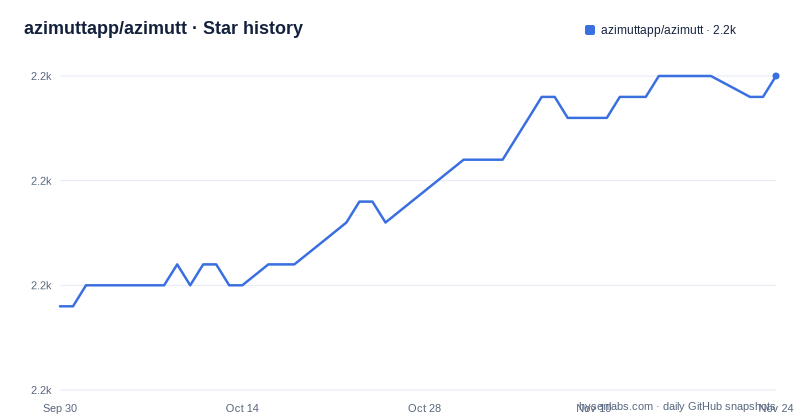
Star history
- azimuttapp/azimutt2,200 ★ · +11
| Repository | 2026-09-30 | 2026-11-24 |
|---|---|---|
| azimuttapp/azimutt | 2.2k | 2.2k |
11 Stars in the last 55 days, measured from the daily GitHub snapshot. Compare with other projects
Editorial analysis
The gap the README names: ERDs, catalogs and clients
Azimutt's argument for existing is unusually specific, and it is worth repeating because it doubles as its competitive framing. Databases have been around for more than 40 years, the README says, and despite the number of tools around them the authors could not find one that gave a good exploration experience. Then three sentences about why the existing categories fail.
ERD tools have a good diagram interface but fall short once the schema grows, which is precisely the case anyone documenting a real system is in. Data catalogs are built for data governance and lineage, so they lack relational database knowledge. Database clients focus on querying, with auto-completion and table and column lists, but offer no visual help.
That third point is the sharpest. Every query client already knows your schema. What it cannot do is show you that the table you are about to join is four hops from the one you started at, or that the foreign key you assumed exists is a nullable column somebody typed by hand. Azimutt's whole bet is that the schema viewer and the query tool should be the same surface.
It started with the narrow case the authors had at hand, schema exploration for databases with hundreds of tables, and grew into five areas: design with AML, explore with search everywhere, query with entities shown in the diagram, document with notes, tags, layouts and memos, and analyze for inconsistencies and best practices.
The audience, then, is a developer or analyst who has inherited a large relational database and needs to understand it in days rather than weeks.
Five verbs, and AML for the design direction
Most schema tools are good at one direction: read a database and draw it. Azimutt claims both directions, and the design half is where the differentiation sits.
Design works through AML, the project's schema description language, and the stated benefit is fast diagramming. The reason a language helps is that a diagram editor on a schema with hundreds of tables spends all its time on layout, while a text format can be diffed, reviewed in a pull request and generated from.
Explore is the core, and the mechanism is specific: search everywhere, then display only the useful tables and columns and follow relations from there. That is a filter-and-expand model rather than a zoom-and-pan one, and it is the feature that addresses the hundreds-of-tables complaint directly. The filtering is on columns as well as tables, which matters when a table has forty columns of which two matter.
Query is listed separately, with the promise of following foreign keys and displaying entities in the diagram. So a query result can sit next to the entities it touched rather than in a second window.
Document is the part most tools skip, and here the primitives are table and column notes, tags, layouts and memos scoped to a use case, a feature or a team. Scope matters more than it sounds: a note about why a column exists is worth little if the column is used by six teams with six reasons, so the memo and layout concepts exist to attach context to a slice rather than to the whole schema.
Analyze is the least developed-sounding of the five and the most interesting to evaluate, since it claims to discover inconsistencies and best practices to apply. The README does not say which checks it runs, which is the first place to look for detail if you are considering it.
An Elm editor over an Elixir backend, wired with pnpm
The recorded primary language is Elm and the backend is Elixir, which makes this a polyglot repository rather than an Elm one. The package.json tells you the shape immediately: version 2.0.0, MIT, and a set of workspace scripts.
"setup": "pnpm install && pnpm -r --if-present run setup",
"test": "pnpm -r run test",
"format": "pnpm -r run format",
"lint": "pnpm -r run lint"
The `start` script runs three named packages in parallel: `@azimutt/gateway`, `azimutt-backend` and `azimutt-editor`. Those names are the architecture, because the editor is the Elm application, the backend is the Phoenix application that talks to databases, and the gateway is a separate process with its own entry point and its own environment variable, `GATEWAY_URL`.
The `build` script excludes one directory from the recursive build, `./extensions/desktop`, and there is a separate `build:docker` target that filters the backend, then everything scoped to `@azimutt/*`, then the editor. So the desktop extension is packaged differently from the web application, and the Docker image is assembled in a defined order rather than by a single top-level build.
The toolchain is pinned hard. The `engines` field requires pnpm 9.5.0, and the `packageManager` field carries the same version with a sha256 hash, so a wrong pnpm is a warning rather than an accident. There is a `.tool-versions` file at the top level for anyone managing versions that way instead.
The remaining directories describe the rest: `cli/` for a command line entry point, `charts/` for diagram templates, `demos/` for sample databases, `libs/` for shared code, `extensions/` for targets beyond the web editor, and `backend/priv/repo/` for the example schema file that the badge feature loads.
Local development: postgres, port 4000 and an env file
There is a docker-compose.yml for local work and an INSTALL.md for the prose. The compose file is small: a postgres service with a named volume for its data, and a backend service built from the top-level Dockerfile.
  database:
    image: postgres
    restart: always
    container_name: azimutt-db
    volumes:
      - pg-data:/var/lib/postgresql/data
The backend service publishes one port and reads configuration from a file you create yourself:
    ports:
      - 4000:4000
    env_file: .env
    environment:
      DATABASE_URL: "ecto://postgres:postgres@database/azimutt_dev"
      SECRET_KEY_BASE: "1wOVZ9rWAqPcbVZdilZzBPLXFKNrUmLUzX0q9Z02LpOy2jVWZwa6ee4fU81tuN+W"
That SECRET_KEY_BASE is a checked-in example value with an inline note that it can be anything but is normally generated with the kind of tool Phoenix provides. Change it before you expose the instance anywhere.
The .env.example is the real configuration reference and it is heavily commented, which makes it the most useful file in the repository. The minimum set for a local run:
export PHX_SERVER=true
export PHX_HOST=localhost
export PORT=4000
export SECRET_KEY_BASE=CHANGE_ME
export DATABASE_URL=postgresql://postgres:postgres@localhost/azimutt_dev
export FILE_STORAGE_ADAPTER=local
export AUTH_PASSWORD=true
Two optional database knobs appear commented out, `DATABASE_ENABLE_SSL` and `DATABASE_POOL_SIZE`, plus `DATABASE_IPV6` for the network mode. Set `FILE_STORAGE_ADAPTER=local` and uploaded files stay on the machine you are running on, which is the right default for an evaluation and the wrong one for a shared deployment.
Loading a public SQL file with a URL parameter
The lowest-friction feature in this project costs nothing and requires no account. Azimutt will load any public SQL file given as a URL parameter, and you can put a badge in your README that points at it:
[](https://azimutt.app/create?sql=https://raw.githubusercontent.com/azimuttapp/azimutt/refs/heads/main/backend/priv/repo/structure.sql&name=Azimutt)The project demonstrates it on itself, pointing the URL at `structure.sql` in its own `backend/priv/repo/` directory. The badge comes in a colour per engine, and the list in the README covers PostgreSQL, MySQL, MariaDB, Oracle, SQL Server, SQLite, MongoDB, Couchbase, Snowflake and BigQuery.
That engine list is the real story for adoption. The same diagram UI over relational engines, document stores and warehouse platforms means you can put one badge over a repository that ships several schemas, and the comparison is not only between tools but between your own systems.
The limitation follows directly from the mechanism, and it is not a small one: the URL has to be publicly fetchable. A structure.sql in a private repository cannot be loaded this way, so the badge is for open source and for public documentation sites, not for the private schema that most teams actually want to explore. For that you install the project and point it at your own database, which is what the rest of this article is about.
One more property worth knowing: this route is read-only exploration. It gets your schema into a diagram without granting anyone a connection string, which is a reasonable trade for a tool that renders foreign-key graphs.
Adapters for storage, email and auth, plus a licence key variable
The .env.example is where Azimutt's product shape shows through, because the same file that configures a local instance also enumerates the hosted feature set.
File storage is an adapter. `FILE_STORAGE_ADAPTER=local` is the default, and the commented alternative is `s3` with `S3_BUCKET`, `S3_HOST`, `S3_KEY_ID`, `S3_KEY_SECRET`, `S3_REGION` and `S3_FOLDER`. So the same build stores diagrams on local disk or in object storage without a rebuild.
Email is an adapter too, with three choices: Mailgun with `MAILGUN_DOMAIN`, `MAILGUN_API_KEY` and `MAILGUN_BASE_URL`; Gmail with an access token from the OAuth playground; or plain SMTP with a relay, username, password and port. Four address variables follow, for sender, contact, support and enterprise support.
Authentication lists what exists and what does not, and that list is worth reading carefully. `AUTH_PASSWORD=true` and `AUTH_GITHUB` with a client id and secret are the implemented paths. LinkedIn, Google, Twitter, Facebook and SAML appear with a heading that says not implemented yet, which is a clear statement of scope rather than a documentation gap.
And near the top there is a commented `LICENCE_KEY=lce_...`. That is a hook for a paid tier inside an MIT-licensed codebase, and the README does not say what the key unlocks or what the hosted plan includes. If you are evaluating this, that variable is the place where the open-source project and the product meet, and the file is where you find out which one you are running.
A pinned amd64 builder, Elixir 1.14.3, and no releases
The Dockerfile is where the project's age and its engineering decisions both become visible.
ARG ELIXIR_VERSION=1.14.3
ARG OTP_VERSION=25.2.2
ARG DEBIAN_VERSION=bullseye-20230109-slim
Those defaults are pinned build arguments, and they are old: Elixir 1.14.3 with OTP 25.2.2 on a Debian bullseye image. The builder also installs Node from NodeSource 20.x, npm 9.8.1, and the Elm 0.19.1 compiler binary for linux-64-bit, then compiles it into `/usr/local/bin`. The runtime image is plain Debian at the same version, with no Elixir in it.
Two choices in that file are deliberate and documented. The comment at the top explains that Ubuntu and Debian are used instead of Alpine to avoid DNS resolution issues in production, which is the kind of note that only exists because someone hit the problem. And the first `FROM` line pins `--platform=linux/amd64`, which the compose file repeats with `platform: linux/amd64` on the backend service. The consequence for you is concrete: on an ARM machine the build runs under emulation unless you override that, and it will be slow.
Maintenance: the last push was on 2026-08-25 and the repository is not archived, but there are no GitHub releases at all. The version lives in package.json at 2.0.0, and the licence is MIT in LICENSE.txt. With no tags, an upgrade is a pull of main and a rebuild, which for a project you host yourself is the difference between a five-minute update and a choreographed one.
There are also `heroku.yml` and `app.json` at the top level, so a one-click Heroku deploy is the intended fast path if you would rather not assemble the image. And the toolchain age above is the honest answer to whether you should build from source: it works, it is pinned, and nothing in the repository says the pins move on their own.
Editorial conclusion
Adopt Azimutt when your schema has outgrown a diagram you can read, since search that filters down to useful tables and columns is the feature the project positions itself on, and when documentation that lives next to the schema matters more than governance lineage. Do not use the badge route for a private schema, because that path fetches a public URL. Self-host if you need the S3 storage adapter, GitHub login or the email integrations, since each is an environment variable you supply. Read the pinned Elixir and OTP versions in the Dockerfile before building, because the builder is fixed to linux/amd64.
Frequently asked questions
What is Azimutt and who is it for?
Azimutt is a full-stack database exploration tool that describes, explores, documents and analyzes database schemas and data. The project started with schema exploration for databases with hundreds of tables and now covers design with AML, search-based exploration, query with entities in the diagram, documentation with notes and memos, and analysis for inconsistencies.
How does Azimutt compare with an ERD tool or a data catalog?
The README's own framing is that ERD tools have a good diagram interface but fall short as a schema grows, data catalogs focus on governance and lineage rather than relational knowledge, and database clients give you auto-completion without visual help. Azimutt's answer is search that filters to useful tables and columns, then follows relations, with the query results shown in the same diagram.
Which databases does Azimutt support?
The README demonstrates badge variants for PostgreSQL, MySQL, MariaDB, Oracle, SQL Server, SQLite, MongoDB, Couchbase, Snowflake and BigQuery. The repository topics also list Couchbase, MariaDB, MongoDB, MySQL, Oracle, PostgreSQL and SQL Server.
Can I load a schema into Azimutt without installing anything?
Yes, if the SQL file is publicly fetchable. The create URL takes a `sql` parameter and a `name` parameter, and the README shows a badge that points at a structure.sql file in a repository, with a colour variant per engine. A schema file in a private repository cannot be loaded this way, because the fetch happens server side from a public URL.
What is needed to run Azimutt locally?
A Postgres instance and the backend, which docker-compose.yml provides as two services with the backend on port 4000 reading a .env file. The minimum environment variables are PHX_SERVER, PHX_HOST, PORT, SECRET_KEY_BASE, DATABASE_URL, FILE_STORAGE_ADAPTER=local and AUTH_PASSWORD=true, and INSTALL.md carries the full instructions.
Is Azimutt free to self-host, and what does the licence cover?
The project is MIT licensed with the licence in LICENSE.txt, and the self-hosted feature set is driven by environment variables: an S3 storage adapter, Mailgun, Gmail or SMTP for email, and password or GitHub authentication. A commented LICENCE_KEY variable exists for a paid tier, and the README does not describe what it unlocks.
Official sources
Add this badge to your README
If you maintain this project, the badge below links readers to this analysis and shows its maintenance status from the daily GitHub snapshot. Paste the markdown into your README; add ?metric=license or ?metric=stars to the image URL for a different field.

[](https://hysenlabs.com/projects/azimuttapp-azimutt)Star history chart for your README
[](https://hysenlabs.com/projects/azimuttapp-azimutt)Was this useful?