Aimmy: an ONNX and DirectML aim aligner that is source-available, not open source
Universal Second Eye for Gamers with Impairments (Universal AI Aim Aligner (AI Aimbot) - ONNX/YOLOv8 - C#)
At a glance
- What is it?
- Aimmy is a C#/.NET 8 WPF application that captures the screen, runs a YOLOv8 model through DirectML and ONNX, and moves the mouse cursor toward detected players. The README states outright that it is not an open source project, which matters more than any feature list here.
- Who is it for?
- Aimmy is aimed at Windows users who want a pre-trained, UI-driven aim aligner without writing inference code, and who accept the project's own framing that it is source-available rather than open source. It is the wrong choice if you need a permissive licence to fork commercially, if you cannot install the .NET 8 desktop runtime and the x64 Visual C++ redistributable, or if you need a documented accuracy figure before adopting.
- Can I use it commercially?
- Check first. The repository uses a licence we do not classify automatically, so read its LICENSE file before any commercial use.
- Is it still maintained?
- Yes. The repository last received commits 42 days ago.
- What is it written in?
- Mainly C#, according to GitHub's language statistics.
Answers come from the project's GitHub data, last synced on November 15, 2026, and from our analysis. They are not legal advice.
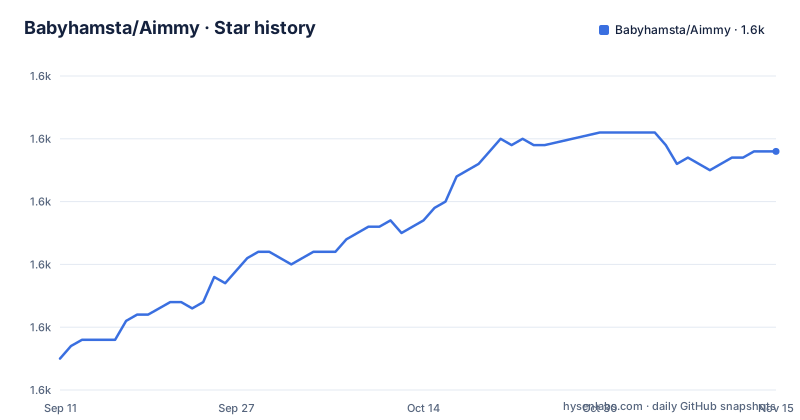
Star history
- Babyhamsta/Aimmy1,618 ★ · +33
| Repository | 2026-09-11 | 2026-11-15 |
|---|---|---|
| Babyhamsta/Aimmy | 1.6k | 1.6k |
33 Stars in the last 65 days, measured from the daily GitHub snapshot. Compare with other projects
Editorial analysis
The problem Aimmy claims to solve, and who it names
The README frames Aimmy around accessibility rather than competitive advantage. Its stated purpose is to help gamers who are at a severe disadvantage, and the list it gives is unusually specific: physically challenged players, mentally challenged players, people with untreated or untreatable visual impairments, players without a second human-interface device for the pointer, players working on reaction time, players with poor hand-eye coordination, players who perform poorly in FPS games, and players in hot environments whose hands become greasy enough to make aiming difficult. That last entry is a good indicator of the intended audience. This is not a tool pitched at people chasing a rank. It is pitched at people who cannot reliably move a cursor onto a target. The README also notes you can use Aimmy to train how you aim, which reframes the same mechanism as a practice aid. Whether you accept that framing is a separate question from whether the software works, and the project does not try to resolve it for you.
Screen capture to cursor movement: the pipeline in the README
The README includes a Mermaid flowchart that describes the data flow. The trigger binding is the entry point: when you press it, Aimmy captures the screen. That image goes into YOLOv8 recognition running through DirectML and ONNX on your own hardware. The recognition result is then combined with two user-set parameters, an X and Y axis adjustment and a field of view, and the combination produces a change in mouse cursor position. A separate triggering functionality sits alongside the loop. Two things follow from this description. First, there is no game memory reading anywhere in the pipeline, which is why the README can argue the project needs no upkeep: if the game updates, the model still sees pixels. Second, the X and Y adjustment and the FOV are not cosmetic settings. They are inputs to the decision step, so tuning them changes where the cursor lands, not just how large the detection region is. The README does not document the units for the X and Y adjustment, and it does not state the frame rate the capture loop achieves. Those are gaps, not details I can fill in.
DirectML instead of TensorRT, and what that buys
The README's central technical claim is about the inference backend. Aimmy uses DirectML, ONNX and YOLOv8, and the README argues this gives higher accuracy and faster performance than other aim aligners, particularly on AMD GPUs, which it says would not perform well on aligners built on TensorRT. TensorRT is NVIDIA-specific, so an AMD user is locked out of a TensorRT-based tool entirely. DirectML runs on both vendors. That is a compatibility argument rather than a speed argument, and the README blurs the two by putting accuracy and performance in the same sentence. Accuracy comes from the model, not the backend; the backend determines whether the model runs at all and how fast. The README also states Aimmy is written in C# using .NET 8 and WPF, built on pre-existing libraries, and ships with a pre-bundled model trained on thousands of images. It does not give a benchmark, a frame time, or a comparison against a named alternative. Treat the performance claim as a design rationale, not a measurement.
Installing Aimmy: the actual prerequisites
The setup section is short and leaves little room for interpretation. Install the x64 version of .NET Runtime 8.0.x, which the README links to the desktop runtime installer for 8.0.2. Install the x64 Visual C++ Redistributable from the aka.ms link. Download Aimmy from Releases, and the README adds a warning worth repeating: make sure it is the Aimmy zip and not the Source zip. Extract Aimmy.zip, run Aimmy.exe, then choose your model. That is the whole install path. There is no build step, no package manager, and no configuration file you edit by hand before first launch. The prerequisites are Windows-only by construction: .NET 8 desktop runtime plus the WPF UI plus DirectML plus a VC++ redistributable. The two runtime installs are also the most likely cause of a launch failure, and the README does not offer a troubleshooting section for them.
Models, configurations and the store as a dependency
Aimmy separates the application from the detection model. The bundled model is generic; the README says dozens of other community-made models are available through the store and the Discord server, varying by game and by image count. It also describes hotswapping: models and configurations can be changed while Aimmy runs, without a restart. The store supports repositories, so a creator can publish models and configurations that Aimmy pulls updates from. This is the part of the project with the most operational risk. Detection quality is a property of the model, not of Aimmy, so a poor result on your game may mean no one has trained a model for it, or that the one you picked was trained on too few images. The README does not state how models are validated before appearing in the store, nor what happens when a repository you subscribe to publishes a broken model. If you want your own, the README points to a YouTube tutorial on labelling images and training a model rather than documenting the process in text.
The licence is the headline, and the README is explicit
GitHub reports the licence as NOASSERTION, which means the platform could not map the repository's licence file to a known identifier. The README resolves the ambiguity in plain terms: Aimmy is considered a source-available product, not open source, and the authors say they actively discourage other developers from making commercial forks. It repeats the point: do not confuse Aimmy as an open-source project, we are not, and we have never been one. So the code is readable and the releases are free, but the permissions you would assume from a repository on GitHub do not follow. For an engineer evaluating adoption, this is the deciding fact. You can run Aimmy. You cannot assume you may fork it, rebrand it, or ship it inside a commercial product. I am not giving legal advice; read the actual licence file in the repository before you build anything on top of it. The README's own wording is the strongest signal.
Where Aimmy is the wrong tool
Three cases stand out. The first is licensing. If your plan involves a commercial fork or embedding the detection loop in a product you sell, the README's statement that the project is not open source and that commercial forks are discouraged rules Aimmy out, regardless of how well it performs. The second is games where a screen-capture model has nothing to see. Aimmy detects players from rendered pixels, so a game with heavy visual occlusion, extreme motion blur, or player models that differ sharply from the training set will degrade the detection step, and the README documents no accuracy figures to bound that risk. The third is anything that is not Windows x64, since the stack is .NET 8 desktop, WPF and DirectML. There is also a maintenance question the README answers indirectly: because Aimmy reads no game data, the authors argue it would keep working even if they stopped maintaining it. That is true for the inference path, but it is not true for the model store, the repository subscriptions, or new game support, all of which depend on community contributions continuing.
What to compare against before you commit
The obvious alternative class is TensorRT-based aim aligners, and the README names that backend specifically as the thing Aimmy avoids. The difference is not subtle. A TensorRT pipeline compiles the model for a specific NVIDIA GPU and generally delivers lower inference latency on that hardware, but it does not run on AMD GPUs at all. Aimmy's DirectML path runs the same class of ONNX model on either vendor, at whatever speed DirectML achieves on your card. So the choice is between a narrower hardware target with a faster path, and a wider hardware target with a portable one. If you are on NVIDIA and latency is your binding constraint, a TensorRT tool is the more direct answer. If you are on AMD, or you move between machines, Aimmy's backend is the reason it exists. The README also contrasts Aimmy with aligners that require coding to adapt to a game; Aimmy's counter is the UI plus the model store, which shifts the work from writing code to finding or training a model.
Editorial conclusion
Aimmy is aimed at Windows users who want a pre-trained, UI-driven aim aligner without writing inference code, and who accept the project's own framing that it is source-available rather than open source. It is the wrong choice if you need a permissive licence to fork commercially, if you cannot install the .NET 8 desktop runtime and the x64 Visual C++ redistributable, or if you need a documented accuracy figure before adopting. Verify three things first: the licence text in the repository, since GitHub reports NOASSERTION and the README states the project is not open source; whether a community model exists for your specific game, because the bundled model is generic and the store is community-supplied; and whether the detection approach survives your game's visual conditions, including motion blur, smoke and unusual player skins.
Frequently asked questions
what is aimmy
Aimmy is a universal AI based aim alignment mechanism written in C#, which is to say an aimbot. It captures the screen, runs YOLOv8 recognition through ONNX on DirectML, combines the result with a configured X and Y offset and the current field of view, and moves the mouse cursor accordingly. It ships as a Windows desktop program with a WPF interface.
is aimmy open source
No, by its own account. The project calls itself a source-available product and says it has never been open source, and that it discourages commercial forks. The repository root holds both LICENSE and SourceAvailable.md, while the licence field on GitHub reads NOASSERTION, so no recognised licence identifier is recorded there.
is aimmy detectable
The repository makes no claim about detection and does not discuss anti cheat systems at all. What it does state is architectural: Aimmy works from screen capture rather than by reading specific game data, so it has no per game coupling to update.
how to use aimmy ai
The project's own documents do not provide a usage walkthrough, and this article does not add one. What is documented is the mechanism and the configuration surface: a trigger binding, screen capture, YOLOv8 through ONNX on DirectML, a decision combining X and Y adjustment with field of view, five selectable mouse movement methods, and hot swappable models and configurations from a store.
Official sources
Add this badge to your README
If you maintain this project, the badge below links readers to this analysis and shows its maintenance status from the daily GitHub snapshot. Paste the markdown into your README; add ?metric=license or ?metric=stars to the image URL for a different field.

[](https://hysenlabs.com/projects/babyhamsta-aimmy)Star history chart for your README
[](https://hysenlabs.com/projects/babyhamsta-aimmy)Was this useful?