node-crawler: a TypeScript web spider with Cheerio built in
Web Crawler/Spider for NodeJS + server-side jQuery ;-)
At a glance
- What is it?
- The `crawler` Node.js package combines HTTP fetching, request scheduling and Cheerio parsing. Check the exact published version and module exports before integrating it into an ESM or CommonJS application.
- Who is it for?
- node-crawler can simplify queued HTTP fetching and HTML extraction in Node.js. Verify the exact release’s Node requirements and module exports, handle errors and callback completion, and use a browser-based tool if the required content depends on JavaScript execution.
- Can I use it commercially?
- Yes. MIT is a permissive licence: you can use, modify and sell software built on it, as long as you keep its copyright and licence notices.
- Is it still maintained?
- Yes. The repository last received commits 150 days ago.
- What is it written in?
- Mainly TypeScript, according to GitHub's language statistics.
Answers come from the project's GitHub data, last synced on November 15, 2026, and from our analysis. They are not legal advice.
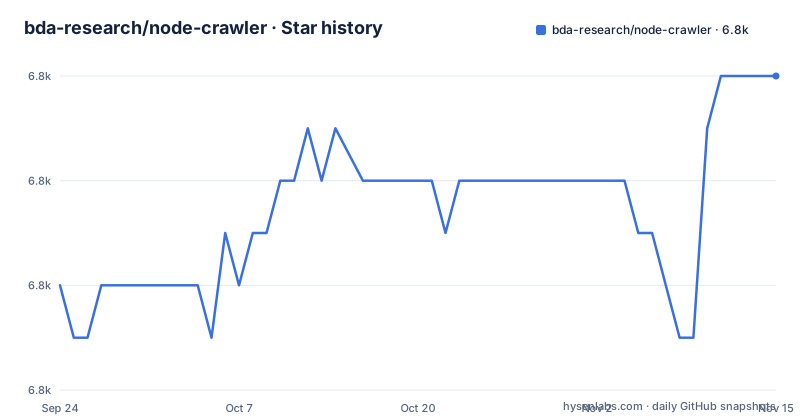
Star history
- bda-research/node-crawler6,798 ★ · +4
| Repository | 2026-09-24 | 2026-11-15 |
|---|---|---|
| bda-research/node-crawler | 6.8k | 6.8k |
4 Stars in the last 52 days, measured from the daily GitHub snapshot. Compare with other projects
Editorial analysis
What node-crawler solves for Node.js scraping work
Writing a scraper by hand means assembling four things that have nothing to do with the data you want: an HTTP client, a concurrency limiter, a parser, and a de-duplication layer so you do not fetch the same URL twice. node-crawler combines request scheduling and parsing, and documents a `skipDuplicates` option; verify its settings for your workload rather than assuming every duplicate is always removed. The package.json describes it as a ready-to-use web spider that works with proxies, asynchrony, rate limit, configurable request pools, jQuery, and HTTP/2 support. The README lists the same set as features: server-side DOM with automatic jQuery insertion through Cheerio, a configurable pool size and retries, rate limit control, a priority queue of requests, and charset detection and conversion.
The audience is a Node.js developer who wants to point at a list of URLs and get parsed HTML back inside a callback. The unit of work is a Crawler instance with a queue attached.
How the queue, the pool and Cheerio fit together
A Crawler instance is constructed with options, and URLs are pushed onto it with add. The README's first example constructs the crawler with maxConnections: 10 and a callback, then calls c.add with a single URL or an array of URLs.
The callback signature is (error, res, done), and done() must be called or the queue stalls. That is the single most important mechanical detail in the whole API. Inside the callback, res.$ is a Cheerio instance, described in the README as a lean implementation of core jQuery designed specifically for the server, so selectors like $("title").text() work as they would in a browser.
Two options change the shape of the pool. Setting rateLimit to a number of milliseconds forces maxConnections to 1, so requests are serialised with a minimum gap between them. Setting encoding to null stops the body being converted to a string, which is what you want for images and PDFs. The README also documents a preRequest hook that runs before each request, with the explicit caveat that direct requests do not trigger it. userParams is the documented way to carry state from the request options through to the callback, read back as res.options.userParams.
Underneath, the dependency list shows got for HTTP, hpagent and http2-wrapper for proxy and HTTP/2 transport, iconv-lite for charset conversion, and seenreq for URL de-duplication. The architecture is a thin orchestration layer over those libraries rather than a from-scratch client.
Installing node-crawler and crawling a page
The README states a hard requirement of Node.js 22 or above, and the package.json engines field agrees. Install with npm:
npm install crawlerThe README describes v2 as ESM-only, but the inspected repository manifest declares both import and require exports. Test the exact published release and its dependencies in your module system. A minimal crawl looks like the README's example:
import Crawler from "crawler";

const c = new Crawler({
    maxConnections: 10,
    callback: (error, res, done) => {
        if (error) {
            console.log(error);
        } else {
            const $ = res.$;
            console.log($("title").text());
        }
        done();
    },
});

c.add("https://example.com/");
If the request succeeds and the response contains a title, the callback prints it. To slow a crawl down, pass rateLimit: 1000 in the constructor options, which the README notes forces maxConnections to 1 and enforces a minimum 1000 ms gap between tasks.
For binary downloads the README shows encoding: null together with jQuery: false, writing res.body to a stream. The jQuery: false flag there is only to suppress a warning message, not to change the download.
Module formats and migration
The README says v2 was designed as an ES module and describes a beta with CommonJS support. The inspected repository package manifest, however, declares both `require` and `import` entries and a dual-format build. This discrepancy means the README alone is insufficient to establish what an installed release exports. Pin the exact package version, inspect its published manifest and test it under the Node and module system you deploy.
The README also warns that code previously using `body` for POST form data should use `form` in the migration path it describes. Test existing requests when upgrading.
Where node-crawler is the wrong tool
The parser is Cheerio, and Cheerio parses HTML strings. It does not execute JavaScript. Content generated only by client-side JavaScript will not be executed by Cheerio; a response may still contain server-rendered or embedded data. If your target is a single-page application, a Puppeteer or Playwright based crawler is the right category of tool, and node-crawler is not a substitute.
Finally, the project ships an agent skill under skills/node-crawler/SKILL.md, installable through openclaw skills install node-crawler or by unzipping a release bundle into a skills directory. That is useful if you drive crawling from an AI agent, but it is a wrapper around the same library, not a different capability. It does not make the crawler render JavaScript either.
Choosing between node-crawler and a Puppeteer-based crawler
The real alternative for most teams is a headless-browser crawler such as one built on Puppeteer. The difference is not speed or ergonomics, it is what the tool can see. A Puppeteer-based crawler boots a Chromium instance, navigates, and waits for the page to finish rendering, so it can read content injected by client-side JavaScript and interact with the page. node-crawler fetches bytes and hands them to Cheerio, so it reads exactly what the server sent.
That trade runs both ways. A browser per worker costs far more memory than an HTTP client, and the concurrency model is entirely different: node-crawler's maxConnections and rateLimit options have no direct equivalent when each unit of concurrency is a browser context. For static HTML, server-rendered pages, sitemaps, and feeds, the Cheerio path is the cheaper and simpler one, and the built-in charset conversion through iconv-lite handles pages that a naive fetch would mangle.
Inspect the HTTP response first. A browser may be needed when the content is generated by client-side code, while some sites expose suitable data in server-rendered HTML or authorized APIs.
Maintenance, licence and upgrade cost
The repository is not archived, and the last push was on 2026-06-18. The most recent tagged release is v2.1.1 from 2026-06-16, preceded by v2.1.0 on 2026-06-04. Before those, the GitHub release list jumps back to 0.4.1 in 2014, even though the README links npm version 1.5.0 as the v1 package. Treat the v2 line as the one under current work and v1 as legacy.
The licence is MIT, which the repository states in both the LICENSE file and the package.json license field. MIT permits commercial use and modification provided the copyright notice and permission notice are retained. That is the extent of what the repository says; it is not legal advice, and if you redistribute the package inside a product you should confirm the notice requirements with whoever handles licensing on your side.
Review the selected release’s exports and breaking changes, including POST form handling, and test existing requests before upgrading.
Editorial conclusion
node-crawler can simplify queued HTTP fetching and HTML extraction in Node.js. Verify the exact release’s Node requirements and module exports, handle errors and callback completion, and use a browser-based tool if the required content depends on JavaScript execution. Respect the target site’s access rules and rate limits.
Frequently asked questions
Which Node.js version does node-crawler v2 require?
The README states Node.js 22 or above, and the package.json engines field sets node to >=22. Installing on an older runtime is outside what the project documents.
Does node-crawler work with CommonJS?
The README describes v2 as ESM-only and mentions a dual-format beta, while the inspected repository package manifest declares both `require` and `import` exports. These sources conflict; inspect and test the exact published version you install before relying on CommonJS compatibility.
What is crawling versus scraping in node-crawler terms?
The package covers both halves: the queue and pool handle fetching pages at a controlled rate, while Cheerio, described in the README as a server-side jQuery implementation, handles extracting values from the HTML that comes back.
Do web crawlers still exist?
Yes. node-crawler is one, published on npm as crawler, and its README documents a v2 line, with GitHub releases in 2026, alongside a legacy v1 line (the README links npm version 1.5.0).
Official sources
Add this badge to your README
If you maintain this project, the badge below links readers to this analysis and shows its maintenance status from the daily GitHub snapshot. Paste the markdown into your README; add ?metric=license or ?metric=stars to the image URL for a different field.

[](https://hysenlabs.com/projects/bda-research-node-crawler)Star history chart for your README
[](https://hysenlabs.com/projects/bda-research-node-crawler)Was this useful?