Open Browser: a TypeScript agent loop that drives Playwright and bills your model provider
Let AI agents browse the web. An autonomous toolkit for browser-based AI agents.
At a glance
- What is it?
- Open Browser is an MIT-licensed TypeScript monorepo that hands a language model a Playwright browser and lets it click, type and extract autonomously. The design is competent but the per-step cost model is the thing to price before you adopt it.
- Who is it for?
- Adopt Open Browser if you want a small, MIT-licensed TypeScript loop that already speaks OpenAI, Anthropic and Google through the Vercel AI SDK, and if you are willing to read the source because failure handling is something to verify yourself. Do not adopt it for unattended automation against third-party sites where a wrong click has consequences, and do not adopt it if you need a published versioned release to pin, since the repository has no published GitHub releases.
- Can I use it commercially?
- Yes. MIT is a permissive licence: you can use, modify and sell software built on it, as long as you keep its copyright and licence notices.
- Is it still maintained?
- Activity is slowing. The repository last received commits 7 months ago.
- What is it written in?
- Mainly TypeScript, according to GitHub's language statistics.
Answers come from the project's GitHub data, last synced on November 14, 2026, and from our analysis. They are not legal advice.
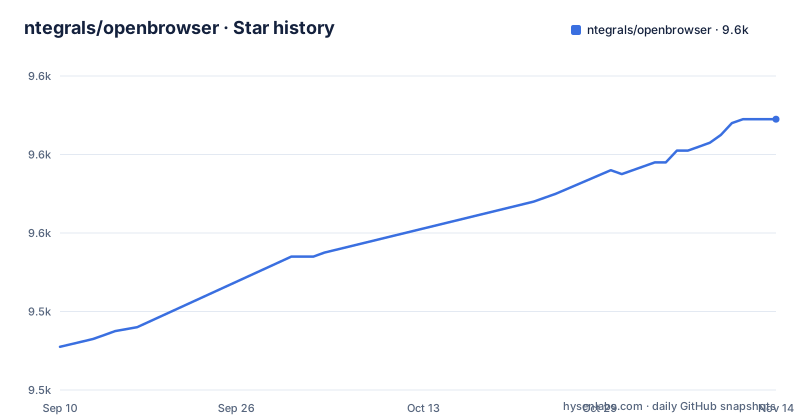
Star history
- ntegrals/openbrowser9,589 ★ · +58
| Repository | 2026-09-10 | 2026-11-14 |
|---|---|---|
| ntegrals/openbrowser | 9.5k | 9.6k |
58 Stars in the last 65 days, measured from the daily GitHub snapshot. Compare with other projects
Editorial analysis
The scripting problem Open Browser is trying to delete
Classic browser automation means writing a selector for every element you care about, and rewriting it when the site ships a redesign. Open Browser takes the other position: you hand the agent a sentence, and the loop decides which element to touch. The README's own example is a single command, open-browser run "Find the price of the MacBook Pro on apple.com", and the CLI table lists options for model, provider, headless mode and step ceiling rather than any selector or script file. The audience is TypeScript developers who already have a provider API key and want an agent loop they can read and modify, not a hosted scraping service. The tasks the README suggests are short and stateful: read a price, submit a newsletter form with a test address, navigate to a repository and star it. Those are the shapes this tool is built for.
What the agent loop actually does between your prompt and the page
The repository is a monorepo with three packages. open-browser holds the agent logic, browser control, DOM analysis and LLM integration. @open-browser/cli wraps that in commands. @open-browser/sandbox adds resource limits and monitoring. The library example shows the wiring: you call createViewport to get a Playwright browser context, createModel to get a provider-backed model, then construct an Agent with a viewport, a model, a task string and a settings object, and await agent.run(). The settings table is where the loop's shape becomes visible. stepLimit caps iterations, commandsPerStep caps actions inside one iteration, failureThreshold stops the run after a set number of consecutive failures, and contextWindowSize sets a token budget for the conversation. enableScreenshots, on by default, means page images are fed back into the model context, which is how the agent sees a page it has no selector for. DOM analysis sits between the browser and the model.
Getting it running: bun, a .env file, and one command
The quick start is four lines. Run bun install, copy .env.example to .env, edit in your keys, then bun run open-browser run "Find the top story on Hacker News and summarize it". At least one provider key is required: OPENAI_API_KEY, ANTHROPIC_API_KEY or GOOGLE_GENERATIVE_AI_API_KEY. Browser behaviour is controlled by BROWSER_HEADLESS and BROWSER_DISABLE_SECURITY, and traces and recordings go to the paths in OPEN_BROWSER_TRACE_PATH and OPEN_BROWSER_SAVE_RECORDING_PATH. The run command takes -m for model (default gpt-4o), -p for provider, --headless or --no-headless, --max-steps with a default of 25, -v for verbose output and --no-cost to hide cost tracking. Note the mismatch worth knowing before you tune anything: the CLI default step ceiling is 25 while the library setting stepLimit defaults to 100. If you move from the command line to the library, your runs get four times longer unless you set the value yourself.
The sandbox package and what its limits do not cover
The @open-browser/sandbox package is the part aimed at running agents you do not fully trust. Its constructor takes timeout in milliseconds, maxMemoryMB, allowedDomains, stepLimit and captureOutput. The README's example uses a 300,000 millisecond timeout, 512 MB of memory, a single allowed domain and a step limit of 100, then reads result.metrics for steps, URLs visited and CPU time. The library-level equivalent is the allowedUrls and blockedUrls settings on the agent. Two things are worth flagging. Domain restrictions constrain navigation, so treat allowedDomains as a navigation guard rather than assuming it is a network firewall. For genuinely hostile pages, this is not the isolation boundary you want.
Cost is the real per-run constraint, not step count
Screenshots are on by default and every step can carry page images plus DOM analysis into a context window that defaults to 128,000 tokens. That is the expensive part of this design, and it is why cost tracking matters here. The step ceiling is the main knob for bounding that spend, and the two defaults disagree: 25 steps from the CLI, 100 from the library. A run that stalls will keep paying until failureThreshold consecutive failures accumulate. Before you point this at anything with a large page, decide whether you want enableScreenshots on, and set stepLimit and contextWindowSize explicitly rather than accepting the defaults. Measure the token or dollar cost per step against your own provider account rather than trusting a number from anywhere else.
Interactive mode is the debugging story, and it is the strongest part
open-browser interactive drops you into a browser> prompt where you can drive the same session by hand: open a URL, run extract with a natural-language goal, click a selector, take a screenshot to a named file, and call help. The non-agent commands cover the same ground one shot at a time, including eval for arbitrary JavaScript on the page, state for the current URL, title and tabs, and sessions to list what is running. This matters because the agent loop is opaque when it fails. When a task produces the wrong result, the practical path is to reproduce the page in interactive mode, run the same extract goal manually, and see whether the failure is in the model's reading of the page or in the DOM analysis feeding it.
Where a deterministic driver beats this, and where it does not
Playwright on its own is the honest alternative, and the difference is not quality but control flow. A Playwright script encodes the decision about which element to click at authoring time; Open Browser moves that decision to a model at run time. The trade is that a Playwright script either works or throws a specific error you can read, while an agent can complete a task in a way you did not intend and still report success. For a login flow, a checkout, or anything where a wrong click costs money or sends a message, write the Playwright script. For reading a page whose markup you do not control and whose structure changes, the agent is the better fit, because a selector rewrite is exactly the maintenance you were trying to avoid.
Maintenance, licensing and the release question
The licence is MIT, which permits commercial use and modification with the copyright notice retained; that is a description of the licence text, not legal advice, and you should read the LICENSE file in the repository before shipping anything. The maintenance picture is limited: the last push is dated 2026-04-02, the repository has no published GitHub releases, and the README's claim of being production-ready since v1.0 has no corresponding tag to pin. Dependencies on Playwright and the Vercel AI SDK mean provider and browser API churn lands on you, not on a maintained release channel. Budget for reading the agent source when something misbehaves, because the README is mostly a configuration and command reference.
Editorial conclusion
Adopt Open Browser if you want a small, MIT-licensed TypeScript loop that already speaks OpenAI, Anthropic and Google through the Vercel AI SDK, and if you are willing to read the source because failure handling is something to verify yourself. Do not adopt it for unattended automation against third-party sites where a wrong click has consequences, and do not adopt it if you need a published versioned release to pin, since the repository has no published GitHub releases. Before writing any code, verify three things: that bun install resolves the workspace, that your chosen provider key works against the model id you pass to createModel, and what the agent actually does when failureThreshold is hit.
Frequently asked questions
How do I install Open Browser?
It is a Bun monorepo: run bun install, copy .env.example to .env, add at least one provider API key, then run bun run open-browser run with a task or bun run open-browser interactive. The repository publishes no GitHub releases, so there is no published version to install instead.
What is the difference between Open Browser and Playwright?
Open Browser is built on Playwright and adds a model that chooses the next action, together with a CLI, an interactive browser> prompt and a sandbox package. Plain Playwright keeps the selector you wrote and produces the same run every time, at no token cost per step.
How do you use Open Browser?
Give it a task in natural language with open-browser run <task>, or open a live browser> prompt with open-browser interactive and issue open, click, extract and screenshot one at a time. From the command line the model defaults to gpt-4o and the run to 25 steps.
What is an alternative to Open Browser?
For any task with known selectors, Playwright on its own is the direct alternative, because it is deterministic, needs no model provider and can assert results. Open Browser is aimed at tasks whose steps cannot be written down in advance.
Official sources
Add this badge to your README
If you maintain this project, the badge below links readers to this analysis and shows its maintenance status from the daily GitHub snapshot. Paste the markdown into your README; add ?metric=license or ?metric=stars to the image URL for a different field.

[](https://hysenlabs.com/projects/ntegrals-openbrowser)Star history chart for your README
[](https://hysenlabs.com/projects/ntegrals-openbrowser)Was this useful?