UnrealEngine-ObjectPool: A World Subsystem Approach to Actor Reuse in UE5
Unreal engine plugin providing an object pool packaged in a world subsystem for easy use.
At a glance
- What is it?
- This plugin wraps the object pool pattern in a UWorldSubsystem for Unreal Engine 5. It spares you from writing per-class pool managers, but it carries real trade-offs in actor lifetime and pre-spawn tuning.
- Who is it for?
- Adopt this plugin if you are building an Unreal Engine 5 project that spawns many short-lived actors, such as a bullet hell shooter, and you want a centralized pool without writing your own manager. Skip it if your actor count is low, if you need strict control over pooled actor lifecycle beyond the provided interface, or if you cannot tolerate the risk of pre-spawn hitches.
- Can I use it commercially?
- Yes. MIT is a permissive licence: you can use, modify and sell software built on it, as long as you keep its copyright and licence notices.
- Is it still maintained?
- Probably not. The repository last received commits 21 months ago, on January 22, 2025.
- What is it written in?
- Mainly C++, according to GitHub's language statistics.
Answers come from the project's GitHub data, last synced on October 4, 2026, and from our analysis. They are not legal advice.
Star history
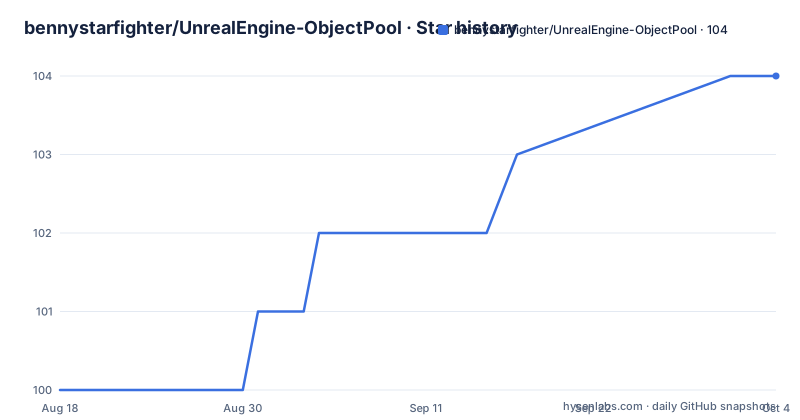
- bennystarfighter/UnrealEngine-ObjectPool104 ★ · +4
| Repository | 2026-08-18 | 2026-10-04 |
|---|---|---|
| bennystarfighter/UnrealEngine-ObjectPool | 100 | 104 |
4 Stars in the last 47 days, measured from the daily GitHub snapshot. Compare with other projects
Editorial analysis
What This Plugin Actually Solves
The problem is plain: spawning and destroying many actors in Unreal Engine causes lag spikes. Each construction allocates memory, runs initialization, and eventually triggers garbage collection when actors are destroyed. The README gives a concrete example: spawning 100 bullet actors per frame and destroying them after 0.2 seconds produces a consistent performance hit, plus larger GC hitches later. The plugin exists to let you reuse actors instead of creating and destroying them. It is aimed at projects like bullet hell games, where actors are numerous, short-lived, and expensive to instantiate. The target user is a UE developer who wants pooling without building a custom system from scratch.
How the Pool Is Organized: A World Subsystem
The core architectural choice is to package the pool as a UWorldSubsystem. For each world, the engine automatically creates an object pool manager. The subsystem's lifetime is tied to the world, so you do not manually create or destroy it. You fetch a reference to the subsystem and call pull and push functions. This design centralizes pooling logic at the world level, which is convenient for game modes and blueprints that already have world context. The README stresses that any system responsible for pushing and pulling actors can use it. The subsystem pattern is a standard UE way to manage per-world services, and it fits pooling well because actors are world-bound. However, this also means the pool is not global across worlds; each world has its own pool, which is sensible for most games but worth noting if you have multiple worlds in one process.
The Object Pooled Actor Interface and Actor Responsibilities
To be pooled, an actor must implement the provided interface named Object Pooled Actor. The pool calls functions on this interface when an actor is pushed or pulled. The README gives an example: an actor that sets its visibility and activates its Niagara system when pulled, then after a set time pushes itself back instead of destroying itself. The key point is that the actor itself decides what happens on push and pull. The documentation says this often includes disabling collision and hiding the actor when pushed. This is a design trade-off: the plugin does not manage actor state for you. You must implement the interface for every actor class you want to pool, and you must remember to handle state reset. If you forget to reset a property, the actor will appear reused with stale state. The interface is the only requirement, but it places significant responsibility on the actor class.
Getting It Running: Settings and Commands
The plugin is installed as a standard UE plugin. The README does not give explicit build commands, but for a UE5 plugin, you would typically copy the plugin folder into your project's Plugins directory and enable it in the editor. The settings are accessible under Project Settings -> Plugins -> Object Pool. There you can add actor classes and specify their pool settings. The settings control how many actors to pre-spawn and whether the pool can expand automatically. The README recommends pre-spawning an estimate of how many actors you need at the same time, and also allowing expansion. You can also use the pool purely through code, without setting defaults, by pulling and pushing actors. If you pull an actor of a class that has not been added to the pool, it will be added automatically with default settings: zero extra actors and expansion allowed. For that automatic addition to work, the actor must still implement the interface. This makes the plugin easy to start with: you implement the interface, pull actors, and the pool grows as needed.
Performance Example and Its Caveats
The README includes a performance example with three scenarios: normal spawning, pooled with pre-spawning, and pooled without pre-spawning. The author warns that this is an extreme example with many actors spawning each frame, and that the performance gain is unique to every project. In the test, normal spawning shows a consistent performance hit and bigger GC hitches. Pooled with pre-spawning shows a big initial hit when spawning many actors at level load, but after that frame time drops to just the general code. Pooled without pre-spawning shows frame time steadily decreasing as the pool fills up. The graphs in the README are not reproduced here, but the description is clear. The caveat is important: pre-spawning above 200 actors can cause a freeze if actors have components that auto-activate on spawn, especially sound or VFX. This is a genuine limitation. The plugin does not mitigate that initial cost; it just moves it to level load. If your actor classes are heavy, you need to count that cost as part of your loading time.
Limitations and Failure Modes
The most obvious failure mode is the pre-spawn hitch. The README explicitly warns about it. Another limitation is that pooled actors are not actually destroyed when pushed. The README quotes Wikipedia: existing references become invalid after an actor is returned to the pool. This means any code holding a pointer to a pooled actor must be aware that the actor may be reused or hidden. The plugin does not provide a mechanism to invalidate references. You must manage that in your game logic. Also, the plugin requires the actor to implement the interface; if you forget, the pool cannot use that actor class. The documentation says automatic addition works only if the actor implements the interface. So a missing interface implementation will likely cause a runtime error or a failed pull. Another limitation is that the plugin is written for UE5, and the README says it probably works in UE4, but that is unconfirmed. If you are on UE4, you need to test it yourself.
Alternatives: Native UE Actor Pooling vs. This Plugin
Unreal Engine has no built-in generic object pool as of the material provided. A common alternative is to write your own pooling system using actor spawning and hiding, often with a TArray of actors per class. The difference in approach is that a custom system gives you full control over the pool's lifetime, pre-spawn logic, and state reset. For example, you might create a pool manager that is a GameInstance subsystem instead of a World subsystem, so it survives level changes. This plugin ties the pool to the world, which means the pool is reset when the world is torn down. If you need a pool that persists across levels, a custom GameInstance-based pool would be more appropriate. Another alternative is to use UE's built-in actor spawning but reduce spawn cost by using object templates or instanced static meshes, though that is a different approach entirely. The plugin is a convenience layer, but the trade-off is less flexibility.
Maintenance, Upgrade Cost, and License
The plugin is MIT licensed, which means you can use, modify, and distribute it, provided you include the copyright notice. There is no restriction on commercial use. The maintenance cost is low because the plugin is small and self-contained, but you must keep up with UE API changes. The README mentions the author rewrote it recently to be a better version, so the code may have changed from older versions. The last push date is unknown, and there are no recent releases retrieved, so you cannot rely on a release cadence. You will likely need to build the plugin from source. The upgrade cost comes when Epic changes subsystem interfaces or actor lifecycle functions. Since the plugin uses UWorldSubsystem, it is tied to UE's subsystem framework, which is stable but not immune to changes. You should check the plugin source against your UE version before adopting it. The MIT license also means you can patch it yourself if it breaks, which is a plus for a small plugin.
Editorial conclusion
Adopt this plugin if you are building an Unreal Engine 5 project that spawns many short-lived actors, such as a bullet hell shooter, and you want a centralized pool without writing your own manager. Skip it if your actor count is low, if you need strict control over pooled actor lifecycle beyond the provided interface, or if you cannot tolerate the risk of pre-spawn hitches. Before adopting, verify the plugin builds in your UE version (5.x confirmed, 4.x unconfirmed), test the pooling interface with your actual actor classes, and measure frame time with and without pre-spawning in a representative scene. The plugin is MIT licensed, so you can modify it freely, but you must keep the copyright notice in any distributed copies.
Frequently asked questions
What is object pooling?
It is a creational design pattern that keeps a set of objects already initialised and ready, so a client requests one, uses it, and returns it rather than having it created and destroyed each time. The definition quoted in the project notes that references held to an object become invalid once it is returned.
Is object pooling worth it?
The project says the gain is unique to every project and warns against reading its numbers as general. In its own test, which spawns 100 bullet actors each frame, normal spawning costs frame time steadily and causes later garbage collection hitches, while pooling moves that cost into one initial spike or into a curve that falls as the pool fills.
What does the UnrealEngine-ObjectPool plugin add to a project?
An object pool manager created for each world as a UWorldSubsystem, so the engine handles its lifetime and you only fetch a reference. Actors you want to pool must implement the provided Object Pooled Actor interface, whose functions the pool calls each time an actor is pushed or pulled.
How do I set the pool size in UnrealEngine-ObjectPool?
Either pre-spawn a fixed number of actors, let the pool spawn one when a pull finds it empty, or combine both, which is what the text suggests: pre-spawn an estimate of the peak count and leave expansion enabled. A class that was never added is added on first use with the defaults of spawning zero extra actors and allowing expansion.
What should I watch for when pre-spawning actors with UnrealEngine-ObjectPool?
Above roughly 200 pre-spawned actors, the text warns against components that auto-activate on spawn, naming sound and vfx, because the number of things switching on at once can freeze the game for a long time. The pooled actor is also expected to handle hiding and collision itself once it implements the interface.
Official sources
Add this badge to your README
If you maintain this project, the badge below links readers to this analysis and shows its maintenance status from the daily GitHub snapshot. Paste the markdown into your README; add ?metric=license or ?metric=stars to the image URL for a different field.

[](https://hysenlabs.com/projects/bennystarfighter-unrealengine-objectpool)Star history chart for your README
[](https://hysenlabs.com/projects/bennystarfighter-unrealengine-objectpool)