zrok: sharing local services and folders through an OpenZiti overlay, without opening ports
Secure internet sharing made simple.
At a glance
- What is it?
- zrok shares a local web service, a folder or a TCP or UDP service with other people without firewall changes or port forwarding, using the OpenZiti zero-trust overlay. The sharing model is simple, but public shares and private shares carry very different requirements for the person on the other end.
- Who is it for?
- zrok fits developers who need to expose a local service or folder quickly, either to the open internet or to named zrok users, and who want the option to run their own instance later. It is a poor choice if the people you share with cannot install zrok and you need a private share, or if you need hard numbers for reliability, because the project gives claims rather than measurements.
- Can I use it commercially?
- Yes. Apache-2.0 is a permissive licence: you can use, modify and sell software built on it, as long as you keep its copyright and licence notices.
- Is it still maintained?
- Yes. The repository last received commits 2 days ago.
- What is it written in?
- Mainly Go, according to GitHub's language statistics.
Answers come from the project's GitHub data, last synced on November 15, 2026, and from our analysis. They are not legal advice.
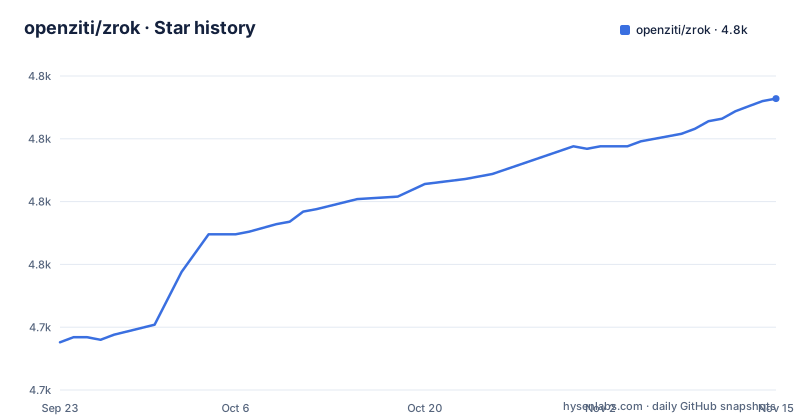
Star history
- openziti/zrok4,816 ★ · +97
| Repository | 2026-09-23 | 2026-11-15 |
|---|---|---|
| openziti/zrok | 4.7k | 4.8k |
97 Stars in the last 53 days, measured from the daily GitHub snapshot. Compare with other projects
Editorial analysis
Three steps from install to a live share
zrok is described as secure internet sharing made simple. After you install it for your platform, you get an account with zrok invite, which targets the free zrok.io service, and then run zrok enable on the machine you want to share from. After that, a single command creates a share. The project says you can be sharing in under 2 minutes, which is the project's own claim and depends on your install path.
$ zrok share public localhost:8080
$ zrok share public --backend-mode drive ~/Documents
$ zrok share private localhost:3000
The three commands cover the three main cases: a web service shared publicly, a folder shared as a network drive, and a service shared privately with other zrok users. Every share follows the same pattern of mode, then target.
Public and private shares ask different things of the other person
A public share makes a local web app reachable over the internet, so the person on the other end needs nothing special. A private share is different. It shares TCP or UDP services only with other zrok users, with no public internet exposure, which means the recipient must also have zrok and an account.
That difference decides which mode you can use for a given audience. If you want a customer to look at a demo in a browser, public is the only practical choice, and you accept that anyone who gets the address can try it. If you want to expose a database port or an SSH-style service to a colleague, private keeps it off the public internet but requires your colleague to run zrok too. The README lists HTTP and HTTPS, TCP, UDP and file sharing as supported protocols.
Drive mode turns a folder into a network drive, and the sample makes it public
The backend mode named drive shares a directory as a network drive. The documentation example uses a repository folder, and the quick start shares a Documents folder. Both examples are written as public shares.
Be careful with that pairing. A public share of a Documents folder exposes whatever is in it to anyone who obtains the share address, so the example is a demonstration of the mechanism and not a recommendation for personal files. If you want a folder reachable only by specific people, the private share mode is the safer starting point, though the README does not show the private drive form as a ready-made command. Point the command at a purpose-made directory, not at a home folder, and stop the share when you are done.
The OpenZiti overlay explains the no-firewall-changes claim
zrok is built on OpenZiti, a programmable zero-trust network overlay. That is the reason it needs no inbound connectivity: it works from behind firewalls and NAT, and the project says it also works on corporate networks. All traffic is encrypted end to end, even from the zrok servers. Connections between users are peer to peer when possible, and access is identity based, so you share with specific users and not with IP addresses.
The words when possible matter. They mean a direct path is not guaranteed, and traffic may otherwise pass through the overlay's relays. The README does not give latency or throughput numbers, and the heading claim of enterprise reliability comes with no figures. Treat both as design intent. If you need to know how fast a large file transfer will be in your network, test it yourself.
The Go SDK embeds a share inside your own program
Applications can create shares directly through the Go SDK, so a service can expose itself without a separate command. The README example creates a private TCP tunnel share and then accepts connections from a listener:
// Create a share
shr, err := sdk.CreateShare(root, &sdk.ShareRequest{
    BackendMode: sdk.TcpTunnelBackendMode,
    ShareMode:   sdk.PrivateShareMode,
})

// Accept connections
listener, err := sdk.NewListener(shr.Token, root)
The go.mod declares the module as github.com/openziti/zrok/v2 and requires Go 1.26.0, so import the v2 path and use a recent toolchain. The share token comes back from the creation call and is what the listener uses. A complete walkthrough is in the SDK guide on the OpenZiti blog, linked from the README.
Building from source runs npm twice, and make clean empties your Go bin directory
Self-hosting is a stated goal: a single binary contains everything you need, it scales from small personal instances to large public services, and it is built on the same codebase as the public zrok.io service. A Self-Hosting Guide on docs.zrok.io covers the setup.
Building from source has its own traps. The default make target depends on a frontend step that runs npm install and npm run build in two places, ui and agent/agentUi, and then runs go install on all packages. So you need Node tooling as well as Go. The Makefile refuses to run if GOBIN points at the root directory. More importantly, its clean target runs rm -f on everything inside the GOBIN directory, so if that directory also holds other Go tools you installed, running make clean deletes them as well.
Frequent v2 releases, and safety claims that are the project's own
The three newest releases are v2.0.9 on 2026-10-31, v2.0.8 on 2026-10-08 and v2.0.7 on 2026-10-03, and the last push was on 2026-10-31. The repository has goreleaser files for macOS, Windows and several Linux targets, including amd64, arm64, armel and armhf, which matches the README's list of Windows, macOS, Linux and Raspberry Pi.
The license is Apache-2.0. Statements such as secure by default and zero-trust architecture describe design, and nothing in the README here shows an audit. The project does include a SECURITY.md file, so check it for how to report problems. If you decide whether zrok.io is safe for a given task, the end-to-end encryption claim, which includes the zrok servers, is the property to weigh, along with your own threat model.
Editorial conclusion
zrok fits developers who need to expose a local service or folder quickly, either to the open internet or to named zrok users, and who want the option to run their own instance later. It is a poor choice if the people you share with cannot install zrok and you need a private share, or if you need hard numbers for reliability, because the project gives claims rather than measurements. Before sharing anything publicly, check exactly which directory or port your command exposes.
Frequently asked questions
How does zrok work?
zrok is built on the OpenZiti zero-trust overlay. You run zrok share to publish a local service or folder, traffic is encrypted end to end, and no inbound ports or firewall changes are needed.
How does OpenZiti work?
OpenZiti is a programmable zero-trust network overlay. It needs no inbound connectivity, encrypts all traffic end to end, connects peers directly when possible, and grants access by identity.
Is zrok free?
The project is Apache-2.0 licensed and can be self-hosted. The README points to a free zrok.io service for getting an account with zrok invite.
Is zrok.io safe?
The project says all traffic is encrypted end to end, even from the zrok servers, and sharing is identity based. These are its own design claims, and the README gives no audit results.
Official sources
Add this badge to your README
If you maintain this project, the badge below links readers to this analysis and shows its maintenance status from the daily GitHub snapshot. Paste the markdown into your README; add ?metric=license or ?metric=stars to the image URL for a different field.

[](https://hysenlabs.com/projects/openziti-zrok)Star history chart for your README
[](https://hysenlabs.com/projects/openziti-zrok)Was this useful?