pdfGPT: Chat With a PDF Using GPT, Without a Vector Database
PDF GPT allows you to chat with the contents of your PDF file by using GPT capabilities. The most effective open source solution to turn your pdf files in a chatbot!
At a glance
- What is it?
- pdfGPT is a Gradio app that chunks an uploaded PDF, embeds each chunk with a Universal Sentence Encoder model, and sends the nearest chunks to OpenAI. It is small, MIT licensed, and its README warns that the documentation has fallen behind the code.
- Who is it for?
- pdfGPT suits someone who wants to read the whole pipeline in an evening and is comfortable pasting an OpenAI key into a Gradio form. It does not suit anyone who needs multiple PDFs per session, OCR on scanned documents, or a maintained library API, because the README lists the first two as unshipped pipeline items and says its documentation is outdated.
- Can I use it commercially?
- Yes. MIT is a permissive licence: you can use, modify and sell software built on it, as long as you keep its copyright and licence notices.
- Is it still maintained?
- Activity is slowing. The repository last received commits 8 months ago.
- What is it written in?
- Mainly Python, according to GitHub's language statistics.
Answers come from the project's GitHub data, last synced on November 15, 2026, and from our analysis. They are not legal advice.
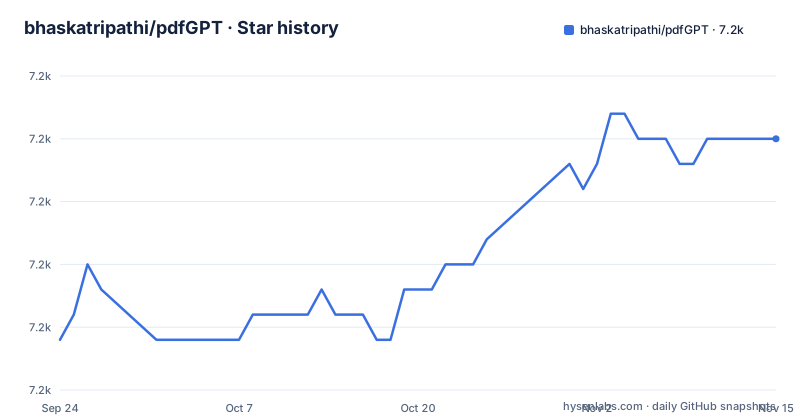
Star history
- bhaskatripathi/pdfGPT7,170 ★ · +8
| Repository | 2026-09-24 | 2026-11-15 |
|---|---|---|
| bhaskatripathi/pdfGPT | 7.2k | 7.2k |
8 Stars in the last 52 days, measured from the daily GitHub snapshot. Compare with other projects
Editorial analysis
The problem pdfGPT was written to solve
A PDF does not fit in a prompt. The README states the constraint plainly: pass a large text to OpenAI and it hits a 4K token limit, so the whole file cannot be an input. The second problem it names is chattiness. OpenAI, in the project's words, "sometimes becomes overtly chatty and returns irrelevant response not directly related to your query", which the author attributes to poor embeddings. Third, ChatGPT cannot read external data on its own, and the README argues that LangChain-based solutions are token hungry when implemented carelessly.
The intended user is an engineer or analyst who has one document and one set of questions about it, and who wants to see every step of the retrieval logic rather than inherit a framework. The README also positions the project against hosted chat-with-PDF services, claiming those have "poor content quality" and are "prone to hallucination problem". That is the author's assessment of competitors, not a measured comparison, and the repository contains no evaluation harness or benchmark numbers to back it.
How the chunking, embedding and KNN retrieval actually work
The README ships a Mermaid sequence diagram, and it is the most precise description of behaviour in the repository. The flow is: the user enters an API key, uploads a PDF or supplies a PDF URL, and asks a question. The system validates the blank fields, converts the PDF to text, and decomposes the text into chunks of 150 words. It then checks whether an embeddings file already exists. If it does, the file is loaded and an internal fitted flag is set to true. If it does not, embeddings are generated, the recommender is fitted, and the result is saved. Semantic search then finds the nearest chunks by K-nearest neighbours, the most relevant ones are passed to OpenAI in a prompt, and the answer is generated.
Two details matter more than the rest. The embeddings come from a Deep Averaging Network Encoder, which the README ties to the Universal Sentence Encoder family, not from OpenAI's embedding endpoint. And there is no vector database and no index: scikit-learn holds the fitted neighbour structure in memory, and persistence is a single embeddings file on disk. The flowchart adds that chunks carry citation history, which is how the answer can cite a page number in square brackets.
The caching step is the sharpest edge in the design. The README does not document how the file is keyed or cleared.
Installing pdfGPT with Docker Compose and asking a first question
The README gives one installation instruction: run docker-compose. The compose file defines two services, langchain-serve on port 8080 and pdf-gpt on port 7860, both built from the same context with different Dockerfile targets.
docker-compose -f docker-compose.yaml upAfter the build finishes, the Gradio interface is served on port 7860. Open http://localhost:7860, paste an OpenAI API key into the form, and upload a PDF or give a URL.
The Dockerfile shows what happens underneath. The pdf-gpt-img target starts from python:3.8-slim-buster, copies requirements.txt, installs it, copies the rest of the repository, and runs app.py. The langchain-serve-img target installs langchain-serve, then runs lc-serve deploy local api, which is how the README's claim of "APIs on Production" is realised.
FROM python:3.8-slim-buster as pdf-gpt-img
WORKDIR /app
COPY requirements.txt requirements.txt
RUN pip3 install -r requirements.txt
COPY . .
CMD [ "python3", "app.py" ]
If you prefer to run it outside Docker, the pinned dependencies are the ones to reproduce, and they are heavy: tensorflow>=2.0.0 and tensorflow_hub==0.13.0 pull a large runtime, alongside PyMuPDF==1.22.1, scikit-learn==1.2.2, openai==0.27.4 and gradio==4.11.0.
pip install -r requirements.txt
python3 app.py
Expect the first question on a document to take noticeably longer than later ones, because that is when the embeddings are generated and the recommender is fitted. The README notes that a pre-defined question list auto-fills the input, and that chat history is kept.
Where pdfGPT breaks down, and when it is the wrong tool
The README is unusually candid about model behaviour. It states that if a response is poor with Turbo models, that is expected: gpt-3.5-turbo is a chat completion model and "will not give a good response in some cases where the embedding similarity is low". The suggested workaround is to switch to text-DaVinci-003 or GPT4 and above. That is a real constraint on the default experience, and it is not something the application can fix, because the failure lives in the retrieval step.
Scanned PDFs are the second boundary. OCR support appears twice in the upcoming release pipeline, which means it is not implemented. A PDF made of page images will convert to little or no text, and the pipeline has nothing to embed.
Multiple PDF file support is also listed as upcoming, not shipped. If your questions span a folder of documents, this is the wrong tool today.
The README adds that "The library documentation that you see below is a bit outdated as I do not get enough time to maintain it." Treat the README's architecture description as a starting point and the code as the authority. The repository has no published GitHub releases, so there is no tagged version to pin against. The last push to the main branch was on 2026-03-06.
pdfGPT against LangChain-based RAG pipelines
The clearest alternative is a LangChain document-loader, splitter, vector-store and retriever chain. The difference is not cosmetic. A LangChain pipeline typically persists chunk vectors in a store such as FAISS or Chroma and queries that store, which lets you add documents incrementally and delete them individually. pdfGPT holds the neighbour structure in memory via scikit-learn, writes one embeddings file, and has no notion of a document collection. The README's stated reason for avoiding LangChain is token consumption when implemented incorrectly, and the author's claim that the simpler architecture is more accurate.
That trade is legible: you give up incremental indexing, multi-document collections and a pluggable embedding model, and in exchange you get a pipeline short enough to audit in one sitting. If you need to swap in a different embedding model or a hosted vector store, pdfGPT's design works against you.
A second alternative is a hosted chat-with-PDF service. Those remove the API key handling and the TensorFlow install, but the README explicitly argues they hallucinate more. You cannot verify that claim from this repository, so weigh it as the author's position rather than a finding.
Maintenance, dependencies and the MIT licence
The repository is not archived and the last push to main was on 2026-03-06. The README itself says the author does not get enough time to maintain the documentation, and it closes by asking for contributors to take up backlog items voluntarily. Plan for a project where the code may move ahead of the docs.
The upgrade cost sits mostly in the dependency pins. tensorflow_hub==0.13.0 and tensorflow>=2.0.0 are the heaviest items,. openai==0.27.4 predates the current OpenAI client, so any refresh of that package is a code change in app.py, not a version bump. langchain-serve>=0.0.19 floats (as do tensorflow>=2.0.0 and the unpinned litellm), and it is the piece that exposes the API on port 8080.
The licence is MIT, stated in the README with a LICENSE.txt at the repository root. MIT permits commercial use and modification provided the copyright notice and permission notice are retained. It offers no patent grant and no warranty, and this is a description of the licence text, not legal advice. Because the application sends document text to OpenAI, the licence says nothing about the data-handling obligations you take on by using a third-party API.
Editorial conclusion
pdfGPT suits someone who wants to read the whole pipeline in an evening and is comfortable pasting an OpenAI key into a Gradio form. It does not suit anyone who needs multiple PDFs per session, OCR on scanned documents, or a maintained library API, because the README lists the first two as unshipped pipeline items and says its documentation is outdated. Before adopting it, open app.py and confirm the chunk length still matches the README's 150-word description, and check whether the embeddings-file caching step writes to a path your deployment can persist.
Frequently asked questions
Is pdfGPT free?
The code is MIT licensed and free to use, and the Docker Compose file runs it locally. The application still calls OpenAI, so you supply an API key and pay OpenAI for the completions.
Which AI is best for PDFs?
The README says the project supports Turbo models and GPT4 including the 16K and 32K token variants. It also warns that Turbo models give poor answers when embedding similarity is low and suggests text-DaVinci-003 or GPT4 instead.
Is there a free AI PDF generator available?
pdfGPT does not generate PDFs; it reads an uploaded PDF and answers questions about its contents. The README describes chatting with a document, not producing one.
Official sources
Add this badge to your README
If you maintain this project, the badge below links readers to this analysis and shows its maintenance status from the daily GitHub snapshot. Paste the markdown into your README; add ?metric=license or ?metric=stars to the image URL for a different field.

[](https://hysenlabs.com/projects/bhaskatripathi-pdfgpt)Star history chart for your README
[](https://hysenlabs.com/projects/bhaskatripathi-pdfgpt)Was this useful?