Baritone: the Minecraft pathfinding bot that walks where you send it
google maps for block game
At a glance
- What is it?
- Baritone is a Java pathfinding mod for Minecraft that turns a chat command into a walking route. It is built for players who want automated travel and mining, not for anyone expecting a hands-off bot.
- Who is it for?
- Adopt Baritone if you play Minecraft on one of the supported versions and want a pathfinder you drive by hand, on Forge, Fabric or NeoForge. Do not adopt it if you expect a fully autonomous bot, or if your server treats automated movement as cheating.
- Can I use it commercially?
- Yes, with conditions. LGPL-3.0 is a weak copyleft licence: you can use it inside commercial and closed-source software, but if you distribute changes to its own files, you must publish those changes under the same licence.
- Is it still maintained?
- Yes. The repository last received commits 4 days ago.
- What is it written in?
- Mainly Java, according to GitHub's language statistics.
Answers come from the project's GitHub data, last synced on November 13, 2026, and from our analysis. They are not legal advice.
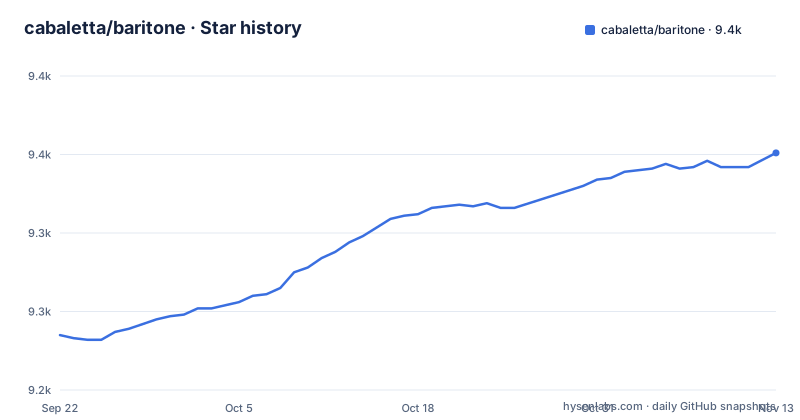
Star history
- cabaletta/baritone9,351 ★ · +116
| Repository | 2026-09-22 | 2026-11-13 |
|---|---|---|
| cabaletta/baritone | 9.2k | 9.4k |
116 Stars in the last 52 days, measured from the daily GitHub snapshot. Compare with other projects
Editorial analysis
What Baritone actually does for a Minecraft player
The README calls Baritone "a Minecraft pathfinder bot" and the repository description calls it "google maps for block game". Both land on the same idea: you name a destination, and the mod computes a route and walks it. The pathfinding is the product. The README states that Baritone has been the pathfinding system used in Impact since version 4.4, which tells you the code has been embedded in third-party clients rather than only shipped standalone.
The intended user is a Minecraft player on a supported game version who wants to travel, mine or build without steering manually.
What Baritone automates beyond movement is documented in FEATURES.md and USAGE.md, so check those files before deciding it fits a larger automation goal.
How the pathfinder is wired into the game
The repository layout is the clearest evidence of the architecture. There are separate top-level directories named forge, fabric and neoforge, plus a shared src directory, a buildSrc directory and a tweaker directory. The default branch is named 1.21.4. This is a multi-loader mod: the same pathfinding code is compiled against different mod loaders through loader-specific entry points, which is why one project produces jars for Forge, Fabric and NeoForge.
The README's download table is split into Forge, Fabric and NeoForge columns, and the download links start at Minecraft 1.12.2. A single build therefore does not fit every game version. The Dockerfile installs openjdk-21-jdk and git, copies the repository to /code, and runs ./gradlew build, so Java 21 is the toolchain the project expects.
Anyone who needs details of the search itself, such as the cost function or node representation, should read src.
Installing Baritone and running a first goto
The README's quick download table links release jars per loader and per Minecraft version, for example baritone-api-forge-1.2.19.jar for 1.12.2 Forge. Pick the jar that matches both your loader and your game version, drop it in your mods folder, and start the game. SETUP.md in the repository covers setup in more detail.
Once in game, Baritone is driven from chat. USAGE.md is the file that covers the commands, and the release notes for v1.20.0, v1.12.0 and v1.11.3 are the place to check for behaviour changes between versions.
If you would rather build from source, the repository ships a Dockerfile that does it for you:
FROM ubuntu:focal

ENV DEBIAN_FRONTEND noninteractive

RUN apt update -y

RUN apt install \
          openjdk-21-jdk \
	  git \
          --assume-yes

COPY . /code

WORKDIR /code

RUN ./gradlew build
The image installs JDK 21, copies the checkout into /code and runs the Gradle build. Expect a Gradle build of a Java mod, not a one-line install. For a local build outside Docker, the repository includes gradlew and gradlew.bat, so the wrapper is the intended entry point.
Where Baritone stops being the right tool
The README describes Baritone as a Minecraft pathfinder bot. Commands are issued by the player, so check USAGE.md and FEATURES.md for what each command automates before expecting hands-off behaviour.
Server rules are the second boundary. Whether a given multiplayer server permits automated movement is a question for that server.
Version coverage is uneven. The download table starts at 1.12.2 and is organised per loader, so a player on a Minecraft version with no matching release jar has no supported install path from the README.
Finally, if a new release changes pathing behaviour in a way you dislike, the fallback is installing an older release jar yourself.
Baritone against Litematica and other build helpers
Litematica is a common comparison for Baritone, and the two solve different halves of a build. Litematica is a schematic mod: it loads a saved structure and renders a ghost overlay so a player can place blocks against it. The placement is still manual. Baritone works from the world state toward a destination, and it is the movement layer.
The README's integration badges point at a different kind of neighbour. Impact, Lambda, ForgeHax, Aristois, rootNET, Future and RusherHack all embed or add on to Baritone. Those are full client mods that bundle pathfinding rather than replace it. Choosing between Baritone standalone and a client that includes it is a question of how much other functionality you want in the same jar.
Using Baritone to build a Litematica schematic is a combination rather than a competition; check USAGE.md for any schematic-related commands before assembling such a workflow yourself.
Licence, maintenance and what an upgrade costs
The repository licence is LGPL-3.0, and the repository carries LICENSE and LICENSE-Part-2.jpg as separate files. LGPL-3.0 is the standard weak-copyleft licence for libraries; any additional terms are in those files, not in the README. Read both files before you redistribute a modified build. This is a description of what the repository states, not legal advice.
The project is not archived, and the last push was on 2026-10-23. v1.12.0 and v1.11.3 both landed on 2026-09-01, and v1.20.0 followed on 2026-09-23. That pattern, two version lines released on the same day, suggests the project maintains parallel branches for different Minecraft versions rather than a single rolling release. Upgrading therefore means matching a release line to your game version, not always taking the newest tag.
The upgrade cost is mostly the loader matrix. A jar built for one loader and game version does not carry over to another, and the repository has separate forge, fabric and neoforge directories because of it. Budget for a rebuild or a re-download on every Minecraft version bump.
Editorial conclusion
Adopt Baritone if you play Minecraft on one of the supported versions and want a pathfinder you drive by hand, on Forge, Fabric or NeoForge. Do not adopt it if you expect a fully autonomous bot, or if your server treats automated movement as cheating. Before installing, check that your game version matches a release jar on the releases page, and confirm the LGPL-3.0 licence and the terms in LICENSE and LICENSE-Part-2.jpg are acceptable to you.
Frequently asked questions
How do I install the Baritone Minecraft mod?
Download the release jar from the README's quick download table that matches both your mod loader and your Minecraft version, then place it in your mods folder. The README organises those links into Forge, Fabric and NeoForge columns.
How do I build Baritone from source?
The repository's Dockerfile installs openjdk-21-jdk and runs ./gradlew build.
How do I use Baritone commands?
Baritone is driven from in-game chat, and USAGE.md in the repository is the command reference.
How do I use the Baritone mod?
You issue commands in chat and the pathfinder computes a route over the block world; USAGE.md documents the commands. The README describes Baritone as a Minecraft pathfinder bot and notes it has been used in Impact since version 4.4.
How do I use Baritone to mine diamonds?
Mining commands are covered by the command reference in USAGE.md, so check that file for how to target a specific ore.
How do I use Baritone to find structures?
Check the command reference in USAGE.md, and the feature list in FEATURES.md, for any structure-finding command.
Official sources
Add this badge to your README
If you maintain this project, the badge below links readers to this analysis and shows its maintenance status from the daily GitHub snapshot. Paste the markdown into your README; add ?metric=license or ?metric=stars to the image URL for a different field.

[](https://hysenlabs.com/projects/cabaletta-baritone)Star history chart for your README
[](https://hysenlabs.com/projects/cabaletta-baritone)Was this useful?