Crank.js: a UI framework where generators hold the state
The Just JavaScript UI Framework
At a glance
- What is it?
- Crank.js replaces hooks and dependency arrays with generator functions and async functions, so state is a local variable and cleanup is the code after the loop. Here is how the mechanism works, how to install it, and where it stops being the right choice.
- Who is it for?
- Adopt Crank.js if your team already writes generators and async functions comfortably and you want component state to be a plain closure variable rather than a hook call with a dependency array. Skip it if you need a large third-party component ecosystem, or if a generator in a component body would confuse the people reviewing the code.
- Can I use it commercially?
- Yes. MIT is a permissive licence: you can use, modify and sell software built on it, as long as you keep its copyright and licence notices.
- Is it still maintained?
- Yes. The repository last received commits 4 days ago.
- What is it written in?
- Mainly TypeScript, according to GitHub's language statistics.
Answers come from the project's GitHub data, last synced on November 7, 2026, and from our analysis. They are not legal advice.
Star history
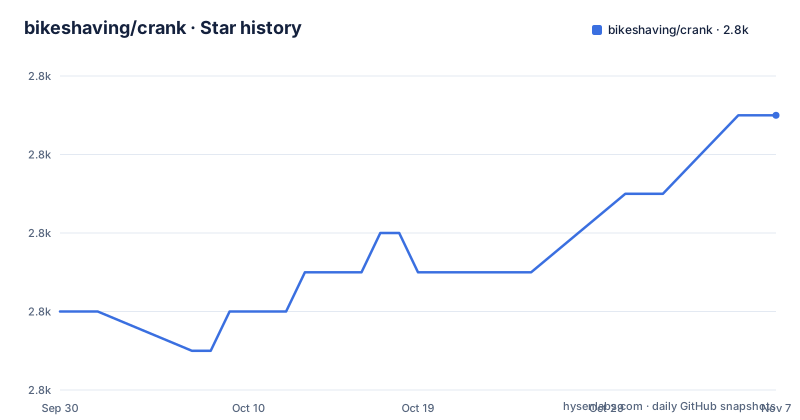
- bikeshaving/crank2,803 ★ · +5
| Repository | 2026-09-30 | 2026-11-07 |
|---|---|---|
| bikeshaving/crank | 2.8k | 2.8k |
5 Stars in the last 38 days, measured from the daily GitHub snapshot. Compare with other projects
Editorial analysis
The problem Crank.js solves: state that lives in a closure, not a hook
Most component frameworks make you describe the same component three times: once as a render function, once as a set of state declarations, and once as a list of dependencies that decide when the state should reset. Crank.js collapses those into one construct. A stateful component is a generator function. Setup is the code before the loop. State is a `let` binding in the generator scope. Updates are re-execution: the documentation states that calling `refresh()` runs the loop again. Cleanup is the code after the loop, which runs when the component unmounts.
The audience is narrow and specific. This is for engineers who are comfortable with JavaScript's own control flow and would rather read `for ({} of this)` than a dependency array. The README frames the pitch as "a framework that feels like JavaScript" and notes there are no hooks, no dependency arrays, no compiler, and no rules about what you can call where. That is a real design position, not a marketing line: the lifecycle is the control flow, so a `try`/`finally` block is a valid teardown mechanism and a closure is a valid store.
How generator components and async components actually work
Two component shapes carry the framework. A synchronous stateful component is a generator that yields elements and receives props by iterating `this`. The README's `Timer` example declares `let seconds = 0`, starts an interval whose callback calls `this.refresh(() => seconds++)`, then loops `for ({} of this)` and yields a `<div>`. When the loop exits, `clearInterval(interval)` runs. The generator is suspended at the yield, so the local binding survives between renders without any framework-managed store.
Async components are the second shape. An `async` function component can `await` data and return JSX directly. The README's `Definition` component fetches from an external dictionary API, awaits the JSON, and returns a fragment. On the server, the README shows `await renderer.render(...)`, so the same async component resolves before output is produced.
The interesting piece is `async function*`, which the README describes as a way to race component trees. The `RandomDogLoader` example loops `for await ({throttle} of this)`, yields a `LoadingIndicator`, then yields the real `RandomDog`. Because the loop is `for await`, a new prop arriving while the loading indicator is still on screen cancels the pending branch and starts the next one. That is the framework's answer to race conditions, and it comes from the language rather than from an abort-controller convention the library invents. The README does not document what happens to in-flight promises inside a superseded branch beyond this example, so treat cancellation semantics as something to confirm in the source before relying on them.
Installing Crank.js and rendering a first component
The package is published on npm under the `@b9g` organization, which the README says is short for bikeshaving. The scaffold command creates a new project:
npm create crankIf you would rather add it to an existing project, the install is a single dependency:
npm i @b9g/crankJSX needs a transform. With the automatic transform, the README gives this configuration for `tsconfig.json`:
{
  "compilerOptions": {
    "jsx": "react-jsx",
    "jsxImportSource": "@b9g/crank"
  }
}
The `jsxImportSource` value is what tells the compiler where the JSX factory lives. With that in place, a component and its render call look like this, adapted from the README's simple component example:
import {renderer} from "@b9g/crank/dom";

function Greeting({name = "World"}) {
  return (
    <div>Hello {name}</div>
  );
}

renderer.render(<Greeting />, document.body);
After the render call, the greeting paragraph replaces the contents of `document.body`. If your project cannot run a JSX transform, the README points to a tagged template alternative that ships from version 0.5 onward:
import {jsx} from "@b9g/crank/standalone";
import {renderer} from "@b9g/crank/dom";

renderer.render(jsx`
  <p>No transpilation is necessary with the JSX template tag.</p>
`, document.body);
The README also lists ESM CDNs, jsDelivr and esm.sh, for environments that can import modules directly from a URL. The README's own configuration section is labeled an incomplete list, and the TypeScript section is truncated mid-example, so the project site's TypeScript guide is the place to look for the rest of the typing story.
Where Crank.js gets awkward: tooling, ecosystem and generator fluency
The trade-off is the mirror image of the design. Because there is no compiler and no hook runtime, there is also no lint rule ecosystem of the size React has, and the README's own example set is small: the repository's `examples/` directory holds a todomvc, a tetris, a hackernews clone, a wizard, an animated-letters demo, a password-strength meter, a hexagonal minesweeper, an xstate calculator and a couple of others. That is a demo catalogue, not a component library. If your application depends on a mature ecosystem of third-party UI components built for a specific framework, Crank.js will not hand you one.
The second cost is generator fluency. A component that mixes a `for ({} of this)` loop with an event listener registered on `this` and a `this.refresh(() => ...)` callback is readable to someone who writes generators daily and opaque to someone who does not. React's rules-of-hooks complaints are replaced by a different question: does this reader know what happens at a yield point? The README treats that as the selling point, and for some teams it will be, but it is a hiring and code-review constraint, not a free win.
The third constraint is that the framework is at a 0.x version line. The most recent releases listed are v0.7.12, v0.7.11 and v0.7.10, and the repository's own `package.json` still declares `0.7.9` at the root. A pre-1.0 version number means minor releases can carry breaking changes; the CHANGELOG.md at the repository root is where that history lives. The README does not document a migration or codemod path between 0.x versions, so plan upgrades as manual work.
Crank.js compared with React and with a signals-based framework
The clearest contrast is with React. React keeps component state in a framework-managed store and re-runs the whole function on every render, which is why hooks must be called unconditionally and in the same order. Crank.js keeps state in the generator's own scope and resumes the generator at its yield point. The practical difference shows up in cleanup: React needs an effect with a return function, while Crank puts the teardown after the loop, where a reader can see it next to the setup that created the resource.
Against a signals-based framework, the difference is where the dependency graph lives. Signals frameworks track which computations read which values and update only the parts that changed; Crank.js re-executes the component function and diffs the result, with `refresh()` as the explicit trigger. Crank's model is closer to a re-render framework with a different state container, and the explicit `this.refresh` call is a reminder that the framework is not trying to infer your dependencies for you. If your reason for considering signals is fine-grained update performance, Crank.js is not making that argument; its argument is about the shape of the code.
Maintenance, licensing and what an upgrade costs
The repository is not archived and the last push was on 2026-09-23, days before this writing, with releases in the same month. That is a live project by the only measure available here, though the 0.x version line still means the API surface can move between minor releases.
The licence is MIT, declared in the repository's `package.json` and present as a LICENSE file at the root. MIT is permissive: it allows use, modification and redistribution, including in closed-source products, provided the copyright notice and permission notice are retained. That is a description of the licence text, not legal advice; if your organisation has a policy on attribution notices in distributed bundles, route it through whoever handles that.
Upgrade cost is the part the material is thinnest on. The README does not document rollback, and there is no published migration guide in the files available here. The CHANGELOG.md at the repository root is the only upgrade record you can read before bumping the version. For a 0.x dependency in a production application, pinning the exact version and reading the changelog entry for each bump is the realistic process, because there is no compatibility promise to lean on.
Editorial conclusion
Adopt Crank.js if your team already writes generators and async functions comfortably and you want component state to be a plain closure variable rather than a hook call with a dependency array. Skip it if you need a large third-party component ecosystem, or if a generator in a component body would confuse the people reviewing the code. Before committing, verify that your JSX transform is configured with jsxImportSource set to @b9g/crank, and read the TypeScript guide on the project site, because the README's configuration section is explicitly described as incomplete.
Frequently asked questions
How do I install Crank.js?
Scaffold a new project with npm create crank, or add the dependency to an existing one with npm i @b9g/crank. JSX then needs a transform, and the README gives a tsconfig.json with jsx set to react-jsx and jsxImportSource set to @b9g/crank.
Does Crank.js use hooks?
No. The README states there are no hooks, no dependency arrays, no compiler, and no rules about what you can call where. State is a local variable in a generator's scope, and updates re-execute the loop.
Can I use Crank.js without a JSX build step?
Yes. Starting in version 0.5 the package ships a tagged template function, imported as jsx from @b9g/crank/standalone, which the README says provides similar syntax and semantics to the JSX transform without transpilation.
How does async data loading work in Crank.js?
Async function components can await data and return JSX directly, and the README shows await renderer.render(...) for server output. For racing component trees, an async generator component can loop with for await over this and yield a loading state before the resolved state.
Official sources
Add this badge to your README
If you maintain this project, the badge below links readers to this analysis and shows its maintenance status from the daily GitHub snapshot. Paste the markdown into your README; add ?metric=license or ?metric=stars to the image URL for a different field.

[](https://hysenlabs.com/projects/bikeshaving-crank)Star history chart for your README
[](https://hysenlabs.com/projects/bikeshaving-crank)Was this useful?