AssetFurnace: image-to-3D with rigging, animation and a licence record
AssetFurnace: the most complete open-source image-to-3D pipeline (Oct 2026). Prompt or picture → textured, rigged, animated game character, locally on Apple Silicon or NVIDIA. Pixal3D, TRELLIS.2, Hunyuan3D, SF3D, auto-rig and 21 moves. For indie game devs and 3D artists. Free, Apache-2.0.
At a glance
- What is it?
- AssetFurnace, the renamed Image to 3D Lab, turns a sentence or a picture into a textured, rigged and animated game character entirely on your own machine, with Pixal3D, TRELLIS.2 and Hunyuan3D behind one studio and one CLI. The distinctive part is not the generation but the finishing, where the pipeline copies your original pixels back onto the model and records the licence behind every file.
- Who is it for?
- Use AssetFurnace if you are an indie developer or 3D artist who needs game-ready assets without uploading references to someone else's server, since the pipeline runs on Apple Silicon, NVIDIA or AMD hardware and the licensing record travels with the files. Do not adopt it expecting photorealism on the first attempt, because the README is candid that image-to-3D models redraw your picture and the detail recovery step is what repairs text, logos and faces.
- Can I use it commercially?
- Yes. Apache-2.0 is a permissive licence: you can use, modify and sell software built on it, as long as you keep its copyright and licence notices.
- Is it still maintained?
- Yes. The repository last received commits 1 day ago.
- What is it written in?
- Mainly Python, according to GitHub's language statistics.
Answers come from the project's GitHub data, last synced on November 7, 2026, and from our analysis. They are not legal advice.
Star history
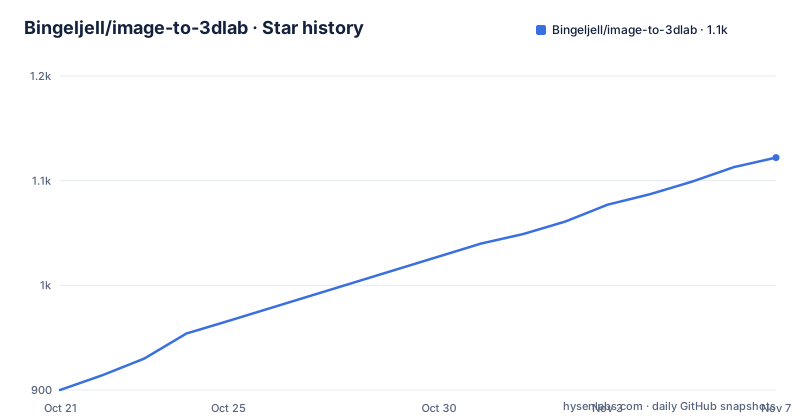
- Bingeljell/image-to-3dlab1,122 ★ · +222
| Repository | 2026-10-21 | 2026-11-07 |
|---|---|---|
| Bingeljell/image-to-3dlab | 900 | 1.1k |
222 Stars in the last 17 days, measured from the daily GitHub snapshot. Compare with other projects
Editorial analysis
What the pipeline produces from one input
AssetFurnace takes a sentence, a picture, or a model you bring yourself, and the promise is a rigged, animated game character in return, on your own Apple Silicon Mac or NVIDIA PC. The result is a textured model with a skeleton and moves chosen from 21 presets, walk, run, jump, dance, kicks and more, exported as a GLB for Godot, Unity, Unreal, Blender or three.js. The README also lists the studio, with your Library, a 3D viewer and a Steps panel, where Create runs every step and you can stop after any of them, and where closing the tab does not stop the run. There are two more outputs that make it more than a generator. Prop sheets turn one picture into nine separate game-ready props with levels of detail. And the Finish step turns a heavy generated model into a compressed, game-sized one. The repository was formerly called Image to 3D Lab, the same repository under a new name, and the project site is assetfurnace.com.
Three backends behind one interface
The choice of model is presented as a menu rather than a fixed pipeline. Pixal3D, TRELLIS.2 and Hunyuan3D sit behind the same studio and the same command line, and there is a directory in the repository named hunyuan_mlx, which is the Apple Silicon path for that family. The rendering targets are the usual game targets, Godot, Unity, Unreal, Blender and three.js, all named in the README and all in the repository topic tags. The backend choice also determines which features are available, and the README is explicit that Pixel Match is on by default for Pixal3D models while other backends are next, so the feature set is not uniform across the three. The licensing section is separate from the model section, and the topic tags list the model names alongside the engine names, which tells you the project treats the engines as first-class outputs rather than an afterthought.
Pixel Match puts your own pixels back
The most interesting technical claim in the README is about what image-to-3D does badly. Generated models redraw your picture, so text, logos and faces come back as garbled lookalikes. Pixel Match, in the Finish step, copies the real pixels from the source image back onto every surface the image can see, so a chest marking reading VANGUARD 07 stays VANGUARD 07 even after the model is cut to about five thousand faces. The claim about low poly is paired with that: the point is not to keep the high face count but to keep the detail that matters after the reduction. There is also a front-and-back mode where the generator builds the shape from both views and Pixel Match paints from both, so the back of the character is your character rather than a guess, on by default once its two downloads are in place, and Setup and Status reports that as 6.6 GB. The README also links a page on how Pixel Match works.
Rigging with SkinTokens and 21 fitted presets
Press Rig and SkinTokens fits a skeleton and skin weights to your humanoid, and then you choose a move from the presets, each fitted to your character so arms stay out of the body and feet stay on the floor. That detail is the whole claim of the rigging step: a rig that is technically attached but produces self-intersecting elbows is not usable in a game, and the presets are described as fitted rather than merely selectable. The hardware story is worth reading carefully. It runs on Apple Silicon, NVIDIA and AMD through ROCm alike, because SkinTokens is pure PyTorch and therefore needs no NVIDIA-only build on an AMD card. The repository carries a rigs directory and the release history shows a separate Pixal3D NVIDIA build tag, pixal3d-nvidia-1f432fd-r1, published on 2026-10-19, alongside the AssetFurnace releases v0.4.6 and v0.4.5, which suggests the NVIDIA-specific pieces are versioned apart from the main package.
The install is a shell script, and the models are opt-in
On Mac with Apple Silicon or on Linux, the install is a single piped command.
curl -fsSL https://assetfurnace.com/install.sh | bashWindows has an equivalent script, and the README marks it as limited testing with more testers wanted.
irm https://assetfurnace.com/install.ps1 | iexThe installer is short and the README suggests reading it before running it, which is good advice for a piped install. It checks your machine, installs the code and Python 3.11, then starts the studio and opens it in the browser. On a RunPod pod it prints the pod's link instead, and over plain SSH it prints the tunnel command. You start it again with ./lab in the install folder, and you update by running the same line again. The important detail is that it downloads no model weights at all: the weights are chosen in Setup and Status, which states each size and licence and asks first. For scripts and agents there is a non-interactive form with --yes and --dir, and --dry-run shows what it would do.
Text to image, then image to 3D
If you have no picture to start from, the studio offers a Create button and you type a sentence, and it makes the picture first and then carries on to the 3D stage. That step runs Qwen-Image 2.1 on your own machine, and the README notes that the pictures you make are yours with a link to Qwen's own statement. The prompt guide is linked separately and it makes a point that decides most of the result: a soft 3D-render look, an A-pose and open hands are the things that produce a usable model, so the prompt is not decoration. The images in the README show three creatures generated from text prompts taking about four and a half minutes each, which is the number to keep in mind for a pipeline that starts with nothing. The requirements file shows the shape of the environment, with torch and torchvision at the lower bounds, onnxruntime, huggingface-hub, rembg pinned to 2.0.69 because it is the newest that knows BiRefNet-lite and still installs beside numpy 1.x, numpy held below 2, and the MCP package the agents connect to.
Licence records and the MCP surface
Two features stand out as deliberate choices rather than conveniences. The first is the licence record: the README says every file carries a record of the licences behind it, and that you know what you can ship. Given that the pipeline pulls in models with different terms and in some cases gated access, that record is the difference between an asset you can put in a commercial game and one you cannot. The repository has a manifests directory and a NOTICE file, which is where such records would live. The second is the agent surface: your agent can drive it, with Claude Code, Codex and other MCP clients making, checking and tweaking assets for you. The lab command exposes an MCP server, since the requirements file names the package the agents connect to, and the repository contains an AGENTS.md and a CLAUDE.md, which are the instructions those agents read.
Where AssetFurnace is the wrong choice
Four limits apply. The output quality is bounded by what the diffusion-based reconstruction can recover, and the README says so plainly, since the models redraw your picture and only the finishing step repairs the parts that matter, so a reference with fine detail will come back wrong in ways that need manual work in a modeller. The hardware requirements are real, since a 30 MB generated model and a 6.6 GB model download are not trivial, and the NVIDIA path is versioned separately from the main package, so the support surface is larger than the repository suggests. The pipeline is local, which is a privacy benefit and an operational cost, because there is no hosted fallback when your machine cannot run a step. And the licence position, while documented, is only as good as the models you are permitted to use, since gated models are checked for reachability by the Setup page rather than guaranteed available.
Editorial conclusion
Use AssetFurnace if you are an indie developer or 3D artist who needs game-ready assets without uploading references to someone else's server, since the pipeline runs on Apple Silicon, NVIDIA or AMD hardware and the licensing record travels with the files. Do not adopt it expecting photorealism on the first attempt, because the README is candid that image-to-3D models redraw your picture and the detail recovery step is what repairs text, logos and faces. Verify first which backend and which model sizes you will download, since Setup and Status asks before pulling weights and the front-plus-back feature alone needs 6.6 GB, that your hardware matches the backend you pick, because SkinTokens is pure PyTorch while the CUDA-specific wheels are deliberately avoided, and that the licence record attached to each output tells you what you may actually ship.
Frequently asked questions
What does AssetFurnace generate from a prompt or a picture?
A textured 3D model with a skeleton and animation, exported as a GLB for Godot, Unity, Unreal, Blender or three.js. Rigging is done by SkinTokens and the animation comes from 21 fitted presets including walk, run, jump, dance and kicks.
How do I install AssetFurnace?
On Mac with Apple Silicon or on Linux, run curl -fsSL https://assetfurnace.com/install.sh | bash. On Windows there is an install.ps1 equivalent with limited testing. The installer checks the machine, installs the code and Python 3.11, then starts the studio, and you start it again later with ./lab in the install folder.
Does the installer download the AI models?
No. It downloads no model weights. Those are chosen in Setup and Status, which states each size and licence and asks before fetching, and the front-plus-back feature alone needs 6.6 GB of downloads.
Which 3D backends does AssetFurnace support?
Pixal3D, TRELLIS.2 and Hunyuan3D, all behind the same studio and command line, with a separate MLX path for Hunyuan3D on Apple Silicon. Pixel Match is on by default for Pixal3D models while the other backends are listed as next.
Can I use AssetFurnace without a picture to start from?
Yes. You press Create in the studio and type a sentence, and it generates the picture first with Qwen-Image 2.1 running on your own machine, then continues to the 3D stage. The prompt guide notes that the prompt style decides most of the result.
Official sources
Add this badge to your README
If you maintain this project, the badge below links readers to this analysis and shows its maintenance status from the daily GitHub snapshot. Paste the markdown into your README; add ?metric=license or ?metric=stars to the image URL for a different field.

[](https://hysenlabs.com/projects/bingeljell-image-to-3dlab)Star history chart for your README
[](https://hysenlabs.com/projects/bingeljell-image-to-3dlab)Was this useful?