ts-blank-space erases TypeScript types without emitting new code
A small, fast, pure JavaScript type-stripper that uses the official TypeScript parser.
At a glance
- What is it?
- ts-blank-space is a pure JavaScript type-stripper from Bloomberg that replaces TypeScript syntax with blank space instead of compiling to JavaScript. It is fast because it does almost nothing, and that restraint brings its own set of edge cases around semicolons, parentheses and unsupported syntax.
- Who is it for?
- ts-blank-space is the right tool when you want to run TypeScript source directly on Node.js, keep source positions byte-identical, or avoid a native or WebAssembly dependency in a build pipeline. It is the wrong tool when you need down-levelling for older runtimes, when your code uses syntax listed in docs/unsupported_syntax.md, or when you want a compiler that also transforms the language.
- Can I use it commercially?
- Yes. Apache-2.0 is a permissive licence: you can use, modify and sell software built on it, as long as you keep its copyright and licence notices.
- Is it still maintained?
- Yes. The repository last received commits 19 days ago.
- What is it written in?
- Mainly TypeScript, according to GitHub's language statistics.
Answers come from the project's GitHub data, last synced on November 7, 2026, and from our analysis. They are not legal advice.
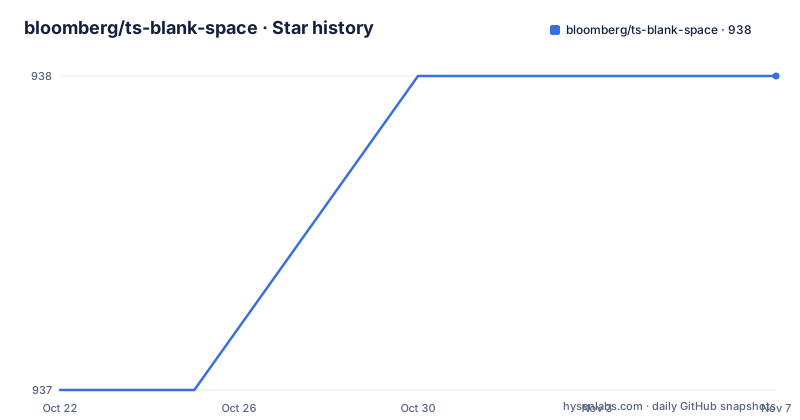
Star history
- bloomberg/ts-blank-space938 ★ · +1
| Repository | 2026-10-22 | 2026-11-07 |
|---|---|---|
| bloomberg/ts-blank-space | 937 | 938 |
1 Stars in the last 16 days, measured from the daily GitHub snapshot. Compare with other projects
Editorial analysis
The problem: running TypeScript without a compiler that rewrites code
Most tools that accept TypeScript either compile it to JavaScript or strip types with an emit step that produces new source. ts-blank-space takes a third route. It parses the file with the official TypeScript parser and then replaces every piece of type syntax with blank space, keeping the original text in place.
The visible effect is in the README's before and after. A class declaration with generics, an implements clause, a typed field and a typed method parameter comes out as the same characters with the type regions emptied. The JavaScript around those regions is untouched, not regenerated.
That design targets a specific audience: anyone who wants to execute TypeScript directly without pulling a compiler's emit step into the runtime path, and anyone who cares that positions in the output match the input exactly. It is a library, not a build system, and it is not trying to be a bundler, a transpiler or a type checker. It does one job, and the tradeoff is that you give up the transformations a compiler would normally perform for you.
Reusing slices of the source string is why it is fast
The README's rationale section makes the performance argument structural rather than empirical. Because no new JavaScript code is generated, the library re-uses slices of the existing source string instead of serialising a new program. The README also points out that this matters most when your program is already producing the TypeScript SourceFile object, because that AST can be reused and producing it is the most time consuming part of the pipeline.
That reuse is exposed as a second API entry point. The default export takes a string and returns a string, while a named export, blankSourceFile, accepts a SourceFile directly. If you already have the parser output, you skip straight to blanking.
The comparison the README offers is a micro-benchmark in the ./perf folder, and the claims are bounded: only four times slower than a native multi-threaded transformer, and the fastest among non-native implementations in JavaScript or Wasm. The runtime footprint is also part of the story. The library is 100 percent JavaScript runtime, with no WebAssembly, no native addons and no child process. The whole implementation is around 800 lines of code with a single dependency on TypeScript.
Where it does more than blank: semicolons and arrow function parentheses
Blanking type syntax is not always sufficient, and the README is candid about the two cases where the library goes further.
The first is automatic semicolon insertion. If a type-only statement is removed and the next line begins with a parenthesis, the two lines could merge into a call expression. So ts-blank-space adds a semicolon at the end of type-only statements, and also when removing a leading type annotation could introduce an ASI hazard. The README gives the case of a class field followed by a computed field, where a semicolon is inserted before the computed key.
The second case is arrow functions. If type annotations around a parameter list introduce a new line, replacing them with spaces can be wrong, because the newline inside the parentheses changes how the code parses. So the library may move the opening or closing parenthesis of the parameter list. A multi-line return type becomes a parameter list that ends with the closing parenthesis on its own line, and an async arrow with multi-line type arguments has its angle brackets replaced by parentheses.
Both edits are small, but they mean the output is not literally only whitespace changes, which matters if you diff the transformed file against the source.
SourceMap positions survive because the output never shifts
The README answers the SourceMap question directly. Because all the JavaScript in the output is located at the same line, column and byte-offset as the original source, no mapping information is lost during the transform.
This is the payoff of the blanking strategy, and it is a bigger deal than it first appears. A compiler that regenerates code moves tokens around, so a source map has to be produced to reconnect stack traces and debugger positions to the original TypeScript. Here there is nothing to reconnect, because the runtime code is in the same place in the file.
The practical consequences are narrow but real. A stack trace pointing at a line in the stripped file points at the corresponding line in your .ts file. Debuggers can attach to the running script without a mapping step. And the transform does not need a separate source map processing pass, which the README lists as one of the benefits of the library.
The trade-off is implied by the same design. Since the output preserves the input layout, the output cannot be smaller, and it still carries the visual weight of the type annotations even though nothing reads them.
The Node.js loader runs .ts and .mts files directly
Beyond the two API functions, the package ships a Node.js loader that pre-processes TypeScript files before they are evaluated. The install is a dev dependency, and the invocation uses the --import flag with the register entry point.
# Install (one time):
$ npm install --save-dev ts-blank-space

# Example usage (Node.js >= v18.20):
$ node --import ts-blank-space/register ./path/to/your/file.ts
The loader does more than rewrite the files it finds. It also registers an import resolver that catches failed .js and .mjs imports and retries them with the extension replaced by .ts or .mts. The stated reason is to let import paths pick either the TypeScript or the JavaScript extension depending on other project concerns such as bundling and package distribution.
One assumption is called out explicitly: the loader assumes that all .ts and .mts files are ESM. The package manifest declares type as module and the engines field requires Node.js >=18.0.0, and the README documents a recommended tsconfig.json section for ensuring ESM output.
For local development and test runs this is genuinely convenient. For production, note that the loader is a pre-processing hook, so what actually executes is the stripped JavaScript.
Unsupported syntax and the absence of down-levelling
The README carries a plain warning that not all TypeScript syntax is supported, pointing to a separate file, docs/unsupported_syntax.md, for the parts that cannot be erased in place because they have runtime semantics. Features with runtime semantics fall in that category.
That is a genuine failure mode, and it is a per-feature one. The transform does not error loudly on everything; it declines to handle specific constructs, so a codebase can pass through fine until it reaches one of them.
The second limitation is the absence of down-levelling. The README states that the JavaScript is preserved as is, which means no transpilation happens: no rewriting of class fields, no conversion of newer syntax to older equivalents, no transformation of modules. The output runs only on a runtime that already understands the syntax you wrote.
This is where the library differs from the compiler it borrows its parser from. TypeScript the compiler emits a target-specific program for the configuration you give it. ts-blank-space takes the parsed program and erases it, which is cheaper but leaves every non-type transformation undone.
Small codebase, single dependency, and a pre-1.0 release history
The package manifest is short enough to read in one sitting. The name is ts-blank-space, the version is 0.10.1, the licence is Apache-2.0, and the description repeats the one-line summary from the README. The dependencies section lists a single entry, TypeScript, pinned to the range 5.1.6 - 6.0.x. The exports map points the package root at./out/index.js, exposes./package.json for tooling, and offers./register at./loader/register.js for the loader entry point.
The repository layout matches that smallness. Top level entries include src/, loader/, tests/, perf/, scripts/, docs/, website/ and assets/, which lines up with the features described in the README: implementation, loader, test suite, micro-benchmark, build scripts, documentation and a playground site.
Release history shows regular work: v0.7.0 on 2026-01-22, v0.8.0 on 2026-03-30 and v0.9.0 on 2026-05-12. The manifest version of 0.10.1 sits above the newest listed tag, so the default branch carries unreleased work. The repository is not archived and the last push was on 2026-10-20, so the project is moving, but it is still pre-1.0, which in practice means the API and the set of supported syntax can change between minor releases.
Editorial conclusion
ts-blank-space is the right tool when you want to run TypeScript source directly on Node.js, keep source positions byte-identical, or avoid a native or WebAssembly dependency in a build pipeline. It is the wrong tool when you need down-levelling for older runtimes, when your code uses syntax listed in docs/unsupported_syntax.md, or when you want a compiler that also transforms the language. Before adopting it, check the unsupported syntax list against your codebase, confirm your Node.js version is at least 18.0.0 as the package manifest requires, and pin a version near 0.10.1 since the library is still pre-1.0.
Frequently asked questions
How do I install ts-blank-space and strip a TypeScript file?
Install the package with npm install ts-blank-space, then call the default export with the source text, for example tsBlankSpace(`let x: string;`), which returns the string with the type region blanked out. The README also documents a Node.js loader invoked with node --import ts-blank-space/register.
Does ts-blank-space produce source maps?
No source map is produced because none is needed. The README states that all the JavaScript in the output is located at the same line, column and byte-offset as the original source, so no mapping information is lost during the transform.
Can I use ts-blank-space to compile TypeScript for older browsers?
No. The README states there is no down-levelling and that the JavaScript is preserved as is, so the output runs only on a runtime that already supports the syntax you wrote. Some TypeScript syntax is also unsupported because it cannot be erased in place, as listed in docs/unsupported_syntax.md.
Official sources
Add this badge to your README
If you maintain this project, the badge below links readers to this analysis and shows its maintenance status from the daily GitHub snapshot. Paste the markdown into your README; add ?metric=license or ?metric=stars to the image URL for a different field.

[](https://hysenlabs.com/projects/bloomberg-ts-blank-space)Star history chart for your README
[](https://hysenlabs.com/projects/bloomberg-ts-blank-space)Was this useful?