Venom v6 drives WhatsApp Web through a Chromium page it downloads on install
Venom is a high-performance system developed with JavaScript to create a bot for WhatsApp, support for creating any interaction, such as customer service, media sending, sentence recognition based on artificial intelligence and all types of design architecture for WhatsApp.
At a glance
- What is it?
- Venom v6 is a TypeScript automation library for WhatsApp, published to npm as venom-bot, that controls WhatsApp Web through Puppeteer. The rewrite drops the stealth plugin stack, shrinks the source tree to six files, and has no v6 tag among the listed releases.
- Who is it for?
- Venom v6 fits a team that is willing to drive a real Chromium page it must download and keep matched to WhatsApp Web, and that reads sessions as part of its operations. Check the full documentation first if your deployment depends on an HTTP trigger from another service or on an upgrade path from v5.
- Can I use it commercially?
- Yes. Apache-2.0 is a permissive licence: you can use, modify and sell software built on it, as long as you keep its copyright and licence notices.
- Is it still maintained?
- Yes. The repository last received commits 70 days ago.
- What is it written in?
- Mainly TypeScript, according to GitHub's language statistics.
Answers come from the project's GitHub data, last synced on November 17, 2026, and from our analysis. They are not legal advice.
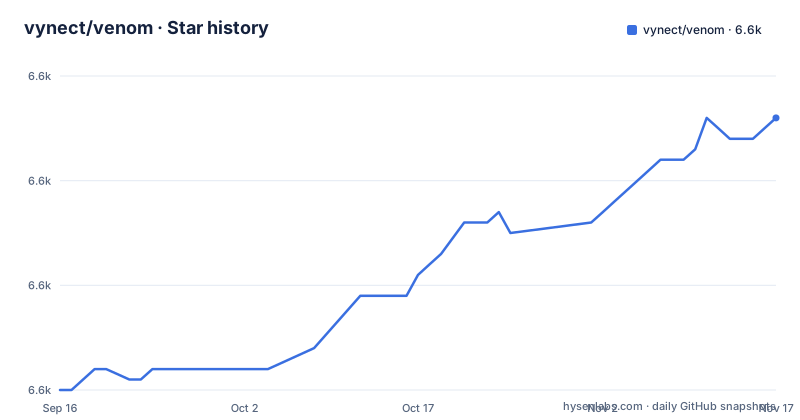
Star history
- vynect/venom6,606 ★ · +26
| Repository | 2026-09-16 | 2026-11-17 |
|---|---|---|
| vynect/venom | 6.6k | 6.6k |
26 Stars in the last 62 days, measured from the daily GitHub snapshot. Compare with other projects
Editorial analysis
npm install venom-bot is the whole setup, and Chromium arrives with it
The install path is one command, and it needs Node.js 18 or newer. The `engines` field in package.json spells that out as `node >=18.0.0`.
npm install venom-botTwo things happen inside that single command. The name on the registry is `venom-bot` even though the repository directory is `venom`, and the `postinstall` script is `node scripts/download-chromium.js`, so the browser build Puppeteer drives is fetched while npm runs rather than by a step you can forget on a headless host.
The first run is the block the README files under Quick Start:
import { create } from 'venom-bot';

create({ session: 'venom-bot' }).then((client) => {

  client.onMessage(async (message) => {
    if (message.body === 'hello') {
      await client.sendText(message.from, 'Hey there! 👋 I\'m running on Venom.');
    }
  });

});
`create` resolves a promise rather than taking a callback, and the `session` key is what a run is named after. A QR code prints to the terminal, the phone scans it, and the session is written to disk, which is why the same page says there is no need to rescan on every restart.
puppeteer-extra and the stealth plugins are gone from the dependency list
The v6 notes read as much as a list of removals as of additions: rewritten from scratch, pure Puppeteer with no puppeteer-extra and no stealth plugins, updated WhatsApp Web modules such as WAWebSocketModel and WAWebConnModel, Chromium downloaded on install, Node.js 18+, TypeScript 5.7+ with strict types, a Pino logger, and only six source files instead of 83 or more.
package.json agrees with the removal. There is no puppeteer-extra anywhere in the runtime dependencies:
"dependencies": {
  "puppeteer": "^24.0.0",
  "qrcode-terminal": "^0.12.0",
  "ws": "^8.18.0",
  "mime-types": "^2.1.35",
  "pino": "^9.6.0"
}
Each of those five has a job you can trace. Puppeteer holds the page, qrcode-terminal draws the login code, pino writes structured logs, mime-types names files you download, and `ws` sits beside the named WhatsApp Web modules. What the rewrite gives up is the layer whose job was making the browser look less like a browser.
the tarball ships dist/ and the downloader, not docs/ or test/
The `files` array decides what npm publishes: `dist/*`, `scripts/*`, `package.json`, `LICENSE` and `README.md`. The repository holds a good deal more than that. At the top level sit `docs/`, `test/`, `examples/`, `src/`, `Docs.md`, `Update.md`, `CHANGELOG.md`, `CONTRIBUTING.md`, `SECURITY.md`, `typedoc.json` and `tsconfig.json`, and none of them reach an installed copy.
"main": "dist/index.js",
"types": "dist/index.d.ts",
"files": [
  "dist/*",
  "scripts/*",
  "package.json",
  "LICENSE",
  "README.md"
]
So an installed project gets compiled JavaScript and its type declarations from one build, plus the `scripts/` directory because `postinstall` calls into it. Inside a checkout, `npm run build` runs `tsc`, `npm run dev` runs `tsc -w`, and `prepare` cleans `dist` before building, which is how a source install becomes usable code.
one client object covers sending, reading, groups, profile and chat state
Everything hangs off the object `create` resolves. Sending comes in pairs: `sendText`, `sendImage`, `sendFile`, `sendVoice`, `sendImageAsSticker`, plus `sendImageFromBase64` and `sendFileFromBase64` for bytes that never touch disk. `sendTextViaTyping` and `sendPhotoVideoViaTyping` run the typing indicator first, `reply` quotes a message id, `forwardMessages` takes an array of ids, and `sendMentioned` takes the numbers to mention. Contacts appear as `[email protected]` in the examples, groups as `groupId`.
Reading is its own group of calls: `getAllChats`, `getAllContacts`, `getUnreadMessages`, `getAllMessagesInChat`, `getProfilePicFromServer`, `checkNumberStatus`, `getBlockList`. Group work covers `createGroup`, `addParticipant`, `removeParticipant`, `promoteParticipant`, `demoteParticipant`, `getGroupMembers`, `getGroupAdmins`, `getGroupInviteLink`, `setGroupDescription` and `joinGroup`.
The profile and device surface is short: `setProfileStatus`, `setProfileName`, `setProfilePic`, then `getHostDevice`, `getConnectionState`, `getBatteryLevel`, `isConnected`, `getWAVersion`. Chat operations are `sendSeen`, `startTyping`, `deleteChat`, `clearChatMessages`, `archiveChat`, `pinChat`, `blockContact`, `unblockContact` and `sendMute`, where the mute call takes a count and a unit string such as `'minutes'`.
That is a wide surface for a source tree of six files, and all of it operates on the page you are already logged into.
ack codes run from -7 to 4, and state names say when the session ended
Two callbacks carry the diagnosis. `onAck` reports delivery for each message with a numbered code, `onStateChange` reports the session itself, and the code comments in the README are the whole vocabulary:
client.onAck((ack) => {
  // -7 MD_DOWNGRADE | -6 INACTIVE | -5 CONTENT_UNUPLOADABLE
  // -4 CONTENT_TOO_BIG | -3 CONTENT_GONE | -2 EXPIRED | -1 FAILED
  //  0 CLOCK | 1 SENT | 2 RECEIVED | 3 READ | 4 PLAYED
});
client.onStateChange((state) => {
  // CONFLICT | CONNECTED | DEPRECATED_VERSION | OPENING | PAIRING
  // PROXYBLOCK | TIMEOUT | TOS_BLOCK | UNLAUNCHED | UNPAIRED
});
A negative ack means the send did not land; `4` means media played. `TOS_BLOCK` and `UNPAIRED` are the two an unattended process has to watch, because they describe a session that has ended rather than a message that failed. `CONFLICT` matters too when more than one page holds the same number.
Inbound traffic has its own pair: `onMessage` for incoming messages, and `onAnyMessage`, documented as covering all messages including groups. The difference between them is scope, not kind of event.
every example is tagged javascript, though the claim is strict TypeScript
The v6 notes promise TypeScript 5.7+ with strict types, and package.json holds `typescript` at `^5.7.0` in devDependencies next to `@types/node`, `@types/ws`, `@types/mime-types` and `@types/qrcode-terminal`. The README's examples are tagged `javascript` and the quick start imports `create` with no type annotations; the `tsconfig.json` in the repository root is where the strict setting can be confirmed.
Upgrade guidance is thinner. The v6 section is a list of what changed, not a migration note: it names new WhatsApp Web modules and a smaller file count without saying which v5 calls were renamed or dropped. The listed releases top out at v5.3.0, published 2024-11-15, while package.json already reads `6.0.0`. There is no v6 tag to diff against.
no webhook, no queue, and nothing about throttling or proxies
In the README's Events section, the inbound triggers are `onMessage` and `onAnyMessage`, both callbacks, and `onAck` hands you `CONTENT_UNUPLOADABLE` and `EXPIRED` failures to act on.
The configuration block hints at what is available but unshown. `browserArgs` and `addBrowserArgs` take Chromium flags, `browserWS` and `browserPathExecutable` let you point at a browser you run yourself, `headless: 'new'` picks the headless mode, and `folderNameToken: 'tokens'` names the directory a session is written to. `catchQR` and `statusFind` are the hooks for reporting login and connection state.
Apache-2.0 in the repository record, MIT in package.json
The two licence statements disagree. The repository is recorded as Apache-2.0 and a `LICENSE` file sits at the root, while package.json declares `"license": "MIT"`. That is not something to settle in the abstract: read the `LICENSE` file in the checkout you actually ship from, since that file travels with the code and is the one included in the npm tarball.
Ownership shows the same split. The `repository` field is `git+https://github.com/orkestral/venom.git`, the install-from-source line reads `npm install github:orkestral/venom`, and the nightly tarball URL points at the same upstream release stream, while the npm author is Orkestral and the homepage is orkestral.io. This copy lives under a different account.
The last push was 2026-09-09 and the repository is not archived, so work continues past the tagged v5.3.0. Between the three install routes, the nightly tarball is the only documented way to pull a v6 build by URL.
Editorial conclusion
Venom v6 fits a team that is willing to drive a real Chromium page it must download and keep matched to WhatsApp Web, and that reads sessions as part of its operations. Check the full documentation first if your deployment depends on an HTTP trigger from another service or on an upgrade path from v5. Before adopting, read the LICENSE file against the MIT field in package.json, confirm your host can run Node.js 18 or newer and complete the Chromium download, and decide which ack codes you will treat as retryable.
Frequently asked questions
What Node.js version does Venom v6 require?
Node.js 18 or newer. The engines field in package.json asks for node >=18.0.0, and the install notes repeat the same requirement. Chromium is not a separate step: a postinstall script downloads it.
Do I have to scan the QR code again every time Venom restarts?
No. Sessions are saved automatically, so a restart reuses the stored login instead of printing a new code to scan. The session name passed to create is what the stored profile is keyed on.
What kinds of messages can Venom send through WhatsApp?
Text, images, videos, documents, audio, stickers, locations and polls. The client also offers base64 variants for images and files, sends that show a typing indicator, replies to a message id, forwards arrays of message ids, and mentions phone numbers.
How does Venom report that a send failed or the session died?
An onAck callback reports numbered delivery codes that run from -7 for MD_DOWNGRADE to 4 for PLAYED, and onStateChange reports named session states including CONFLICT, TOS_BLOCK and UNPAIRED. The client also exposes getConnectionState and isConnected.
Which licence applies to Venom v6?
Two statements disagree: the repository record says Apache-2.0 while the licence field in package.json says MIT. Read the LICENSE file in your own checkout before shipping, since that file is what travels with the code.
Official sources
Add this badge to your README
If you maintain this project, the badge below links readers to this analysis and shows its maintenance status from the daily GitHub snapshot. Paste the markdown into your README; add ?metric=license or ?metric=stars to the image URL for a different field.

[](https://hysenlabs.com/projects/vynect-venom)Star history chart for your README
[](https://hysenlabs.com/projects/vynect-venom)Was this useful?