colorlog: adding colour to the Python logging module
A colored formatter for the python logging module
At a glance
- What is it?
- colorlog is a formatter for the standard library logging module, and it keeps colours in the format string itself so you can colour the level, the message, or anything else you name. It is a decade old, it warns that version 6 may break backwards compatibility, and it disables colour automatically when the output is not a terminal.
- Who is it for?
- colorlog fits a Python project whose logs go to a terminal for a human, and it handles the awkward parts well: no colour in a redirected file, colour forced on when you want it, and colours in configuration rather than in code.
- Can I use it commercially?
- Yes. MIT is a permissive licence: you can use, modify and sell software built on it, as long as you keep its copyright and licence notices.
- Is it still maintained?
- Yes. The repository last received commits 108 days ago.
- What is it written in?
- Mainly Python, according to GitHub's language statistics.
Answers come from the project's GitHub data, last synced on November 6, 2026, and from our analysis. They are not legal advice.
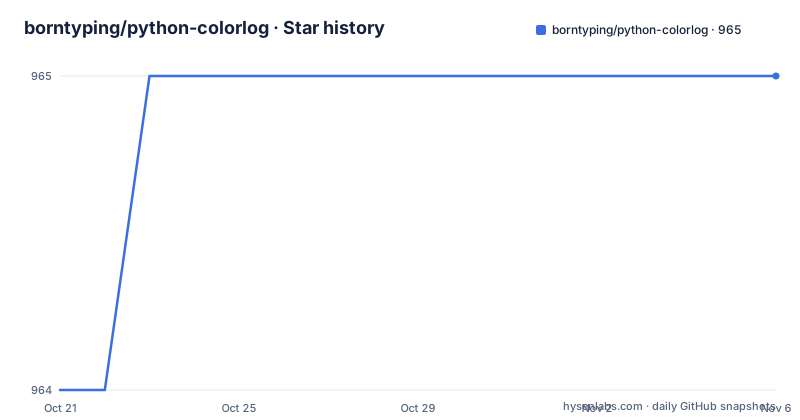
Star history
- borntyping/python-colorlog965 ★ · +1
| Repository | 2026-10-21 | 2026-11-06 |
|---|---|---|
| borntyping/python-colorlog | 964 | 965 |
1 Stars in the last 16 days, measured from the daily GitHub snapshot. Compare with other projects
Editorial analysis
Colour lives in the format string, not in the handler
colorlog works by extending logging.Formatter, so it slots into the standard library rather than replacing it. The idea is that colours are selected by putting escape-code names into the format string, and the formatter resolves each one when a record is formatted. A log_color placeholder returns the colour associated with the record's level, and a named variant such as message_log_color returns a different colour chosen by level, provided the formatter was configured with secondary colours. The reset placeholder clears all formatting, both foreground and background, which matters because a coloured level name otherwise bleeds into the message that follows it. The colour names available cover the eight standard colours, a set of light variants that are not standard ANSI codes, and integers from 0 to 255 for 256-colour support, written as fg_196 or bg_42. The light colours are the ones to be careful with, since the documentation says their support varies wildly across terminals.
Three lines to get a coloured handler
The smallest useful setup is short, and it is worth noticing that the handler here is colorlog's own rather than logging.StreamHandler, which is what gives the formatter a way to know whether it is writing to a terminal. The logger comes from colorlog.getLogger, which takes the name you want and returns something you add handlers to as usual:
import colorlog

handler = colorlog.StreamHandler()
handler.setFormatter(colorlog.ColoredFormatter())

logger = colorlog.getLogger('example')
logger.addHandler(handler)
With no arguments at all, ColoredFormatter picks a default format string based on the style, and for the percent style that default is the level name, the logger name and the message. That default is deliberately plain, so if you want a colourful message rather than a colourful level name, you have to say so in the format string. The install itself is a single pip command, and several Linux distributions ship official packages for it, with user-maintained packages also available for BSD ports and Conda.
pip install colorlogMapping levels to colours is a dict you pass in
The level-to-colour mapping is the log_colors argument, a dictionary keyed by record level name. A level you do not list simply gets no colour, which is a convenient way to leave one level plain while colouring the rest. The values are colour names, and they can also be a comma joined list, which is how you get a coloured background as well as a coloured foreground. In the example below the level name is coloured by the record level through log_color, the reset closes that off, and the message itself is rendered in a fixed blue. The critical level gets red text on a white background:
from colorlog import ColoredFormatter

formatter = ColoredFormatter(
	"%(log_color)s%(levelname)-8s%(reset)s %(blue)s%(message)s",
	log_colors={
		"DEBUG": "cyan",
		"INFO": "green",
		"WARNING": "yellow",
		"ERROR": "red",
		"CRITICAL": "red,bg_white",
	}
)
Note that the comma joined form is a configuration value, not something you can type into the format string directly. The format string only accepts the escape-code names.
Secondary colours let one level drive two different colours
A single level-to-colour map is limiting when you want, say, the level name coloured by severity and the message coloured by severity too, but differently. That is what secondary_log_colors is for. Each key you add becomes an attribute usable in a format string, so the key message produces message_log_color, and the value is a mapping in exactly the same format as log_colors. The documented example highlights the level name with the default log colours and then adds a second colour that turns the message red for error and critical records only:
from colorlog import ColoredFormatter

formatter = ColoredFormatter(
	"%(log_color)s%(levelname)-8s%(reset)s %(message_log_color)s%(message)s",
	secondary_log_colors={
		'message': {
			'ERROR': 'red',
			'CRITICAL': 'red'
		}
	}
)
This is the feature that separates colorlog from a one-line filter that colours whole lines. The cost is a slightly longer format string, and one subtlety: a secondary colour that has no entry for the record's level simply renders nothing, so the message appears uncoloured for every other level, which is usually what you want.
Non-TTY output is where most coloured log libraries go wrong
Here is the failure mode that makes this library worth using, and the documentation is explicit about it. The formatter takes a stream argument, the stream being written to, and uses it to detect whether the output is a TTY. Colours are disabled automatically on non-TTY streams, so redirecting your logs to a file or piping them into another process does not fill the file with escape sequences. If you do want colour anyway, force_color does it, and it takes precedence over no_color. The counterpart, no_color, disables colour output and can also be set through the NO_COLOR environment variable, while FORCE_COLOR does the same for forcing it. The result is that the same application can be colourful in a terminal and clean in a log file with no configuration change, which is exactly the behaviour that makes coloured logging safe to add to a shared codebase. On Windows, colourama is pulled in as a dependency and initialised automatically so that the same code produces colours on a console that does not natively support them.
It also plugs into dictConfig and fileConfig
A formatter that only worked through code would be awkward in projects that configure logging from a file, and colorlog handles both of the standard configuration mechanisms. With dictConfig, the formatter class is named as a factory in the '()' key and the format string is given alongside it, so the same colours you would write in Python become configuration:
logging.config.dictConfig({
	'formatters': {
		'colored': {
			'()': 'colorlog.ColoredFormatter',
			'format': "%(log_color)s%(levelname)-8s%(reset)s %(blue)s%(message)s"
		}
	}
})
The fileConfig equivalent is an ini section, and here the format can use a background colour on the logger name and a date format, which the dictConfig example does not show:
[formatters]
keys=color

[formatter_color]
class=colorlog.ColoredFormatter
format=%(log_color)s%(levelname)-8s%(reset)s %(bg_blue)s[%(name)s]%(reset)s %(message)s from fileConfig
datefmt=%m-%d %H:%M:%S
A full example dictionary is kept in the test file tests/test_colorlog.py and a full example configuration in tests/test_config.ini, which is a useful reference when the documentation examples are not enough.
Custom levels work, and the versioning carries a warning
Two things about the project itself are worth knowing before you depend on it. First, custom log levels are supported. The formatter works with levels registered through logging.addLevelName, so a level such as TRACE defined at 5 with a colour attached behaves like any built-in level, and the example registers a name and then passes a log_colors mapping containing that name. Second, and more important, the project says things about its own future that you should take at face value. It describes itself as over a decade old and says that supporting a wide set of Python versions for most of its life has made it a difficult library to add new features to. It states that colorlog 6 may break backwards compatibility so newer features can be added more easily, but may still not accept all changes or feature requests. It says colorlog 4 might accept essential bugfixes but should not be considered actively maintained. That is a project telling you plainly that its API surface may shift in a future major version, and the sensible response is to pin a version.
Python versions, packaging and the last release
The status section draws a clear line through the version history. Version 6.x requires Python 3.6 or higher, version 5.x is described as an interim release that will warn Python 2 users to downgrade, and 4.x is the final version supporting Python 2. The setup file agrees, declaring python_requires as 3.6 or higher and listing classifiers for Python 3.6 through 3.13, and it marks the development status as Production/Stable and the operating system as OS Independent. The package itself is a single package directory with a py.typed marker, which is what tells type checkers to use the inline annotations, and the development extra pulls in black, flake8, mypy, pytest and types-colorama. Version 6.12.0 is the current release, published on 2026-07-23, with 6.11.0 a week earlier and 6.10.1 back in October 2025. The last push to the repository was on 2026-07-23. The licence field on the repository says MIT, and the setup file names the same licence, so there is no ambiguity to resolve before you add this to a project.
Editorial conclusion
colorlog fits a Python project whose logs go to a terminal for a human, and it handles the awkward parts well: no colour in a redirected file, colour forced on when you want it, and colours in configuration rather than in code. It does not fit a service whose logs are only ever parsed, where the escape codes are pure overhead, and it does not fit a project that has to survive the next major version unchanged, because the project states plainly that 6 may break backwards compatibility. Before adopting it, pin an exact version rather than a range, and check the secondary_log_colors and custom log level examples to confirm the features you need are in the release you pick.
Frequently asked questions
How do I install colorlog and add coloured output?
Install it with pip install colorlog, then create a colorlog.StreamHandler, set a ColoredFormatter on it, and add the handler to a logger obtained from colorlog.getLogger. The formatter disables colours automatically when the output stream is not a terminal.
How do I colour a log message differently from the log level?
Use the secondary_log_colors argument. Each key you add there becomes a format string attribute, so a key of message gives you message_log_color, and the value uses the same format as log_colors.
Does colorlog work with dictConfig and fileConfig?
Yes. In dictConfig, name colorlog.ColoredFormatter as the factory in the '()' key of a formatter entry. In fileConfig, set class=colorlog.ColoredFormatter in a formatter section. Example configurations are kept in the tests directory.
Which Python versions does colorlog support?
Version 6.x requires Python 3.6 or higher, and the setup file lists classifiers for Python 3.6 through 3.13. Version 4.x was the final release supporting Python 2, and 5.x is described as an interim release warning Python 2 users to downgrade.
Official sources
Add this badge to your README
If you maintain this project, the badge below links readers to this analysis and shows its maintenance status from the daily GitHub snapshot. Paste the markdown into your README; add ?metric=license or ?metric=stars to the image URL for a different field.

[](https://hysenlabs.com/projects/borntyping-python-colorlog)Star history chart for your README
[](https://hysenlabs.com/projects/borntyping-python-colorlog)Was this useful?