DSH Desktop: An Electron Shell That Lets Long-Running dsh Tasks Survive Window Closes
Independent dsh desktop client: the official Web UI untouched, long tasks alive in the tray, curated plugins reviewed before install.
At a glance
- What is it?
- DSH Desktop wraps the official DeepSeek Harness Web UI in an Electron client with tray persistence, a curated plugin marketplace, and a hardened update chain. It is a community project, not an official DeepSeek product.
- Who is it for?
- Adopt DSH Desktop if you run dsh tasks that must survive window closes, want a double-click installer that bundles the official runtime, or need a plugin installation path that reviews code before executing anything. Skip it if you require official DeepSeek support, need signed installers, or plan to connect remote or containerized dsh instances.
- Can I use it commercially?
- Yes. MIT is a permissive licence: you can use, modify and sell software built on it, as long as you keep its copyright and licence notices.
- Is it still maintained?
- Yes. The repository last received commits 3 days ago.
- What is it written in?
- Mainly TypeScript, according to GitHub's language statistics.
Answers come from the project's GitHub data, last synced on October 23, 2026, and from our analysis. They are not legal advice.
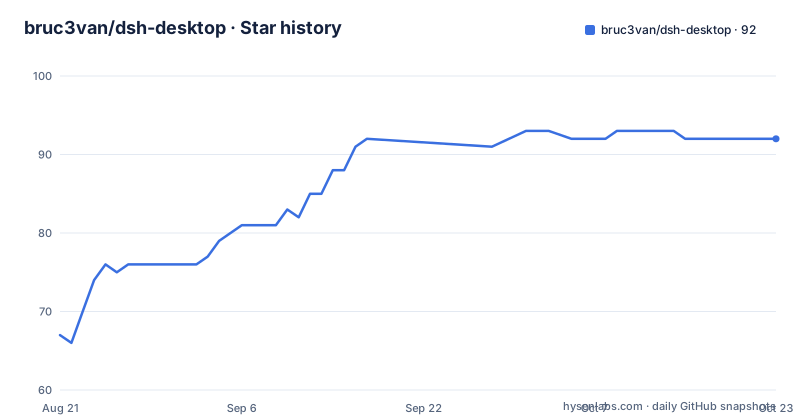
Star history
- bruc3van/dsh-desktop92 ★ · +25
| Repository | 2026-08-21 | 2026-10-23 |
|---|---|---|
| bruc3van/dsh-desktop | 67 | 92 |
25 Stars in the last 63 days, measured from the daily GitHub snapshot. Compare with other projects
Editorial analysis
The Problem: Long Tasks Die When the Window Closes
The README frames the core problem clearly: dsh usage is shifting from short conversations to delegated long tasks, and those tasks live outside the browser tab. If you close the tab, the task dies. If you close the terminal, the service stops. The official Web UI itself is not the bottleneck, so DSH Desktop leaves it untouched and puts its engineering effort into the shell around it. The target user is someone who runs dsh regularly, either a developer who already has dsh installed or a non-technical user who wants the harness without installing Node.js. The project explicitly targets two audiences: people who want a double-click installer and people who want to connect to their own running dsh instance. Both paths are treated as first-class, which is a rare design choice for a wrapper.
How It Works: Reuse, Then Fall Back, Then Bundle
The connection logic is the heart of the project. In smart mode, the client probes in a fixed order: it first tries to reuse an official instance already listening on 127.0.0.1:3080, including any port configured in ~/.dsh/profiles/web/cordis.patch.yml. Next it looks for dsh on the PATH, then an npx cache of the official package, and finally it falls back to the bundled runtime. The client reads the web profile patch file to find a custom port, so it does not start a second harness next to an existing one. Each of the four sources can be individually disabled in the connection settings, and the client only uses what already exists on the machine. It does not download anything or install Node.js. If the selected runtime fails to start, it falls back to the next enabled source, with the bundled runtime as the last resort. The client starts dsh as a background process with --no-open on rc.8 and above, and shuts it down when the desktop app exits.
Tray Persistence and Session Recovery
The main user-facing feature is that closing the window does not stop the harness service. The app stays in the tray or menu bar, and the service continues running in the background. The README mentions a controlled restart if the local service exits unexpectedly, and automatic page recovery after system wake or long background periods, but only after confirming the service is reachable. This is a meaningful difference from a browser tab, where a crash or a close kills the task. The session state is shared because the client reuses the same ~/.dsh directory as the CLI and browser. For DSH 0.1.2-alpha.1 and later, the client generates a short-lived HttpOnly session for the loopback address using the official persisted session signature, and it does not save the process startup token printed to the terminal. If a running dsh instance still holds keys from before a credential file change, the client asks you to restart that instance instead of starting a second process that writes to the same session data.
Agent Environment Engineering: PATH, Homebrew, and Node
The README spends significant space on the agent execution environment, which is the part most wrappers ignore. When the client starts the bundled runtime, it makes node, dsh, and pnpm available even if the user never installed them. It aligns the PATH with the login shell on macOS, so tools from Homebrew, ~/.local/bin, and ~/.zshrc are found even when the app is launched from Finder or Dock. It also prevents ELECTRON_RUN_AS_NODE from leaking to the agent, which would otherwise break Electron-based tools like code. This is a concrete set of fixes that address real failures, not a marketing list. The trade-off is that these fixes only apply to the bundled runtime. If you reuse your own dsh instance, the agent runs in your full shell environment by definition, so the client's environment work is irrelevant in that mode.
The Security Market: Review Before Install, Not Sandboxing
The built-in plugin marketplace is disabled by default and only goes online after you enable it. The directory comes from a data source repository that collects daily and is manually curated. The key mechanism is that 'safe install' does not execute any command for you. Instead, it hands a review prompt to the agent, which reads the plugin code and confirms it is clean before you run the official install command. This is a meaningful distinction: the client does not sandbox the plugin, it just adds a review step. The README is honest that this is a review, not a guarantee. The value depends on the quality of the review prompt and the agent's ability to read code, which is not something the client can enforce. If the agent misreads a malicious plugin, the install command still runs with your permissions.
Security Hardening: Small Boundary, Layered Defenses
The client's security posture is described as a small boundary with layered defenses. It only uses the public dsh web CLI and /api protocol, not internal packages. The Electron window has context isolation and sandboxing enabled, Node integration is off, and navigation is locked to the official Web UI origin. External links go to the system browser. The update chain is hardened: in packaged builds, the update source URL, GitHub API URL, data directories (DSH_HOME and DSH_DESKTOP_HOME), and connection probe switches cannot be overridden by environment variables. The only debug backdoor is DSH_DESKTOP_ALLOW_UNSAFE=1, which the README says to use only for deliberate inspection of packaged artifacts. The update manifest checks the installer filename to prevent path traversal. Downloads are verified with SHA-256 before installation. These are specific, verifiable claims, and they address the real risk of a file-writing process updating itself over an insecure channel.
Getting Started and Known Limitations
Installation is a standard download from GitHub Releases. The packaged app includes a fixed version of the official dsh runtime, so no Node.js, pnpm, or CLI is needed. On first launch, you either enter an API key or skip and add it later in Settings → Model → DeepSeek. The README warns that installers are not yet formally developer-signed, so macOS may block the first open. The workaround is to right-click and select Open, or run xattr -dr com.apple.quarantine "/Applications/DSH Desktop.app" in the terminal. Windows users may need to click 'More info' and then 'Run anyway' in SmartScreen. A clear limitation is that the official dsh only listens on 127.0.0.1, and binding to 0.0.0.0 is explicitly rejected due to remote code execution risk. This means remote or containerized instances are not officially supported, and the README advises using trusted networks and HTTPS if you tunnel via SSH anyway. Another limitation is that the bundled runtime is a fixed version, so if you rely on it, you depend on the app's update cadence to get new dsh features. The smart mode mitigates this by reusing your own newer dsh if you have one.
Maintenance and Upgrade Cost
The project is actively maintained, with three releases in two days around v0.3.2, but the README does not specify a release cadence or a long-term support policy. The license is MIT, which means you can fork and modify it freely, but there is no contributor agreement or governance model described. The update chain is designed to push new bundled runtimes through the app's built-in updater, with SHA-256 verification. However, the README notes that the client and the official dsh have independent version numbers, and the connection settings page shows both, which is a practical way to diagnose compatibility issues. The main upgrade cost is that you must trust the project's release process to keep the bundled runtime current and to maintain the security hardening as Electron and dsh evolve. Since the project is not affiliated with DeepSeek, you cannot expect official support if the harness changes its API or protocol. The README explicitly states that issues should be filed in this repository, not with DeepSeek.
Editorial conclusion
Adopt DSH Desktop if you run dsh tasks that must survive window closes, want a double-click installer that bundles the official runtime, or need a plugin installation path that reviews code before executing anything. Skip it if you require official DeepSeek support, need signed installers, or plan to connect remote or containerized dsh instances. Before adopting, verify the SHA-256 checksum of the downloaded release, confirm your existing dsh version matches the bundled runtime, and review the plugin marketplace's review prompt to ensure it matches your threat model. The project's value rests on its tray persistence and environment reuse, not on any promise of official endorsement.
Frequently asked questions
What does DSH stand for in dsh-desktop?
DeepSeek Harness, referred to as dsh and shipped as the official @deepseek-ai/dsh runtime that the installer pins and bundles. DeepSeek, DeepSeek Harness and dsh are names and marks belonging to their respective rights holders, and this desktop client is a community maintained unofficial project.
Does dsh-desktop need Node.js or the dsh CLI installed first?
No. The installer bundles a pinned version of the official runtime, so starting the client and using the bundled runtime needs no separate Node.js, pnpm or dsh CLI, and the first launch does not run an npm install. Specific tasks or plugins may still need extra tools, and npm and npx are not bundled.
How does dsh-desktop choose which dsh runtime to use?
Smart mode tries a running official instance first, then dsh on PATH, then the npx cache, then the bundled runtime, using only what is already on the machine. Custom mode connects to an address you maintain yourself and starts no local runtime. Sources can be disabled individually as long as one remains enabled.
Is the dsh-desktop plugin market safe to install from?
The catalog is off by default and only fetched after you enable it, and installs go through the official plugin manager with an optional AI review of the installed version. The README states that the review is not a security guarantee and that inclusion in the catalog is not an endorsement of safety, so the review still has to be read.
Where does dsh-desktop keep sessions and plugins?
In the shared environment, sessions, credentials, model configuration and plugins live in ~/.dsh under the official dsh, while desktop settings, command shims and update downloads live in ~/.bruc3van-dsh-desktop. The separate environment puts its sessions and plugins in ~/.bruc3van-dsh-desktop/dsh. Switching environments takes effect after a restart and copies nothing across.
Official sources
Add this badge to your README
If you maintain this project, the badge below links readers to this analysis and shows its maintenance status from the daily GitHub snapshot. Paste the markdown into your README; add ?metric=license or ?metric=stars to the image URL for a different field.

[](https://hysenlabs.com/projects/bruc3van-dsh-desktop)Star history chart for your README
[](https://hysenlabs.com/projects/bruc3van-dsh-desktop)Was this useful?