dsh-web: a plugin bundle for the DeepSeek Harness web interface
DeepSeek Harness (DSH) Web Plugin Aggregation Ecosystem · Everything is a plugin, distributed via the Creative Workshop
At a glance
- What is it?
- A modular plugin ecosystem mounted into an existing harness instance through its own profile mechanism, covering cron task boards, phone pairing, SSH terminals, Git worktrees, session archiving and token statistics. The desktop client manages its profile inside the app and restricts external command-line changes, the task board judges your agent with a second model and bills you for it, and quick tunnels cannot carry the streaming channel.
- Who is it for?
- It suits someone already running the harness web interface or desktop client who wants scheduled agent work, remote terminals and usage accounting without patching the host application. It does not suit someone who wants the plugins installed from the command line on the desktop client, because that profile is managed inside the app, and it does not suit a setup where a second model call per task is unacceptable.
- Can I use it commercially?
- Yes. Apache-2.0 is a permissive licence: you can use, modify and sell software built on it, as long as you keep its copyright and licence notices.
- Is it still maintained?
- Yes. The repository received new commits within the last day.
- What is it written in?
- Mainly TypeScript, according to GitHub's language statistics.
Answers come from the project's GitHub data, last synced on November 14, 2026, and from our analysis. They are not legal advice.
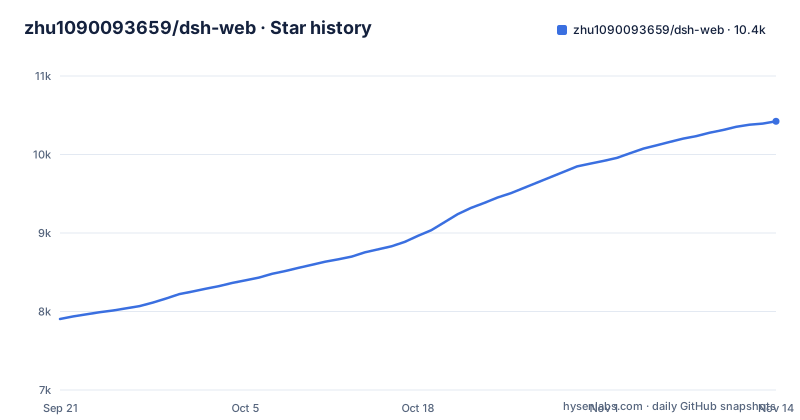
Star history
- zhu1090093659/dsh-web10,423 ★ · +2,519
| Repository | 2026-09-21 | 2026-11-14 |
|---|---|---|
| zhu1090093659/dsh-web | 7.9k | 10.4k |
2,519 Stars in the last 54 days, measured from the daily GitHub snapshot. Compare with other projects
Editorial analysis
The desktop profile cannot be installed from the command line
There are two install paths and one of them is deliberately closed to the shell. The web interface is extended through the official profile mechanism, mounted onto a running instance with no modification to the host source. The desktop client is different: it shares the same data directory with the web interface, and its profile is named desktop, but that profile is managed inside the application, and an external command line is restricted from modifying it. The documented procedure is therefore entirely in the app. Open the client and go to the plugins page in settings, or use the plugins entry in the left navigation. Type the bundle package name into the install input, with or without the latest tag, click install, and restart the client. Until you do that, nothing you do from a terminal will reach that profile.
The repository you read is a wrapper around one dependency
The root manifest makes the shape of this project unusually clear. It is private, its version tracks the bundle, and its file list contains three entries: the manifest itself, a single patch descriptor inside the aggregate package directory and the locale directory. Its only dependency is the aggregate package at a caret range.
"dsh": {
  "bundle": {
    "patch": "./packages/dsh-web-all/cordis.patch.yml"
  }
}"dependencies": {
"@linxin666/dsh-web-all": "^0.4.14"
}So the code you are reading is largely a mount description, a workspace of individual plugin packages, and the tooling that keeps them honest. The manifest description also records that skins, pets and the community plugin index have been split into their own repositories and are pulled in here through npm packages. The practical consequence is a version-skew question you have to ask yourself: the wrapper and the bundle it depends on are released separately, and a caret range will not tell you which bundle you actually got. Around them sits a large gate surface in the scripts: a recursive build and test across the workspace, a typecheck pass, standards and runtime dependency checks, an internationalisation audit, an emoji audit, a coverage gate with a baseline you can rewrite, an end-to-end mount script, and separate market build, check and fetch commands.
The workshop site is generated from JSON and its likes live in D1
The asset platform is described as part of this repository, and its build is mechanical. The frontend is a purely static build produced by the build script from data sources such as the skin, pet and community JSON files, which is why the tree carries a market directory and a locked inputs file. Everything dynamic, like the like counts that determine the ordering, is served by Cloudflare Workers edge functions backed by a D1 database, and the restriction is spelled out: one vote per device. The workshop ranks projects by real device like popularity, lets you preview a skin before installing it, and hands out a one-click install command for plugins. Code merged into the main branch triggers the deployment automatically, so the public site and the repository move together.
The task board judges your agent and charges you for the verdict
The board has five columns, from to plan through to failed, and pressing execute on a card starts a real agent session whose result is written back to the card. Tasks can be given a cron expression, and the scheduling is server side: closing the browser does not stop the host process from firing the task and saving the result. The expensive part is the optional acceptance step. A task running in goal form cannot be marked complete by the agent alone; a judge model has to verify it first, using three coding criteria, a 0.65 threshold, and two rounds with the compared answers swapped in position, at most twice per execution. A first failure sends the score and the problems back for the agent to fix, and a second failure marks the execution failed. The configuration is fixed when an execution starts, and every acceptance consumes real quota on the judge model.
The mobile channel is gated, and the tunnel advice is specific
Phone access starts from a pairing panel opened from the icon at the bottom of the sidebar, and everything after that runs through one gated channel. A pairing token is single use and expires, stopping the panel revokes every connected device at once, and all remote traffic goes through a dedicated API path where unverified access is blocked and only a banner is shown. The same pairing link also serves a second computer browser, which loads the full desktop interface rather than the phone layout. The documentation is specific about the tunnel case: the pairing code is based on local network communication by default, and when you expose it you are told to use the pairing channel and not to configure a trusted host argument for the tunnel domain, because that would bypass device verification. There is a similar warning about streaming.
Quick tunnels cannot stream, so the channel falls back to polling
Real time messages on mobile are delivered over server sent events. That has a documented failure mode, and it is worth knowing before you blame the phone. Cloudflare quick tunnels on the trycloudflare domain and Tailscale Serve do not pass those events through by default. In those environments the plugin degrades itself to high frequency polling, which keeps sending and receiving working, but new messages can arrive with a small delay. The recommendation for instant streaming is a tunnel service that supports long lived connections and server sent events, naming a Cloudflare named tunnel or a self hosted TCP port forward as the examples. So the quality of the mobile experience depends on which tunnel you chose, not on the plugin, and the fallback is silent rather than an error.
SSH host lists live in the data directory next to the harness
The remote operations panel opens from a sidebar entry and offers key or password authentication, including a one-click import of the host list from your local SSH config file. Its own configuration is stored separately, in a JSON file inside the harness data directory. Four capabilities sit on top of that: a full remote terminal built on xterm.js with live output, SFTP upload and download with progress and visual directory browsing, encrypted port forwarding from local to a remote internal service such as a database or a backend API which by default listens only on the loopback address, and batch command execution across many hosts filtered by alias, run environment or tag. The last entry is the one to think about before enabling anything: the agent shares the same host configuration as the panel, so instructions issued inside a session can delegate remote inspection and operations commands to the agent.
Editorial conclusion
It suits someone already running the harness web interface or desktop client who wants scheduled agent work, remote terminals and usage accounting without patching the host application. It does not suit someone who wants the plugins installed from the command line on the desktop client, because that profile is managed inside the app, and it does not suit a setup where a second model call per task is unacceptable. Check four things before you install: which profile you are installing into, whether the aggregate package version tracks what you read, whether you accept judge model quota for accepted tasks, and whether your tunnel supports streaming, because quick tunnels fall back to polling and the recommendation in the documentation is specific about which option to avoid.
Frequently asked questions
How do I install the dsh-web plugin bundle into the desktop client?
Inside the desktop client, not from a terminal, because the desktop profile is managed in the application and external command line changes to it are restricted. Open the plugins page in settings, enter the bundle package name with or without the latest tag, click install, and restart the client.
What does the dsh-web repository actually contain?
A private root package whose file list is the manifest, one patch descriptor and the locale directory, with the aggregate bundle as its only dependency, plus a workspace of individual plugin packages, scripts, tests and the workshop site sources. The manifest also notes that skins, pets and the community plugin index live in their own repositories and are pulled in as npm packages.
Does the dsh-web task board cost extra model quota?
Yes, if you enable task acceptance. A task running in goal form must be verified by a judge model before the agent can mark it complete, using three coding criteria, a 0.65 threshold and at most two rounds per execution. Every acceptance consumes real quota on the judge model, which defaults to the host model but can be changed.
Why are mobile messages arriving with a delay on my phone?
The mobile channel uses server sent events, and quick Cloudflare tunnels on the trycloudflare domain and Tailscale Serve do not pass them through. In that case the plugin falls back to high frequency polling, which works but adds a small delay. A named Cloudflare tunnel or a self hosted TCP port forward avoids the fallback.
Where does dsh-web keep SSH host configuration?
In its own JSON file inside the harness data directory, separate from your local SSH config, which can be imported into the panel in one click. The panel supports key and password authentication, an xterm.js terminal, SFTP transfer, port forwarding that listens on the loopback address by default, and batch execution across hosts.
Official sources
Add this badge to your README
If you maintain this project, the badge below links readers to this analysis and shows its maintenance status from the daily GitHub snapshot. Paste the markdown into your README; add ?metric=license or ?metric=stars to the image URL for a different field.

[](https://hysenlabs.com/projects/zhu1090093659-dsh-web)Star history chart for your README
[](https://hysenlabs.com/projects/zhu1090093659-dsh-web)Was this useful?