bukosabino/ta: forty-three technical indicators in a single pandas-native package
Technical Analysis Library using Pandas and Numpy
At a glance
- What is it?
- A MIT licensed Python library that turns OHLCV financial series into indicator columns, with every indicator exposed twice, once as a class and once as a plain function.
- Who is it for?
- ta earns its place in a feature engineering pipeline rather than in a trading application, which is exactly what its README says it is for. Its value is breadth without ceremony: forty-three indicators, two entry points each, numpy and pandas as the only runtime dependencies, and no configuration layer at all.
- Can I use it commercially?
- Yes. MIT is a permissive licence: you can use, modify and sell software built on it, as long as you keep its copyright and licence notices.
- Is it still maintained?
- Activity is slowing. The repository last received commits 7 months ago.
- What is it written in?
- Mainly Jupyter Notebook, according to GitHub's language statistics.
Answers come from the project's GitHub data, last synced on October 22, 2026, and from our analysis. They are not legal advice.
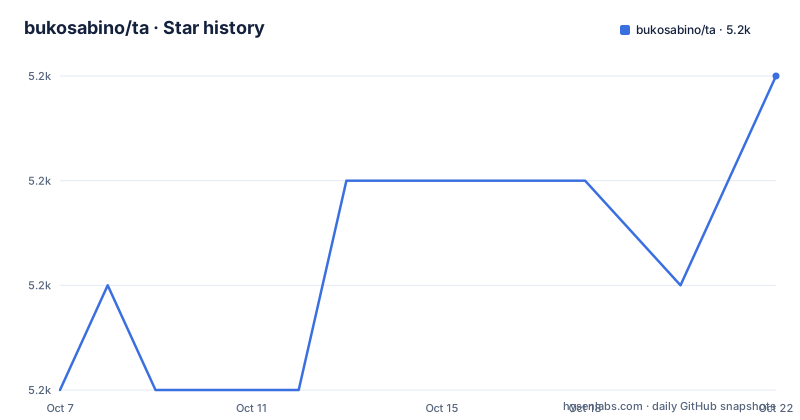
Star history
- bukosabino/ta5,238 ★ · +3
| Repository | 2026-10-07 | 2026-10-22 |
|---|---|---|
| bukosabino/ta | 5.2k | 5.2k |
3 Stars in the last 15 days, measured from the daily GitHub snapshot. Compare with other projects
Editorial analysis
Forty-three indicators, each exposed twice
The README makes one headline claim, that the library has implemented 43 indicators, and then backs it with a table that has an ID column, a Name column, a Class column and a defs column. That structure is the most useful thing on the page, because it tells you the library is not one API but two parallel ones.
Look at the first nine rows, all under Volume. Money Flow Index maps to `MFIIndicator` and to `money_flow_index`. Accumulation/Distribution Index maps to `AccDistIndexIndicator` and `acc_dist_index`. On-Balance Volume maps to `OnBalanceVolumeIndicator` and `on_balance_volume`. The same pattern runs through the Volatility block: Average True Range is both `AverageTrueRange` and `average_true_range`, Bollinger Bands is `BollingerBands` with seven listed functions, Keltner Channel is `KeltnerChannel` with seven, Donchian Channel is `DonchianChannel`.
So a reader has a choice to make on day one. The class form takes an input series in the constructor and returns a value you can hold. The function form takes a series as an argument and returns one, which composes better inside a pandas `apply` or a pipeline cell. Having both means you can switch styles per indicator without rewriting the surrounding code.
The category list in the repository topics fills in what the visible tables start: volume, volatility, momentum, trend, oscillator, plus fundamental-analysis and financial as broader labels. The table also shows the naming convention is exact rather than approximate. Ease of Movement is listed as EoM, EMV and `EaseOfMovementIndicator`, and it carries two functions, `ease_of_movement` and `sma_ease_of_movement`, because a moving average of the indicator is treated as a separate function rather than something the caller composes.
Input is one row set, output is another
The README's opening sentence defines the contract in one line: it is a technical analysis library for feature engineering from financial time series datasets, with Open, Close, High, Low and Volume as the inputs, built on Pandas and Numpy. That is the whole interface. There is no data loader, no ticker abstraction, no backtester and no broker connection anywhere in the repository tree.
That restraint is the design. `ta/` is the package, `test/` is the test suite, and everything else in the tree is tooling rather than features: `docs/`, `examples_to_use/`, `static/` for the Bollinger Bands image the README embeds, plus `MANIFEST`, `RELEASE.md` and `setup.cfg`. The absence of a data layer is what lets the library sit inside a notebook, a script or a training pipeline without arguing about where the numbers came from.
The dependency list is equally short and lives in `setup.py`.
from distutils.core import setup

setup(
    name="ta",
    packages=["ta"],
    version="0.11.0",
    install_requires=[
        "numpy",
        "pandas",
    ],
)
Two runtime dependencies, numpy and pandas, and the package list is a single entry, `packages=["ta"]`. Nothing is optional at install time, so there is no extras mechanism to learn.
setup.py still calls distutils, which matters on new Python
The first line of `setup.py` is worth pausing on. It imports `setup` from `distutils.core`, not from `setuptools`. distutils was deprecated in Python 3.10 and removed from the standard library in Python 3.12, so an install on a current interpreter depends on whichever installed copy of setuptools happens to be supplying the shim.
The rest of the file gives you the packaging metadata in full. The name is `ta`, the version is `0.11.0`, and the keywords are `technical analysis`, `python3` and `pandas`. The author and maintainer fields name Dario Lopez Padial. License metadata says The MIT License, and the classifier list includes `License :: OSI Approved :: MIT License` along with Python 3.6 and Python 3.7.
Those two classifiers are the second thing worth pausing on. They tell you the packaging metadata was written when 3.7 was current, which is consistent with the distutils import and with the `download_url` pointing at the 0.11.0 tarball. Nothing in the metadata claims support for a modern interpreter, and nothing claims incompatibility either, so the file simply predates the shift.
There is a matching detail in the `Makefile`, where the formatter runs `black --target-version py36`. The whole toolchain is pinned to a Python 3.6 syntax target, which tells you the code is conservative in style as well as in packaging.
The long description in `setup.py` also states the positioning more directly than the README does: a technical analysis library for financial time series datasets, usable to do feature engineering, built on the Python Pandas library.
The Makefile is the actual developer workflow
Most Python repositories bury their contributor instructions in a CONTRIBUTING file. This one puts them in a Makefile, and the targets are worth reading because they tell you what the maintainer considers done.
init:
	pip install -r requirements.txt

test: lint
	coverage run -m unittest discover
	coverage report -m
`test` does not depend on `test` running tests directly. It depends on `lint`, which means lint failures block the test run. `lint` in turn depends on `isort`, which is `isort --check-only --recursive ta test`, so import ordering is enforced before anything else. After that, `prospector` runs twice, once over `test/` and once over `ta/`, using `--no-autodetect`.
The coverage side uses the standard library runner, `coverage run -m unittest discover`, followed by `coverage report -m`. That matches the `.coveragerc` and `.coveralls.yml` files in the tree, and the README carries a Coveralls badge for coverage status and a CircleCI badge for the build.
Formatting has the same shape. `format` depends on `isort` rather than on `isort-fix`, so running `make format` on a dirty tree checks ordering first and then runs `black` over `ta` and `test`. A separate `isort-fix` target exists for when you do want it to rewrite. There is also a `.prospector.yaml` and a `pylintrc`, so the linter configuration is committed rather than implicit.
What this tells you about the project is that it is defended by a fairly conventional Python gate: import order, a static linter, black formatting, unit tests, and a coverage number.
Four requirements files instead of one
The tree carries five requirements files, which is more than a library this small strictly needs, and the naming scheme explains why. There is `requirements-core.txt`, then `requirements-test.txt`, `requirements-coverage.txt`, `requirements-doc.txt` and `requirements-play.txt`.
The top-level `requirements.txt` is not a list of packages at all. It is three inclusions and nothing else.
-r requirements-test.txt
-r requirements-coverage.txt
-r requirements-doc.txt
So `make init`, which runs `pip install -r requirements.txt`, installs the test, coverage and documentation stacks but not the core requirements, since numpy and pandas come from `install_requires` in `setup.py` instead. `requirements-play.txt` is the interesting one: it is present in the tree but excluded from the default file, which suggests a separate set of dependencies for trying the examples, most likely the Jupyter stack.
That also explains why the repository's primary language shows up as Jupyter Notebook rather than Python. The notebooks are not the library, they are the `examples_to_use/` directory, and `requirements-play.txt` exists to serve them separately from the library itself.
A popular repository with an unusually large issue count
The repository has 5,226 stars, 1,158 forks and 158 open issues, on the `master` branch, under the MIT license, with the last push on 2026-03-18. It is not archived. There are no published releases, so the version to install is whatever PyPI currently serves, and the README carries both a PyPI version badge and a monthly downloads badge.
The fork count relative to the star count is the number that stands out, a little over a fifth of stars, which is what you see when people fork a library to add one indicator rather than to contribute it back. The issue count is the other one. A project with this many users accumulates issues faster than a single maintainer closes them, and 158 open with one maintainer listed in the metadata is consistent with that.
Set against those numbers, the shape of the project is clear. This is a widely used, thinly staffed, feature-complete-enough library. Forty-three indicators covering the standard volume, volatility, momentum, trend and oscillator families is well past the point where the hard part is coverage and well before the point where anyone would call it institutional. The absence of releases and the old distutils call are the cost of that shape, and both are things you can see before you install anything.
Editorial conclusion
ta earns its place in a feature engineering pipeline rather than in a trading application, which is exactly what its README says it is for. Its value is breadth without ceremony: forty-three indicators, two entry points each, numpy and pandas as the only runtime dependencies, and no configuration layer at all. The counterweights are equally plain, a setup.py still calling distutils.core, classifiers pinned to Python 3.6 and 3.7, and no tagged releases to install against. For a reader deciding whether to depend on it, the fastest check is to install it, run `ta.macd` and `ta.rsi` on your own frame, and read the source of the indicators you plan to trust, since the README documents which functions exist but not how each one handles the edges of your data.
Frequently asked questions
How do I install bukosabino/ta and what does it depend on?
Install it from PyPI as `ta`. The `setup.py` declares exactly two runtime dependencies, numpy and pandas, under `install_requires`, and installs a single package, `ta`, at version 0.11.0. Note that the packaging file imports from `distutils.core`, so on Python 3.12 or newer the install relies on setuptools supplying that module.
What is the difference between the class and the function form of an indicator?
Every indicator is exposed twice, as a class such as `AverageTrueRange` and as a plain function such as `average_true_range`. The class form takes the input series at construction time, and the function form takes it as an argument, which is the one that composes inside pandas pipelines. Bollinger Bands, for example, lists seven functions against its single class.
Does ta fetch stock data or run backtests?
No. The library's job is feature engineering on financial time series you already hold, taking Open, Close, High, Low and Volume as input. There is no data loader, ticker abstraction, backtester or broker connection in the repository, which is what lets it sit inside an existing notebook or training pipeline.
Official sources
Add this badge to your README
If you maintain this project, the badge below links readers to this analysis and shows its maintenance status from the daily GitHub snapshot. Paste the markdown into your README; add ?metric=license or ?metric=stars to the image URL for a different field.

[](https://hysenlabs.com/projects/bukosabino-ta)Star history chart for your README
[](https://hysenlabs.com/projects/bukosabino-ta)