Caelestia dots: Hyprland configs split into variables and user Lua
A fluid, morphing interface to your Linux desktop
At a glance
- What is it?
- The Caelestia dotfiles ship a complete Hyprland, shell and app configuration for Arch, split so your edits live in two Lua files that updates never touch. The manual path means installing each component's packages and copying its files by hand.
- Who is it for?
- Adopt the dots if you run Arch Linux, have already picked Hyprland, and want a complete desktop with working keybinds, window groups and special workspaces without writing the config yourself; keep personal settings in hypr-vars.lua and hypr-user.lua and nothing else. Do not adopt them if you need a pin version, a non-Arch package manager such as NixOS, or unrestricted control of `~/.config/hypr/`.
- Can I use it commercially?
- Yes, with conditions. GPL-3.0 is a copyleft licence: if you distribute software that includes it, you must release that software's source code under the same licence. Running it internally without distributing it does not trigger that obligation.
- Is it still maintained?
- Yes. The repository last received commits 2 days ago.
- What is it written in?
- Mainly TypeScript, according to GitHub's language statistics.
Answers come from the project's GitHub data, last synced on November 13, 2026, and from our analysis. They are not legal advice.
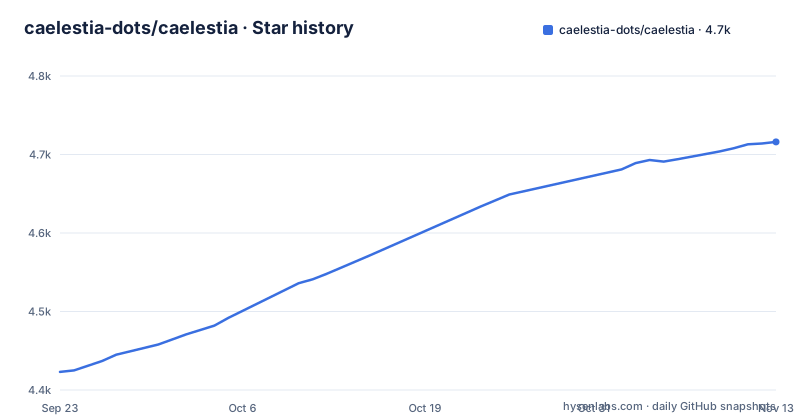
Star history
- caelestia-dots/caelestia4,716 ★ · +293
| Repository | 2026-09-23 | 2026-11-13 |
|---|---|---|
| caelestia-dots/caelestia | 4.4k | 4.7k |
293 Stars in the last 51 days, measured from the daily GitHub snapshot. Compare with other projects
Editorial analysis
One repository of app configs, not a single desktop theme
The repository is a pile of user configs, not a binary or a theme pack. Top-level directories map one to one onto the applications they configure: `hypr/`, `fish/`, `foot/`, `nvim/`, `zed/`, `vscode/`, `firefox/`, `zen/`, `spicetify/`, `btop/`, `fastfetch/`, `micro/`, `thunar/`, `uwsm/`, plus loose files such as `starship.toml` and `manifest.toml`. That layout is the decision to make early. There is no installer that picks a wallpaper and stops; you are adopting a set of configs for programs you may not use.
The audience is specific: someone on Arch Linux who has chosen Hyprland as their compositor and wants a working desktop, keyboard shortcuts and window rules, rather than someone assembling a desktop from parts. Hyprland configuration is written in Lua here, a recent switch from the earlier `.conf` files. The repository is not archived and its last push was on 2026-11-02, so the layout is still moving, and the README itself warns about migrations.
hypr-vars.lua and hypr-user.lua divide what you may touch from what you must not
The whole update story rests on one file boundary. Files inside `~/.config/hypr/` are owned by the dots: the README states plainly that you should never modify them, because doing so blocks updates and forces you to reconcile conflicts by hand. Your changes belong in `~/.config/caelestia/hypr-vars.lua`, a Lua table of override values, and in `~/.config/caelestia/hypr-user.lua`, raw Hyprland config loaded at the end of the loading sequence.
The split is by scope, not by convenience. `hypr-vars.lua` handles anything the dots already manage, and the variables file in the repo, `hypr/variables.lua`, is the reference for every available key and its default. Override a value, and the generated config changes on the next install or update:
return {
  -- Changing default apps:
  browser          = "zen-browser",    -- Change default browser to Zen
  editor           = "code",           -- Change default editor to Code

  -- Changing window/decoration properties:
  blurEnabled      = false,            -- Disable window blur
  windowBorderSize = 3,                -- Increase window border size (default: 1)

  -- Changing keybinds:
  kbTerminal       = "SUPER + Return", -- Change the keybind for opening terminal
}
`windowBorderSize` is the clearest case: the default is 1, you set 3, and nothing in `~/.config/hypr/` is edited to record that. `hypr-user.lua` is the escape hatch for what variables do not cover, monitor layouts, extra window rules, and keybinds the dots do not define. The loading order is what makes this work, yours last means your rules can override the generated ones.
The AUR install is two commands, and the CLI owns your files
On Arch the install is the AUR package plus one command. Install the CLI, then hand it the job:
paru -S caelestia-cli
caelestia install
After that, `caelestia update` performs a full system update and updates the dots in one pass. That is the whole upgrade path, and the README says the install and update workflows never modify `hypr-vars.lua` and `hypr-user.lua`.
The shell has its own configuration, `~/.config/caelestia/shell.json`, which controls shell behaviour, and the CLI reads `~/.config/caelestia/cli.json` for theming and special workspace handling. Three files under `~/.config/caelestia/` cover three separate programs. The dots are one repository, but the ecosystem around it spans the dotfiles, the shell and the CLI, each documented in its own repository.
One gap is worth planning around. These dots contain no login manager, and the README says you must install one yourself unless you plan to log in from a TTY. It points at `greetd` with `tuigreet` as a suggestion, while leaving the choice open.
The manual clone route drops you out of the update workflow
The manual path reads the manifest, installs what you want, and copies component directories by hand:
git clone https://github.com/caelestia-dots/caelestia.git
cd caelestia
sudo pacman -S --needed hyprland xdg-desktop-portal-hyprland xdg-desktop-portal-gtk ttf-jetbrains-mono-nerd
mkdir -p $XDG_CONFIG_HOME/hypr
cp -r hypr/. $XDG_CONFIG_HOME/hypr/
The package list in the example covers only the hyprland component: `hyprland`, `xdg-desktop-portal-hyprland`, `xdg-desktop-portal-gtk` and `ttf-jetbrains-mono-nerd`. Every other component needs the same treatment by hand, which is precisely the work the CLI automates.
Keybinds are generated from variables, except the ones that restart or kill the shell
The default bindings are the visible surface of the system: a tap of `Super` opens the launcher, `Super + 1~9, 0` jumps to workspaces, `Super + Alt + 1~9, 0` moves a window to one, and `Ctrl + Super + 1~9, 0` addresses workspace groups multiplied by ten. `Alt + Tab` goes to the next window in a group. Special workspaces have their own pair, `Super + Alt + S` and `Ctrl + Super + Shift + Down`, for windows you want off the normal stack.
The important detail is the exception. Keybinds are overridable through their variables in `hypr-vars.lua`, with one exclusion: the shell restart and kill binds are not.
The Lua rewrite and the removed install.fish script
Every change arrives as a commit to the default branch, with `caelestia update` as the only automated upgrade. There is one good property to that: if you let the dots and the CLI move together, they cannot drift apart. There is one bad one: you cannot pin a configuration that worked yesterday, because no version marker exists to pin to.
The README's migration notes show how fast the surface moves. `install.fish` has been removed in favour of the CLI install command, and anyone holding a legacy installation is told to update the CLI and run install again to complete the migration. Custom `hypr-user.conf` and `hypr-vars.conf` files are gone as well, and the README asks you to convert them to Lua by hand or with one of the converters it points to. One removed installer and one config format change covering two files, all documented as IMPORTANT blocks in the same file. The `.luacheckrc` and `.luarc.json` in the repository root exist because the configs are Lua, so a broken rewrite shows up as a config error on the day you update rather than at a versioned boundary.
Where a plain Hyprland config is the honest alternative
The alternative is a hand-written Hyprland configuration, the path the Hyprland wiki itself documents, with an optional login manager, a shell and a terminal chosen separately. The difference in approach is ownership. A hand-written config has no generated layer, so there is nothing to overwrite and nothing to split into variables and user files; the same merge problem simply does not exist. What you give up is the other half: the keybind tables, window groups, special workspaces and the coordinated set of app configs that arrive together here.
A fair comparison is not quality but surface. Hand-written costs you the arrangement, and buys freedom over the format. Caelestia costs you the freedom inside `~/.config/hypr/`, and buys the arrangement, the update command and the guarantee that your overrides survive it.
Anyone on NixOS is outside this entirely. The install instructions are Arch commands, `pacman` and an AUR helper, and the repository carries no Nix flake or derivation.
Editorial conclusion
Adopt the dots if you run Arch Linux, have already picked Hyprland, and want a complete desktop with working keybinds, window groups and special workspaces without writing the config yourself; keep personal settings in hypr-vars.lua and hypr-user.lua and nothing else. Do not adopt them if you need a pin version, a non-Arch package manager such as NixOS, or unrestricted control of `~/.config/hypr/`. Before installing, confirm you already have or will install a login manager such as greetd with tuigreet, and check that `hypr/variables.lua` contains a variable for the keybind or setting you intend to change.
Frequently asked questions
how to install caelestia dots
On Arch Linux install the CLI from the AUR and run the install command. The dots can also be installed manually by cloning the repository, reading `manifest.toml` and copying the components you want.
how to use caelestia dots
Customisation happens in `~/.config/caelestia/hypr-vars.lua` for values the dots manage and `~/.config/caelestia/hypr-user.lua` for anything else, both written as Lua and both left untouched by install and update. Updates run with `caelestia update`.
What is Caelestia Shell?
It is one part of a three-part ecosystem: the dotfiles in this repository, the Caelestia shell and the Caelestia CLI. Its own configuration lives in `~/.config/caelestia/shell.json`, which changes how the shell behaves.
how to install caelestia
The documented path is Arch Linux: install `caelestia-cli` from the AUR, then run `caelestia install`. A login manager is not included and has to be installed separately.
Official sources
Add this badge to your README
If you maintain this project, the badge below links readers to this analysis and shows its maintenance status from the daily GitHub snapshot. Paste the markdown into your README; add ?metric=license or ?metric=stars to the image URL for a different field.

[](https://hysenlabs.com/projects/caelestia-dots-caelestia)Star history chart for your README
[](https://hysenlabs.com/projects/caelestia-dots-caelestia)Was this useful?